
SegProbe
SegProbe makes box-prompt experiments reproducible across medical image segmentation models. It generates prompt protocols, records the manual effort, and evaluates the resulting masks through one small API.
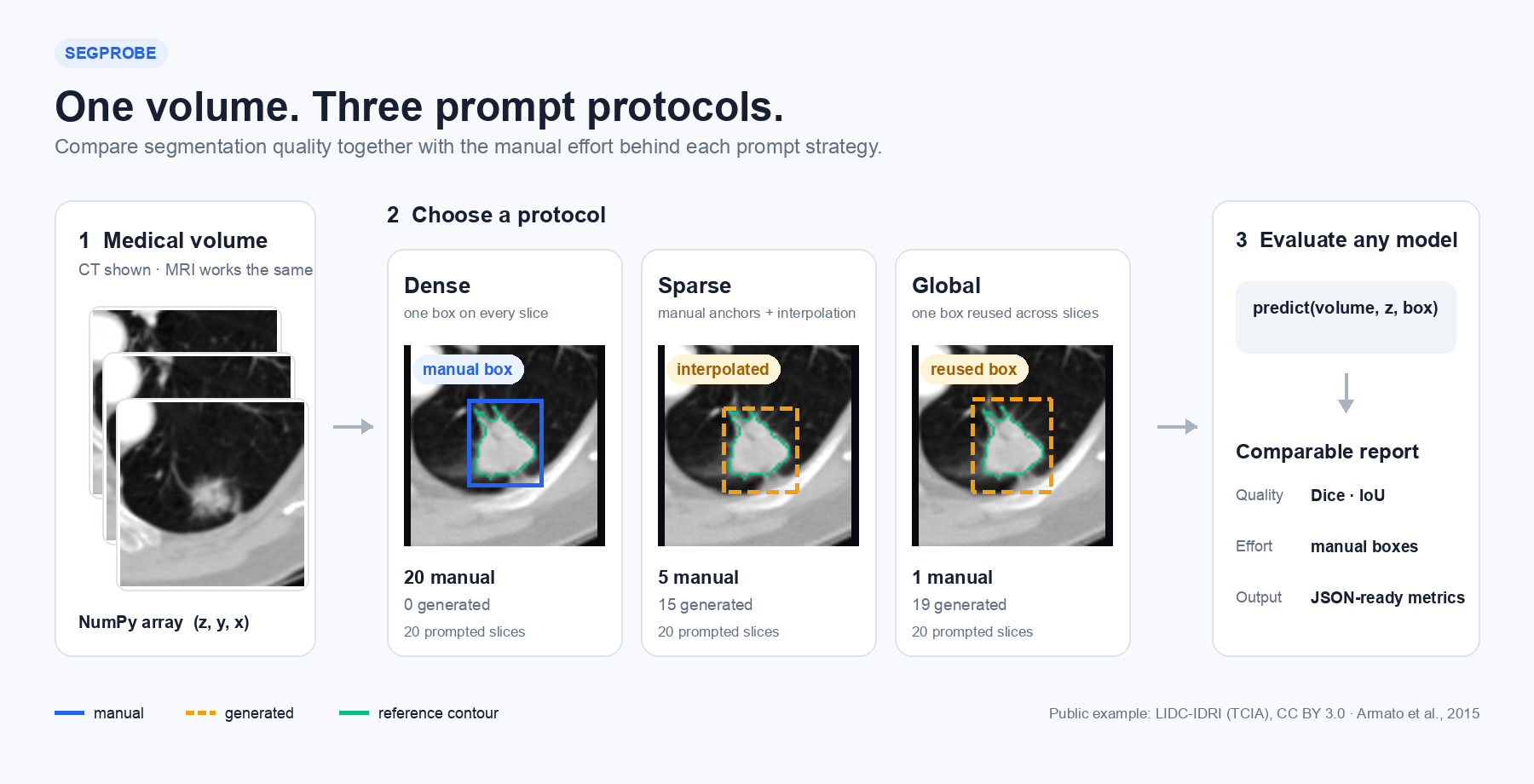
It started as code i used while testing MedSAM. i wanted to answer simple questions without rewriting the evaluation each time:
- How many boxes must be drawn manually?
- What happens if boxes are sparse, larger, or slightly misplaced?
- Can the same protocol be compared across different models?
SegProbe has one runtime dependency: NumPy. It does not download a model or a dataset.
Install
python -m pip install segprobe
For development, install it from a local clone:
python -m pip install -e .
Quick start
from segprobe import evaluate, sparse_boxes

plan = sparse_boxes(target_mask, every=3, padding=5)

def predictor(volume, z_index, box_xyxy):
    image_slice = volume[z_index]
    return my_model.predict(image_slice, box=box_xyxy)

result = evaluate(predictor, image_volume, target_mask, plan)

print(result.dice)
print(result.manual_boxes)
print(result.generated_boxes)
The predictor function is the only model-specific part. It can call MedSAM,
SAM2, nnInteractive, or your own slice-based model.
Prompt protocols
from segprobe import global_box, slice_boxes, sparse_boxes

dense = slice_boxes(mask, padding=5)
global_prompt = global_box(mask, padding=5)
sparse = sparse_boxes(mask, every=3, padding=5)
| Protocol | Manual effort | Boxes sent to the model |
|---|---|---|
slice_boxes |
one per positive slice | one manual box on each slice |
global_box |
one per volume | the same box reused on all positive slices |
sparse_boxes |
one every N positive slices, plus the last | manual anchors and interpolated boxes |
Each plan reports manual_boxes, generated_boxes, and manual_fraction.
plan.to_dict() returns the boxes and protocol parameters as plain Python
values ready for JSON. PromptPlan.from_dict() restores the same plan later.
Interpolate boxes you already have
You do not need a reference mask if the boxes were drawn manually or produced by another tool:
from segprobe import interpolate_boxes

plan = interpolate_boxes(
    {
        10: (40, 50, 90, 100),
        20: (45, 55, 96, 108),
    },
    shape_zyx=(30, 512, 512),
)
By default, this returns one box on every slice from the first anchor to the
last. Pass slices=[10, 12, 14, 16, 18, 20] to generate boxes only on selected
slices. The anchors stay marked as manual and the interpolated boxes as
generated.
Sparse prompts
Here, only five boxes are drawn manually. The other fifteen are interpolated.
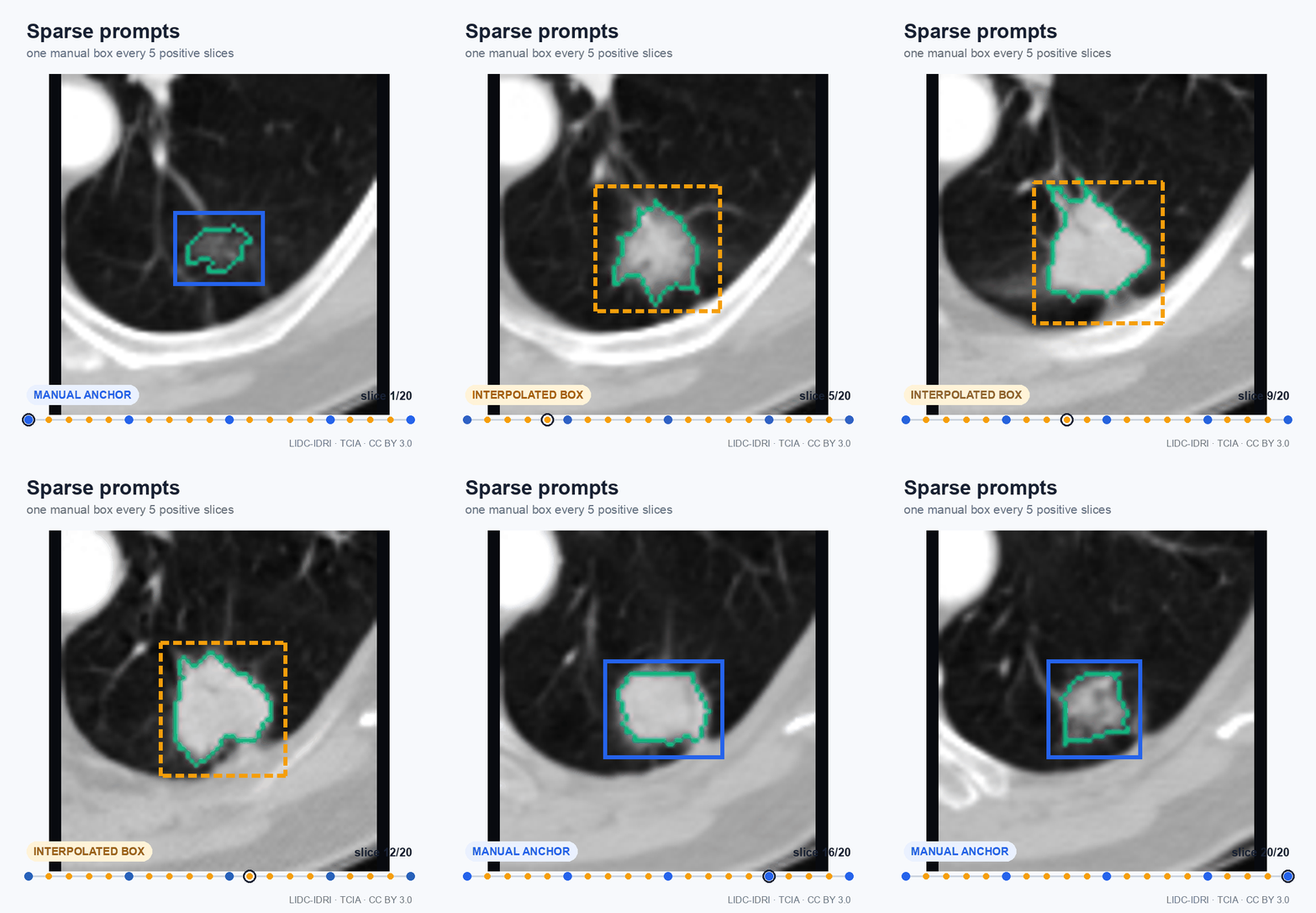
Blue boxes are manual anchors. Orange dashed boxes are generated between them. The green line is the reference-mask contour.
Prompt robustness
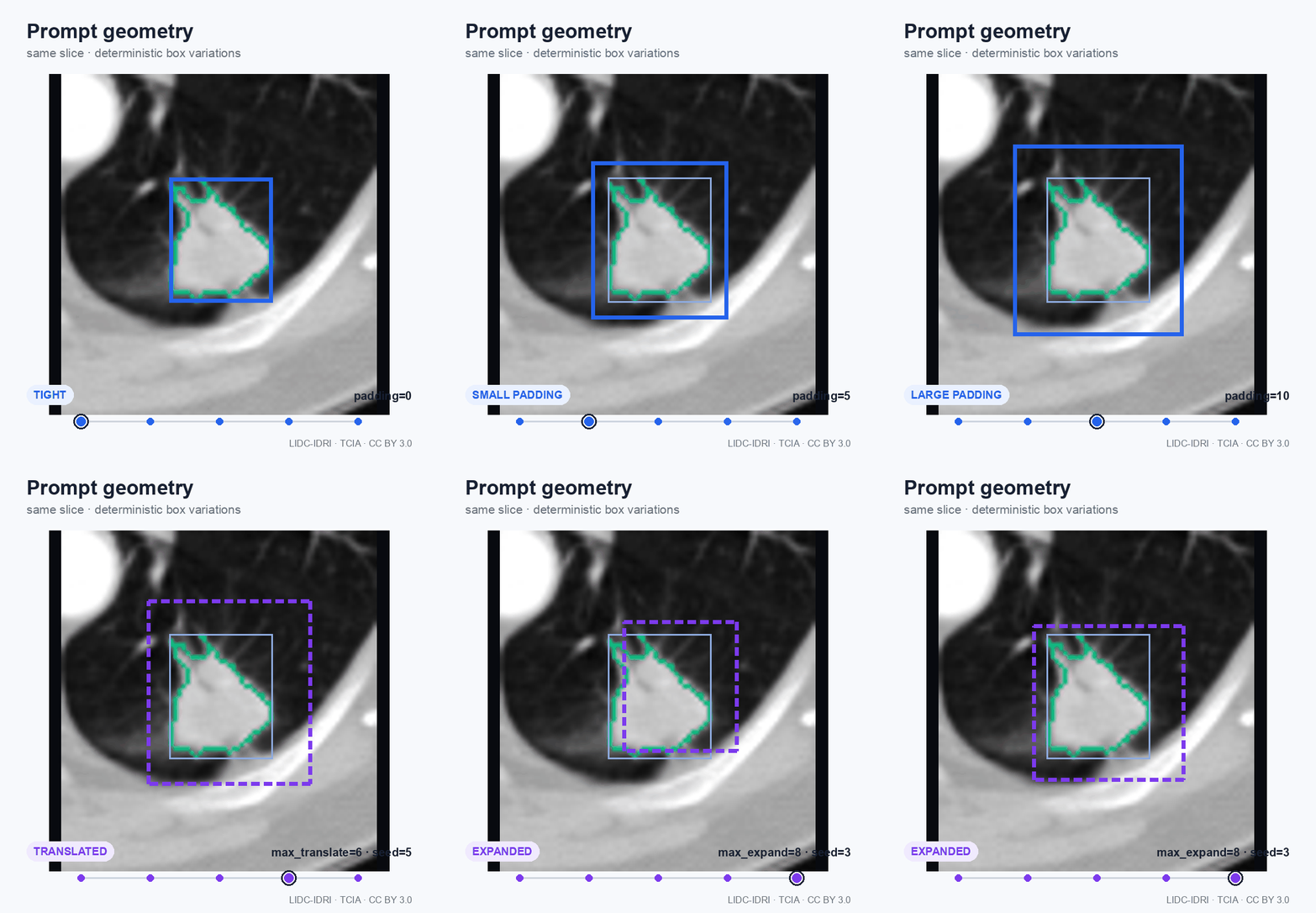
Box size and placement can change a promptable model's result. SegProbe can add
padding or apply deterministic perturbations, so the same stress test can be
run again with the same seed. A non-empty sample_key keeps the perturbations
different across cases, and the sampled box always overlaps its source box.
from segprobe import jitter_plan

noisy = jitter_plan(
    dense,
    max_translate=5,
    max_expand=10,
    seed=42,
    sample_key="case-001",
)
Public MedSAM example
examples/medsam_lidc.py connects SegProbe to the
official MedSAM ViT-B model. It expects
one folder per case containing
image.nii.gz and mask.nii.gz.
Run it from an environment where MedSAM, PyTorch, NiBabel, and scikit-image are available:
python examples/medsam_lidc.py \
  --cases-root /path/to/lidc_crops \
  --one-per-patient \
  --limit 5 \
  --medsam-repo /path/to/MedSAM \
  --checkpoint /path/to/medsam_vit_b.pth \
  --output-dir medsam_results \
  --device cpu
The script saves results.csv and results.json after every protocol. Running
the same command again resumes from the saved results.
We used it for a small public check with five LIDC-IDRI nodules, one per patient. The run used the official MedSAM checkpoint, no private fine-tuning, no postprocessing, and an oracle positive z-range from the reference mask.
Prompt density with padding=5
| Protocol | Mean manual boxes | Mean generated boxes | Mean Dice ± SD |
|---|---|---|---|
| Global | 1.0 | 16.0 | 0.372 ± 0.173 |
| Sparse every 5 slices | 4.4 | 12.6 | 0.515 ± 0.267 |
| Sparse every 3 slices | 7.0 | 10.0 | 0.508 ± 0.270 |
| Sparse every 2 slices | 9.2 | 7.8 | 0.510 ± 0.270 |
| Dense | 17.0 | 0.0 | 0.511 ± 0.271 |
In this small run, sparse prompting every five slices used about 74% fewer manual boxes than dense prompting, with nearly the same mean Dice.
Dense prompt geometry
| Box | Mean Dice ± SD |
|---|---|
Tight, padding=0 |
0.843 ± 0.031 |
padding=5 |
0.511 ± 0.271 |
Large, padding=10 |
0.310 ± 0.224 |
padding=5 with deterministic jitter |
0.363 ± 0.263 |
The tight box is derived directly from the reference mask, so it is a strong oracle prompt. These five cases are a reproducibility example, not a model comparison or a clinical result.
Inputs and image formats
SegProbe works with arrays, not a specific medical file format. CT, MRI, PET, and other 3D images can use the same API after they are loaded into NumPy.
- The mask must have shape
(z, y, x). - The image must start with the same dimensions:
(z, y, x)or(z, y, x, channels). - Boxes use
(x_min, y_min, x_max, y_max), with exclusive maximum coordinates.
NIfTI, DICOM, NRRD, and other files can be loaded with tools such as NiBabel, SimpleITK, or pydicom. File loading stays outside SegProbe so the core package remains small and does not impose an imaging stack.
Evaluation output
evaluate returns the predicted 3D mask together with:
- Dice and IoU;
- target and prediction voxel counts;
- manual and generated box counts;
- number of prompted slices.
The scalar values are available with result.to_dict() for a CSV or JSON
report.
Scope
The mask-based prompt generators are made for controlled oracle-prompt
evaluation, not automatic lesion localization. interpolate_boxes can instead
use boxes supplied directly by a reader, detector, or annotation tool.
With the mask-based generators, only reference-positive slices receive a box, so the positive z-range is known. Those results should be described as prompt-effort or prompt-robustness experiments, not end-to-end detection results.
The manual-box count is an effort proxy. It is not a measurement of annotation time. SegProbe is a research evaluation tool and is not intended for clinical decision-making.
Development
python -m pip install -e ".[dev]"
ruff check .
pytest -q
python -m build
Tests use small synthetic masks. They do not download images, checkpoints, or patient data.
Citation
If SegProbe supports your work, please cite the software using
CITATION.cff.
The images in this README use a cropped, windowed, and annotated case from the public LIDC-IDRI collection:
Armato III, S. G., McLennan, G., Bidaut, L., et al. (2015). Data From LIDC-IDRI. The Cancer Imaging Archive. https://doi.org/10.7937/K9/TCIA.2015.LO9QL9SX
LIDC-IDRI is available under the Creative Commons Attribution 3.0 license.
License
SegProbe is released under the Apache-2.0 license.
1 maintainer

Download files
Download the file for your platform. If you're not sure which to choose, learn more about installing packages.
Source Distribution
Built Distribution
Filter files by name, interpreter, ABI, and platform.
If you're not sure about the file name format, learn more about wheel file names.
Copy a direct link to the current filters
File details
Details for the file segprobe-0.1.1.tar.gz.
File metadata
- Download URL: segprobe-0.1.1.tar.gz
- Upload date:
- Size: 24.6 kB
- Tags: Source
- Uploaded using Trusted Publishing? Yes
- Uploaded via:
twine/7.0.0 CPython/3.13.14
File hashes
| Algorithm | Hash digest | |
|---|---|---|
| SHA256 |
977bd727727664013ccb15f33995a08e6853599ab8e6a353bd3c9a9874043bad
|
|
| MD5 |
2d2e1f7f241dce926c05c720d0c5af03
|
|
| BLAKE2b-256 |
77d8f9685061d86e90c557a0d7997891e6a938496b5e9c635227f1088c69db65
|
Provenance
The following attestation bundles were made for segprobe-0.1.1.tar.gz:
Publisher:
release.yml on hajteyib/segprobe
-
Statement:
-
Statement type:
https://in-toto.io/Statement/v1 -
Predicate type:
https://docs.pypi.org/attestations/publish/v1 -
Subject name:
segprobe-0.1.1.tar.gz -
Subject digest:
977bd727727664013ccb15f33995a08e6853599ab8e6a353bd3c9a9874043bad - Sigstore transparency entry: 2436189414
- Sigstore integration time:
-
Permalink:
hajteyib/segprobe@ce3226f62beafdb19d203d3f99e6505bc1609608 -
Branch / Tag:
refs/tags/v0.1.1 - Owner: https://github.com/hajteyib
-
Access:
public
-
Token Issuer:
https://token.actions.githubusercontent.com -
Runner Environment:
github-hosted -
Publication workflow:
release.yml@ce3226f62beafdb19d203d3f99e6505bc1609608 -
Trigger Event:
release
-
Statement type:
File details
Details for the file segprobe-0.1.1-py3-none-any.whl.
File metadata
- Download URL: segprobe-0.1.1-py3-none-any.whl
- Upload date:
- Size: 15.2 kB
- Tags: Python 3
- Uploaded using Trusted Publishing? Yes
- Uploaded via:
twine/7.0.0 CPython/3.13.14
File hashes
| Algorithm | Hash digest | |
|---|---|---|
| SHA256 |
287741e78cb14913d3046ed1f84f2d4bbd4b9915001185318d70dbf5ad543a34
|
|
| MD5 |
7355d14b73c7c0a7d44c1676e3414b2b
|
|
| BLAKE2b-256 |
e8c02e0df297ef5bc286ed47c0320b5f9363b7dc32e882452ca053e4b924f11f
|
Provenance
The following attestation bundles were made for segprobe-0.1.1-py3-none-any.whl:
Publisher:
release.yml on hajteyib/segprobe
-
Statement:
-
Statement type:
https://in-toto.io/Statement/v1 -
Predicate type:
https://docs.pypi.org/attestations/publish/v1 -
Subject name:
segprobe-0.1.1-py3-none-any.whl -
Subject digest:
287741e78cb14913d3046ed1f84f2d4bbd4b9915001185318d70dbf5ad543a34 - Sigstore transparency entry: 2436191402
- Sigstore integration time:
-
Permalink:
hajteyib/segprobe@ce3226f62beafdb19d203d3f99e6505bc1609608 -
Branch / Tag:
refs/tags/v0.1.1 - Owner: https://github.com/hajteyib
-
Access:
public
-
Token Issuer:
https://token.actions.githubusercontent.com -
Runner Environment:
github-hosted -
Publication workflow:
release.yml@ce3226f62beafdb19d203d3f99e6505bc1609608 -
Trigger Event:
release
-
Statement type:














