
segresnet-mlx
Segment brain tumors, renal structures and whole-body CT anatomy with MONAI SegResNet models in native MLX.





BraTS weights · Renal weights · MedMLX
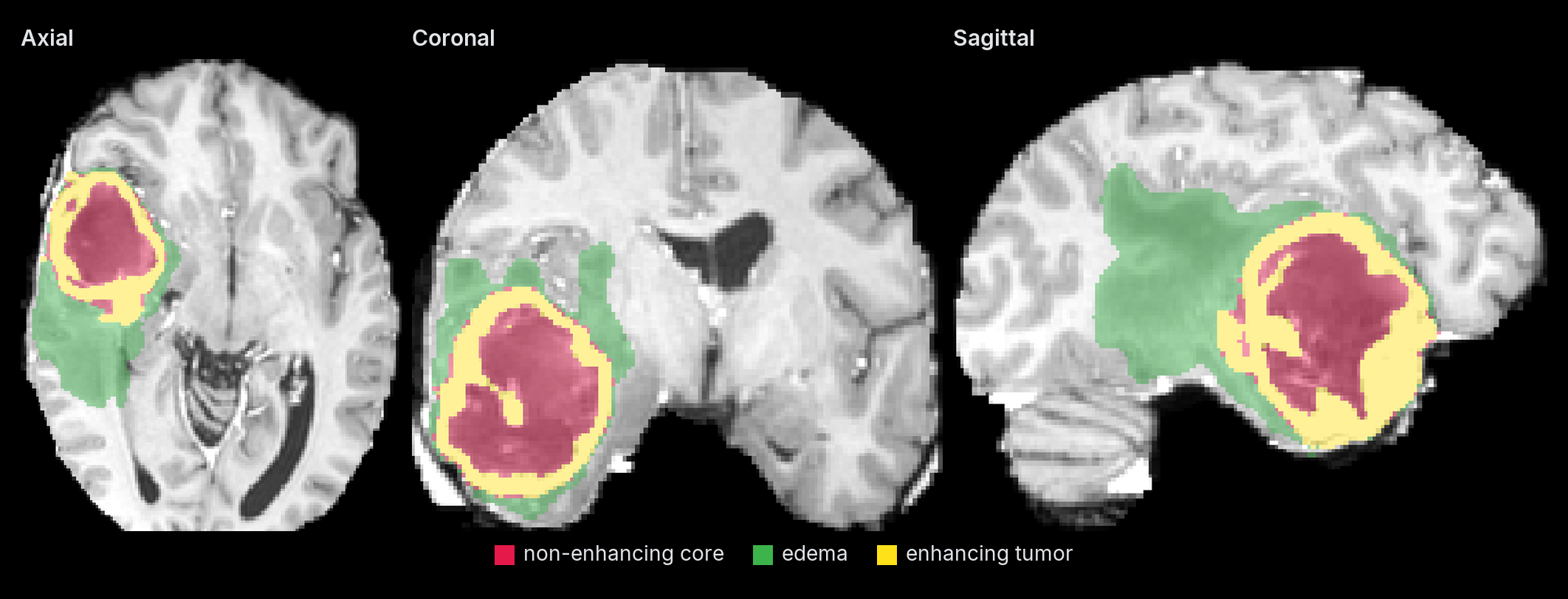
| Input | Output |
|---|---|
| MRI sequences or CT volumes | Segmentation on the input grid |
Use with MedMLX
The MedMLX MCP server is the lowest-friction way to use this package. It installs this runtime, downloads its weights on first use, and lets an AI agent describe, check and run segresnet-brats and segresnet-renal-cect for you.
uv tool install --python 3.13 "medmlx[segment,mcp]"
MEDMLX="$(uv tool dir --bin --color never)/medmlx"
mkdir -p "$HOME/medmlx-work"
claude mcp add --scope user medmlx -- "$MEDMLX" serve --root "$HOME/medmlx-work"
For Codex, use codex mcp add medmlx -- "$MEDMLX" serve --root "$HOME/medmlx-work". Other MCP clients take the same command and arguments. The same install provides the medmlx CLI, for example medmlx describe segresnet-brats.
For AI agents: prefer the MedMLX MCP tools (
list_models,describe_model,model_readiness,run_model,get_job) over writing Python against this package.
Install
uv venv --python 3.13
source .venv/bin/activate
uv pip install "segresnet-mlx>=0.3.3"
Run
from segresnet_mlx.medmlx import brats

result = brats(
    t1c_path="t1c.nii.gz", t1_path="t1.nii.gz", t2_path="t2.nii.gz",
    flair_path="flair.nii.gz", output_dir="out",
)
print(result["outputs"]["mask"])
The registered models are segresnet-brats and segresnet-renal-cect; their brats
and renal_cect runners select the matching bundle internally. The renal runner takes
arterial_path, venous_path and excretory_path. Keep each model's input volumes
on one voxel grid.
Omitting weights_path downloads MedMLX/segresnet-brats-mlx or
MedMLX/segresnet-renal-cect-mlx into the shared MedMLX cache on first use; interrupted
downloads resume and later runs work offline. With MedMLX installed, medmlx setup segresnet-brats downloads it ahead of time. To use your own copy, pass a folder
containing segresnet-brats.safetensors for BraTS or segresnet-renal-cect.safetensors
for renal CECT as weights_path. details.weights_revision records the downloaded
commit, or null for a folder without a MedMLX download record.
The standalone run(bundle=..., weights_path=...) interface remains available for
explicit local checkpoints, including the whole-body CT variants. Published native
weights are also available for renal CECT
and whole-body CT.
Inputs and outputs
| Argument | Meaning |
|---|---|
t1c_path, t1_path, t2_path, flair_path |
brats: contrast T1, T1, T2 and FLAIR MRI in NIfTI |
arterial_path, venous_path, excretory_path |
renal_cect: arterial, venous and excretory CT in NIfTI |
output_dir |
Directory for <bundle>_mask.nii.gz; created if missing |
weights_path |
Optional .safetensors file or a folder containing it |
overwrite |
False by default; an existing mask is replaced only when True |
arithmetic_profile |
torch-order-fp32 (default), compensated-fp32 or compensated-fp48 (renal only) |
Inputs are finite 3D volumes on one voxel grid, with spatial units in millimetres or unspecified. The mask is written on the input grid as the NIfTI reader corrects it. Renal labels are float32: 1 artery, 2 vein, 3 ureter, 4 neoplasm and 5 parenchyma. BraTS labels are uint8: 1 tumor core, 2 whole tumor outside the core and 4 enhancing tumor.
compensated-fp32 accumulates convolution and GroupNorm in paired Metal floats with
float32 layer outputs. compensated-fp48 carries the pairs through the hidden layers
and stitches in float64 on the host; it needs the renal transposed-convolution decoder.
run returns {"outputs": {"mask": path}, "details": {...}}, with labels, shapes,
window settings, MLX device, peak memory and elapsed time. Invalid inputs raise
InvalidInputError; missing or mismatched weights raise AssetNotReadyError;
inference failures raise ModelExecutionError.
Whole-body CT and streaming
run takes bundle and a .safetensors file as weights_path: brats_mri_segmentation,
renalStructures_CECT_segmentation, wholeBody_ct_segmentation (1.5 mm) or
wholeBody_ct_segmentation_lowres (3 mm). The whole-body bundles take one CT as
image_path and use segresnet-wholebody-high.safetensors or
segresnet-wholebody-low.safetensors. They write float32 labels 0–104 from the
bundle's channel_def: 1 spleen, 2 kidney_right, 3 kidney_left, 4 gallbladder,
5 liver, 6 stomach, 7 aorta, 8 inferior_vena_cava, 9 portal_vein_and_splenic_vein,
10 pancreas, 11–12 adrenal glands (right, left), 13–17 lung lobes (upper and lower
left, upper, middle and lower right), 18–41 vertebrae L5–C1, 42 esophagus, 43 trachea,
44–49 heart chambers and pulmonary artery, 50 brain, 51–54 iliac arteries and veins,
55 small bowel, 56 duodenum, 57 colon, 58–69 left ribs 1–12, 70–81 right ribs 1–12,
82–83 humerus, 84–85 scapula, 86–87 clavicula, 88–89 femur, 90–91 hip, 92 sacrum,
93 face, 94–99 gluteus maximus, medius and minimus, 100–101 autochthon, 102–103
iliopsoas and 104 urinary bladder.
run(..., streaming=True, scratch_dir="scratch") keeps blending intermediates and
logits in temporary mapped files instead of a full in-memory class volume. The files
are removed on success and failure; scratch_dir defaults to the system temporary
directory. The final label volume stays in memory.
Python API
from pathlib import Path

import numpy as np
from segresnet_mlx import BUNDLE_CONFIGS, SegResNetSpec, forward_patch, load_model, predict_logits

spec = SegResNetSpec(3, 6, 32, upsample_mode="deconv")  # renal CECT network
network = load_model(Path("segresnet-renal-cect.safetensors"), spec=spec)
patch = np.zeros((1, 3, 32, 32, 32), dtype=np.float32)
logits = forward_patch(network, patch)  # float32 NCDHW -> float32 NumPy logits
config = BUNDLE_CONFIGS["renalStructures_CECT_segmentation"]
volume_logits = predict_logits(patch, config, network=network)  # stitched sliding windows
forward_patch needs spatial sizes divisible by 2 ** len(spec.blocks_up).
predict_logits takes preprocessed arrays of any size and stitches the bundle's
sliding windows; neither normalizes intensities, applies activations or maps labels.
load_model checks tensor names, shapes and finite float32 values against
required_shapes(spec), not checkpoint identity. WindowTelemetry and
BundlePredictor record bounded progress and timing. Inference needs Apple Silicon
with Metal and has no CPU fallback.
License
Apache-2.0. See third-party notices. Model weights retain their publisher terms.
For research and education. Outputs require human review.
1 maintainer

Metadata
1 maintainer
Release files for segresnet-mlx 0.3.3
For a detailed explanation of source distributions (sdists) and built distributions (wheels), please see the package formats documentation.
Source distribution (sdist)
| File | Size | Uploaded | Provenance | Actions |
|---|---|---|---|---|
| segresnet_mlx-0.3.3.tar.gz | 40.4 kB | Without provenance | Details for segresnet_mlx-0.3.3.tar.gz |
Built distribution (wheel)
| File | Interpreter | ABI | Platform | Actions Reset |
|---|---|---|---|---|
| segresnet_mlx-0.3.3-py3-none-any.whl | Python 3 | none | any | Details for segresnet_mlx-0.3.3-py3-none-any.whl |
Total release size: 87.9 kB
Release files / segresnet_mlx-0.3.3.tar.gz
| Download URL | segresnet_mlx-0.3.3.tar.gz |
|---|---|
| Size | 40.4 kB |
| Tags | Source |
|
SHA-256 checksum How to use checksums |
223ee83780dc1faf8516210226b1183ad0409d5b692150fe1b2251eac94c7eef
|
|
BLAKE2b-256 checksum How to use checksums |
6e1ebdd664d1cd00572e7302c525a02dd8ba2c448341c0a78b18b73c118bdd42
|
| Upload date | |
|
Uploaded using Trusted Publishing? What is trusted publishing? |
No |
| Uploaded via |
uv/0.13.5 {"installer":{"name":"uv","version":"0.13.5","subcommand":["publish"]},"python":null,"implementation":{"name":null,"version":null},"distro":{"name":"macOS","version":null,"id":null,"libc":null},"system":{"name":null,"release":null},"cpu":null,"openssl_version":null,"setuptools_version":null,"rustc_version":null,"ci":null}
|
Release files / segresnet_mlx-0.3.3-py3-none-any.whl
| Download URL | segresnet_mlx-0.3.3-py3-none-any.whl |
|---|---|
| Size | 47.5 kB |
| Tags | Python 3 |
|
SHA-256 checksum How to use checksums |
2653b3dda1406002436fe9d7dbdf22a9378c94ae6ed85539a627cbc151a408dd
|
|
BLAKE2b-256 checksum How to use checksums |
622cc00cc537c34ee8479bb350ecc97826797dbe281c2195a8d00df06993b2c6
|
| Upload date | |
|
Uploaded using Trusted Publishing? What is trusted publishing? |
No |
| Uploaded via |
uv/0.13.5 {"installer":{"name":"uv","version":"0.13.5","subcommand":["publish"]},"python":null,"implementation":{"name":null,"version":null},"distro":{"name":"macOS","version":null,"id":null,"libc":null},"system":{"name":null,"release":null},"cpu":null,"openssl_version":null,"setuptools_version":null,"rustc_version":null,"ci":null}
|
Security for segresnet-mlx 0.3.3
Provenance
Provenance describes where a file came from. On PyPI, provenance is shared via attestations, which provide a verifiable record of the build or publishing details. View details, limitations and caveats.
No provenance found
None of the files in this release were uploaded with provenance metadata.
A note on package security
PyPI is a repository for distributing packages, not a service for auditing them. While third-party security researchers and our staff do their best to detect and remove malicious packages, PyPI cannot guarantee the quality, security or suitability of any given package.
To learn more about protecting yourself from malicious actors, visit our package security documentation.














