
selahx_client
-
Remote Access Tool — Fast and lightweight CLI experience.
-
For educational purposes only.


Features
-
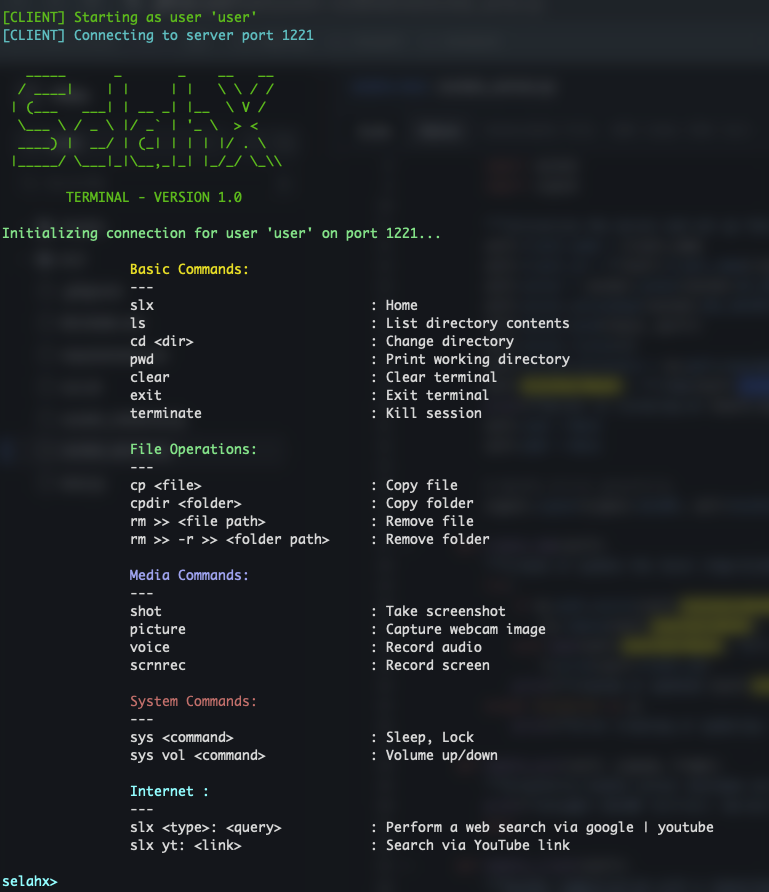
Basic Commands: Navigate the system (ls, cd, pwd), clear terminal, exit, or terminate sessions.
-
File Operations: Copy files/folders (cp, cpdir), remove files/folders (rm).
-
Media Commands: Capture screenshots, webcam images, record audio or screen.
-
System Commands: Control system functions (sleep, lock) and volume.
-
Internet Commands: Perform web or YouTube searches directly.
Usage
Help
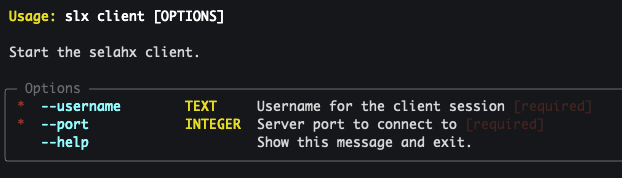
slx client --help
slx save --help
Client
Start a client and connect to the server:
slx client --username user --port 1221
Options:
--username— Username for the client session--port— Server port to connect to
Transfer files from EC2 to Local
Start saving files:
slx save --key-file key.pem --ssh-host ubuntu@ec2-xx-xx-xx-xx.compute-1.amazonaws.com --dest ~/Downloads/test
Options:
--key-file— Path to the SSH private key--ssh-host— E.gubuntu@ec2-xx-xx-xx-xx.compute-1.amazonaws.com--dest— Destination folder~/Downloads/test— Example local destination path
i.e

Example Workflow
- Launch the server:
-
server package: https://pypi.org/project/selahx_server
slx --key-file key.pem --port 1221 --ssh-host ubuntu@ec2-xx-xx-xx-xx.compute-1.amazonaws.com
- Connect a client from your local machine:
slx client --username user --port 1221
Once connected, a reverse SSH tunnel is automatically established.
NB:
-
Ensure the port you configured on the target machine is open in your EC2 instance’s
inboundandoutboundrules, along withSSHfor remote access. -
Grant Terminal access to the file system and other necessary resources (e.g: camera).
-
Ensure your
.pemfile is executable. Check withls -l(e.g.,-rwx------@ 1 Abiy staff 1678 Nov 15 22:36 key.pem). -
If reverse tunneling fails to forward the connection, kill any active process using the same port. (use
kill $PID)
Requirements
- Python 3.11+
- Dependencies are managed via Poetry (see
pyproject.toml)
1 maintainer

Metadata
1 maintainer
Release files for selahx_client 0.1.0
For a detailed explanation of source distributions (sdists) and built distributions (wheels), please see the package formats documentation.
Source distribution (sdist)
| File | Size | Uploaded | |
|---|---|---|---|
| selahx_client-0.1.0.tar.gz | 411.3 kB | Details |
Built distribution (wheel)
| File | Interpreter | ABI | Platform | Reset |
|---|---|---|---|---|
| selahx_client-0.1.0-py3-none-any.whl | Python 3 | none | any | Details |
Total release size: 823.5 kB
Release files / selahx_client-0.1.0.tar.gz
| Download URL | selahx_client-0.1.0.tar.gz |
|---|---|
| Size | 411.3 kB |
| Tags | Source |
|
SHA-256 checksum How to use checksums |
46bc970d1b939d558edc882b793595bf36891aa06e1ab64aa5c45462d7770970
|
|
BLAKE2b-256 checksum How to use checksums |
466dccb3ab25203cb58727b2ab1dac9c18fbea8c86c0bc689bb23f1615dd2a2e
|
| Upload date | |
|
Uploaded using Trusted Publishing? What is trusted publishing? |
No |
| Uploaded via |
poetry/2.2.1 CPython/3.13.2 Darwin/24.6.0
|
Release files / selahx_client-0.1.0-py3-none-any.whl
| Download URL | selahx_client-0.1.0-py3-none-any.whl |
|---|---|
| Size | 412.2 kB |
| Tags | Python 3 |
|
SHA-256 checksum How to use checksums |
c84c43b28f7d814532e094b24e30a3ba4130603eec9f45ebc9264349e6964eec
|
|
BLAKE2b-256 checksum How to use checksums |
ea94d9947bc9c485256df44f3cc71e2775dcbecdebb06f3eac1deb987e0a4934
|
| Upload date | |
|
Uploaded using Trusted Publishing? What is trusted publishing? |
No |
| Uploaded via |
poetry/2.2.1 CPython/3.13.2 Darwin/24.6.0
|













