



Seldom is an automation testing framework based on unittest.
seldom 是基于unittest 的自动化测试框架。
Features
⭐ web/app/api全功能测试框架
⭐ 提供脚手架快速创建自动化项目
⭐ 集成XTestRunner测试报告,现代美观
⭐ 提供丰富的断言
⭐ 提供强大的数据驱动
⭐ 平台化支持
Install
pip install seldom
If you want to keep up with the latest version, you can install with GitHub/Gitee repository url:
> pip install -U git+https://github.com/SeldomQA/seldom.git@master
> pip install -U git+https://gitee.com/fnngj/seldom.git@master
🤖 Quick Start
1、查看帮助:
seldom --help

 Usage: seldom [OPTIONS]

 seldom CLI.


╭─ Options ────────────────────────────────────────────────────────────────────────────────────────╮
│ --version             -v                 Show version.                                           │
│ --project-api         -api      TEXT     Create a project of API type. [default: None]           │
│ --project-app         -app      TEXT     Create a project of App type [default: None]            │
│ --project-web         -web      TEXT     Create a project of Web type [default: None]            │
│ --clear-cache         -cc                Clear all caches of seldom.                             │
│ --log-level           -ll       TEXT     Set the log level [TRACE |DEBUG | INFO | SUCCESS |      │
│                                          WARNING | ERROR].                                       │
│                                          [default: None]                                         │
│ --mod                 -m        TEXT     Run tests modules, classes or even individual test      │
│                                          methods from the command line.                          │
│                                          [default: None]                                         │
│ --path                -p        TEXT     Run test case file path. [default: None]                │
│ --env                 -e        TEXT     Set the Seldom run environment `Seldom.env`.            │
│                                          [default: None]                                         │
│ --browser             -b        TEXT     The browser that runs the Web UI automation tests       │
│                                          [chrome | edge | firefox | chromium]. Need the --path.  │
│                                          [default: None]                                         │
│ --base-url            -u        TEXT     The base-url that runs the HTTP automation tests. Need  │
│                                          the --path.                                             │
│                                          [default: None]                                         │
│ --debug               -d                 Debug mode. Need the --path/--mod.                      │
│ --rerun               -rr       INTEGER  The number of times a use case failed to run again.     │
│                                          Need the --path.                                        │
│                                          [default: 0]                                            │
│ --report              -r        TEXT     Set the test report for output. Need the --path.        │
│                                          [default: None]                                         │
│ --collect             -c                 Collect project test cases. Need the --path.            │
│ --level               -l        TEXT     Parse the level of use cases [data | case]. Need the    │
│                                          --path.                                                 │
│                                          [default: data]                                         │
│ --case-json           -j        TEXT     Test case files. Need the --path. [default: None]       │
│ --har2case            -h2c      TEXT     HAR file converts an seldom test case. [default: None]  │
│ --swagger2case        -s2c      TEXT     Swagger file converts an seldom test case.              │
│                                          [default: None]                                         │
│ --api-excel                     TEXT     Run the api test cases in the excel file.               │
│                                          [default: None]                                         │
│ --install-completion                     Install completion for the current shell.               │
│ --show-completion                        Show completion for the current shell, to copy it or    │
│                                          customize the installation.                             │
│ --help                                   Show this message and exit.                             │
╰──────────────────────────────────────────────────────────────────────────────────────────────────╯
2、创建项目:
> seldom -api myapi  # API automation test project.
> seldom -app myapp  # or App automation test project.
> seldom -web myweb  # or Web automation test project.
目录结构如下:
myweb/
├── test_dir/
│   ├── __init__.py
│   └── test_sample.py
├── test_data/
│   └── data.json
├── reports/
└── confrun.py
test_dir/测试用例目录。test_data/测试数据文件目录。reports/测试报告目录。confrun.py运行配置文件。
3、运行项目:
-
❌️ 在
PyCharm中右键执行。 -
✔️ 通过命令行工具执行。
> seldom -p test_dir # 运行 test_dir 测试目录


              __    __
   ________  / /___/ /___  ____ ____
  / ___/ _ \/ / __  / __ \/ __ ` ___/
 (__  )  __/ / /_/ / /_/ / / / / / /
/____/\___/_/\__,_/\____/_/ /_/ /_/  v3.x.x
-----------------------------------------
                             @itest.info
...

2022-04-30 18:37:36 log.py | INFO | ✅ Find 1 element: id=sb_form_q  -> input 'seldom'.
2022-04-30 18:37:39 log.py | INFO | 👀 assertIn title: seldom - 搜索.
.52022-04-30 18:37:39 log.py | INFO | 📖 https://cn.bing.com
2022-04-30 18:37:41 log.py | INFO | ✅ Find 1 element: id=sb_form_q  -> input 'poium'.
2022-04-30 18:37:42 log.py | INFO | 👀 assertIn title: poium - 搜索.
.62022-04-30 18:37:42 log.py | INFO | 📖 https://cn.bing.com
2022-04-30 18:37:43 log.py | INFO | ✅ Find 1 element: id=sb_form_q  -> input 'XTestRunner'.
2022-04-30 18:37:44 log.py | INFO | 👀 assertIn title: XTestRunner - 搜索.
.72022-04-30 18:37:44 log.py | INFO | 📖 http://www.itest.info
2022-04-30 18:37:52 log.py | INFO | 👀 assertIn url: http://www.itest.info/.
.82022-04-30 18:37:52 log.py | SUCCESS | generated html file: file:///D:\mypro\reports\2022_04_30_18_37_29_result.html
2022-04-30 18:37:52 log.py | SUCCESS | generated log file: file:///D:\mypro\reports\seldom_log.log
4、查看报告
你可以到 mypro\reports\ 目录查看测试报告。

🔬 Demo
seldom继承unittest单元测试框架,完全遵循unittest编写用例规范。
demo 提供了丰富实例,帮你快速了解seldom的用法。
Web UI 测试
import seldom
from seldom import Steps


class BaiduTest(seldom.TestCase):

    def test_case_one(self):
        """a simple test case """
        self.open("https://www.baidu.com")
        self.type(id_="kw", text="seldom")
        self.click(css="#su")
        self.assertTitle("seldom_百度搜索")

    def test_case_two(self):
        """method chaining """
        Steps().open("https://www.baidu.com").find("#kw").type("seldom").find("#su").click()
        self.assertTitle("seldom_百度搜索")


if __name__ == '__main__':
    seldom.main(browser="chrome")
说明:
seldom.main()通过browser指定运行的浏览器。
HTTP 测试
seldom 2.0 支持HTTP测试
import seldom


class TestRequest(seldom.TestCase):

    def test_put_method(self):
        self.put('/put', data={'key': 'value'})
        self.assertStatusCode(200)

    def test_post_method(self):
        self.post('/post', data={'key': 'value'})
        self.assertStatusCode(200)

    def test_get_method(self):
        payload = {'key1': 'value1', 'key2': 'value2'}
        self.get("/get", params=payload)
        self.assertStatusCode(200)

    def test_delete_method(self):
        self.delete('/delete')
        self.assertStatusCode(200)


if __name__ == '__main__':
    seldom.main(base_url="http://httpbin.org")
说明:
seldom.main()通过base_url指定接口项目基本URL地址。
App 测试
seldom 3.0 支持App测试
import seldom
from seldom.appium_lab.keyboard import KeyEvent
from seldom.appium_lab.android import UiAutomator2Options


class TestBingApp(seldom.TestCase):

    def start(self):
        self.ke = KeyEvent(self.driver)

    def test_bing_search(self):
        """
        test bing App search
        """
        self.sleep(2)
        self.click(id_="com.microsoft.bing:id/sa_hp_header_search_box")
        self.type(id_="com.microsoft.bing:id/sapphire_search_header_input", text="seldomQA")
        self.ke.press_key("ENTER")
        self.sleep(1)
        elem = self.get_elements(xpath='//android.widget.TextView')
        self.assertIn("seldom", elem[0].text.lower())


if __name__ == '__main__':
    capabilities = {
        'deviceName': 'ELS-AN00',
        'automationName': 'UiAutomator2',
        'platformName': 'Android',
        'appPackage': 'com.microsoft.bing',
        'appActivity': 'com.microsoft.sapphire.app.main.MainSapphireActivity',
        'noReset': True,
    }
    options = UiAutomator2Options().load_capabilities(capabilities)
    seldom.main(app_server="http://127.0.0.1:4723", app_info=options, debug=True)
说明:
seldom.main()通过app_info指定App信息;app_server指定appium server 地址。
📖 Document
项目实例
B站实战视频:
https://www.bilibili.com/video/BV1QHQVYoEHC
基于seldom的web UI自动化项目:
https://github.com/SeldomQA/seldom-web-testing
基于seldom的接口自动化项目:
https://github.com/defnngj/seldom-api-testing
微信(WeChat)
相关书籍推荐, 基于 SeldomQA 相关开源项目,虫师 编著。

欢迎添加微信,交流和反馈问题。

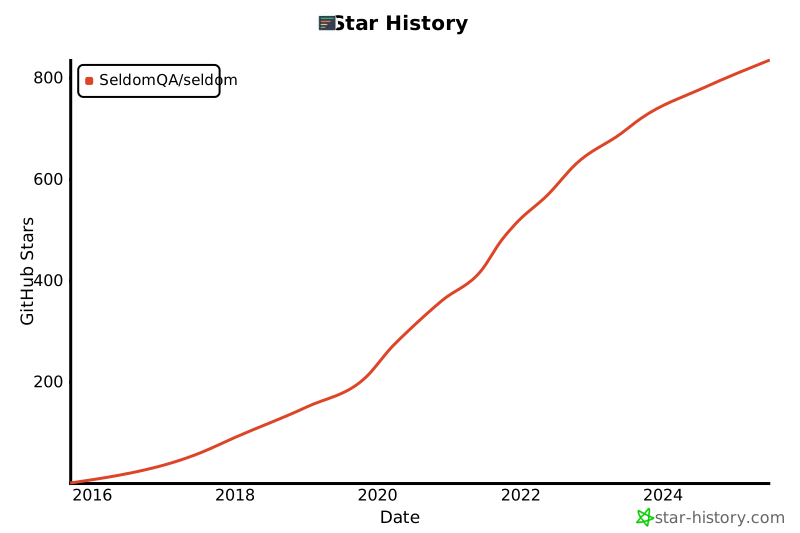
Star History
感谢
感谢从以下项目中得到思路和帮助。
贡献者

交流
QQ群:948994709
1 maintainer

Metadata
1 maintainer
Release files for seldom 3.14.2
For a detailed explanation of source distributions (sdists) and built distributions (wheels), please see the package formats documentation.
Source distribution (sdist)
| File | Size | Uploaded | Provenance | |
|---|---|---|---|---|
| seldom-3.14.2.tar.gz | 107.0 kB | Without provenance | Details |
Built distribution (wheel)
| File | Interpreter | ABI | Platform | Reset |
|---|---|---|---|---|
| seldom-3.14.2-py3-none-any.whl | Python 3 | none | any | Details |
Total release size: 240.5 kB
Release files / seldom-3.14.2.tar.gz
| Download URL | seldom-3.14.2.tar.gz |
|---|---|
| Size | 107.0 kB |
| Tags | Source |
|
SHA-256 checksum How to use checksums |
860887e5f911203859e68301985d037bb8939a3f52bfd2265b890281982537ef
|
|
BLAKE2b-256 checksum How to use checksums |
3380c81e212fcc0ad5492a557073161fa6dcb859198708575e76ade19d405c40
|
| Upload date | |
|
Uploaded using Trusted Publishing? What is trusted publishing? |
No |
| Uploaded via |
twine/6.2.0 CPython/3.14.0
|
Release files / seldom-3.14.2-py3-none-any.whl
| Download URL | seldom-3.14.2-py3-none-any.whl |
|---|---|
| Size | 133.5 kB |
| Tags | Python 3 |
|
SHA-256 checksum How to use checksums |
6b0d2bc65c26eb995524fff239fd7e3532508951fd286344b6c9bf3b09cc1ab8
|
|
BLAKE2b-256 checksum How to use checksums |
5b2125b3affa493fedd4d9fb132ca2074d6e695e61cabce4445fb63a8f7a1af7
|
| Upload date | |
|
Uploaded using Trusted Publishing? What is trusted publishing? |
No |
| Uploaded via |
twine/6.2.0 CPython/3.14.0
|
Security for seldom 3.14.2
Provenance
Provenance describes where a file came from. On PyPI, provenance is shared via attestations, which provide a verifiable record of the build or publishing details. View details, limitations and caveats.
No provenance found
None of the files in this release were uploaded with provenance metadata.
A note on package security
PyPI is a repository for distributing packages, not a service for auditing them. While third-party security researchers and our staff do their best to detect and remove malicious packages, PyPI cannot guarantee the quality, security or suitability of any given package.














