

The browser agent that tells the model less.




You describe a task in plain language and Selfbrowse drives a real browser to do it. It is an open-source Python library, a command line tool and an MCP server.
Most browser agents hand the model everything: a screenshot or a large slice of the page, your data as it appears on screen, and the same cookie banner on every visit. Selfbrowse sends less of all three, which makes it cheap enough for a model on your laptop and careful enough for sites you are signed in to.
pip install selfbrowse && playwright install chromium
selfbrowse "Open news.ycombinator.com and tell me the title of the top story."
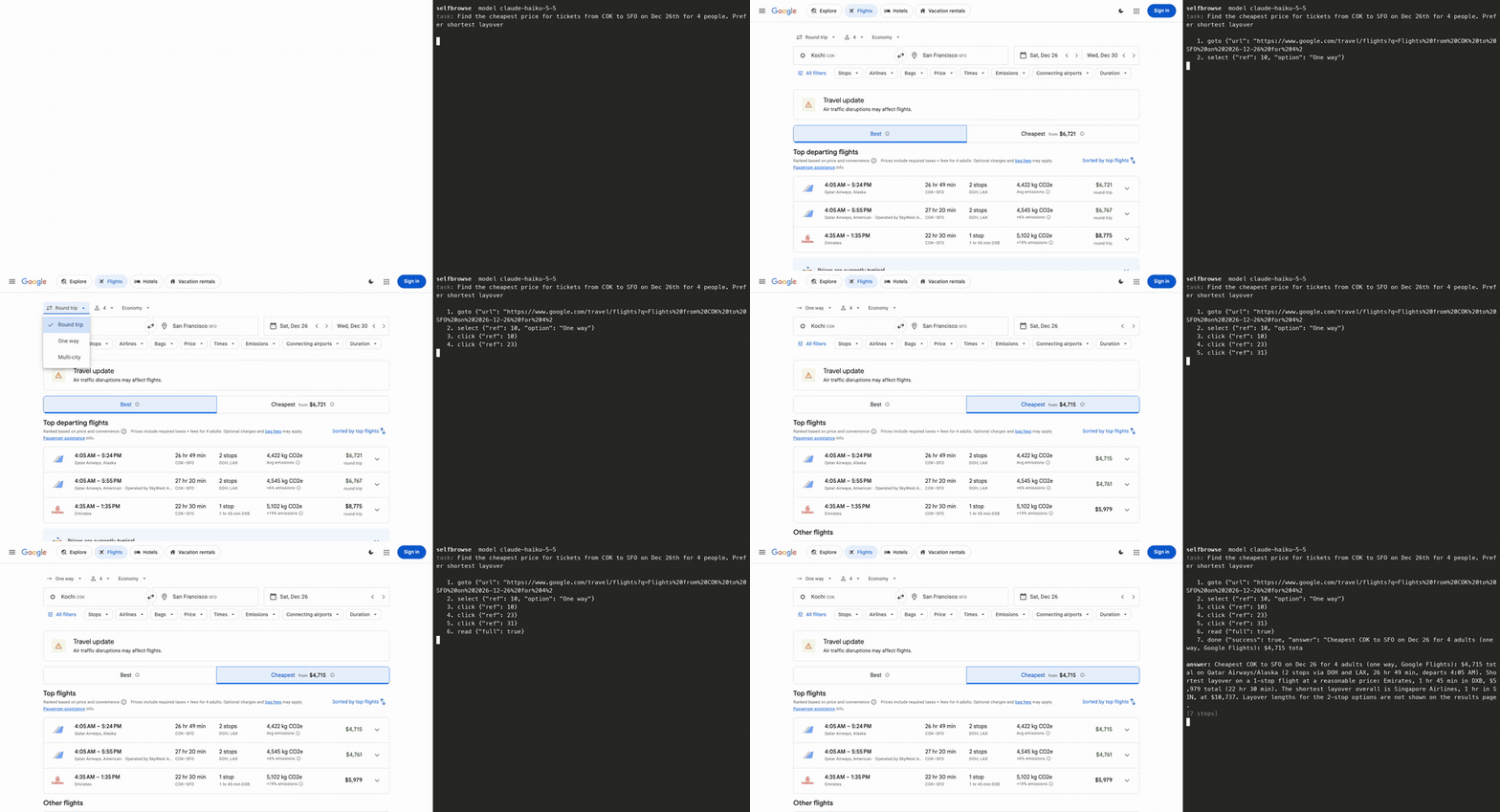
A real run, not a mock-up: Claude Haiku 5.5 finds the cheapest COK to SFO fare for 4 people on Google Flights in 7 steps. It took about 30 seconds and is shown at 1.3× speed. The prompt and the other runs are under Showcase in the docs.
Less page, less of your data, less repetition
Less page. The model reads each page as a short numbered list of what a person could click or type into, and answers with a number. No screenshots, no HTML, and only the newest list stays in the conversation.
['Corner Shop | Lamps' | https://corner-shop.test/lamps]
#1 link "Corner Shop" (→/)
#2 textbox "Search products"
#3 button "Search"
#4 link "Cart (0)" (→/cart)
#5 heading "Desk Lamp"
#6 combobox "Finish" (value="Brass", options: Brass | Black | White)
#7 button "Add to cart"
#8 button "Accept"
The model replies click {"ref": 7}. On 13 tasks with a local qwen3.8, the first model call averaged 1,128 tokens with Selfbrowse and 13,467 with browser-use.
Less of your data. Passwords, emails, phone numbers, card numbers and (with Presidio) names reach the model as placeholders such as <secret:pw> and <EMAIL_1>. The model types the placeholder and Selfbrowse swaps in the real value at the keyboard, on the same site only. In a check with a local model, the form was filled with the real values in 5 of 5 runs and the model saw them in 0 of 5.
The page shows      Email on file: priya.raman@acme.com
The model reads     Email on file: <EMAIL_1>
The model replies   type {"ref": 2, "text": "<EMAIL_1>"}
The page receives   priya.raman@acme.com
Less repetition. Selfbrowse remembers the clicks that worked on each site and replays the trusted ones without calling the model. On a multi-page lookup repeated four times, the third and fourth runs took 3 model calls and about 11 seconds, against 7 to 9 calls and 55 to 79 seconds without learning.
   1. goto {"url": "https://shop.example.com"}  [845 in / 65 out]
   2. click {"ref": 8}  [0 tokens] (learned: replayed from saved flow, no model call)
How it works
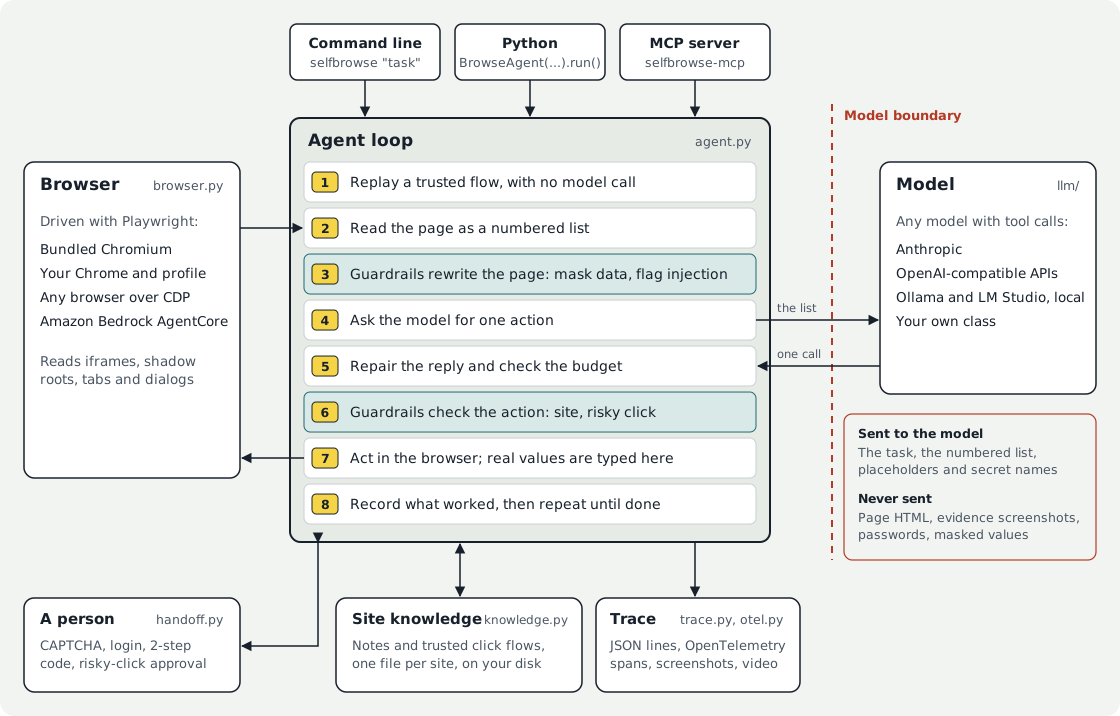
Selfbrowse is one loop with a browser on one side and a model on the other. Guardrails act twice in every step: once on the page before the model reads it, and once on the action before the browser runs it. Real values exist only at step 7, where they are typed. Each step, the module layout and the places you can plug in your own code are in Architecture.
Quick start
pip install selfbrowse
playwright install chromium        # or use your installed Chrome with --channel chrome
With Claude (set the key in your own shell):
export ANTHROPIC_API_KEY=your-key-here
selfbrowse "Open news.ycombinator.com and tell me the title of the top story."
With a free local model through Ollama, no key:
selfbrowse -m ollama:qwen3.6:latest "Open news.ycombinator.com and tell me the title of the top story."
Add --headed to watch the browser. Each step prints with the tokens it used, and the last line gives the totals:
   1. goto {"url": "https://example.com"}  [845 in / 65 out]
   2. done {"success": true, "answer": "The heading is Example Domain."}  [901 in / 76 out]
[2 steps, 2 model calls, 1746 in / 141 out tokens, 24.1s]
The heading is Example Domain.
A step that shows [0 tokens] came from the same reply as the one before it, or was replayed from saved knowledge. -q hides the steps and --json prints the full result.
From Python:
from selfbrowse import BrowseAgent
from selfbrowse.guardrails import AllowedDomains, ConfirmRisky, RedactPII, Budget

result = BrowseAgent(
    "Find the cheapest desk lamp and add it to the cart",
    llm="ollama:qwen3.6",
    guardrails=[
        AllowedDomains(["shop.example.com"]),   # stay on this site
        ConfirmRisky(),                          # ask before Buy, Pay, Delete, Send
        RedactPII(),                             # emails, phones, cards become placeholders
        Budget(max_tokens=50_000),
    ],
).run()

print(result.output)
print(result.usage)        # input, output and cache tokens, and the number of model calls
There are fourteen runnable scripts in examples/. Three of them need no API key.
Measured against other agents
The same tasks, model and browser for each library, behind one proxy that counts every token. Code judges success (the demo shop's state, or a fact from the site's own API), never the agent's own claim.
| Model and tasks | Library | Passed | Tokens sent per task | Seconds per task |
|---|---|---|---|---|
| qwen3.8, local, 13 tasks (demo shop and real sites) | Selfbrowse | 12/13 | 11,810 | 54 |
| browser-use 0.13.14 | 12/13 | 34,613 | 167 | |
| Claude Haiku 4.5, 6 demo-shop tasks, 2 runs each | Selfbrowse | 11/12 | 11,452 | 11 |
| browser-use | 7/12 | 70,133 | 47 | |
| qwen3.8, local, 6 real sites | Selfbrowse | 6/6 | 66,195 | 84 |
| Fastbrowse 0.10.0 | 4/6 | 160,574 | 171 | |
| Claude Sonnet 5.5, 6 real sites | Selfbrowse | 5/6 | 22,474 | 22 |
| browser-use | 6/6 | 27,311 | 22 |
What this does and does not show:
- The gap is largest on small and local models, where Selfbrowse sent 3 to 6 times fewer tokens than browser-use. On Claude Sonnet 5.5 the two were close, and browser-use passed one more task.
- These are small samples. Most rows are one run per task, so a single flaky result moves a row. Treat them as measurements, not a ranking.
- Selfbrowse makes more model calls per task than browser-use and sends far less per call.
- Some of browser-use's failures on Haiku 4.5 were output-format errors, not wrong answers. It ran with default settings.
- Fastbrowse picks actions with a hosted decision model whose tokens are not counted here.
The harness, per-run data and versions are in benchmarks/compare, so you can rerun it on your own models. More detail, and three showcase tasks on live sites with their cost per run, are in Tests and benchmarks.
What is in the box
| What you get | Read more | |
|---|---|---|
| Models | Anthropic, OpenAI, Gemini, Groq, DeepSeek, OpenRouter, Together, Ollama and LM Studio by name (provider:model). Any gateway that speaks the Anthropic or OpenAI API. Your own model as a small class. |
Models |
| Guardrails | Domain allow and block lists, approval before risky clicks, a watch for prompt injection in page text, token, time and dollar budgets, and your own rules as a small class. | Guardrails |
| Personal data | --redact-pii for emails, phones, SSNs and cards. --redact-presidio adds names with Microsoft Presidio, running on your machine. |
Personal data |
| Secrets | Passwords are given by name and typed at the keyboard. They never appear in prompts, results or traces. | Passwords and secrets |
| Hand-off | When a CAPTCHA, login or 2-step code appears, the run pauses and you finish that step in the browser window. Selfbrowse does not solve CAPTCHAs. | CAPTCHAs and hand-off |
| Learning | Per-site notes and click flows, replayed only once trusted. selfbrowse sites lists them and selfbrowse forget <domain> clears one. |
How learning works |
| Observability | --trace for a local timeline of every prompt, reply and action. --otel URL for OpenTelemetry spans in Jaeger, Phoenix, Langfuse or Tempo. Screenshots and video as evidence. |
Traces, prompts and screenshots |
| MCP server | selfbrowse-mcp gives Claude, VS Code and other MCP clients a browser, as one browse(task) tool or step by step. |
MCP server |
| Remote browsers | Attach to any browser over CDP with --cdp-url, or start an Amazon Bedrock AgentCore session with --cloud agentcore. |
Remote browsers |
| Page coverage | Iframes (same and cross origin), open shadow roots, native dropdowns, new tabs and popups, JavaScript dialogs. | What the agent can do |
Every option is in the command line reference.
Use it as the browser for Claude or VS Code
pip install 'selfbrowse[mcp]'
claude mcp add selfbrowse -- selfbrowse-mcp --model ollama:qwen3.6 --headed
In task mode the assistant calls browse(task) and gets back only the answer. A cheap or local model reads the pages, so they never enter the assistant's context. In step mode the assistant drives the browser itself and reads the numbered list. Config for VS Code and Claude Desktop is in the MCP guide.
Signing in without showing the model your password
export SELFBROWSE_SECRET_user='me@example.com'
read -s "SELFBROWSE_SECRET_pw?Password: " && export SELFBROWSE_SECRET_pw     # zsh

selfbrowse --headed --allow-domain example.com --redact-pii \
  "Go to example.com/login, sign in with <secret:user> and <secret:pw>, then tell me my latest order number"
The model is told only the names. --allow-domain means the values can be typed on that site and nowhere else, and --redact-pii hides what the account page shows back.
Limits
Selfbrowse is early software (0.1). What we know it does not do well yet, or have not checked:
- Not supported yet: file uploads, drag and drop, closed shadow roots, custom dropdowns beyond clicking them, and vision (
--visionis a stub). - Learning helps routine jobs you repeat. It gave no saving across different tasks on one site, and research-style tasks learn little.
- Hard forms vary. The same Google Flights prompt took 7 steps in one run and more than 30 in two others.
- Guardrails reduce risk; they are not guarantees. Pattern matching for personal data and injection misses things. A hosted model still sees any page text you do not mask. Only a local model keeps page content on your machine.
- Untested against live accounts: the AgentCore adapter and the Azure and Bedrock model routes are tested with stand-ins.
- Benchmarks are small. See the notes under the table above.
What comes next is in the roadmap.
Develop
git clone https://github.com/rinshadkk/selfbrowse && cd selfbrowse
python3 -m venv .venv && source .venv/bin/activate
pip install -e '.[dev]'
playwright install chromium
python -m pytest -q
Browser tests use local fixture pages and a faked model, so no API key is needed. See CONTRIBUTING.md.
License
MIT.
1 maintainer

Metadata
1 maintainer
Release files for selfbrowse 0.2.0
For a detailed explanation of source distributions (sdists) and built distributions (wheels), please see the package formats documentation.
Source distribution (sdist)
| File | Size | Uploaded | Provenance | Actions |
|---|---|---|---|---|
| selfbrowse-0.2.0.tar.gz | 99.0 kB | Without provenance | Details for selfbrowse-0.2.0.tar.gz |
Built distribution (wheel)
| File | Interpreter | ABI | Platform | Actions Reset |
|---|---|---|---|---|
| selfbrowse-0.2.0-py3-none-any.whl | Python 3 | none | any | Details for selfbrowse-0.2.0-py3-none-any.whl |
Total release size: 180.3 kB
Release files / selfbrowse-0.2.0.tar.gz
| Download URL | selfbrowse-0.2.0.tar.gz |
|---|---|
| Size | 99.0 kB |
| Tags | Source |
|
SHA-256 checksum How to use checksums |
256b5e2f02b3d6f8ca59b8bedee57ce1bac4281b826d2eee2692d1d706e3cb39
|
|
BLAKE2b-256 checksum How to use checksums |
c8238239a47d414e920f95ee233f0fc94bf4b855c93a1650399178a643b9c209
|
| Upload date | |
|
Uploaded using Trusted Publishing? What is trusted publishing? |
No |
| Uploaded via |
twine/7.0.0 CPython/3.10.9
|
Release files / selfbrowse-0.2.0-py3-none-any.whl
| Download URL | selfbrowse-0.2.0-py3-none-any.whl |
|---|---|
| Size | 81.3 kB |
| Tags | Python 3 |
|
SHA-256 checksum How to use checksums |
a12f5bdee5e570ecfbfec1ed40f5d17906865a9077a2a1b3e517b7c918856786
|
|
BLAKE2b-256 checksum How to use checksums |
dad5972dbc1c78ab735d7ac899ff4f524bda3fa5571d023c08c8b0ae455d45dd
|
| Upload date | |
|
Uploaded using Trusted Publishing? What is trusted publishing? |
No |
| Uploaded via |
twine/7.0.0 CPython/3.10.9
|
Security for selfbrowse 0.2.0
Provenance
Provenance describes where a file came from. On PyPI, provenance is shared via attestations, which provide a verifiable record of the build or publishing details. View details, limitations and caveats.
No provenance found
None of the files in this release were uploaded with provenance metadata.
A note on package security
PyPI is a repository for distributing packages, not a service for auditing them. While third-party security researchers and our staff do their best to detect and remove malicious packages, PyPI cannot guarantee the quality, security or suitability of any given package.
To learn more about protecting yourself from malicious actors, visit our package security documentation.














