
sem2surface


sem2surface reconstructs a three-dimensional surface from three to five
multi-detector SEM/BSE images. It extracts two normalized principal images,
identifies their orientation with a Radon transform, and integrates the resulting
gradients using the Frankot-Chellappa FFT method.
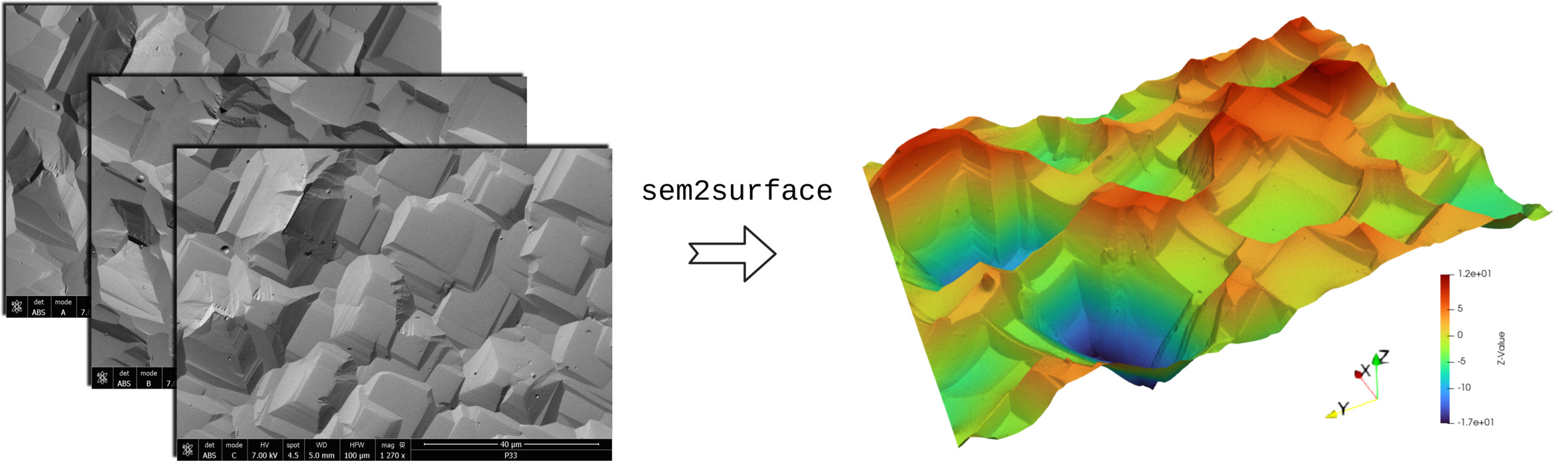
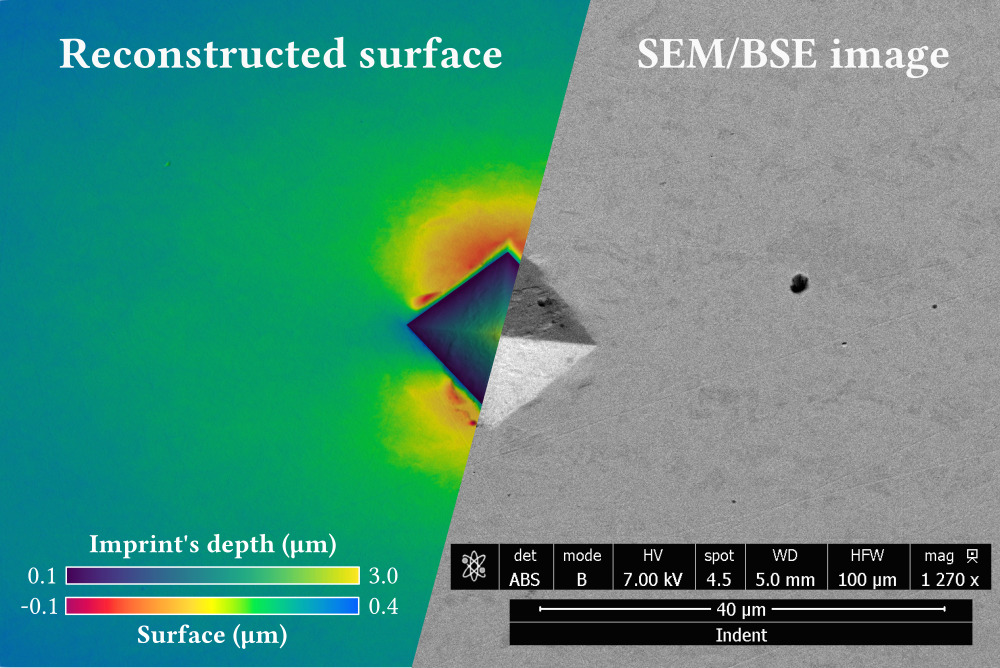
The reconstruction can be used qualitatively with an arbitrary vertical scale. Quantitative measurements require a calibrated Z scaling factor for the imaging configuration. The included Vickers-indentation example demonstrates that calibration procedure.
Installation
Python 3.10 or newer is required. Install sem2surface from PyPI with:
pip install sem2surface
If several Python installations are present, use the interpreter explicitly:
python3 -m pip install sem2surface # Linux or macOS
Windows
Install Python 3.10 or newer from
python.org. Keep the standard
pip, Tcl/Tk, and Python Launcher components enabled. Then open PowerShell or
Command Prompt and run:
py -m pip install sem2surface
sem2surface-gui
If Windows cannot find the installed launcher, start the GUI through Python:
py -m sem2surface_gui
On Linux, Tkinter may be packaged separately. For example, Ubuntu and Debian
users can install python3-tk with their system package manager.
A virtual environment is optional. It is useful when the system Python is externally managed, installation permissions are restricted, or other packages have conflicting dependencies:
python3 -m venv .venv
source .venv/bin/activate  # Windows PowerShell: .\.venv\Scripts\Activate.ps1
python -m pip install sem2surface
VTK export is optional because VTK is a large dependency:
python -m pip install "sem2surface[vtk]"
# From this source checkout instead: python -m pip install ".[vtk]"
The application does not require ImageMagick or a LaTeX installation. Tkinter is included with the standard Python installers on Windows and macOS.
Desktop application
After installation, launch the graphical interface from a terminal:
sem2surface-gui
Select three to five detector images, confirm the pixel size and scaling factor, choose an output directory, and start the reconstruction. TIFF, PNG, JPEG, and BMP images are supported. The work runs in the background so the window remains responsive.
The GUI intentionally provides only the FFT reconstruction. Atomic-number correction and direct profile integration have been removed.
Command line
Installation also provides a sem2surface executable:
sem2surface detector_A.tif detector_B.tif detector_C.tif \
  --z-scale 217.27243 \
  --save npz \
  --output-dir results
Pixel size is read from the first TIFF by default. For images without compatible SEM metadata, provide it in micrometres:
sem2surface detector_A.png detector_B.png detector_C.png \
  --pixel-size-um 0.325521 \
  --curvature none
Run sem2surface --help for the complete list of options. VTK output requires
the optional vtk installation described above.
Python API
from pathlib import Path

from sem2surface import construct_surface

images = [Path("detector_A.tif"), Path("detector_B.tif"), Path("detector_C.tif")]
preview, X, Y, Z, warning = construct_surface(
    images,
    z_scaling_factor_per_pixel=217.27243,
    remove_curvature=True,
    save_file_type="NPZ",
    output_dir="results",
)
Pixel size and manual curvature radii use metres in the Python API. Returned
coordinate and height arrays use micrometres. The old constructSurface
function remains as a compatibility wrapper for version 0.1 scripts, but only
FFT reconstruction is accepted and the old atomic-number arguments are ignored.
Outputs
Every reconstruction creates:
- a colour PNG of the reconstructed surface;
- a grayscale PNG suitable for further image analysis;
- a UTF-8 log containing parameters, input names, angles, and surface RMS.
Surface arrays can additionally be saved as CSV, compressed NumPy NPZ, or VTK structured-grid data. Optional diagnostic output includes the detector/PCA decomposition, Radon search, and oriented gradients.
When timestamps are disabled, an existing output with the same name is replaced. Choose a dedicated output folder or enable timestamps when results must be kept.
Reference examples and scaling
The examples directory contains the reference analyses:
Surface_1andSurface_2: representative reconstructed surfaces;Vickers_imprint: reconstruction of a Vickers indentation;Vickers_imprint_scaling: identification of the Z scaling factor from the known Vickers geometry.
After installing the package with the VTK extra, an example can be run from any working directory:
python examples/Surface_1/test_without_gui.py
Development
Create an isolated environment and install the editable project with its test tools:
python -m venv .venv
source .venv/bin/activate
python -m pip install -e ".[test]"
python -m pytest
python -m build
python -m twine check dist/*
Continuous integration tests Python 3.10 and 3.13 on Linux, Windows, and macOS, and verifies both the source distribution and universal wheel.
Maintainer release checklist
Use a clean virtual environment and update the version in both
pyproject.toml and src/sem2surface.py. PyPI does not allow an uploaded file
or release version to be replaced.
python -m pytest -q
python -m build
python -m twine check dist/*
For a first trial, create a separate account and API token on TestPyPI, then upload only the files for the new version:
python -m twine upload --repository testpypi dist/sem2surface-0.2.1*
When prompted, use __token__ as the username and the complete TestPyPI token,
including its pypi- prefix, as the password. Test the uploaded wheel in a new
environment without resolving dependencies from TestPyPI:
python -m pip install --index-url https://test.pypi.org/simple/ --no-deps sem2surface==0.2.1
sem2surface --version
For the real release, create a PyPI account and API token at pypi.org, then run:
python -m twine upload dist/sem2surface-0.2.1*
PyPI and TestPyPI use separate accounts and tokens. Never commit a token or put one directly in a command. For later automated releases, prefer PyPI Trusted Publishing.
Method references
- Neggers, J. et al. (2021). Principal image decomposition for multi-detector backscatter electron topography reconstruction. Ultramicroscopy, 227, 113200. DOI
- Frankot, R. T. and Chellappa, R. (1988). A method for enforcing integrability in shape from shading algorithms. IEEE Transactions on Pattern Analysis and Machine Intelligence, 10(4), 439-451. DOI
Author and license
Developed by Vladislav A. Yastrebov, CNRS, Mines Paris – PSL, Centre des matériaux. Distributed under the BSD 3-Clause License.
1 maintainer

Metadata
1 maintainer
Release files for sem2surface 0.2.1
For a detailed explanation of source distributions (sdists) and built distributions (wheels), please see the package formats documentation.
Source distribution (sdist)
| File | Size | Uploaded | |
|---|---|---|---|
| sem2surface-0.2.1.tar.gz | 22.0 kB | Details |
Built distribution (wheel)
| File | Interpreter | ABI | Platform | Reset |
|---|---|---|---|---|
| sem2surface-0.2.1-py3-none-any.whl | Python 3 | none | any | Details |
Total release size: 43.2 kB
Release files / sem2surface-0.2.1.tar.gz
| Download URL | sem2surface-0.2.1.tar.gz |
|---|---|
| Size | 22.0 kB |
| Tags | Source |
|
SHA-256 checksum How to use checksums |
c91b8d3020908de6960b71ef9cae051df1f83afe95a988dcc186f74f0595dbef
|
|
BLAKE2b-256 checksum How to use checksums |
71152102502a6df6192cfd6c2d288bc9c096d5aebe226510a4dc870f3c0a5c90
|
| Upload date | |
|
Uploaded using Trusted Publishing? What is trusted publishing? |
No |
| Uploaded via |
twine/7.0.0 CPython/3.10.12
|
Release files / sem2surface-0.2.1-py3-none-any.whl
| Download URL | sem2surface-0.2.1-py3-none-any.whl |
|---|---|
| Size | 21.1 kB |
| Tags | Python 3 |
|
SHA-256 checksum How to use checksums |
204513f5ae97b94c5c9aeb556bc6b7024c70a64b47462f02f5e8a0e77f3b8097
|
|
BLAKE2b-256 checksum How to use checksums |
f3931bdff33fd46cd5da4132ca0080c3fc73411c197d75982de090b2bdb322dc
|
| Upload date | |
|
Uploaded using Trusted Publishing? What is trusted publishing? |
No |
| Uploaded via |
twine/7.0.0 CPython/3.10.12
|














