
File semantic integrity validator — fills the gap ZFS checksums miss

Project description
SemanticDog
Your NAS keeps your files safe from hardware failure. SemanticDog checks they are still actually openable.
ZFS and RAID verify that bits on disk match what was written. That is not the same as verifying a JPEG can be decoded, a RAW file parsed, a PDF opened, or a video probed. Bit-rot, partial writes, failed copies, and application-level corruption can pass checksums and still leave you with broken files.
SemanticDog scans your library for semantic corruption, records what changed, and helps you find problems before you need the files.
It ships as a single service with:
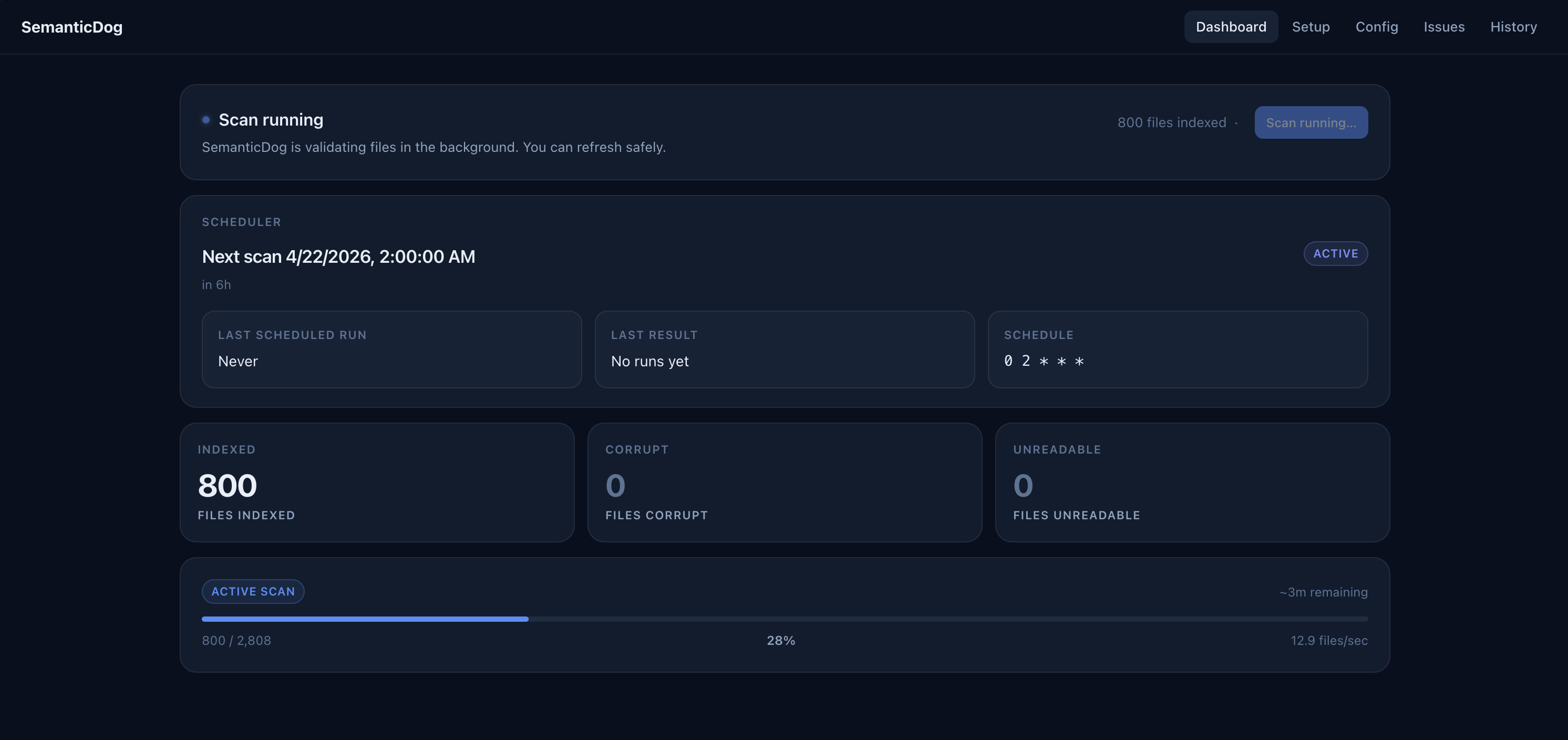
- a built-in Web UI for setup, scheduling, and issue review
- an HTTP API and Prometheus metrics endpoint
- a CLI for direct scans and scripting
- an MCP server for AI agent access
Works with AI agents. SemanticDog exposes an MCP server so Claude and other agents can inspect scan results, trigger scans, and reason about library health.
Quick Start
The recommended install path is Docker on your NAS.
- Pull the image.
- Start the container with named volumes for app data and read-only mounts for your library.
- Open the Web UI.
- Add scan roots, choose the schedule, and save.
The Web UI is the main way to operate SemanticDog on Docker and NAS deployments.
Docker / NAS
SemanticDog publishes Linux images for linux/amd64 and linux/arm64.
For NAS installs, pin an exact release tag instead of floating on latest.
docker pull ghcr.io/kytmanov/semantic-dog:0.3.2
Docker Compose (Host Paths)
services:
  semanticdog:
    image: ghcr.io/kytmanov/semantic-dog:0.3.2
    container_name: semanticdog
    restart: unless-stopped
    # Replace 1000 with your NAS user's UID
    user: "1000"
    ports:
      - "8181:8181"
    environment:
      # Replace with your timezone (e.g., America/Los_Angeles, Europe/London)
      TZ: America/Your_Timezone
    volumes:
      # App data - persists config and scan database across updates
      - /path/to/semanticdog/config:/data/config
      - /path/to/semanticdog/state:/data/state
      # Your media library - replace with your actual paths
      - /path/to/your/photos:/Photos:ro
Setup:
# 1. Create directories (replace 1000 with your UID)
mkdir -p /path/to/semanticdog/config /path/to/semanticdog/state
chown -R 1000 /path/to/semanticdog/config /path/to/semanticdog/state

# 2. Start the container
docker compose -f compose.yaml up -d

# 3. Open Web UI
#    http://<your-nas>:8181

# 4. In the Web UI:
#    - Add scan root: /Photos
#    - Set schedule (e.g., "0 2 * * *" for daily at 2am)
#    - Click Save
Named volumes version (easier, no permission management):
services:
  semanticdog:
    image: ghcr.io/kytmanov/semantic-dog:0.3.2
    container_name: semanticdog
    restart: unless-stopped
    ports:
      - "8181:8181"
    environment:
      TZ: America/Your_Timezone
    volumes:
      - sdog-config:/data/config
      - sdog-state:/data/state
      - /path/to/your/photos:/Photos:ro

volumes:
  sdog-config:
  sdog-state:
Docker Run
docker run -d \
  --name semanticdog \
  -p 8181:8181 \
  -e TZ=Europe/Berlin \
  -v semanticdog-config:/data/config \
  -v semanticdog-state:/data/state \
  -v semanticdog-logs:/data/logs \
  -v /mnt/photos:/library/photos:ro \
  -v /mnt/documents:/library/documents:ro \
  ghcr.io/kytmanov/semantic-dog:0.3.2
Web UI Flow
Open http://<nas-host>:8181/ and finish setup in the Web UI:
- add scan roots from the mounted container paths such as
/library/photos - choose how often scans should run
- configure notifications or integrations if you want them
- review results from the dashboard, issues, and history pages
The UI writes normal configuration to /data/config/config.yaml, so you can keep adjusting the app after deployment without rebuilding the container or editing environment variables.
NAS Notes
- Prefer named volumes for
/data/config,/data/state, and/data/logs. That is the easiest non-root path. - Keep media mounts read-only when possible.
- Scan roots must exist inside the container, not just on the host.
- Set
TZso the internal scheduler runs in the timezone you expect. - If your NAS requires host-path mounts for
/data/..., pre-create those directories with writable ownership for the container user or setuser:to the NAS UID:GID that owns them. - Config lives at
/data/config/config.yaml, state at/data/state/state.db, and logs at/data/logs/sdog.log. SDOG_*environment variables always override YAML and show up as locked values in the UI. Use them for secrets or fixed deployment overrides, not for normal first-run setup.
Built-In Auth Without Plaintext Passwords
If you want built-in HTTP basic auth in Docker without putting the password directly in Compose, mount a secret file and point SDOG_HTTP_BASIC_PASSWORD_FILE at it:
services:
  semanticdog:
    image: ghcr.io/kytmanov/semantic-dog:0.3.2
    environment:
      TZ: Europe/Berlin
      SDOG_HTTP_BASIC_ENABLED: "true"
      SDOG_HTTP_BASIC_USERNAME: admin
      SDOG_HTTP_BASIC_PASSWORD_FILE: /run/secrets/semanticdog_http_basic_password
    volumes:
      - semanticdog-config:/data/config
      - semanticdog-state:/data/state
      - semanticdog-logs:/data/logs
      - ./secrets/http-basic-password:/run/secrets/semanticdog_http_basic_password:ro
Supported secret-file env vars are:
SDOG_HTTP_BASIC_PASSWORD_FILESDOG_SMTP_PASS_FILESDOG_MCP_AUTH_TOKEN_FILESDOG_TRUENAS_KEY_FILE
Local Image Builds
If you want to build locally during development instead of pulling a published image:
docker build -t semanticdog:local .
The Docker image installs runtime dependencies from the checked-in uv.lock and includes OCI metadata such as version, source repository, and revision.
Python / CLI Install
If you do not want Docker, you can also install the CLI directly.
# pip
pip install semanticdog

# uv
uv tool install semanticdog
Then verify your environment:
sdog check-deps
SemanticDog requires Python 3.12+. The Python package already includes its Python-level validators and libraries such as rawpy, pillow-heif, pypdf, and mutagen. The main external system dependency is ffmpeg for video validation.
First CLI Scan
sdog scan /mnt/photos
Results go into a local SQLite database. Progress is printed to stderr every 5 seconds:
Discovered 15234 files.
Scan ID: abc123-...  (resume with: sdog scan --resume abc123-...)
  [1500/15234]  9.8%  ok:1498  corrupt:2  unreadable:0  43.1 f/s  ETA: ~3.2 min
When it finishes:
sdog show-stats
sdog report
Exit code is 0 if everything is clean and 2 if issues were found.
Resuming An Interrupted Scan
If a scan is interrupted, it stays resumable:
sdog scan --resume abc123-...
Use sdog list-scans to find incomplete scan IDs.
What Results Mean
| Status | Meaning | What To Do |
|---|---|---|
ok |
File opened and parsed successfully | Nothing |
corrupt |
File is structurally broken | Restore from backup |
unreadable |
File could not be opened at all | Check mount or permissions |
unsupported |
Library version does not recognize this format variant | Update libraries; not corruption by itself |
error |
Validator crashed or timed out | Inspect sdog report --format json |
unreadable usually means a mount or permission problem, not corruption. If many files suddenly become unreadable, check storage connectivity before investigating individual files.
Supported Formats
Photos: JPEG, PNG, TIFF, HEIC, WebP
RAW: CR2, CR3, NEF, ARW, ORF, RW2, PEF, DNG, RAF, NRW
Documents: PDF, DOCX, XLSX, PPTX, DOC, XLS, PPT
Video: MP4, MOV, MTS, M4V, MKV
Audio: MP3, FLAC, WAV, AAC
Scheduled Scanning
SemanticDog includes an internal scheduler. Set schedule in config.yaml or in the Web UI to run background scans automatically.
schedule: "0 2 * * *"
The expression uses standard 5-field cron syntax: minute, hour, day-of-month, month, day-of-week.
Leave schedule empty to disable automatic scans. On later runs, only changed files are re-validated. The first scan of a large library may take much longer than subsequent incremental scans.
In Docker, the schedule uses the container timezone. Set TZ explicitly.
Notifications
SemanticDog can alert you when corrupt or unreadable files are found.
notify_email: you@example.com
smtp_host: smtp.example.com
smtp_user: sdog@example.com
smtp_pass: ""   # prefer SDOG_SMTP_PASS or SDOG_SMTP_PASS_FILE
Webhook
webhook_url: https://gotify.example.com/message?token=abc
Alerts fire on first detection instead of repeating every scan for the same issue.
AI Agent Integration (MCP)
SemanticDog has a built-in MCP server. Connect Claude or any MCP-compatible agent to query scan results and trigger scans conversationally.
Enable It
mcp_enabled: true
mcp_allow_write: true
SDOG_MCP_AUTH_TOKEN=your-secret sdog serve --port 8181
Claude Code Example
Add this to ~/.claude/settings.json:
{
  "mcpServers": {
    "semanticdog": {
      "type": "sse",
      "url": "http://localhost:8181/mcp/sse",
      "headers": { "Authorization": "Bearer your-secret" }
    }
  }
}
Example prompts:
- "Which files are corrupt?"
- "Run a scan for my 2024 photos and summarize the result."
Configuration
Config is loaded automatically from the first location found:
./config.yaml~/.config/semanticdog/config.yaml/data/config/config.yaml
Override with --config /path/to/config.yaml on any command.
If you run the Web UI, the same config can also be edited from /setup and /config. Environment variables still win over YAML and show up as locked values in the UI.
paths:
  - /mnt/photos
  - /mnt/documents

db_path: /data/state/state.db

workers: 4
raw_workers: 2

schedule: "0 2 * * *"
Every option has a matching SDOG_* environment variable. Env vars always override the YAML file. Secret fields also support _FILE variants.
The full reference is in config.example.yaml.
HTTP API And Prometheus
sdog serve --port 8181
Core endpoints:
GET /health— process livenessGET /ready— operational readiness for configured runtime, storage, and scan rootsGET /metrics— Prometheus scrape endpointGET /status— current state, counts, last scan, and scheduler statePOST /trigger— start a background scan remotely
Web UI and config endpoints:
GET /api/app— runtime status, readiness details, version, current scanGET /api/setup— setup diagnosticsGET /api/config— effective config and source metadataPOST /api/config/validate— validate config changes without savingPUT /api/config— save config through the same path the Web UI usesPOST /api/notify/test— send a test notification with current settings
Scan and issue endpoints:
GET /api/scan/current— active scan snapshot and notification errorsGET /api/issues— current corrupt and unreadable filesGET /api/scans— scan historyGET /api/scans/{scan_id}— single scan record
The built-in Web UI uses the same service:
/— setup or dashboard landing page/dashboard— health-first dashboard/setup— environment diagnostics and first-run settings/config— structured config editor/issues— corrupt and unreadable file list/history— scan history
Troubleshooting
New camera RAW files show unsupported
LibRaw adds support gradually. unsupported is not corruption. Update rawpy or the underlying libraries.
Many unreadable files suddenly
Usually a mount going offline or a permission change. SemanticDog flags likely systemic failures in notifications when unreadable files dominate the scan.
Video files are not validating
Install ffmpeg and rerun sdog check-deps.
Moved your library to a new path
sdog db-export -o backup.json
sdog db-import -i backup.json --path-map /old/path:/new/path
AI Agent Reference — structured data for agents and tooling
Project Identity
name:       semanticdog
binary:     sdog
module:     semanticdog
python:     >=3.12
entrypoint: semanticdog/cli.py
Repository Layout
semanticdog/
  cli.py            CLI entrypoint (Typer)
  config.py         Config dataclass, validation, env override
  config_store.py   Web UI config persistence and source metadata
  db.py             SQLite state database
  scanner.py        File discovery and validator execution
  server.py         FastAPI app and Web UI routes
  notify.py         Notification plumbing
  runtime.py        Runtime wiring and startup loading
  mcp_server.py     MCP SSE transport
  services/
    diagnostics.py  Setup and readiness diagnostics
    scheduler.py    Background scheduler
    scan_manager.py Background scan orchestration
  validators/
tests/
CLI Exit Codes
sdog scan: 0 = clean, 1 = config/DB/scan error, 2 = corrupt or unreadable files found, 130 = interrupted
sdog check-deps: 0 = required deps present, 1 = required dep missing
HTTP API
GET  /health      → 200 {"status":"ok"}
GET  /ready       → 200|503 readiness payload
GET  /status      → 200 {status, files_indexed, by_status, last_scan, current_scan, scheduler}
GET  /metrics     → 200 Prometheus text
GET  /api/app     → 200 {ready, readiness, version, config_path, config_error, db_error, current_scan}
GET  /api/setup   → 200 {config, db, scan_roots, dependencies, warnings}
GET  /api/config  → 200 {path, raw, effective, sources}
POST /api/config/validate → 200 {valid, effective?}
PUT  /api/config  → 200 {status:"saved", restart_required, ...}
GET  /api/scan/current → 200 {current, last, last_error, notification_errors}
GET  /api/issues  → 200 {issues:[...]}
GET  /api/scans   → 200 {scans:[...]}
GET  /api/scans/{scan_id} → 200 scan or 404
POST /api/notify/test → 200 {status:"sent"|"partial", errors:[...]}
POST /trigger     → 200 {status:"started", scan_id}
GET  /mcp/sse     → SSE stream when MCP is enabled and authenticated
Config Keys To Env Vars
| Key | Env var | Default |
|---|---|---|
paths |
SDOG_PATHS |
[] |
exclude |
SDOG_EXCLUDE |
[...] |
db_path |
SDOG_DB_PATH |
/data/state/state.db |
workers |
SDOG_WORKERS |
4 |
raw_workers |
SDOG_RAW_WORKERS |
2 |
raw_decode_depth |
SDOG_RAW_DECODE_DEPTH |
structure |
validation_timeout_s |
SDOG_VALIDATION_TIMEOUT_S |
120 |
force_recheck_days |
SDOG_FORCE_RECHECK_DAYS |
90 |
http_port |
SDOG_HTTP_PORT |
8181 |
http_basic_enabled |
SDOG_HTTP_BASIC_ENABLED |
false |
http_basic_username |
SDOG_HTTP_BASIC_USERNAME |
"" |
http_basic_password |
SDOG_HTTP_BASIC_PASSWORD or SDOG_HTTP_BASIC_PASSWORD_FILE |
"" |
notify_email |
SDOG_NOTIFY_EMAIL |
"" |
smtp_pass |
SDOG_SMTP_PASS or SDOG_SMTP_PASS_FILE |
"" |
webhook_url |
SDOG_WEBHOOK_URL |
"" |
mcp_enabled |
SDOG_MCP_ENABLED |
false |
mcp_auth_token |
SDOG_MCP_AUTH_TOKEN or SDOG_MCP_AUTH_TOKEN_FILE |
"" |
mcp_allow_write |
SDOG_MCP_ALLOW_WRITE |
false |
mcp_rate_limit_s |
SDOG_MCP_RATE_LIMIT_S |
60 |
truenas_key |
SDOG_TRUENAS_KEY or SDOG_TRUENAS_KEY_FILE |
"" |
Database Schema
files (
  path TEXT PRIMARY KEY,
  mtime REAL, size INTEGER,
  status TEXT,
  error TEXT, suggested_action TEXT,
  checked_at TEXT,
  scan_id TEXT,
  notified_at TEXT
)

scans (
  id TEXT PRIMARY KEY,
  started_at TEXT, finished_at TEXT,
  total INTEGER, corrupt INTEGER, unreadable INTEGER,
  scope TEXT,
  files_per_sec REAL
)

scan_queue (
  scan_id TEXT, path TEXT,
  done INTEGER DEFAULT 0
)
Running Tests
uv run pytest                                  # 541 tests
uv run pytest tests/test_e2e.py -v            # end-to-end scans and HTTP behavior
uv sync --extra dev
uv run pytest tests/test_playwright_e2e.py -v # browser UI E2E
Known Limitations
- RAW
unsupporteddoes not necessarily mean corrupt - HEIC validation checks the primary frame, not every burst/live-photo variant
- Sidecars such as
.XMPand.AAEare validated independently verify-hashesis a placeholder command and not yet implemented for production use


Download files
Download the file for your platform. If you're not sure which to choose, learn more about installing packages.
Source Distribution
Built Distribution
Filter files by name, interpreter, ABI, and platform.
If you're not sure about the file name format, learn more about wheel file names.
Copy a direct link to the current filters
File details
Details for the file semanticdog-0.3.2.tar.gz.
File metadata
- Download URL: semanticdog-0.3.2.tar.gz
- Upload date:
- Size: 31.5 kB
- Tags: Source
- Uploaded using Trusted Publishing? Yes
- Uploaded via: twine/6.1.0 CPython/3.13.12
File hashes
| Algorithm | Hash digest | |
|---|---|---|
| SHA256 |
5c705a24710510edad4e57e3cc2d7dadda953a85dab4306661d161e49a82e2ae
|
|
| MD5 |
af27b04d7242dbae1624fd348239a793
|
|
| BLAKE2b-256 |
b4d77c0b17a5548cc49128fbb02876557940fba9d497b1538b164a7b41758d0f
|
Provenance
The following attestation bundles were made for semanticdog-0.3.2.tar.gz:
Publisher:
release.yml on kytmanov/semantic-dog
-
Statement:
-
Statement type:
https://in-toto.io/Statement/v1 -
Predicate type:
https://docs.pypi.org/attestations/publish/v1 -
Subject name:
semanticdog-0.3.2.tar.gz -
Subject digest:
5c705a24710510edad4e57e3cc2d7dadda953a85dab4306661d161e49a82e2ae - Sigstore transparency entry: 1358932255
- Sigstore integration time:
-
Permalink:
kytmanov/semantic-dog@0a87af15526212d7000b3662ecde0ca20089859d -
Branch / Tag:
refs/tags/v0.3.2 - Owner: https://github.com/kytmanov
-
Access:
public
-
Token Issuer:
https://token.actions.githubusercontent.com -
Runner Environment:
github-hosted -
Publication workflow:
release.yml@0a87af15526212d7000b3662ecde0ca20089859d -
Trigger Event:
push
-
Statement type:
File details
Details for the file semanticdog-0.3.2-py3-none-any.whl.
File metadata
- Download URL: semanticdog-0.3.2-py3-none-any.whl
- Upload date:
- Size: 35.4 kB
- Tags: Python 3
- Uploaded using Trusted Publishing? Yes
- Uploaded via: twine/6.1.0 CPython/3.13.12
File hashes
| Algorithm | Hash digest | |
|---|---|---|
| SHA256 |
1e5f3f9294877d9880a96197d1556ce2a0880e70d74860de396e33c36bfee1b3
|
|
| MD5 |
2b970ccaae39dc309685b50434d2a12b
|
|
| BLAKE2b-256 |
25f97a73a7988d9f8213a12a352c56975a12ddfb06a1482b58ae300b889abf5a
|
Provenance
The following attestation bundles were made for semanticdog-0.3.2-py3-none-any.whl:
Publisher:
release.yml on kytmanov/semantic-dog
-
Statement:
-
Statement type:
https://in-toto.io/Statement/v1 -
Predicate type:
https://docs.pypi.org/attestations/publish/v1 -
Subject name:
semanticdog-0.3.2-py3-none-any.whl -
Subject digest:
1e5f3f9294877d9880a96197d1556ce2a0880e70d74860de396e33c36bfee1b3 - Sigstore transparency entry: 1358932275
- Sigstore integration time:
-
Permalink:
kytmanov/semantic-dog@0a87af15526212d7000b3662ecde0ca20089859d -
Branch / Tag:
refs/tags/v0.3.2 - Owner: https://github.com/kytmanov
-
Access:
public
-
Token Issuer:
https://token.actions.githubusercontent.com -
Runner Environment:
github-hosted -
Publication workflow:
release.yml@0a87af15526212d7000b3662ecde0ca20089859d -
Trigger Event:
push
-
Statement type:






