
Lightweight static analysis for many languages. Find bug variants with patterns that look like source code.


Project description

Code scanning at ludicrous speed.








Semgrep is a fast, open-source, static analysis tool that searches code, finds bugs, and enforces secure guardrails and coding standards. Semgrep supports 30+ languages and can run in an IDE, as a pre-commit check, and as part of CI/CD workflows.
Semgrep is semantic grep for code. While running grep "2" would only match the exact string 2, Semgrep would match x = 1; y = x + 1 when searching for 2. Semgrep rules look like the code you already write; no abstract syntax trees, regex wrestling, or painful DSLs.
Note that in security contexts, Semgrep Community Edition will miss many true positives as it can only analyze code within the boundaries of a single function or file. If you want to use Semgrep for security purposes (SAST, SCA, or secrets scanning), the Semgrep AppSec Platform is strongly recommended since it adds the following critical capabilities:
- Improved core analysis capabilities (cross-file, cross-function, data-flow reachability) that greatly reduce false positives by 25% and increase detected true positives by 250%
- Contextual post-processing of findings with Semgrep Assistant (AI) to further reduce noise by ~20%. In addition, Assistant enriches findings with tailored, step-by-step remediation guidance that humans find actionable >80% of the time.
- Customizable policies and seamless integration into developer workflows, giving security teams granular control over where, when, and how different findings are presented to developers (IDE, PR comment, etc.)
The Semgrep AppSec Platform works out-of-the-box with 20000+ proprietary rules across SAST, SCA, and secrets. Pro rules are written and maintained by the Semgrep security research team and are highly accurate, meaning AppSec teams can feel confident bringing findings directly to developers without slowing them down.
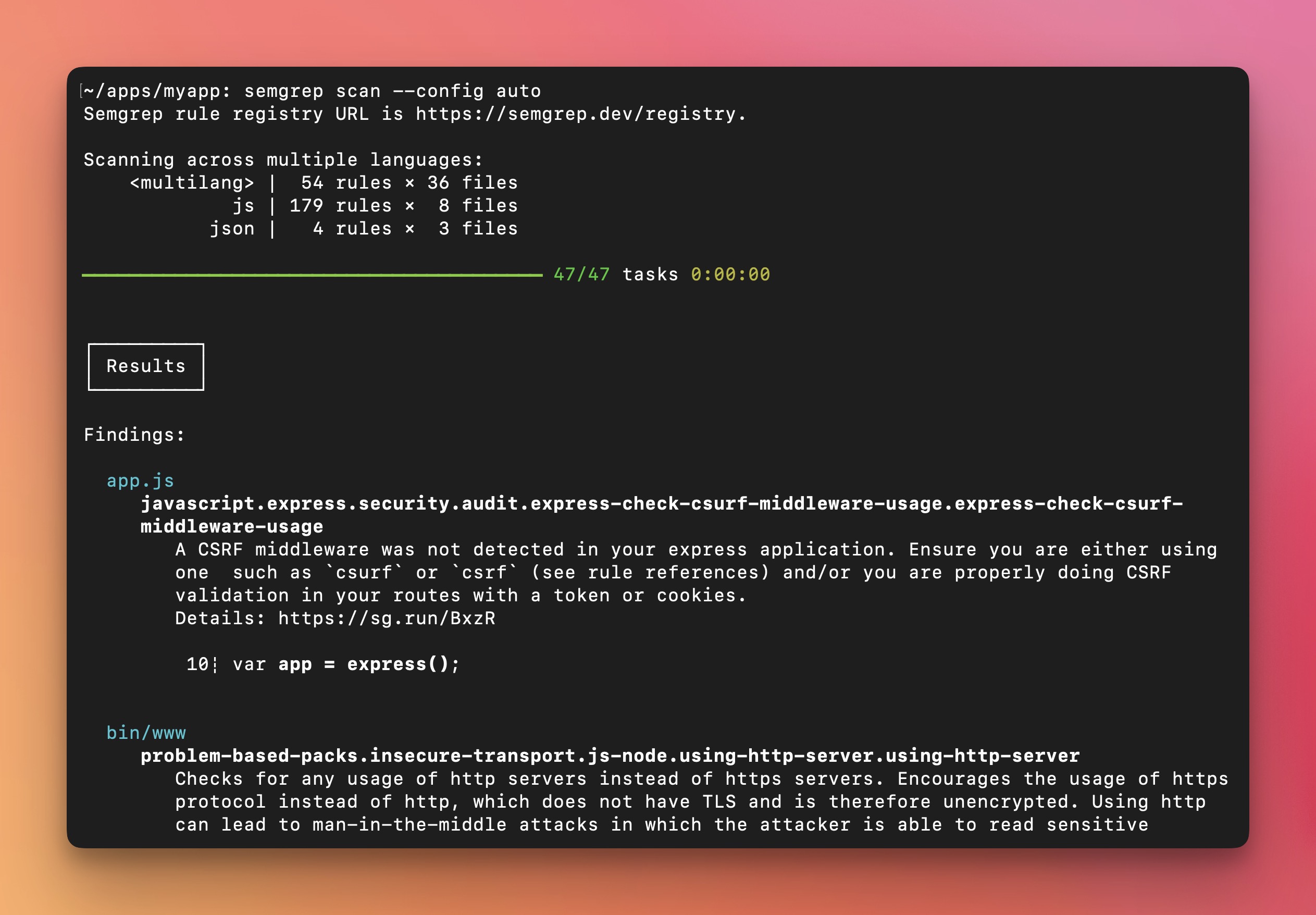
Semgrep analyzes code locally on your computer or in your build environment: by default, code is never uploaded. Get started →.
Language support
Semgrep Code supports 30+ languages, including:
Apex · Bash · C · C++ · C# · Clojure · Dart · Dockerfile · Elixir · HTML · Go · Java · JavaScript · JSX · JSON · Julia · Jsonnet · Kotlin · Lisp · Lua · OCaml · PHP · Python · R · Ruby · Rust · Scala · Scheme · Solidity · Swift · Terraform · TypeScript · TSX · YAML · XML · Generic (ERB, Jinja, etc.)
Semgrep Supply Chain supports 12 languages across 15 package managers, including:
C# (NuGet) · Dart (Pub) · Go (Go modules, go mod) · Java (Gradle, Maven) · Javascript/Typescript (npm, Yarn, Yarn 2, Yarn 3, pnpm) · Kotlin (Gradle, Maven) · PHP (Composer) · Python (pip, pip-tool, Pipenv, Poetry) · Ruby (RubyGems) · Rust (Cargo) · Scala (Maven) · Swift (SwiftPM)
For more information, see Supported languages.
Getting started 🚀
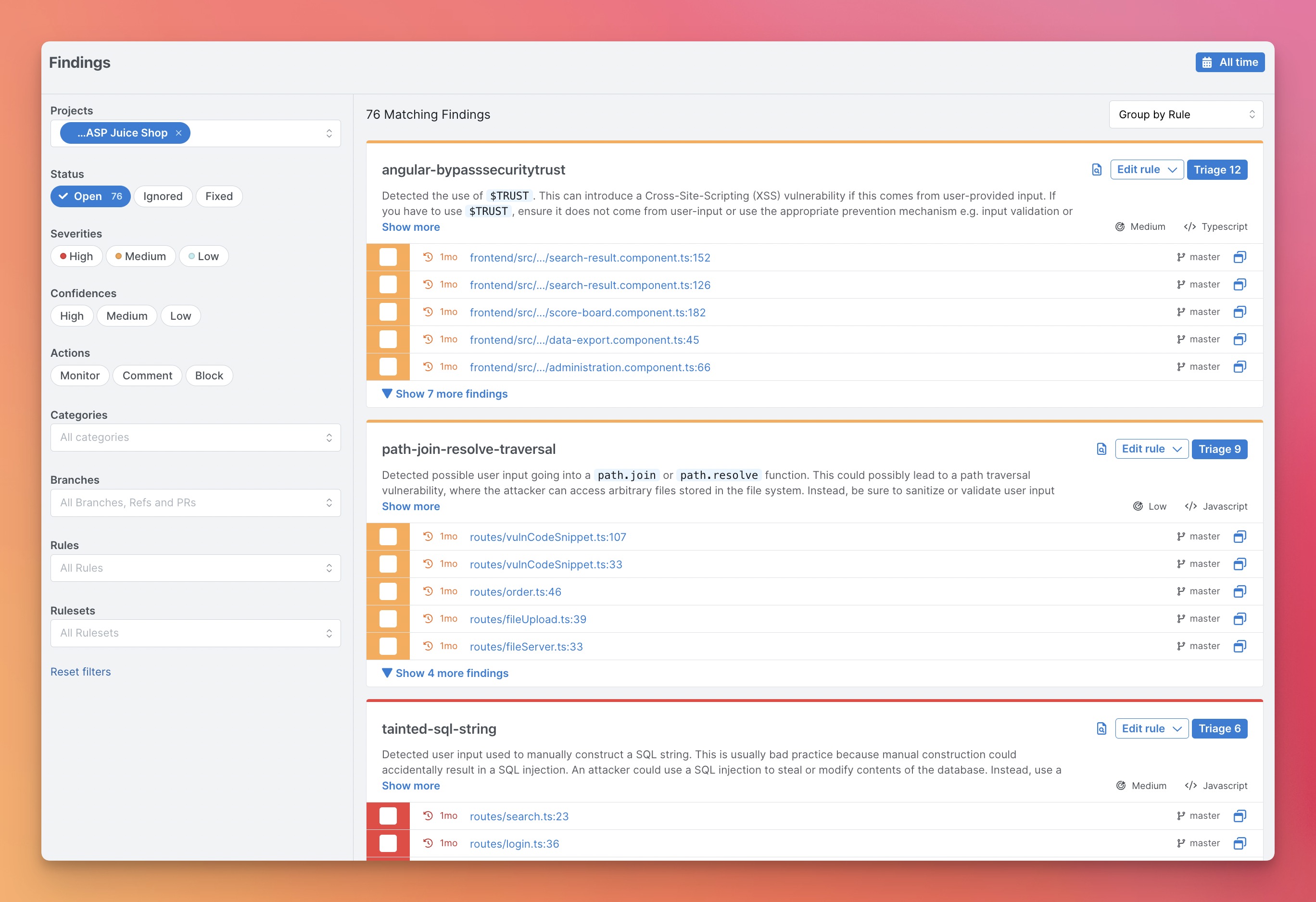
For new users, we recommend starting with the Semgrep AppSec Platform because it provides a visual interface, a demo project, result triaging and exploration workflows, and makes setup in CI/CD fast. Scans are still local and code isn't uploaded. Alternatively, you can also start with the CLI and navigate the terminal output to run one-off searches.
Option 1: Getting started from the Semgrep Appsec Platform (Recommended)
-
Register on semgrep.dev
-
Explore the demo findings to learn how Semgrep works
-
Scan your project by navigating to
Projects > Scan New Project > Run scan in CI -
Select your version control system and follow the onboarding steps to add your project. After this setup, Semgrep will scan your project after every pull request.
-
[Optional] If you want to run Semgrep locally, follow the steps in the CLI section.
Notes:
If there are any issues, please ask for help in the Semgrep Slack.
Option 2: Getting started from the CLI
-
Install Semgrep CLI
# For macOS $ brew install semgrep # For Ubuntu/WSL/Linux/macOS $ python3 -m pip install semgrep # To try Semgrep without installation run via Docker $ docker run -it -v "${PWD}:/src" semgrep/semgrep semgrep login $ docker run -e SEMGREP_APP_TOKEN=<TOKEN> --rm -v "${PWD}:/src" semgrep/semgrep semgrep ci -
Run
semgrep loginto create your account and login to Semgrep. This step is optional, but logging into Semgrep gets you access to:- Semgrep Supply Chain: A dependency scanner that detects reachable vulnerabilities in third party libraries
- Semgrep Code's Pro rules: 600+ high confidence rules written by Semgrep's security research team
- Semgrep Code's Pro engine: An advanced code analysis engine, designed to detect complex vulnerabilities, and reduce false positives
-
Go to your app's root directory and run
semgrep ci. This will scan your project to check for vulnerabilities in your source code and its dependencies. -
Try writing your own query interactively with
-e. For example, a check for Python == where the left and right hand sides are the same (potentially a bug):$ semgrep -e '$X == $X' --lang=py path/to/src
Semgrep Ecosystem
The Semgrep ecosystem includes the following:
-
Semgrep Community Edition - The open-source program analysis engine at the heart of everything. Suitable for ad-hoc use cases with a high tolerance for false positives - think consultants, security auditors, or pentesters.
-
Semgrep AppSec Platform - Easily orchestrate and scale SAST, SCA, and Secrets scanning across an organization, with no risk of overwhelming developers. Customize which findings developers see, where they see them, and integrate with CI providers like GitHub, GitLab, CircleCI, and more. Includes both free and paid tiers.
-
Semgrep Code (SAST) - Make real progress on your vulnerability backlog with SAST that minimizes noise and empowers developers to quickly fix issues on their own, even if they have no security knowledge. Easy to deploy secure guardrails and tailored, step-by-step remediation guidance mean developers actually fix issues since they don't feel slowed down.
-
Semgrep Supply Chain (SSC) - A high-signal dependency scanner that detects reachable vulnerabilities in open source third-party libraries and functions.
-
Semgrep Secrets (Secrets scanning) - Secrets detection that uses semantic analysis, improved entropy analysis, and validation to accurately surface sensitive credentials in the developer workflow.
-
Semgrep Assistant (AI) - Assistant is an AI-powered AppSec engineer that helps both developers and AppSec teams prioritize, triage, and remediate Semgrep findings at scale. Humans agree with Assistant auto-triage decisions 97% of the time, and rate generated remediation guidance as helpful 80% of the time. For an overview of how Assistant works, read this overview.
-
-
Semgrep MCP Server - A Model Context Protocol (MCP) server that lets AI coding assistants run Semgrep scans directly. Integrates with Cursor, VS Code, Windsurf, Claude Desktop, and more. Run
semgrep mcpto start it locally.- Hooks - Automatically trigger Semgrep scans as you code.
- Skills / Prompts - Built-in MCP prompts like
write_custom_semgrep_rulehelp AI assistants write accurate Semgrep rules. - Claude Code plugin - Available on the official marketplace and via the semgrep/mcp-marketplace repo:
/plugin marketplace add semgrep/mcp-marketplace - Cursor plugin - Available on the official marketplace and via the semgrep/cursor-plugin repo.
Additional resources:
- Semgrep Playground - An online interactive tool for writing and sharing rules.
- Semgrep Registry - 2,000+ community-driven rules covering security, correctness, and dependency vulnerabilities.
Join hundreds of thousands of other developers and security engineers already using Semgrep at companies like GitLab, Dropbox, Slack, Figma, Shopify, HashiCorp, Snowflake, and Trail of Bits.
Semgrep is developed and commercially supported by Semgrep, Inc., a software security company.
Semgrep Rules
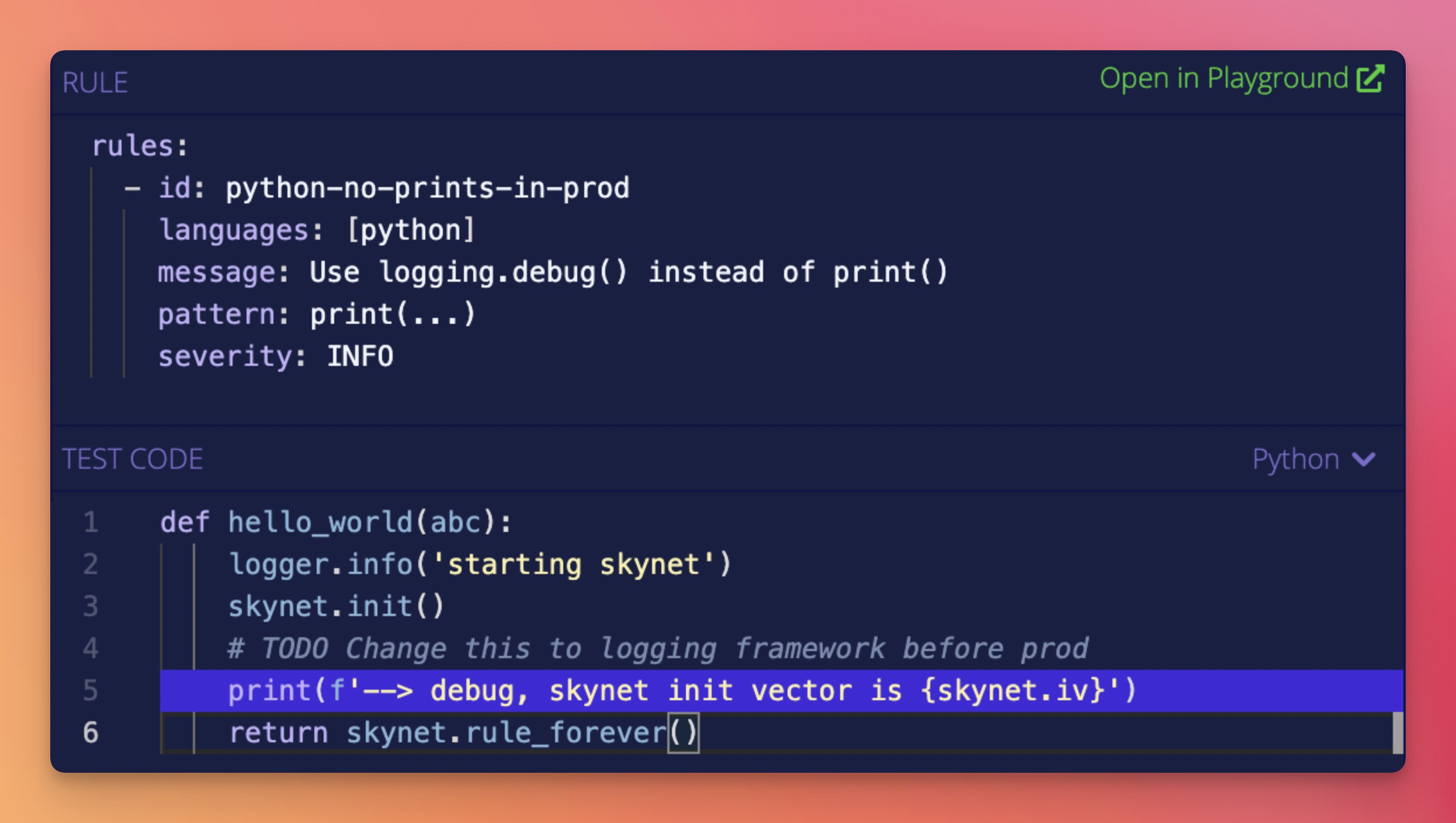
Semgrep rules look like the code you already write; no abstract syntax trees, regex wrestling, or painful DSLs. Here's a quick rule for finding Python print() statements.
Run it online in Semgrep’s Playground by clicking here.
Examples
Visit Docs > Rule examples for use cases and ideas.
| Use case | Semgrep rule |
|---|---|
| Ban dangerous APIs | Prevent use of exec |
| Search routes and authentication | Extract Spring routes |
| Enforce the use secure defaults | Securely set Flask cookies |
| Tainted data flowing into sinks | ExpressJS dataflow into sandbox.run |
| Enforce project best-practices | Use assertEqual for == checks, Always check subprocess calls |
| Codify project-specific knowledge | Verify transactions before making them |
| Audit security hotspots | Finding XSS in Apache Airflow, Hardcoded credentials |
| Audit configuration files | Find S3 ARN uses |
| Migrate from deprecated APIs | DES is deprecated, Deprecated Flask APIs, Deprecated Bokeh APIs |
| Apply automatic fixes | Use listenAndServeTLS |
Extensions
Visit Docs > Extensions to learn about using Semgrep in your editor or pre-commit. When integrated into CI and configured to scan pull requests, Semgrep will only report issues introduced by that pull request; this lets you start using Semgrep without fixing or ignoring pre-existing issues!
Documentation
Browse the full Semgrep documentation on the website. If you’re new to Semgrep, check out Docs > Getting started or the interactive tutorial.
Metrics
Using remote configuration from the Registry (like --config=p/ci) reports pseudonymous rule metrics to semgrep.dev.
When using configs from local files (like --config=xyz.yml), metrics are sent only when the user is logged in.
To disable Registry rule metrics, use --metrics=off.
The Semgrep privacy policy describes the principles that guide data-collection decisions and the breakdown of the data that are and are not collected when the metrics are enabled.
More
- Frequently asked questions (FAQs)
- Contributing
- Build instructions for developers
- Ask questions in the Semgrep community Slack
- CLI reference and exit codes
- Semgrep YouTube channel
- License (LGPL-2.1)
- Licensing Semgrep
Upgrading
To upgrade, run the command below associated with how you installed Semgrep:
# Using Homebrew
$ brew upgrade semgrep

# Using pipx
$ pipx upgrade semgrep

# Using uv tool command
$ uv tool upgrade semgrep

# Using Docker
$ docker pull semgrep/semgrep:latest
Release history Release notifications | RSS feed


Download files
Download the file for your platform. If you're not sure which to choose, learn more about installing packages.
Source Distribution
Built Distributions
Filter files by name, interpreter, ABI, and platform.
If you're not sure about the file name format, learn more about wheel file names.
Copy a direct link to the current filters
File details
Details for the file semgrep-1.167.0.tar.gz.
File metadata
- Download URL: semgrep-1.167.0.tar.gz
- Upload date:
- Size: 56.1 MB
- Tags: Source
- Uploaded using Trusted Publishing? Yes
- Uploaded via: twine/6.1.0 CPython/3.13.7
File hashes
| Algorithm | Hash digest | |
|---|---|---|
| SHA256 |
7ee779321c3a8580ba1192d4933422ae29f8802ca38edcbfa942ce0a97592ac1
|
|
| MD5 |
b4f0a8e60fda88bbbba712bcb44ad16b
|
|
| BLAKE2b-256 |
33cb5c694b392583aa73727272ae48aecf28703ba98d4aa1dd96f7bf2ac2b0d6
|
Provenance
The following attestation bundles were made for semgrep-1.167.0.tar.gz:
Publisher:
pro-release.yml on semgrep/semgrep-proprietary
-
Statement:
-
Statement type:
https://in-toto.io/Statement/v1 -
Predicate type:
https://docs.pypi.org/attestations/publish/v1 -
Subject name:
semgrep-1.167.0.tar.gz -
Subject digest:
7ee779321c3a8580ba1192d4933422ae29f8802ca38edcbfa942ce0a97592ac1 - Sigstore transparency entry: 1853790468
- Sigstore integration time:
-
Permalink:
semgrep/semgrep-proprietary@4bcd76f568deb6c0c03ecc3154dfc6324f3bcf0b -
Branch / Tag:
refs/heads/yosef/release-from-select-commit - Owner: https://github.com/semgrep
-
Access:
private
-
Token Issuer:
https://token.actions.githubusercontent.com -
Runner Environment:
github-hosted -
Publication workflow:
pro-release.yml@4bcd76f568deb6c0c03ecc3154dfc6324f3bcf0b -
Trigger Event:
workflow_dispatch
-
Statement type:
File details
Details for the file semgrep-1.167.0-cp310.cp311.cp312.cp313.cp314.py310.py311.py312.py313.py314-none-win_amd64.whl.
File metadata
- Download URL: semgrep-1.167.0-cp310.cp311.cp312.cp313.cp314.py310.py311.py312.py313.py314-none-win_amd64.whl
- Upload date:
- Size: 57.1 MB
- Tags: CPython 3.10, CPython 3.11, CPython 3.12, CPython 3.13, CPython 3.14, Python 3.10, Python 3.11, Python 3.12, Python 3.13, Python 3.14, Windows x86-64
- Uploaded using Trusted Publishing? Yes
- Uploaded via: twine/6.1.0 CPython/3.13.7
File hashes
| Algorithm | Hash digest | |
|---|---|---|
| SHA256 |
b01823d9b540cccb92e09a404ee796f5fe2a28c132170967386909e3b77f5b8e
|
|
| MD5 |
142d16e0376cd54871ef1d2f26d33431
|
|
| BLAKE2b-256 |
387e203e7dbea7c1f534eedce440216c7c77151a1dab96c4b02b16edff5b3337
|
Provenance
The following attestation bundles were made for semgrep-1.167.0-cp310.cp311.cp312.cp313.cp314.py310.py311.py312.py313.py314-none-win_amd64.whl:
Publisher:
pro-release.yml on semgrep/semgrep-proprietary
-
Statement:
-
Statement type:
https://in-toto.io/Statement/v1 -
Predicate type:
https://docs.pypi.org/attestations/publish/v1 -
Subject name:
semgrep-1.167.0-cp310.cp311.cp312.cp313.cp314.py310.py311.py312.py313.py314-none-win_amd64.whl -
Subject digest:
b01823d9b540cccb92e09a404ee796f5fe2a28c132170967386909e3b77f5b8e - Sigstore transparency entry: 1853790641
- Sigstore integration time:
-
Permalink:
semgrep/semgrep-proprietary@4bcd76f568deb6c0c03ecc3154dfc6324f3bcf0b -
Branch / Tag:
refs/heads/yosef/release-from-select-commit - Owner: https://github.com/semgrep
-
Access:
private
-
Token Issuer:
https://token.actions.githubusercontent.com -
Runner Environment:
github-hosted -
Publication workflow:
pro-release.yml@4bcd76f568deb6c0c03ecc3154dfc6324f3bcf0b -
Trigger Event:
workflow_dispatch
-
Statement type:
File details
Details for the file semgrep-1.167.0-cp310.cp311.cp312.cp313.cp314.py310.py311.py312.py313.py314-none-musllinux_1_2_x86_64.whl.
File metadata
- Download URL: semgrep-1.167.0-cp310.cp311.cp312.cp313.cp314.py310.py311.py312.py313.py314-none-musllinux_1_2_x86_64.whl
- Upload date:
- Size: 76.6 MB
- Tags: CPython 3.10, CPython 3.11, CPython 3.12, CPython 3.13, CPython 3.14, Python 3.10, Python 3.11, Python 3.12, Python 3.13, Python 3.14, musllinux: musl 1.2+ x86-64
- Uploaded using Trusted Publishing? Yes
- Uploaded via: twine/6.1.0 CPython/3.13.7
File hashes
| Algorithm | Hash digest | |
|---|---|---|
| SHA256 |
912be28e47409bb1c53d1a4512f2a39ac9e693c7895cb94d8c181702c8bed837
|
|
| MD5 |
002e58db540e55f5d8300532507bc957
|
|
| BLAKE2b-256 |
99c7d3affb19e16180b034363539f06a274b94df58b10940c6c0c97bc8b90eeb
|
Provenance
The following attestation bundles were made for semgrep-1.167.0-cp310.cp311.cp312.cp313.cp314.py310.py311.py312.py313.py314-none-musllinux_1_2_x86_64.whl:
Publisher:
pro-release.yml on semgrep/semgrep-proprietary
-
Statement:
-
Statement type:
https://in-toto.io/Statement/v1 -
Predicate type:
https://docs.pypi.org/attestations/publish/v1 -
Subject name:
semgrep-1.167.0-cp310.cp311.cp312.cp313.cp314.py310.py311.py312.py313.py314-none-musllinux_1_2_x86_64.whl -
Subject digest:
912be28e47409bb1c53d1a4512f2a39ac9e693c7895cb94d8c181702c8bed837 - Sigstore transparency entry: 1853790820
- Sigstore integration time:
-
Permalink:
semgrep/semgrep-proprietary@4bcd76f568deb6c0c03ecc3154dfc6324f3bcf0b -
Branch / Tag:
refs/heads/yosef/release-from-select-commit - Owner: https://github.com/semgrep
-
Access:
private
-
Token Issuer:
https://token.actions.githubusercontent.com -
Runner Environment:
github-hosted -
Publication workflow:
pro-release.yml@4bcd76f568deb6c0c03ecc3154dfc6324f3bcf0b -
Trigger Event:
workflow_dispatch
-
Statement type:
File details
Details for the file semgrep-1.167.0-cp310.cp311.cp312.cp313.cp314.py310.py311.py312.py313.py314-none-musllinux_1_2_aarch64.whl.
File metadata
- Download URL: semgrep-1.167.0-cp310.cp311.cp312.cp313.cp314.py310.py311.py312.py313.py314-none-musllinux_1_2_aarch64.whl
- Upload date:
- Size: 79.1 MB
- Tags: CPython 3.10, CPython 3.11, CPython 3.12, CPython 3.13, CPython 3.14, Python 3.10, Python 3.11, Python 3.12, Python 3.13, Python 3.14, musllinux: musl 1.2+ ARM64
- Uploaded using Trusted Publishing? Yes
- Uploaded via: twine/6.1.0 CPython/3.13.7
File hashes
| Algorithm | Hash digest | |
|---|---|---|
| SHA256 |
e7d82cc6b5eb8bd699b2a329e6c11de7ba039643c69c1b61150cda1298585aee
|
|
| MD5 |
7f8b9d721a22bfc99136bbfd333e5900
|
|
| BLAKE2b-256 |
6cbd95b42a821ff4eb15887716591cd472afb7e3003761d3b43ad6a8e833fd6d
|
Provenance
The following attestation bundles were made for semgrep-1.167.0-cp310.cp311.cp312.cp313.cp314.py310.py311.py312.py313.py314-none-musllinux_1_2_aarch64.whl:
Publisher:
pro-release.yml on semgrep/semgrep-proprietary
-
Statement:
-
Statement type:
https://in-toto.io/Statement/v1 -
Predicate type:
https://docs.pypi.org/attestations/publish/v1 -
Subject name:
semgrep-1.167.0-cp310.cp311.cp312.cp313.cp314.py310.py311.py312.py313.py314-none-musllinux_1_2_aarch64.whl -
Subject digest:
e7d82cc6b5eb8bd699b2a329e6c11de7ba039643c69c1b61150cda1298585aee - Sigstore transparency entry: 1853790939
- Sigstore integration time:
-
Permalink:
semgrep/semgrep-proprietary@4bcd76f568deb6c0c03ecc3154dfc6324f3bcf0b -
Branch / Tag:
refs/heads/yosef/release-from-select-commit - Owner: https://github.com/semgrep
-
Access:
private
-
Token Issuer:
https://token.actions.githubusercontent.com -
Runner Environment:
github-hosted -
Publication workflow:
pro-release.yml@4bcd76f568deb6c0c03ecc3154dfc6324f3bcf0b -
Trigger Event:
workflow_dispatch
-
Statement type:
File details
Details for the file semgrep-1.167.0-cp310.cp311.cp312.cp313.cp314.py310.py311.py312.py313.py314-none-manylinux_2_34_x86_64.whl.
File metadata
- Download URL: semgrep-1.167.0-cp310.cp311.cp312.cp313.cp314.py310.py311.py312.py313.py314-none-manylinux_2_34_x86_64.whl
- Upload date:
- Size: 69.0 MB
- Tags: CPython 3.10, CPython 3.11, CPython 3.12, CPython 3.13, CPython 3.14, Python 3.10, Python 3.11, Python 3.12, Python 3.13, Python 3.14, manylinux: glibc 2.34+ x86-64
- Uploaded using Trusted Publishing? Yes
- Uploaded via: twine/6.1.0 CPython/3.13.7
File hashes
| Algorithm | Hash digest | |
|---|---|---|
| SHA256 |
687f08c3c3951bcc6f67d63cc0019c40401c900ecc26a6e56382b6cc02f4f50f
|
|
| MD5 |
817c24c4111f1564e6e65b79cca89d6a
|
|
| BLAKE2b-256 |
c10af287be6aff5a2d10528df9e985f8a630fc552960b4e966a21e3edb7d705c
|
Provenance
The following attestation bundles were made for semgrep-1.167.0-cp310.cp311.cp312.cp313.cp314.py310.py311.py312.py313.py314-none-manylinux_2_34_x86_64.whl:
Publisher:
pro-release.yml on semgrep/semgrep-proprietary
-
Statement:
-
Statement type:
https://in-toto.io/Statement/v1 -
Predicate type:
https://docs.pypi.org/attestations/publish/v1 -
Subject name:
semgrep-1.167.0-cp310.cp311.cp312.cp313.cp314.py310.py311.py312.py313.py314-none-manylinux_2_34_x86_64.whl -
Subject digest:
687f08c3c3951bcc6f67d63cc0019c40401c900ecc26a6e56382b6cc02f4f50f - Sigstore transparency entry: 1853791026
- Sigstore integration time:
-
Permalink:
semgrep/semgrep-proprietary@4bcd76f568deb6c0c03ecc3154dfc6324f3bcf0b -
Branch / Tag:
refs/heads/yosef/release-from-select-commit - Owner: https://github.com/semgrep
-
Access:
private
-
Token Issuer:
https://token.actions.githubusercontent.com -
Runner Environment:
github-hosted -
Publication workflow:
pro-release.yml@4bcd76f568deb6c0c03ecc3154dfc6324f3bcf0b -
Trigger Event:
workflow_dispatch
-
Statement type:
File details
Details for the file semgrep-1.167.0-cp310.cp311.cp312.cp313.cp314.py310.py311.py312.py313.py314-none-manylinux_2_34_aarch64.whl.
File metadata
- Download URL: semgrep-1.167.0-cp310.cp311.cp312.cp313.cp314.py310.py311.py312.py313.py314-none-manylinux_2_34_aarch64.whl
- Upload date:
- Size: 71.1 MB
- Tags: CPython 3.10, CPython 3.11, CPython 3.12, CPython 3.13, CPython 3.14, Python 3.10, Python 3.11, Python 3.12, Python 3.13, Python 3.14, manylinux: glibc 2.34+ ARM64
- Uploaded using Trusted Publishing? Yes
- Uploaded via: twine/6.1.0 CPython/3.13.7
File hashes
| Algorithm | Hash digest | |
|---|---|---|
| SHA256 |
a4912d2af1371ad96524163ec10842227fcc79dd14fd8b6a706d598bf380fcbc
|
|
| MD5 |
d614b2b65b90326f5a4372ebb3f6c121
|
|
| BLAKE2b-256 |
08dee72a0e28174cb34a4fbe0d9d5bab805d16683dae6c3eb71bdf06f3f0f15a
|
Provenance
The following attestation bundles were made for semgrep-1.167.0-cp310.cp311.cp312.cp313.cp314.py310.py311.py312.py313.py314-none-manylinux_2_34_aarch64.whl:
Publisher:
pro-release.yml on semgrep/semgrep-proprietary
-
Statement:
-
Statement type:
https://in-toto.io/Statement/v1 -
Predicate type:
https://docs.pypi.org/attestations/publish/v1 -
Subject name:
semgrep-1.167.0-cp310.cp311.cp312.cp313.cp314.py310.py311.py312.py313.py314-none-manylinux_2_34_aarch64.whl -
Subject digest:
a4912d2af1371ad96524163ec10842227fcc79dd14fd8b6a706d598bf380fcbc - Sigstore transparency entry: 1853791218
- Sigstore integration time:
-
Permalink:
semgrep/semgrep-proprietary@4bcd76f568deb6c0c03ecc3154dfc6324f3bcf0b -
Branch / Tag:
refs/heads/yosef/release-from-select-commit - Owner: https://github.com/semgrep
-
Access:
private
-
Token Issuer:
https://token.actions.githubusercontent.com -
Runner Environment:
github-hosted -
Publication workflow:
pro-release.yml@4bcd76f568deb6c0c03ecc3154dfc6324f3bcf0b -
Trigger Event:
workflow_dispatch
-
Statement type:
File details
Details for the file semgrep-1.167.0-cp310.cp311.cp312.cp313.cp314.py310.py311.py312.py313.py314-none-macosx_11_0_arm64.whl.
File metadata
- Download URL: semgrep-1.167.0-cp310.cp311.cp312.cp313.cp314.py310.py311.py312.py313.py314-none-macosx_11_0_arm64.whl
- Upload date:
- Size: 49.1 MB
- Tags: CPython 3.10, CPython 3.11, CPython 3.12, CPython 3.13, CPython 3.14, Python 3.10, Python 3.11, Python 3.12, Python 3.13, Python 3.14, macOS 11.0+ ARM64
- Uploaded using Trusted Publishing? Yes
- Uploaded via: twine/6.1.0 CPython/3.13.7
File hashes
| Algorithm | Hash digest | |
|---|---|---|
| SHA256 |
ca5ba16bd2bf7a3e305a32ad292f66246947d31c41603b580453acd7ab859827
|
|
| MD5 |
9d1dc9a6fc682b3e0a464aa3d6b38681
|
|
| BLAKE2b-256 |
080bac9ff80fa5919f5048fb0005ff7c578f6d0543ee5080cdab564a625d919d
|
Provenance
The following attestation bundles were made for semgrep-1.167.0-cp310.cp311.cp312.cp313.cp314.py310.py311.py312.py313.py314-none-macosx_11_0_arm64.whl:
Publisher:
pro-release.yml on semgrep/semgrep-proprietary
-
Statement:
-
Statement type:
https://in-toto.io/Statement/v1 -
Predicate type:
https://docs.pypi.org/attestations/publish/v1 -
Subject name:
semgrep-1.167.0-cp310.cp311.cp312.cp313.cp314.py310.py311.py312.py313.py314-none-macosx_11_0_arm64.whl -
Subject digest:
ca5ba16bd2bf7a3e305a32ad292f66246947d31c41603b580453acd7ab859827 - Sigstore transparency entry: 1853791130
- Sigstore integration time:
-
Permalink:
semgrep/semgrep-proprietary@4bcd76f568deb6c0c03ecc3154dfc6324f3bcf0b -
Branch / Tag:
refs/heads/yosef/release-from-select-commit - Owner: https://github.com/semgrep
-
Access:
private
-
Token Issuer:
https://token.actions.githubusercontent.com -
Runner Environment:
github-hosted -
Publication workflow:
pro-release.yml@4bcd76f568deb6c0c03ecc3154dfc6324f3bcf0b -
Trigger Event:
workflow_dispatch
-
Statement type:
File details
Details for the file semgrep-1.167.0-cp310.cp311.cp312.cp313.cp314.py310.py311.py312.py313.py314-none-macosx_10_14_x86_64.whl.
File metadata
- Download URL: semgrep-1.167.0-cp310.cp311.cp312.cp313.cp314.py310.py311.py312.py313.py314-none-macosx_10_14_x86_64.whl
- Upload date:
- Size: 45.2 MB
- Tags: CPython 3.10, CPython 3.11, CPython 3.12, CPython 3.13, CPython 3.14, Python 3.10, Python 3.11, Python 3.12, Python 3.13, Python 3.14, macOS 10.14+ x86-64
- Uploaded using Trusted Publishing? Yes
- Uploaded via: twine/6.1.0 CPython/3.13.7
File hashes
| Algorithm | Hash digest | |
|---|---|---|
| SHA256 |
7d8b222f13a947c164e6b89e64258474c0fd59c08bfd1071ed7b3216afcd8cf6
|
|
| MD5 |
b1e38f7374c2ec2a02ae0f1c18063cd2
|
|
| BLAKE2b-256 |
d7f893423330211b987ad6ce17d9fb54cb3772a02c28fb2bb9e302f7be5164b1
|
Provenance
The following attestation bundles were made for semgrep-1.167.0-cp310.cp311.cp312.cp313.cp314.py310.py311.py312.py313.py314-none-macosx_10_14_x86_64.whl:
Publisher:
pro-release.yml on semgrep/semgrep-proprietary
-
Statement:
-
Statement type:
https://in-toto.io/Statement/v1 -
Predicate type:
https://docs.pypi.org/attestations/publish/v1 -
Subject name:
semgrep-1.167.0-cp310.cp311.cp312.cp313.cp314.py310.py311.py312.py313.py314-none-macosx_10_14_x86_64.whl -
Subject digest:
7d8b222f13a947c164e6b89e64258474c0fd59c08bfd1071ed7b3216afcd8cf6 - Sigstore transparency entry: 1853790734
- Sigstore integration time:
-
Permalink:
semgrep/semgrep-proprietary@4bcd76f568deb6c0c03ecc3154dfc6324f3bcf0b -
Branch / Tag:
refs/heads/yosef/release-from-select-commit - Owner: https://github.com/semgrep
-
Access:
private
-
Token Issuer:
https://token.actions.githubusercontent.com -
Runner Environment:
github-hosted -
Publication workflow:
pro-release.yml@4bcd76f568deb6c0c03ecc3154dfc6324f3bcf0b -
Trigger Event:
workflow_dispatch
-
Statement type:






