
semsplit
English | 한국어
Semantic chunking for RAG: a drop-in successor of SemanticChunker from the archived langchain-experimental. With the default arguments it returns the same chunks, and a parity command lets you check that claim against the original or against recorded output. It depends only on langchain-core and numpy, and adds opt-in options: a hard maximum chunk size, exact source slices with a correct start_index, CJK sentence splitting and embedding batches.
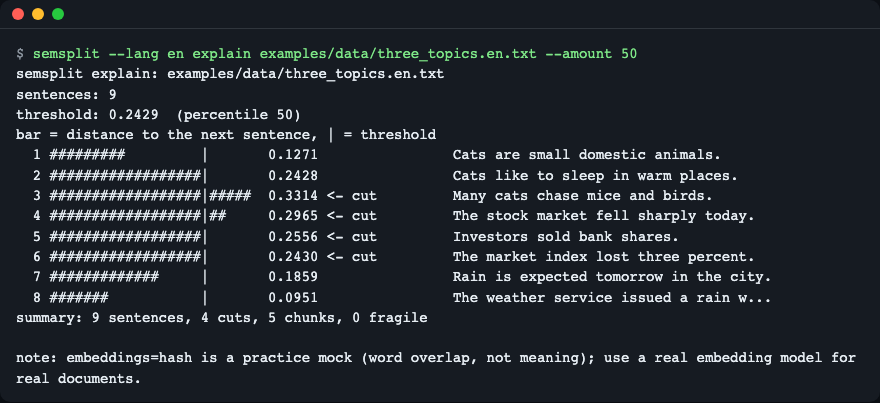
semsplit explain shows the distance to the next sentence as a bar, the threshold as |, and every cut.
Install
pip install semsplit
# or with uv
uv add semsplit
# or straight from GitHub
uv add git+https://github.com/LeeGyeongPil/semsplit
Python 3.10 or newer. Runtime dependencies: langchain-core (1.x) and numpy. Nothing else is imported, so the code does not pull in langchain_community or langchain_experimental.
If you do not have uv: curl -LsSf https://astral.sh/uv/install.sh | sh (docs). The parity check against the original needs an extra: pip install "semsplit[legacy]".
Quick start
Moving off langchain-experimental is one changed line:
- from langchain_experimental.text_splitter import SemanticChunker
+ from semsplit import SemanticChunker
A runnable example (HashEmbeddings is an offline practice mock, see below). The sample file ships with the repository, so run it from a clone of this repository (git clone https://github.com/LeeGyeongPil/semsplit); with a pip install, read your own text file instead:
from semsplit import HashEmbeddings, SemanticChunker

text = open("examples/data/three_topics.en.txt", encoding="utf-8").read()
chunker = SemanticChunker(HashEmbeddings(), breakpoint_threshold_amount=50)
for i, chunk in enumerate(chunker.split_text(text), start=1):
    print(i, chunk[:50])
1 Cats are small domestic animals. Cats like to slee
2 The stock market fell sharply today.
3 Investors sold bank shares.
4 The market index lost three percent.
5 Rain is expected tomorrow in the city. The weather
This is the practice mock mode: HashEmbeddings only looks at word overlap, not meaning, so it needs no key and no network. For real documents pass any LangChain Embeddings object (OpenAI, Ollama, HuggingFace and so on). The CLI can also use a local Ollama model with --embeddings ollama:<model> (reads OLLAMA_HOST, default http://localhost:11434); that path is only tested against a local fake server, and a real model can be slower.
Core concepts
- Distance between sentences. The text is split into sentences, each one is embedded (with
buffer_sizeneighbours on each side), and the cosine distance to the next sentence is computed. - Threshold. A cut goes where the distance is above a threshold chosen by
breakpoint_threshold_type(percentile,standard_deviation,interquartile,gradient) andbreakpoint_threshold_amount. - Fragile cut. A distance that is almost equal to the threshold. A tiny numeric difference could flip it, so
semsplitreports these (--epssets "almost"). - Parity. The old and the new code are fed the same vectors, so any difference comes from the splitting code and not from a changing embedding backend.
flowchart LR
  A[text] --> B[sentences]
  B --> C[embed with neighbours]
  C --> D[distance to next sentence]
  D --> E{above threshold?}
  E -- yes --> F[cut]
  E -- no --> G[keep together]
  F --> H[chunks]
  G --> H
Each box is one step of split_text: split, embed, measure, compare with the threshold, then join what was not cut.
Usage
Command line
uv run semsplit --lang en explain examples/data/three_topics.en.txt --amount 50
note: embeddings=hash is a practice mock (word overlap, not meaning); use a real embedding model for real documents.
semsplit explain: examples/data/three_topics.en.txt
sentences: 9
threshold: 0.2429  (percentile 50)
bar = distance to the next sentence, | = threshold
  1 #########         |       0.1271                Cats are small domestic animals.
  2 ##################|       0.2428                Cats like to sleep in warm places.
  3 ##################|#####  0.3314 <- cut         Many cats chase mice and birds.
  4 ##################|##     0.2965 <- cut         The stock market fell sharply today.
  5 ##################|       0.2556 <- cut         Investors sold bank shares.
  6 ##################|       0.2430 <- cut         The market index lost three percent.
  7 #############     |       0.1859                Rain is expected tomorrow in the city.
  8 #######           |       0.0951                The weather service issued a rain w...
summary: 9 sentences, 4 cuts, 5 chunks, 0 fragile
Sentence 2 has distance 0.2428 against a threshold of 0.2429: that is the kind of value to watch when you tune a threshold. The number of chunks is always cuts + 1.
semsplit split FILE prints one JSON object per chunk (source, chunk, start_index, text), for example:
uv run semsplit --lang en split examples/data/ja.txt --sentence-split cjk --amount 50
note: embeddings=hash is a practice mock (word overlap, not meaning); use a real embedding model for real documents.
{"source": "examples/data/ja.txt", "chunk": 0, "start_index": 0, "text": "猫は小さな動物です。猫は暖かい場所で寝ます。"}
{"source": "examples/data/ja.txt", "chunk": 1, "start_index": 22, "text": "今日、株式市場が下落しました。投資家は銀行株を売りました。"}
By default start_index reproduces the original's value (the sum of the previous chunks' lengths), which can be a character or two off the real position. Pass --text-mode original to get exact offsets into the file. An empty or whitespace-only file prints a one-line note on stderr and no chunks.
Screen language: --lang en|ko, then SEMSPLIT_LANG, then LC_ALL, LC_MESSAGES, LANG (anything that is not Korean falls back to English).
Check that you get the same chunks (parity)
uv run semsplit --lang en parity --golden tests/golden/semantic_chunker_0.4.2.json
note: embeddings=hash is a practice mock (word overlap, not meaning); use a real embedding model for real documents.
semsplit parity: against golden:tests/golden/semantic_chunker_0.4.2.json, embeddings hash (mock)
document               config                                       result    chunks fragile
en-percentile          type=percentile                              equal          2       0
en-standard_deviation  type=standard_deviation                      equal          1       0
...
long-document-min-size amount=80,min_chunk_size=300                 equal          4       0
all 29 cases are identical (8 fragile cut(s) reported)
The 29 cases (English, Korean, Japanese; four threshold types; edge cases such as an empty string and a trailing space) were recorded from langchain-experimental 0.4.2 and are checked byte for byte. To compare live with the original on your own files, install the extra:
uv run --extra legacy semsplit --lang en parity examples/data/three_topics.en.txt examples/data/ko.txt --against legacy --embeddings hash --amount 50
note: embeddings=hash is a practice mock (word overlap, not meaning); use a real embedding model for real documents.
semsplit parity: against legacy, embeddings hash (mock)
document               config                                       result    chunks fragile
three_topics.en.txt    amount=50.0                                  equal          5       0
ko.txt                 amount=50.0                                  equal          3       1
all 2 cases are identical (1 fragile cut(s) reported)
Exit codes: 0 ok or identical, 1 mismatch (the differing boundary positions are printed), 2 usage or config error (for example a bad --threshold), 3 the legacy extra is not installed, 4 embedding backend not reachable. Add --json for a machine-readable report and --record FILE to write your own golden file.
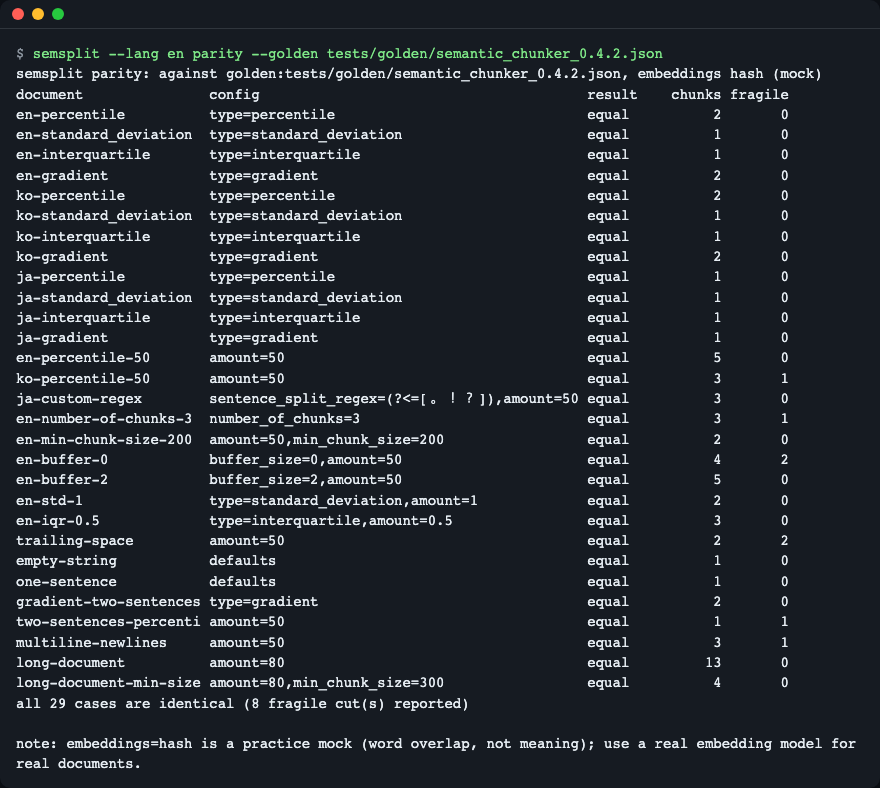
All recorded cases match.
Opt-in options
Defaults reproduce the original, including its quirks. Each option below changes output only when you turn it on (examples/options.py):
from semsplit import HashEmbeddings, SemanticChunker, analyze

# 1. Hard size limit: every chunk is at most 60 characters (no extra embedding calls).
sized = SemanticChunker(HashEmbeddings(), breakpoint_threshold_amount=50, max_chunk_size=60)

# 2. Japanese has no spaces between sentences: sentence_split="cjk" splits at 。!?
cjk = SemanticChunker(HashEmbeddings(), breakpoint_threshold_amount=50, sentence_split="cjk")

# 3. Look inside: distances, threshold and the fragile cuts.
info = analyze(text, HashEmbeddings(), breakpoint_threshold_amount=50)
uv run python examples/options.py
max_chunk_size=60 -> [32, 34, 31, 36, 27, 36, 38, 42, 31]
japanese, default -> 1 chunk(s)
japanese, cjk     -> 2 chunk(s)
threshold=0.2429 cuts=4 fragile=0

Size limit, CJK splitting and analyze on the sample files.
Exact source slices and start_index (examples/quickstart.py):
uv run python examples/quickstart.py
chunks: 5
  1. Cats are small domestic animals. Cats like to sleep in warm places. Many cats chase mice and birds.
  2. The stock market fell sharply today.
  3. Investors sold bank shares.
  4. The market index lost three percent.
  5. Rain is expected tomorrow in the city. The weather service issued a rain warning. Bring an umbrella for the rain.
  start_index=0   len=99  Cats are small domestic animals. Cats li...
  start_index=100 len=36  The stock market fell sharply today....
  start_index=137 len=27  Investors sold bank shares....
  start_index=165 len=36  The market index lost three percent....
  start_index=202 len=113 Rain is expected tomorrow in the city. T...
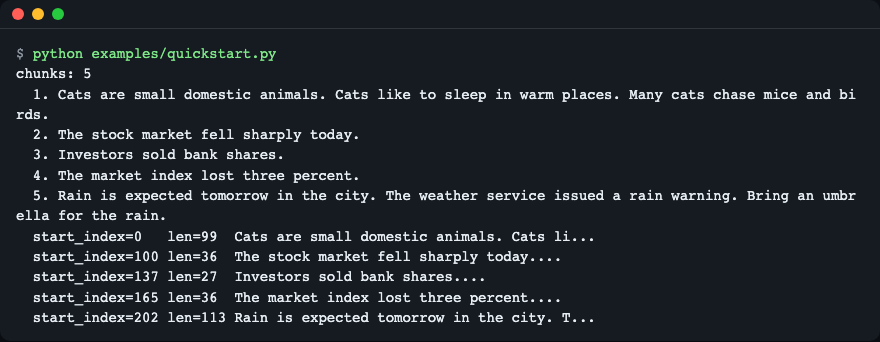
Five chunks, then the same text with text_mode="original" and max_chunk_size=120; the script asserts text[start:start+len] == chunk.
API
| Name | What it does | Main arguments | Returns |
|---|---|---|---|
SemanticChunker |
Splits text at large embedding distances; a LangChain BaseDocumentTransformer |
embeddings, buffer_size=1, add_start_index=False, breakpoint_threshold_type="percentile", breakpoint_threshold_amount, number_of_chunks, sentence_split_regex, min_chunk_size; keyword-only: max_chunk_size, length_function=len, text_mode, sentence_split="default", embed_batch_size |
instance |
.split_text(text) |
Chunks as strings | text: str |
list[str] |
.create_documents(texts, metadatas=None) |
Chunks as Documents (start_index if enabled) |
texts: list[str] |
list[Document] |
.split_documents(docs) / .transform_documents(docs) |
Same, for Documents |
docs |
list[Document] / Sequence[Document] |
.analyze(text, eps=1e-9) |
Distances and cuts without assembling chunks | text, eps |
Analysis |
analyze(text, embeddings, *, eps=1e-9, **options) |
Same as above in one call | chunker options | Analysis (sentences, distances, threshold, breakpoints, fragile, chunk_count) |
check_parity(texts, embeddings=None, configs=None, *, against="legacy", eps=1e-9) |
Compare with the original (needs the legacy extra) or with a golden file path |
see left | ParityReport (all_equal, to_dict()) |
record_golden(texts, path, embeddings=None, configs=None, *, embeddings_name="hash", source="legacy") |
Write a golden file | see left | dict |
HashEmbeddings(dim=256) |
Offline practice mock (word overlap, not meaning) | dim |
Embeddings |
ReplayEmbeddings(inner) |
Embeds each distinct text once and replays it | inner |
Embeddings |
OllamaEmbeddings(model, host, timeout) |
Optional local Ollama backend | model, host="http://localhost:11434" |
Embeddings |
BreakpointThresholdType |
Type of the four threshold names | Literal |
Errors, all subclasses of SemsplitError: InvalidConfigError (bad argument), LegacyNotInstalledError (parity without the extra), EmbeddingBackendError (backend unreachable).
Options in short:
text_mode:"legacy"joins sentences with one space (old behaviour, the default for the default splitter)."original"returns exact slices of the source, keeps newlines, never returns empty chunks and appliesmin_chunk_sizeto the last chunk too.None(default) picks"original"whensentence_splitis not"default".max_chunk_sizeis measured bylength_function(defaultlen; a word counter works too). Over-long chunks are re-cut at the largest distance inside them, and a single sentence longer than the limit is cut as well.sentence_split:"default","cjk", or a callabletext -> [(start, end), ...].embed_batch_size: callembed_documentswith at most this many texts at a time.
When to use it
- Use it when you already depend on
SemanticChunkerfromlangchain-experimentaland want the same chunks without that package, or when you need a size limit, exact offsets or Japanese and Chinese sentence splitting. - Other tools: for fixed-size or structure-aware splitting, see langchain-text-splitters. For the original implementation, see langchain-experimental (archived).
- Scope:
semsplitsplits one text at a time; it does not store vectors or retrieve anything.
Compared with Chonkie and LlamaIndex
Facts checked on 2026-11-19 from the projects' own pages: Chonkie docs, LlamaIndex node parsers, semchunk, semantic-text-splitter.
- Chonkie
SemanticChunkeruses a fixed similarity threshold with Savitzky-Golay smoothing, a token-basedchunk_sizeand its own chunk and embedding interfaces. Pick it if you already use Chonkie or want token-sized chunks out of the box. Its algorithm differs from the LangChain one, so it cannot reproduce oldSemanticChunkeroutput;semsplitexists for that case. - LlamaIndex
SemanticSplitterNodeParseruses the same percentile idea but returns LlamaIndexNodes, has no maximum size and documents its sentence regex as mostly for English. Pick it inside a LlamaIndex pipeline. - semchunk and semantic-text-splitter are named "semantic" but split by structure (paragraphs, sentences) within a token limit and do not use embeddings. They are a better fit when you only need a size limit and no meaning-based cuts.
Limitations
HashEmbeddingscounts word overlap, not meaning. It is for practice and tests only.- The Ollama path (
--embeddings ollama:<model>) was tested only against a local fake server; no real model was evaluated. SemanticChunkeris a LangChainBaseDocumentTransformer, not aTextSplittersubclass, so it has nochunk_sizeargument orTextSplitterhelpers.- There is no native async:
atransform_documentsruns the sync path in an executor. Real async embedding is not implemented yet. text_mode="original"ignores a subclass override of_get_single_sentences_list, because it needs character offsets.- When
number_of_chunksequals the number of distances, the original's behaviour is kept: one cut fewer than asked. - When distances rise monotonically toward one end, the
max_chunk_sizere-split can still be slow. - Argparse's built-in messages follow the Python locale, not
--lang. - Output of the original package can differ near the threshold. The original computes cosine similarity through
langchain_community, which takes a float32simsimdpath whensimsimdis installed;semsplitalways uses float64numpy. A cut whose distance is within--epsof the threshold (thefragilecolumn) could flip. Check on your own files withsemsplit parity --against legacyand watch that column.
Troubleshooting
parity --against legacyexits with 3. The original package is not installed. Run it withuv run --extra legacy ...orpip install "semsplit[legacy]".- A threshold seems to be ignored.
number_of_chunksoverrides the threshold type. When it equals the number of distances, the original's behaviour is kept: one cut fewer than asked. - Everything ends up in one chunk. The short sample documents have few sentences, so a percentile of 95 (the default) cuts almost nothing. Try
--amount 50and look atexplain. - Argparse messages are not translated. Its own built-in messages follow the Python locale, not
--lang.
Versions and compatibility
- Semantic Versioning. While the version is 0.x, a minor release may change the API; changes are listed in CHANGELOG.md.
- Compatible with
langchain-experimental0.4.2 default output (29 recorded cases) andlangchain-core1.x. - The algorithm comes from Greg Kamradt's "5 Levels Of Text Splitting" notebook; see NOTICE. "LangChain" is a trademark of its owners; this project is not affiliated with them.
Development
uv sync
uv run pytest -q
Tests run offline. uv run --extra legacy pytest -q -m legacy runs the live comparison with the original.
License
MIT, see LICENSE. Credits: the algorithm comes from Greg Kamradt's "5 Levels Of Text Splitting" notebook and the original SemanticChunker in langchain-experimental (MIT); see NOTICE.
1 maintainer

Metadata
1 maintainer
Release files for semsplit 0.1.0
For a detailed explanation of source distributions (sdists) and built distributions (wheels), please see the package formats documentation.
Source distribution (sdist)
| File | Size | Uploaded | Provenance | Actions |
|---|---|---|---|---|
| semsplit-0.1.0.tar.gz | 55.8 kB | Without provenance | Details for semsplit-0.1.0.tar.gz |
Built distribution (wheel)
| File | Interpreter | ABI | Platform | Actions Reset |
|---|---|---|---|---|
| semsplit-0.1.0-py3-none-any.whl | Python 3 | none | any | Details for semsplit-0.1.0-py3-none-any.whl |
Total release size: 95.7 kB
Release files / semsplit-0.1.0.tar.gz
| Download URL | semsplit-0.1.0.tar.gz |
|---|---|
| Size | 55.8 kB |
| Tags | Source |
|
SHA-256 checksum How to use checksums |
5d11e6199c812b3e1bc82544ae035c0945bad1113e44c0a0e6b905215af846b9
|
|
BLAKE2b-256 checksum How to use checksums |
43cdcdb2152f0fdd654b3f44745a293d0068bcefb61895bdb756e6d372b7925f
|
| Upload date | |
|
Uploaded using Trusted Publishing? What is trusted publishing? |
No |
| Uploaded via |
uv/0.13.6 {"installer":{"name":"uv","version":"0.13.6","subcommand":["publish"]},"python":null,"implementation":{"name":null,"version":null},"distro":{"name":"macOS","version":null,"id":null,"libc":null},"system":{"name":null,"release":null},"cpu":null,"openssl_version":null,"setuptools_version":null,"rustc_version":null,"ci":null}
|
Release files / semsplit-0.1.0-py3-none-any.whl
| Download URL | semsplit-0.1.0-py3-none-any.whl |
|---|---|
| Size | 39.9 kB |
| Tags | Python 3 |
|
SHA-256 checksum How to use checksums |
cc64448bed7acae6a1cc1d4b4df79b995894fffe9a152e5259d59c0572a806ce
|
|
BLAKE2b-256 checksum How to use checksums |
99b4405d31236d7efd5e43afc645767c83b81c7a4c33b4a520f029ae42c62a4d
|
| Upload date | |
|
Uploaded using Trusted Publishing? What is trusted publishing? |
No |
| Uploaded via |
uv/0.13.6 {"installer":{"name":"uv","version":"0.13.6","subcommand":["publish"]},"python":null,"implementation":{"name":null,"version":null},"distro":{"name":"macOS","version":null,"id":null,"libc":null},"system":{"name":null,"release":null},"cpu":null,"openssl_version":null,"setuptools_version":null,"rustc_version":null,"ci":null}
|
Security for semsplit 0.1.0
Provenance
Provenance describes where a file came from. On PyPI, provenance is shared via attestations, which provide a verifiable record of the build or publishing details. View details, limitations and caveats.
No provenance found
None of the files in this release were uploaded with provenance metadata.
A note on package security
PyPI is a repository for distributing packages, not a service for auditing them. While third-party security researchers and our staff do their best to detect and remove malicious packages, PyPI cannot guarantee the quality, security or suitability of any given package.
To learn more about protecting yourself from malicious actors, visit our package security documentation.













