
Tool to Process Smart Search Results and Identify Top Senders

Project description
Proofpoint Sender Analyzer
This tool helps identify the top senders based on smart search outbound message exports or CSV data.
Requirements:
- Python 3.9+
Installing the Package
You can install the tool using the following command directly from Github.
pip install git+https://github.com/pfptcommunity/senderstats.git
or can install the tool using pip.
pip install senderstats
Use Cases:
Outbound message volumes and data transferred by:
- Envelope sender
- Header From:
- Return-Path:
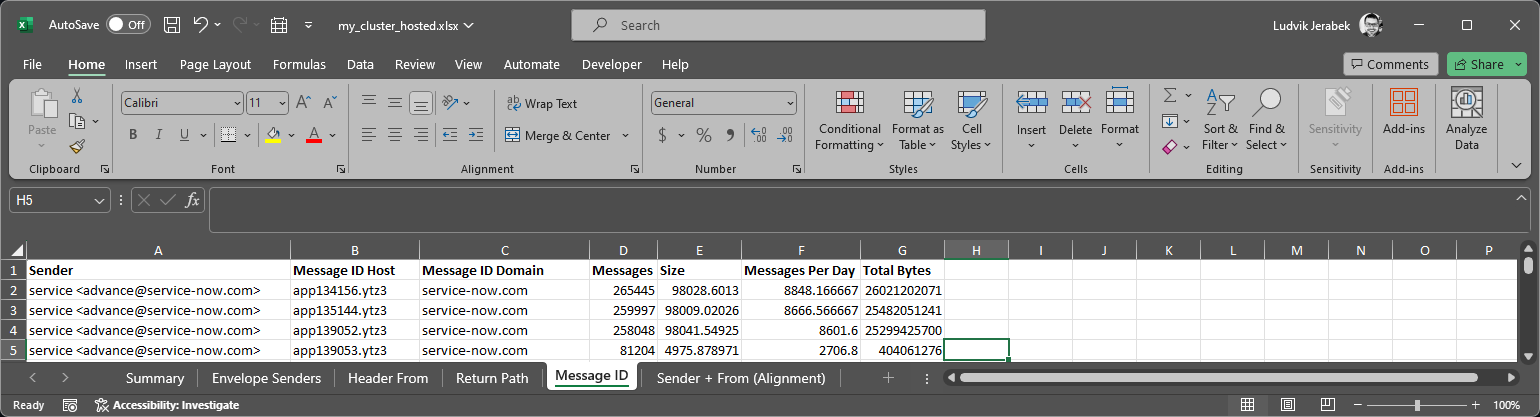
- Envelope header: From:, MessageID Host, MessageID Domain (helpful to identify original sender)
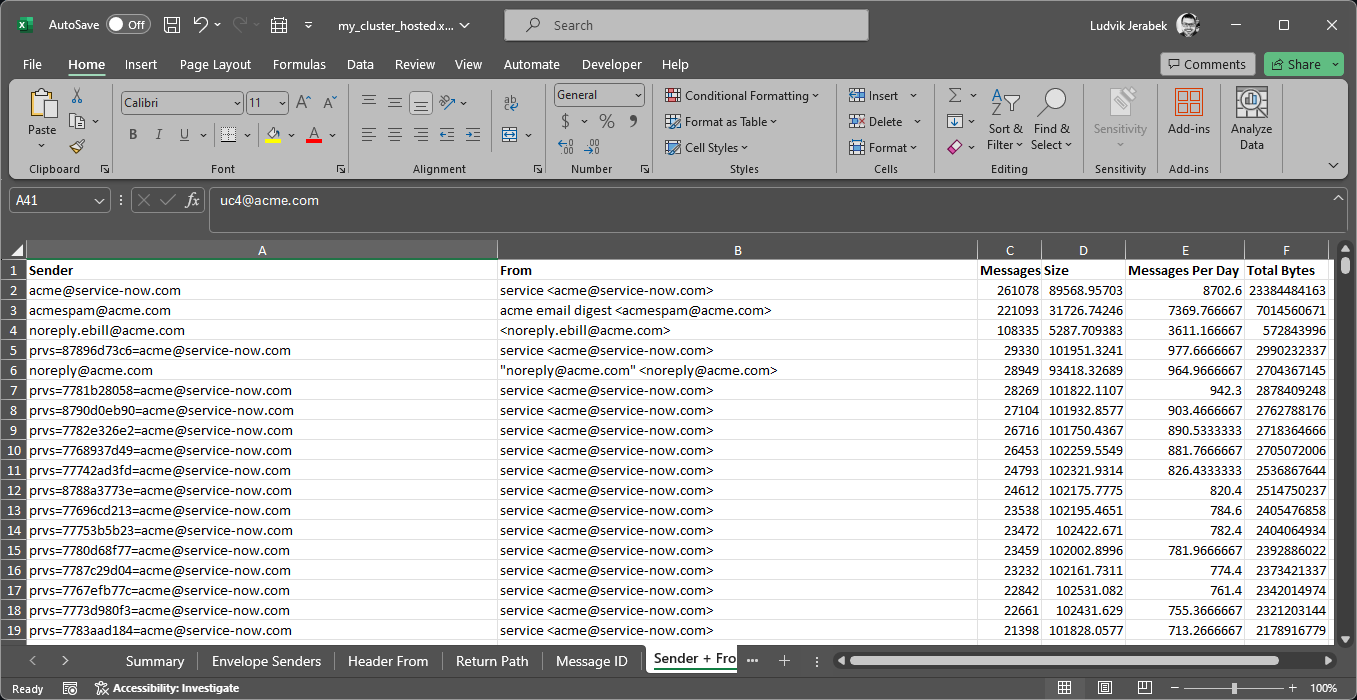
- Envelope sender and header From: for SPF alignment purposes
Summarize message volume information:
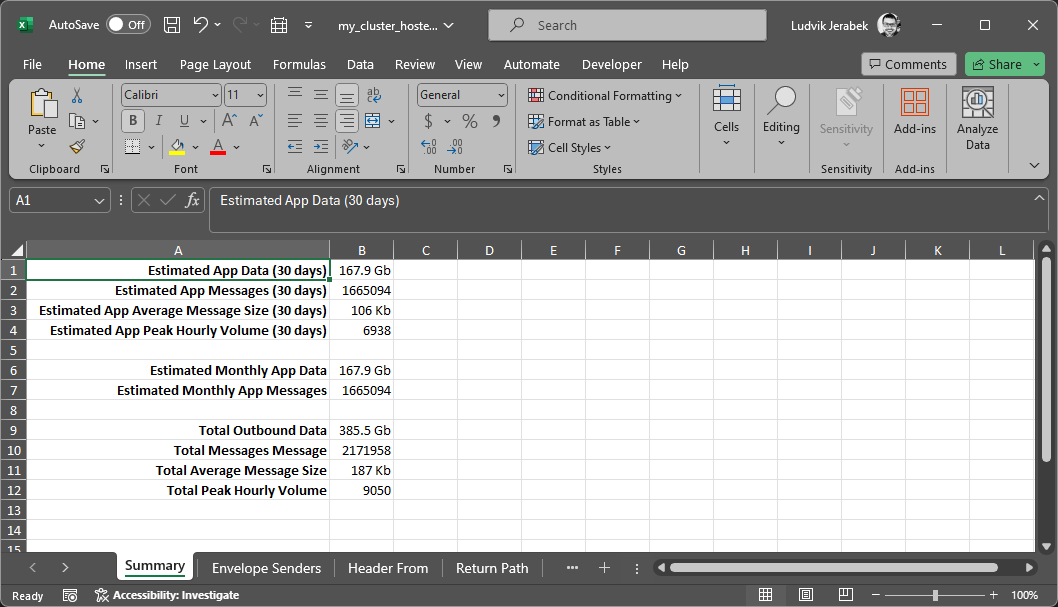
- Estimated application email traffic based on sender volume threshold:
- Estimated application data
- Estimated application messages
- Estimated application average size
- Estimated application peak hourly volume
- Total outbound data
- Total outbound data
- Total outbound messages
- Total outbound average size
- Total outbound peak hourly volume
Usage Options:
usage: senderstats [-h] -i <file> [<file> ...] [--hfrom FromField] [--mfrom SenderField] [--rpath ReturnField] [--mid MIDField] [--size SizeField] [--date DateField] [--date-format DateFormat] [--strip-display-name]
                   [--strip-prvs] [--decode-srs] [--no-empty-from] [--show-skip-detail] [--excluded-domains <domain> [<domain> ...]] [--restrict-domains <domain> [<domain> ...]] [--excluded-senders <sender> [<sender> ...]] -o
                   <xlsx> [-t THRESHOLD]

This tool helps identify the top senders based on smart search outbound message exports.

optional arguments:
  -h, --help                                           show this help message and exit
  -i <file> [<file> ...], --input <file> [<file> ...]  Smart search files to read.
  --hfrom FromField                                    CSV field of the header From: address. (default=Header_From)
  --mfrom SenderField                                  CSV field of the envelope sender address. (default=Sender)
  --rpath ReturnField                                  CSV field of the Return-Path: address. (default=Header_Return-Path)
  --mid MIDField                                       CSV field of the message ID. (default=Message_ID)
  --size SizeField                                     CSV field of message size. (default=Message_Size)
  --date DateField                                     CSV field of message date/time. (default=Date)
  --date-format DateFormat                             Date format used to parse the timestamps. (default=%Y-%m-%dT%H:%M:%S.%f%z)
  --strip-display-name                                 Remove display names, address only
  --strip-prvs                                         Remove bounce attack prevention tag e.g. prvs=tag=sender@domain.com
  --decode-srs                                         Convert SRS forwardmailbox+srs=hash=tt=domain.com=user to user@domain.com
  --no-empty-from                                      If the header From: is empty the envelope sender address is used
  --show-skip-detail                                   Show skipped details
  --excluded-domains <domain> [<domain> ...]           Exclude domains from processing.
  --restrict-domains <domain> [<domain> ...]           Constrain domains for processing.
  --excluded-senders <sender> [<sender> ...]           Exclude senders from processing.
  -o <xlsx>, --output <xlsx>                           Output file
  -t THRESHOLD, --threshold THRESHOLD                  Integer representing number of messages per day to be considered application traffic. (default=100)
Using the Tool with Proofpoint Smart Search
Export all outbound message traffic as a smart search CSV. You may need to export multiple CSVs if the data per time window exceeds 1M records. The tool can ingest multiple CSVs files at once.
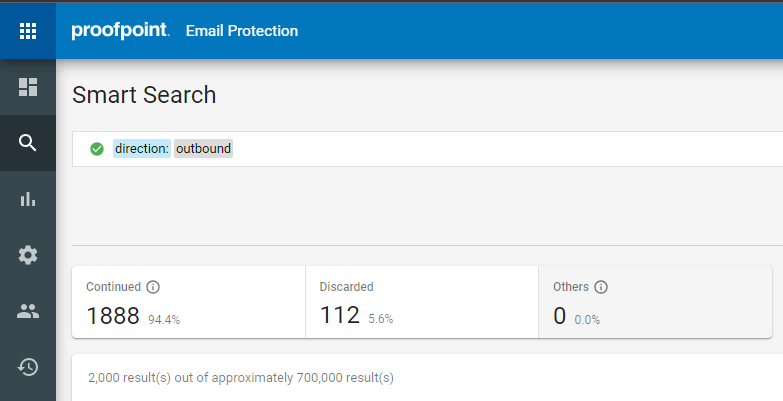
Once the files are downlaoded to a target folder, you can run the following command with the path to the files you downloaded and specify a wildard.
senderstats -i C:\path\to\downloaded\files\smart_search_results_custer_hosted_2024_03_04_*.csv -o C:\path\to\output\file\my_cluster_hosted.xlsx
Sample Output
The execution results should look similar to the following depending the options you select.
Files to be processed:
C:\Users\ljerabek\Downloads\smart_search_results_cluster_hosted_2024_03_04_173552.csv
C:\Users\ljerabek\Downloads\smart_search_results_cluster_hosted_2024_03_04_173855.csv
C:\Users\ljerabek\Downloads\smart_search_results_cluster_hosted_2024_03_04_173656.csv
C:\Users\ljerabek\Downloads\smart_search_results_cluster_hosted_2024_03_04_173754.csv
C:\Users\ljerabek\Downloads\smart_search_results_cluster_hosted_2024_03_04_173834.csv

Domains excluded from processing:
knowledgefront.com
pphosted.com
ppops.net

Processing:  C:\Users\ljerabek\Downloads\smart_search_results_cluster_hosted_2024_03_04_173552.csv
Processing:  C:\Users\ljerabek\Downloads\smart_search_results_cluster_hosted_2024_03_04_173855.csv
Processing:  C:\Users\ljerabek\Downloads\smart_search_results_cluster_hosted_2024_03_04_173656.csv
Processing:  C:\Users\ljerabek\Downloads\smart_search_results_cluster_hosted_2024_03_04_173754.csv
Processing:  C:\Users\ljerabek\Downloads\smart_search_results_cluster_hosted_2024_03_04_173834.csv

File Processing Summary
Total Records:  4409754
Skipped Records:  2237796

Records by Day
2024-02-03: 43926
2024-02-04: 48567
2024-02-05: 82679
2024-02-06: 100960
2024-02-07: 97990
2024-02-08: 100370
2024-02-09: 85954
2024-02-10: 19740
2024-02-11: 15595
2024-02-12: 94800
2024-02-13: 99043
2024-02-14: 96919
2024-02-15: 95478
2024-02-16: 88463
2024-02-17: 19021
2024-02-18: 16961
2024-02-19: 81489
2024-02-20: 96920
2024-02-21: 103170
2024-02-22: 104562
2024-02-23: 81652
2024-02-24: 17902
2024-02-25: 16311
2024-02-26: 97154
2024-02-27: 99578
2024-02-28: 109633
2024-02-29: 104672
2024-03-01: 117695
2024-03-02: 20002
2024-03-03: 14752

Please see report: C:\Users\ljerabek\Downloads\my_cluster_hosted.xlsx
Sample Summary Statistics
Sample Details (Sender + From by Volume):
Sample Details (Message ID) Inferencing:
Release history Release notifications | RSS feed


Download files
Download the file for your platform. If you're not sure which to choose, learn more about installing packages.
Source Distribution
Built Distribution
Filter files by name, interpreter, ABI, and platform.
If you're not sure about the file name format, learn more about wheel file names.
Copy a direct link to the current filters
File details
Details for the file senderstats-1.1.2.tar.gz.
File metadata
- Download URL: senderstats-1.1.2.tar.gz
- Upload date:
- Size: 10.2 kB
- Tags: Source
- Uploaded using Trusted Publishing? No
- Uploaded via: twine/5.0.0 CPython/3.9.18
File hashes
| Algorithm | Hash digest | |
|---|---|---|
| SHA256 |
5d0ddd5bfd52310f228d461395d0e05cb02ea5b900408097d581aa94cee8cd32
|
|
| MD5 |
0943edf2de6c341f86fc2610ffc6eab1
|
|
| BLAKE2b-256 |
476386971ca1096d7b0cda415038681cf40fcd253c45a8aad2f3013f4610369e
|
File details
Details for the file senderstats-1.1.2-py3-none-any.whl.
File metadata
- Download URL: senderstats-1.1.2-py3-none-any.whl
- Upload date:
- Size: 8.6 kB
- Tags: Python 3
- Uploaded using Trusted Publishing? No
- Uploaded via: twine/5.0.0 CPython/3.9.18
File hashes
| Algorithm | Hash digest | |
|---|---|---|
| SHA256 |
c73f8388fcae7230ebbf89cfe2ff8c82a6f119cc2e289f05ca2587e6cafbfec0
|
|
| MD5 |
63353c388cdd92cf9de4845438d59867
|
|
| BLAKE2b-256 |
44ef41602a6a063d63a43b6e054ddbfb94ca4f1bfde552c652a5993fde92f6a5
|






