
Synchronized audio player for Sendspin servers
Project description
sendspin

Connect to any Sendspin server and instantly turn your computer into an audio target that can participate in multi-room audio.
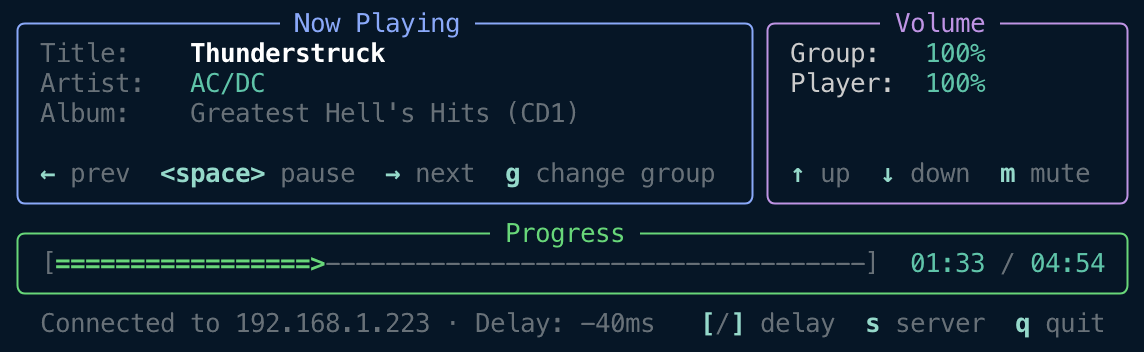
Sendspin CLI includes three apps:
sendspin- Terminal client for interactive usesendspin daemon- Background daemon for headless devicessendspin serve- Host a Sendspin party to demo Sendspin

Quick Start
Run directly with uv:
Start client
uvx sendspin
Host a Sendspin party
uvx sendspin serve --demo
uvx sendspin serve /path/to/media.mp3
uvx sendspin serve https://retro.dancewave.online/retrodance.mp3
Installation
With uv:
uv tool install sendspin
Install as daemon (Linux):
curl -fsSL https://raw.githubusercontent.com/Sendspin/sendspin-cli/refs/heads/main/scripts/systemd/install-systemd.sh | sudo bash
With pip:
pip install sendspin
Install from source
git clone https://github.com/Sendspin-Protocol/sendspin.git
cd sendspin
pip install .
After installation, run:
sendspin
The player will automatically connect to a Sendspin server on your local network and be available for playback.
Updating
To update to the latest version of Sendspin:
If installed with uv:
uv tool upgrade sendspin
If installed with pip:
pip install --upgrade sendspin
If installed as systemd daemon:
The systemd daemon preserves your configuration during updates. Simply upgrade the package:
# Upgrade sendspin (the daemon installer uses uv by default)
uv tool upgrade sendspin

# Or if you installed with pip
pip install --upgrade sendspin

# Restart the service to use the new version
sudo systemctl restart sendspin
Your client name, audio device selection, and other settings in /etc/default/sendspin are preserved during the update.
Note: You do not need to uninstall and reinstall when updating. Your configuration (client name, audio device, delay settings) is stored separately and will be preserved.
Configuration Options
Sendspin stores settings in JSON configuration files that persist between sessions. All command-line arguments can also be set in the config file, with CLI arguments taking precedence over stored settings.
Configuration File
Settings are stored in ~/.config/sendspin/:
settings-tui.json- Settings for the interactive TUI clientsettings-daemon.json- Settings for daemon modesettings-serve.json- Settings for serve mode
Example configuration file (TUI/daemon):
{
  "player_volume": 50,
  "player_muted": false,
  "static_delay_ms": -100.0,
  "last_server_url": "ws://192.168.1.100:8927/sendspin",
  "name": "Living Room",
  "client_id": "sendspin-living-room",
  "audio_device": "2",
  "audio_format": "flac:48000:24:2",
  "log_level": "INFO",
  "listen_port": 8927,
  "use_mpris": true
}
Example configuration file (serve):
{
  "log_level": "INFO",
  "listen_port": 8927,
  "name": "My Sendspin Server",
  "source": "/path/to/music.mp3",
  "clients": ["ws://192.168.1.50:8927/sendspin", "ws://192.168.1.51:8927/sendspin"]
}
Available settings:
| Setting | Type | Mode | Description |
|---|---|---|---|
player_volume |
integer (0-100) | TUI/daemon | Player output volume percentage |
player_muted |
boolean | TUI/daemon | Whether the player is muted |
static_delay_ms |
float | TUI/daemon | Extra playback delay in milliseconds |
last_server_url |
string | TUI/daemon | Server URL (used as default for --url) |
name |
string | All | Friendly name for client or server (--name) |
client_id |
string | TUI/daemon | Unique client identifier (--id) |
audio_device |
string | TUI/daemon | Audio device index or name prefix (--audio-device) |
audio_format |
string | TUI/daemon | Preferred audio format (--audio-format, e.g., flac:48000:24:2) |
log_level |
string | All | Logging level: DEBUG, INFO, WARNING, ERROR, CRITICAL |
listen_port |
integer | daemon/serve | Listen port (--port, default: 8927) |
use_mpris |
boolean | TUI/daemon | Enable MPRIS integration (default: true) |
hook_start |
string | TUI/daemon | Command to run when audio stream starts |
hook_stop |
string | TUI/daemon | Command to run when audio stream stops |
source |
string | serve | Default audio source (file path or URL, ffmpeg input) |
source_format |
string | serve | ffmpeg container format for audio source |
clients |
array | serve | Client URLs to connect to (--client) |
Settings are automatically saved when changed through the TUI. You can also edit the JSON file directly while the client is not running.
Server Connection
By default, the player automatically discovers Sendspin servers on your local network using mDNS. You can also connect directly to a specific server:
sendspin --url ws://192.168.1.100:8080/sendspin
List available servers on the network:
sendspin --list-servers
Client Identification
If you want to run multiple players on the same computer, you can specify unique identifiers:
sendspin --id my-client-1 --name "Kitchen"
sendspin --id my-client-2 --name "Bedroom"
--id: A unique identifier for this client (optional; defaults tosendspin-<hostname>, useful for running multiple instances on one computer)--name: A friendly name displayed on the server (optional; defaults to hostname)
Audio Output Device Selection
By default, the player uses your system's default audio output device. You can list available devices or select a specific device:
List available audio devices:
sendspin --list-audio-devices
This displays all audio output devices with their IDs, channel configurations, and sample rates. The default device is marked.
Select a specific audio device by index:
sendspin --audio-device 2
Or by name prefix:
sendspin --audio-device "MacBook"
This is particularly useful when running sendspin daemon on headless devices or when you want to route audio to a specific output.
Preferred Audio Format
By default, the player negotiates the best audio format with the server from the list of formats supported by your audio device (preferring FLAC over PCM). You can specify a preferred format to prioritize:
sendspin --audio-format flac:48000:24:2
The format string uses the pattern codec:sample_rate:bit_depth:channels:
- codec:
flac(compressed, preferred) orpcm(uncompressed) - sample_rate: Sample rate in Hz (e.g.,
44100,48000,96000) - bit_depth: Bits per sample (
16or24) - channels: Channel count (
1for mono,2for stereo)
The specified format is validated against the audio device on startup. If the device doesn't support it, the player will exit with an error.
Adjusting Playback Delay
The player supports adjusting playback delay to compensate for audio hardware latency or achieve better synchronization across devices.
sendspin --static-delay-ms -100
Note: Based on limited testing, the delay value is typically a negative number (e.g.,
-100or-150) to compensate for audio hardware buffering.
Daemon Mode
To run the player as a background daemon without the interactive TUI (useful for headless devices or scripts):
sendspin daemon
The daemon runs in the background and logs status messages to stdout. It accepts the same connection and audio options as the TUI client:
sendspin daemon --name "Kitchen" --audio-device 2
Hooks
You can run external commands when audio streams start or stop. This is useful for controlling amplifiers, lighting, or other home automation:
sendspin --hook-start "./turn_on_amp.sh" --hook-stop "./turn_off_amp.sh"
Or with inline commands:
sendspin daemon --hook-start "amixer set Master unmute" --hook-stop "amixer set Master mute"
Hooks receive these environment variables:
SENDSPIN_EVENT- Event type: "start" or "stop"SENDSPIN_SERVER_ID- Connected server identifierSENDSPIN_SERVER_NAME- Connected server friendly nameSENDSPIN_SERVER_URL- Connected server URL. Only available if client initiated the connection to the server.SENDSPIN_CLIENT_ID- Client identifierSENDSPIN_CLIENT_NAME- Client friendly name
Debugging & Troubleshooting
If you experience synchronization issues or audio glitches, you can enable detailed logging to help diagnose the problem:
sendspin --log-level DEBUG
This provides detailed information about time synchronization. The output can be helpful when reporting issues.
Install as Daemon (systemd, Linux)
For headless devices like Raspberry Pi, you can install sendspin daemon as a systemd service that starts automatically on boot.
Install:
curl -fsSL https://raw.githubusercontent.com/Sendspin/sendspin-cli/refs/heads/main/scripts/systemd/install-systemd.sh | sudo bash
The installer will:
- Check and offer to install dependencies (libportaudio2, uv)
- Install sendspin via
uv tool install - Prompt for client name and audio device selection
- Create systemd service and configuration
Manage the service:
sudo systemctl start sendspin    # Start the service
sudo systemctl stop sendspin     # Stop the service
sudo systemctl status sendspin   # Check status
journalctl -u sendspin -f        # View logs
Configuration: Edit /etc/default/sendspin to change client name, audio device, or delay settings.
Uninstall:
curl -fsSL https://raw.githubusercontent.com/Sendspin/sendspin-cli/refs/heads/main/scripts/systemd/uninstall-systemd.sh | sudo bash
Sendspin Party
The Sendspin client includes a mode to enable hosting a Sendspin Party. This will start a Sendspin server playing a specified audio file or URL in a loop, allowing nearby Sendspin clients to connect and listen together. It also hosts a web interface for easy playing and sharing. Fire up that home or office 🔥
# Demo mode
sendspin serve --demo
# Local file
sendspin serve /path/to/media.mp3
# Remote URL
sendspin serve https://retro.dancewave.online/retrodance.mp3
# Without pre-installing Sendspin
uvx sendspin serve /path/to/media.mp3
# Connect to specific clients
sendspin serve --demo --client ws://192.168.1.50:8927/sendspin --client ws://192.168.1.51:8927/sendspin
Project details
Release history Release notifications | RSS feed


Download files
Download the file for your platform. If you're not sure which to choose, learn more about installing packages.
Source Distribution
Built Distribution
Filter files by name, interpreter, ABI, and platform.
If you're not sure about the file name format, learn more about wheel file names.
Copy a direct link to the current filters
File details
Details for the file sendspin-5.0.0.tar.gz.
File metadata
- Download URL: sendspin-5.0.0.tar.gz
- Upload date:
- Size: 69.3 kB
- Tags: Source
- Uploaded using Trusted Publishing? Yes
- Uploaded via: twine/6.1.0 CPython/3.13.7
File hashes
| Algorithm | Hash digest | |
|---|---|---|
| SHA256 |
9bcbbcf63f3f26c0299571fd6ef45d19b30f95d1d30eb33546cb78aa3245ac59
|
|
| MD5 |
8d9ec1d1be30bcf60556943e45819ac7
|
|
| BLAKE2b-256 |
1ad8bf3b7e99769bb16ac8275c32f1f7808efa25bcea77819d1deaf636837854
|
Provenance
The following attestation bundles were made for sendspin-5.0.0.tar.gz:
Publisher:
release.yml on Sendspin/sendspin-cli
-
Statement:
-
Statement type:
https://in-toto.io/Statement/v1 -
Predicate type:
https://docs.pypi.org/attestations/publish/v1 -
Subject name:
sendspin-5.0.0.tar.gz -
Subject digest:
9bcbbcf63f3f26c0299571fd6ef45d19b30f95d1d30eb33546cb78aa3245ac59 - Sigstore transparency entry: 990575781
- Sigstore integration time:
-
Permalink:
Sendspin/sendspin-cli@55c4d15262260fbbe3a20db89fd6b918299eee48 -
Branch / Tag:
refs/tags/5.0.0 - Owner: https://github.com/Sendspin
-
Access:
public
-
Token Issuer:
https://token.actions.githubusercontent.com -
Runner Environment:
github-hosted -
Publication workflow:
release.yml@55c4d15262260fbbe3a20db89fd6b918299eee48 -
Trigger Event:
release
-
Statement type:
File details
Details for the file sendspin-5.0.0-py3-none-any.whl.
File metadata
- Download URL: sendspin-5.0.0-py3-none-any.whl
- Upload date:
- Size: 72.7 kB
- Tags: Python 3
- Uploaded using Trusted Publishing? Yes
- Uploaded via: twine/6.1.0 CPython/3.13.7
File hashes
| Algorithm | Hash digest | |
|---|---|---|
| SHA256 |
10d3267f5f8958bee98289ef3769719839e4a5a157e2883942336fa14d018671
|
|
| MD5 |
29068b4c68ffc06264b44d4569c74e66
|
|
| BLAKE2b-256 |
2a33b5a5e84da084c241edf4f16396bebdb78cae60eca7d0612afd9790b7b5f6
|
Provenance
The following attestation bundles were made for sendspin-5.0.0-py3-none-any.whl:
Publisher:
release.yml on Sendspin/sendspin-cli
-
Statement:
-
Statement type:
https://in-toto.io/Statement/v1 -
Predicate type:
https://docs.pypi.org/attestations/publish/v1 -
Subject name:
sendspin-5.0.0-py3-none-any.whl -
Subject digest:
10d3267f5f8958bee98289ef3769719839e4a5a157e2883942336fa14d018671 - Sigstore transparency entry: 990575782
- Sigstore integration time:
-
Permalink:
Sendspin/sendspin-cli@55c4d15262260fbbe3a20db89fd6b918299eee48 -
Branch / Tag:
refs/tags/5.0.0 - Owner: https://github.com/Sendspin
-
Access:
public
-
Token Issuer:
https://token.actions.githubusercontent.com -
Runner Environment:
github-hosted -
Publication workflow:
release.yml@55c4d15262260fbbe3a20db89fd6b918299eee48 -
Trigger Event:
release
-
Statement type:






