
SENSE-HAT WEBTHING




ABOUT
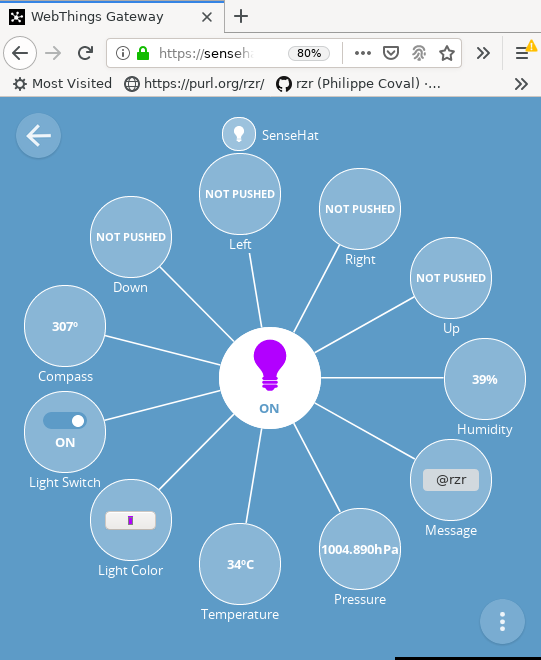
Addon adapter for WebThings Gateway using python module to handle I2C sensors and GPIOs of Raspberry Pi's extension board "SenseHat".
USAGE
PREREQUISITES
Install WebThings Gateway on RaspberryPI (It was made for https://github.com/WebThingsIO/gateway/releases/download/0.12.0/gateway-0.12.0.img.zip )
- Connect to device's wifi "WebThings Gateway FFFF" and then open http://gateway.local/, Setup WiFi Setup
- Connect back to LAN Wifi open http://gateway.local/things again
INSTALL
From "Settings" add-on menu:
- Add "and enable add-on
- Then add "SenseHat" from the things dashboard.
CALIBRATE
For using Inertial measurement unit (IMU sensors), calibration will help to get more accurate measurements.
sudo apt-get install librtimulib-utils

cd ~/.config/sense_hat/
mv -f RTIMULib.ini RTIMULib.ini.orig
RTIMULibCal

#| RTIMULibCal - using RTIMULib.ini
#| Settings file not found. Using defaults and creating settings file
#| Detected LSM9DS1 at standard/standard address
#| Using fusion algorithm RTQF
#| min/max compass calibration not in use
#| Ellipsoid compass calibration not in use
#| Accel calibration not in use
#| LSM9DS1 init complete
#| Options are:
#| m - calibrate magnetometer with min/max
#| e - calibrate magnetometer with ellipsoid (do min/max first)
#| a - calibrate accelerometers
#| (...)

grep '=' RTIMULib.ini
If done correctly north should be indicated by edge where power LED is located the compass value is actually the "yaw" value, while "pitch" is around this same edge. Remaining "roll" value can be changed by rotating on longest middle axis of board.
AUTOMATE
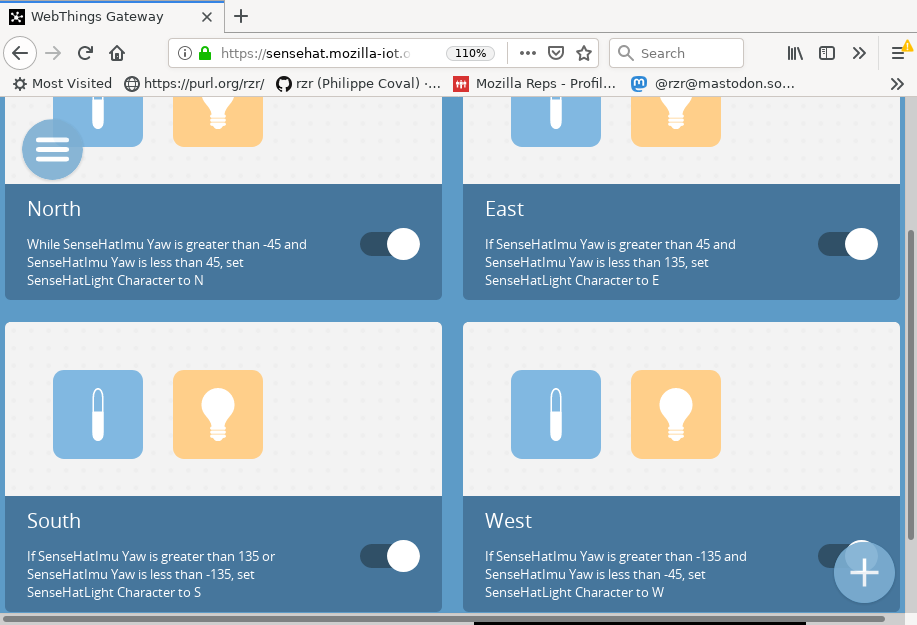
Once added in gateway, it can be used along the rule engine:
DEVELOP
# From Settings / Developer / Enable SSH
# https://sensehat.mozilla-iot.org/settings/developer
ssh pi@gateway.local # password=raspberry
sudo systemctl stop mozilla-iot-gateway
rm -rf ~/.mozilla-iot/addons/sense-hat-*
cd ~/.mozilla-iot/addons/
git clone https://github.com/rzr/sense-hat-webthing sense-hat-adapter
make -C sense-hat-adapter help prep start # unprep # to restore
sudo systemctl restart mozilla-iot-gateway
sudo journalctl -f -xu mozilla-iot-gateway.service
From "/things" webpage "SenseHat" can be added (+, Add, Done)
Note that instead of restarting gateway, from Web UI, any addon can disabled and enabled again.
EXTRA: EXAMPLES
More examples can be also used as standone webthing server:
cd example
# If on debian, it will be faster:
sudo apt-get install python3-sense-hat
pip3 install webthing
# Or if not on debian:
# pip3 install -r requirements.txt
./sense-hat-single-thing.py
Then add thing using "URL" adapter it should be discovered as (http://localhost:8888)
Same procedure for other exampl, like multiple things which is handling orientation sensor.
MORE
For reference the following items are supported:
- https://www.st.com/resource/en/datasheet/hts221.pdf
- https://www.st.com/resource/en/datasheet/lps25hb.pdf
- https://www.st.com/resource/en/datasheet/lsm9ds1.pdf
Thanks to Geof Cohler (@gcohler) for support.
RESOURCES
- https://libraries.io/pypi/sense-hat-webthing
- https://pypi.org/project/sense-hat-webthing/
- https://mastodon.social/@rzr/104052909544715058#LavalVirtual2020
- https://github.com/WebThingsIO/addon-list/pull/822
- https://discourse.mozilla.org/t/is-there-an-add-on-for-pi-sense-hat/58024/5
- https://www.openhub.net/p/sense-hat-webthing
- https://github.com/rzr/mozilla-iot-generic-sensors-adapter/issues/13
- https://github.com/WebThingsIO/wiki/wiki#general-1
- https://github.com/WebThingsIO/gateway-addon-python
- https://hacks.mozilla.org/2018/02/creating-an-add-on-for-the-project-things-gateway/
- https://libraries.io/pypi/sense-hat
- https://www.raspberrypi.org/products/sense-hat/
- https://www.raspberrypi.org/documentation/hardware/sense-hat/
- https://github.com/astro-pi/python-sense-hat
- https://pythonhosted.org/sense-hat/api/
- https://github.com/raspberrypi/rpi-sense/
- https://projects.raspberrypi.org/en/projects/getting-started-with-the-sense-hat
- https://iot.mozilla.org/schemas/
- https://github.com/WebThingsIO/webthing-python/
- https://github.com/WebThingsIO/tplink-adapter
- https://github.com/WebThingsIO/eufy-adapter
1 maintainer

Metadata
1 maintainer
Release files for sense-hat-webthing 0.0.9
For a detailed explanation of source distributions (sdists) and built distributions (wheels), please see the package formats documentation.
Source distribution (sdist)
| File | Size | Uploaded | |
|---|---|---|---|
| sense-hat-webthing-0.0.9.tar.gz | 10.2 kB | Details |
Built distribution (wheel)
| File | Interpreter | ABI | Platform | Reset |
|---|---|---|---|---|
| sense_hat_webthing-0.0.9-py3-none-any.whl | Python 3 | none | any | Details |
Total release size: 25.2 kB
Release files / sense-hat-webthing-0.0.9.tar.gz
| Download URL | sense-hat-webthing-0.0.9.tar.gz |
|---|---|
| Size | 10.2 kB |
| Tags | Source |
|
SHA-256 checksum How to use checksums |
a78c1eab208ae9e1464d188d9c2b29fb6579e5884e7ebb3924329c121bd75b09
|
|
BLAKE2b-256 checksum How to use checksums |
d881b4afb37ae0e2b0c179f40ebfecf0c915cbd31934c284bf5edb21e21770ad
|
| Upload date | |
|
Uploaded using Trusted Publishing? What is trusted publishing? |
No |
| Uploaded via |
twine/3.2.0 pkginfo/1.5.0.1 requests/2.24.0 setuptools/49.2.1 requests-toolbelt/0.9.1 tqdm/4.50.2 CPython/3.9.0
|
Release files / sense_hat_webthing-0.0.9-py3-none-any.whl
| Download URL | sense_hat_webthing-0.0.9-py3-none-any.whl |
|---|---|
| Size | 15.0 kB |
| Tags | Python 3 |
|
SHA-256 checksum How to use checksums |
509a940384c55a4556c9c88782b3262595e8338a072054ae93b1c9b23c1117f3
|
|
BLAKE2b-256 checksum How to use checksums |
4713f9214adc85a68c578fcbfb3bce3697222156a73b83bb9cbc1e8af94bb319
|
| Upload date | |
|
Uploaded using Trusted Publishing? What is trusted publishing? |
No |
| Uploaded via |
twine/3.2.0 pkginfo/1.5.0.1 requests/2.24.0 setuptools/49.2.1 requests-toolbelt/0.9.1 tqdm/4.50.2 CPython/3.9.0
|














