
Python I2C Driver for Sensirion SF06-LF
This repository contains the Python driver to communicate with a Sensirion sensor of the SF06-LF family over I2C.
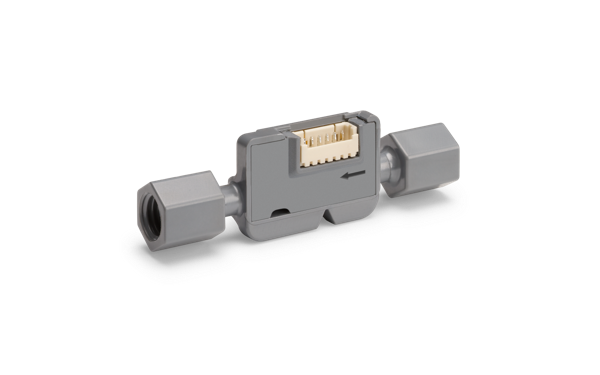
Click here to learn more about the Sensirion SF06-LF sensor family.
Not all sensors of this driver family support all measurements. In case a measurement is not supported by all sensors, the products that support it are listed in the API description.
Supported sensor types
| Sensor name | I²C Addresses |
|---|---|
| SLF3C-1300F | 0x08 |
| SLF3S-1300F | 0x08 |
| SLF3S-0600F | 0x08 |
| SLF3S-4000B | 0x08 |
| LD20-0600L | 0x08 |
| LD20-2600B | 0x08 |
The following instructions and examples use a SLF3C-1300F.
Connect the sensor
You can connect your sensor over a SEK-SensorBridge. For special setups you find the sensor pinout in the section below.
Sensor pinout
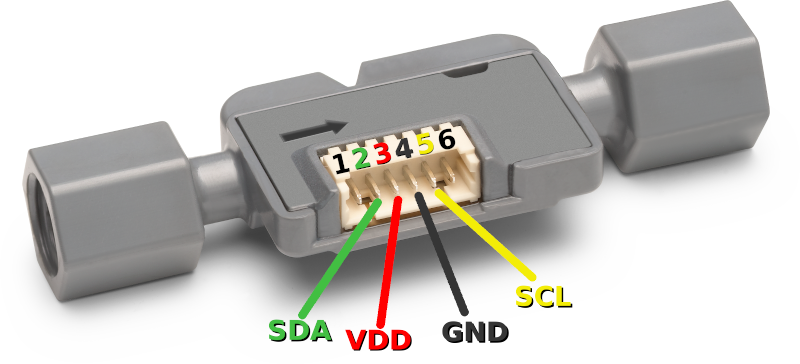
| Pin | Cable Color | Name | Description | Comments |
|---|---|---|---|---|
| 1 | NC | Do not connect | ||
| 2 | green | SDA | I2C: Serial data input / output | |
| 3 | red | VDD | Supply Voltage | 3.2V to 3.8V |
| 4 | black | GND | Ground | |
| 5 | yellow | SCL | I2C: Serial clock input | |
| 6 | NC | Do not connect |
Documentation & Quickstart
See the documentation page for an API description and a quickstart example.
Contributing
We develop and test this driver using our company internal tools (version
control, continuous integration, code review etc.) and automatically
synchronize the master branch with GitHub. But this doesn't mean that we
don't respond to issues or don't accept pull requests on GitHub. In fact,
you're very welcome to open issues or create pull requests :-)
Check coding style
The coding style can be checked with flake8:
pip install -e .[test]  # Install requirements
flake8                  # Run style check
In addition, we check the formatting of files with
editorconfig-checker:
pip install editorconfig-checker==2.0.3   # Install requirements
editorconfig-checker                      # Run check
License
See LICENSE.
1 maintainer

Metadata
1 maintainer
Release files for sensirion-i2c-sf06-lf 1.0.0
For a detailed explanation of source distributions (sdists) and built distributions (wheels), please see the package formats documentation.
Source distribution (sdist)
| File | Size | Uploaded | |
|---|---|---|---|
| sensirion_i2c_sf06_lf-1.0.0.tar.gz | 12.3 kB | Details |
Built distribution (wheel)
| File | Interpreter | ABI | Platform | Reset |
|---|---|---|---|---|
| sensirion_i2c_sf06_lf-1.0.0-py3-none-any.whl | Python 3 | none | any | Details |
Total release size: 23.7 kB
Release files / sensirion_i2c_sf06_lf-1.0.0.tar.gz
| Download URL | sensirion_i2c_sf06_lf-1.0.0.tar.gz |
|---|---|
| Size | 12.3 kB |
| Tags | Source |
|
SHA-256 checksum How to use checksums |
04e0aca27c2675122219c75fb31e6b901926a3d810c713f9f5faa9b4a6672779
|
|
BLAKE2b-256 checksum How to use checksums |
266bea2b2ebf628c5f46a51e04d9f5e50a614de2075c9af272a0baebcfb0c996
|
| Upload date | |
|
Uploaded using Trusted Publishing? What is trusted publishing? |
No |
| Uploaded via |
twine/6.1.0 CPython/3.13.12
|
Release files / sensirion_i2c_sf06_lf-1.0.0-py3-none-any.whl
| Download URL | sensirion_i2c_sf06_lf-1.0.0-py3-none-any.whl |
|---|---|
| Size | 11.4 kB |
| Tags | Python 3 |
|
SHA-256 checksum How to use checksums |
b5cbfed6b2ed2b448e320ab0e86c98d6363094e33d156db4258a24ad6e512bf2
|
|
BLAKE2b-256 checksum How to use checksums |
3a3f5980252b60176fd11151bcd239f09a5c9377f0b4f3fa05ae959d64e09416
|
| Upload date | |
|
Uploaded using Trusted Publishing? What is trusted publishing? |
No |
| Uploaded via |
twine/6.1.0 CPython/3.13.12
|














