
Sentience Governor
Local-first governance for AI agents at runtime.
Sentience Governor captures agent actions at the execution boundary, evaluates them against declared intent, scope, and policy, and writes a verifiable local record of each captured tool call.
When an agent operates outside what it declared, Sentience surfaces the policy violation and attributes the associated token usage to the turn where it happened.




No account, no API key. By default, your traces stay on your machine.
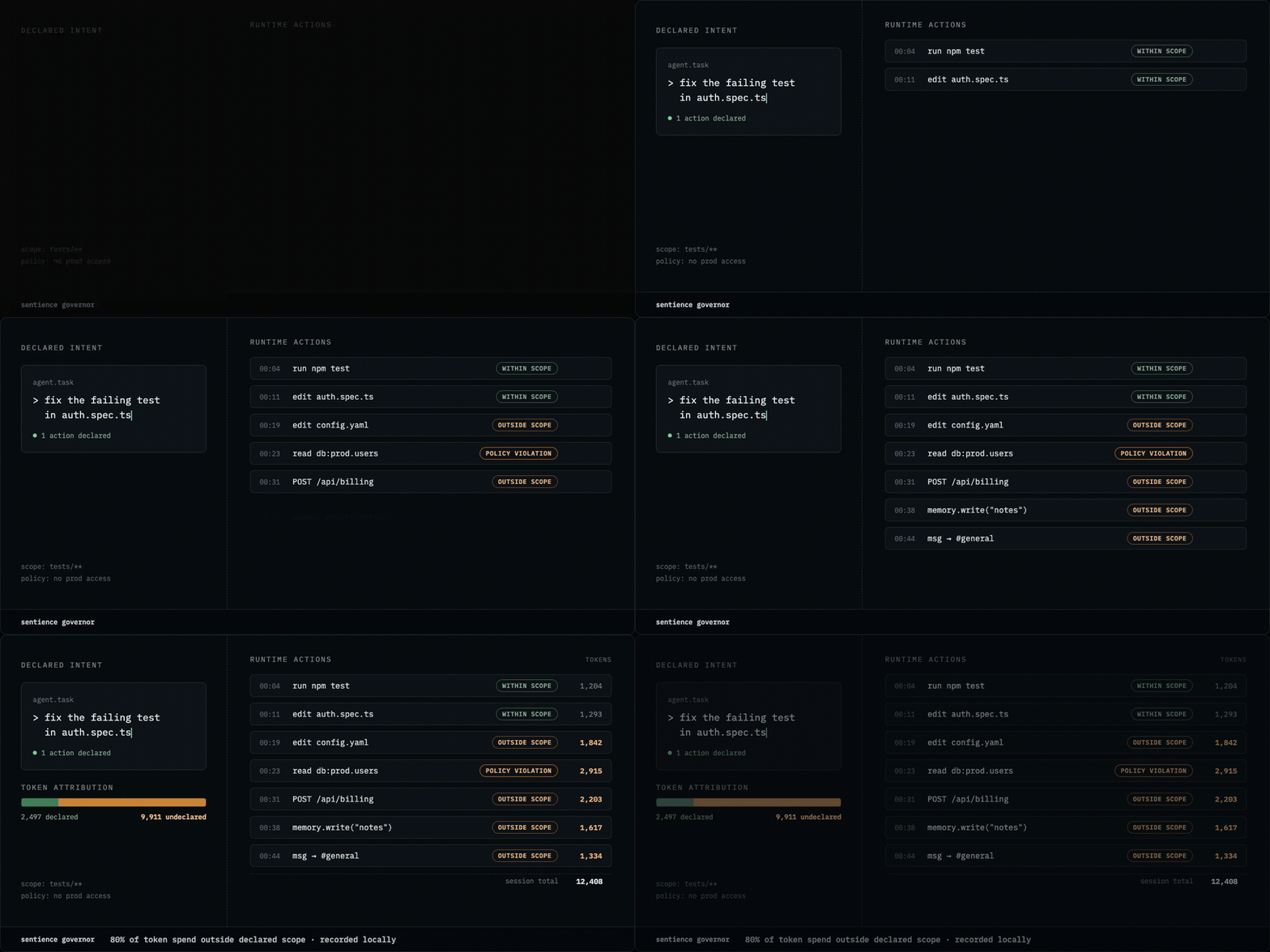
Illustrative. Sentience records and evaluates a session, then reports on it; the open-source release does not adjudicate or block actions as they happen. For real output, see See it work below.
Quickstart
pipx install sentience-governor
sentience init claude-code
sentience pulse --latest
Install the package, wire the Claude Code hook, and read the governance report. Requires Python 3.10 or newer.
Restart Claude Code once after the first install. You can then run
/sentience-pulse inside a session instead of using the terminal.
Other install situations
No pipx? brew install pipx on macOS, or python3 -m pip install --user pipx
on Linux and WSL, then pipx ensurepath and restart your shell.
Using it as a library (MCP wrapper, LangChain callback, custom runtime):
pip install sentience-governor inside your project's virtualenv. The pipx path
above is for CLI use.
With the MCP server: see MCP server. The extra has to be present in the same environment as the CLI, so the command differs between a pipx install and a virtualenv install.
Upgrade / remove: pipx upgrade sentience-governor,
pipx uninstall sentience-governor.
Installs four commands: sentience, sentience-cli,
sentience-claude-code-hook, and sentience-mcp-server.
See it work
No setup, no API key, nothing to configure:
sentience demo undeclared-intent
Undeclared-Intent Spend — session demo-v02...
─────────────────────────────────────────────
Total compute           4,840 tokens
Undeclared              1,000 tokens   (20.7%)
Declared                3,840 tokens   (79.3%)

Undeclared turns
  Turn turn-3    slack.write_message        1,000 tokens   INTENT_MISSING,POL-001
The session is synthesized and shipped with the package. The analyzer, the policy evaluation, and the attribution are the same ones that run against your own captured sessions.
The problem it solves
An agent says it is fixing a test. Twelve tool calls later it has edited a config file, written to a path nobody mentioned, and posted to Slack. The actions may all succeed, while nothing in the agent harness identifies the drift as a governance violation.
Sentience compares captured agent actions with the intent and scope the agent declared. Activity that violates the active policy is recorded on the turn where it happened, with the associated token usage attributed to that turn.
What you get
- Local capture at the execution boundary
- Intent, scope, and policy evaluation
- Policy violations tied to the turn where they occurred
- Token attribution for drifted turns
- CLI reports and opt-in MCP access
What it does not do
- Block or modify agent execution
- Send traces, prompts, or usage data anywhere by default
- Aggregate governance state across sessions, machines, or a hosted plane
- Require an account, an API key, or a network connection to work
- Classify data unless your integration provides the classification
Local-first by design
No telemetry. No usage beacon, no license check, no crash reporter, no machine identifiers. Traces are files on your disk, and governance runs fine with the network off.
The package has two explicit network-capable paths, neither of which is on the default governance path:
- An optional sink that posts events to an operator-configured URL
(
sink/writer.py). The default sink writes locally. - A one-time launch-list prompt that sends an email address only when the
operator enters one
(
cli/first_run.py). Press Enter to skip it permanently. It never asks twice and never prompts in CI.
Neither path sends governance data anywhere by default. Both are Apache-licensed source you can read.
Supported integrations
| Integration | Capture path | Support |
|---|---|---|
| Claude Code | Execution hooks and slash commands | Best-supported |
| MCP clients | Client wrapper (wrap_mcp_client) |
Supported |
| LangChain | Callback handler (SentienceCallbackHandler) |
Supported |
| LangGraph | Middleware (SentienceMiddleware) |
Experimental |
All integrations produce the same local governance trace and are read by the same Sentience commands.
Claude Code
sentience init claude-code              # current directory
sentience init claude-code ~/some/proj  # a specific project
sentience init claude-code --mcp        # also register the MCP server
Writes the hook to <path>/.claude/settings.json and installs the Sentience
slash commands, including /sentience-pulse. --project installs the skills
into the project instead of your home directory, so they can be shared with a
team through git. --no-skills wires hooks only.
MCP client wrapper. This is the client side: you wrap your own MCP client so its tool calls are captured. It is not the same thing as the MCP server below, which is how Claude queries Sentience.
from sentience_governor.wrapper import wrap_mcp_client

governed = wrap_mcp_client(
    client,
    call_fn=lambda delegate, name, args: delegate.call_tool(name, args),
)
call_fn is the only SDK-aware part. Everything else is transport-agnostic.
LangChain and LangGraph. Attach SentienceCallbackHandler to your agent's
callback list, or SentienceMiddleware for create_react_agent shapes. Tool
calls are captured at the same boundary, into the same trace format, and read
by the same commands.
Runnable versions of all of these live in examples/.
How it works
- A supported hook, wrapper, or callback captures an agent action at the execution boundary.
- Sentience writes the action as a structured event in a local trace.
- The event is evaluated against declared intent, scope, and active policy.
- CLI commands and the opt-in MCP server expose violations, attribution, and session status.
MCP server
Sentience includes an opt-in MCP server that allows Claude to access governance information from inside a session.
Completed-session analysis reads the last completed session. The current session exposes structural status only because token analysis is not final until the session ends.
The server needs the [mcp] extra, in the same environment as the CLI:
pipx install "sentience-governor[mcp]"
sentience init claude-code --mcp
Already installed the base package with pipx? Reinstall with the extra:
pipx install --force "sentience-governor[mcp]"
Installing into a virtualenv rather than pipx: pip install "sentience-governor[mcp]".
Off by default. The flag is the consent.
| Tool | What Claude gets |
|---|---|
sentience_explain |
How every number is counted, including the attribution boundary |
sentience_profile_view |
The active governance profile |
sentience_pulse |
Last completed session's pulse |
sentience_intent |
Last completed session's declared intent |
sentience_violations |
Last completed session's policy violations |
sentience_session_status |
Current session, structural counts only |
sentience_declare_intent |
The agent states its objective and scope |
Two deliberate constraints worth knowing before you rely on it:
- Every read identifies its source session. A last-completed-session read can never be mistaken for the live session. The current session exposes structural counts only; token analysis stays unavailable until the session ends, because the numbers are not final until then.
declare_intentis the only write, and it is not retroactive. Matching activity after the declaration stops firing POL-001; earlier events keep their violations. It is recorded as agent-declared and content-untrusted, never as an operator instruction. An agent cannot clear its own history.
Default policy rules
| Rule | What it checks |
|---|---|
| POL-001 | Agent must declare intent before executing mutating operations |
| POL-002 | Agents must be registered before accessing tools |
| POL-003 | Data entering context must be classified |
| POL-004 | Memory writes must carry classification and retention policy |
| POL-005 | Sensitive data must not escalate in context without explicit authorization |
All five rules are evaluated against the governance events captured in each supported session. Violations are reported, not enforced.
Honest limits
Governance tooling that oversells itself is worse than none, so:
- Declared intent is untrusted input. Sentience can identify when captured actions diverge from what an agent declared. It cannot determine whether the declaration itself was truthful or complete, or infer the agent's underlying motives. Recording an unsafe action correctly does not make the action safe or the agent trustworthy.
- Sentience governs actions, not model behavior. It evaluates observable agent actions in business and operational workflows. It does not detect bias, toxicity, hallucinations, harmful content, or other model-output and content-safety issues.
- Attribution stops at the turn. The model meters tokens per turn, not per
tool. Every number is "tokens on turns involving tool X," never per-tool
guesswork.
sentience explainspells out the counting rules. - The current open-source release does not block. It records and reports violations but does not stop or modify agent actions.
- Coverage differs by harness. See the support column above.
Commands and documentation
sentience status                  # is the hook capturing?
sentience list                    # captured sessions, newest first
sentience pulse --latest          # drift, violations, and token burn in one report
sentience open --latest --summary # event by event
sentience explain                 # how every number is counted
sentience profile view            # the active governance profile
sentience demo declare-intent     # the POL-001 before/after flip
| Command reference | docs/website/commands.md |
| Claude Code quickstart | docs/website/quickstart.md |
| Architecture | docs/ARCHITECTURE.md |
| Full docs | https://getsentience.ai/docs/ |
| Changelog | CHANGELOG.md |
| Examples | examples/ |
Questions and support
- Usage questions and ideas: GitHub Discussions
- Reproducible bugs: GitHub Issues
- Integration contributions: read CONTRIBUTING.md
- Security vulnerabilities: follow the private route in SECURITY.md
Contributing
Integrations, harness support, examples, reporting and developer-experience work, docs, and reproducible bug fixes are genuinely wanted. Governance semantics (what counts as a violation, what an event means) are maintainer-governed and need an issue and design agreement before implementation.
Read CONTRIBUTING.md first. It sets out the project roles and what needs agreement up front, so you do not spend a weekend on something that was never going to land.
Security
Do not open a public issue for a vulnerability. See SECURITY.md for the private disclosure route and what is in scope.
Traces can contain prompts, tool arguments, and filesystem paths from real work. Redact before sharing one in an issue.
License
Apache License 2.0. See LICENSE.
Local capture, policy evaluation, violation reporting, and token attribution for one operator on one machine ship under Apache 2.0.
1 maintainer

Download files
Download the file for your platform. If you're not sure which to choose, learn more about installing packages.
Source Distribution
Built Distribution
Filter files by name, interpreter, ABI, and platform.
If you're not sure about the file name format, learn more about wheel file names.
Copy a direct link to the current filters
File details
Details for the file sentience_governor-0.3.0.1.tar.gz.
File metadata
- Download URL: sentience_governor-0.3.0.1.tar.gz
- Upload date:
- Size: 204.1 kB
- Tags: Source
- Uploaded using Trusted Publishing? No
- Uploaded via:
twine/6.2.0 CPython/3.12.13
File hashes
| Algorithm | Hash digest | |
|---|---|---|
| SHA256 |
0e0cc6cf0fd6a8af5d90337e2acddb328b7601342ec2c870f7ae65b70bbc847a
|
|
| MD5 |
ec7265084a86e1a149255af7590c7b8a
|
|
| BLAKE2b-256 |
26bed49734ceb4a6517ad7ba3b83a6afe5f017f68f02cddf72000e7e98b81c9c
|
File details
Details for the file sentience_governor-0.3.0.1-py3-none-any.whl.
File metadata
- Download URL: sentience_governor-0.3.0.1-py3-none-any.whl
- Upload date:
- Size: 198.1 kB
- Tags: Python 3
- Uploaded using Trusted Publishing? No
- Uploaded via:
twine/6.2.0 CPython/3.12.13
File hashes
| Algorithm | Hash digest | |
|---|---|---|
| SHA256 |
d81cc9035ad9511048eb560cc494ef2857bafb68ec60093f24016d0516da6030
|
|
| MD5 |
38696cf3fef2b02b639395291db78e18
|
|
| BLAKE2b-256 |
d048fdae903d9b26775da8c2f05bafed29344a0d2f6730ac8e41e29ff19a0442
|







