
Simple, tunable sentiment analysis from sentence embeddings — TensorFlow-free. Python sibling of the R package sentiment.ai.

Project description
sentiment.ai: Python
TensorFlow-free sentiment analysis from sentence embeddings. The Python sibling of
the R package sentiment.ai, sharing the same trained scorer
artifacts and the same public API.
Status: working pre-release (0.2.0a1). Engine verified end-to-end (e5 embed → numpy scoring head → score in
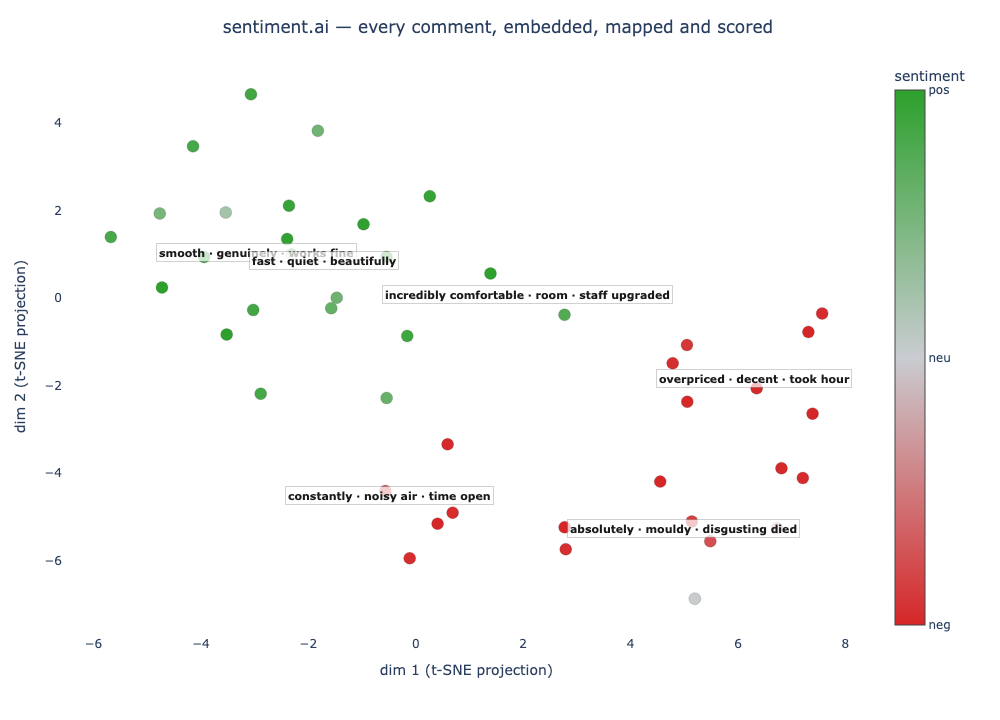
[-1, 1]), bit-for-bit against the R package'sscore_json_head(max diff4.4e-16). v2 adds hate / mixed / style flags, intent-based profiles (setup()/use_profile()), opt-in transformer backends (RoBERTa / XLM-R), and an interactiveplot_sentiment()map. On general business text (employee reviews, macro-F1, n = 10,085) the on-devicee5-basedefault reaches 0.888, within two points of both the paid OpenAI embedding (0.896) and a 125M fine-tuned transformer (0.909).
Install
pip install --pre sentimentai-py            # alpha pre-release
pip install --pre "sentimentai-py[openai]"  # + optional OpenAI embedding backend
pip install --pre "sentimentai-py[plot]"    # + interactive plot_sentiment() map
--pre is required while this is an alpha. The import name is sentimentai.
Quick start
import sentimentai as sa

sa.sentiment_score(["I love this", "this is terrible"])
# array([ 1.  , -1.  ])   # about 1 = positive, about -1 = negative

# the whole picture, not just the scalar: one dict per row with text, sentiment,
# prob_neg / prob_neu / prob_pos, class, and confidence. Use it when the neutral mass
# matters or to triage low-confidence rows.
sa.sentiment(["I love this", "The package arrived on Tuesday afternoon.", "this is terrible"])

# same calibrated score, plus a nearest-phrase explanation (text/sentiment/phrase/
# class/similarity). Pass tunable poles to define what they mean for your domain,
# or omit `phrases` for the bundled balanced 40/40 defaults (the score is identical
# to sentiment_score() either way; poles only shape the explanation).
sa.sentiment_match(["great value", "broke instantly"],
                   phrases={"positive": ["high quality", "great value", "works well"],
                            "negative": ["low quality", "broke quickly", "poor build"]})
# the `sentiment` score is always the reliable signal; give each pole >=3 phrases so the
# nearest-phrase explanation is stable (single-phrase poles can mislabel the phrase)

# or just get embeddings
sa.embed_text(["dogs", "cats"], model="e5-small")   # (2, 384)

# --- v2 ---------------------------------------------------------------------
# sentiment() also returns hate_speech / p_hate / mixed / style flags for e5 models,
# computed from the SAME embedding (no second model, no extra download).
sa.sentiment(["go back to your country, you filth, nobody wants you"])[0]   # ... 'hate_speech': True, 'p_hate': 0.85 ...

# pick a backend by INTENT (persists across sessions) instead of memorising model names:
sa.use_profile("multilingual")    # e5-base, with flags
sa.setup()                         # interactive one-time picker

# opt-in fine-tuned transformer backends, same API:
sa.sentiment_score(["the gate agent was incredible"], model="twitter-roberta")  # English
sa.sentiment_score(["le service était incroyable"], model="xlm-roberta")        # multilingual

# map a whole corpus: embed -> 2-D -> colour by sentiment, hover text, auto cluster labels
fig = sa.plot_sentiment(reviews)             # needs sentimentai-py[plot]
fig.write_html("map.html")                    # or fig.show() in a notebook
The first call downloads the e5 model from HuggingFace (cached afterwards); the small scoring heads ship inside the wheel.
Why a Python package: the v2 engine is already Python (sentence-transformers + a tiny
numpy scoring head). The R package reaches it through reticulate; Python calls it
directly. Strictly less machinery, no bridge, no TensorFlow, and no xgboost at serve.
Benchmarks
Most people scoring sentiment are scoring reviews, tickets, and survey text, not tweets, so we lead with general business text.
General business text (employee reviews, macro-F1, n = 10,085):
model= |
macro-F1 |
|---|---|
twitter-roberta (opt-in transformer) |
0.909 |
openai (paid embedding) |
0.896 |
e5-base (default, on-device) |
0.888 |
| distilBERT-SST2 | 0.879 |
e5-small (on-device) |
0.836 |
| VADER | 0.681 |
| TextBlob | 0.626 |
On real business text the on-device e5-base default lands within about two points of
both the paid OpenAI embedding and a 125M fine-tuned transformer, clears distilBERT, and
sits 20 to 30 points above the lexicon tools. On a separate held-out set of general review
text (n = 19,547) the on-device heads reach macro-F1 0.93 (e5-base) and 0.94
(e5-small).
Where the transformer pulls ahead: tweets. The fine-tuned twitter-roberta opens a
real gap on Twitter benchmarks because tweets are its training data:
| model | SemEval-2017 tweets | Airline tweets |
|---|---|---|
twitter-roberta (opt-in) |
0.724 | 0.761 |
e5-base (default) |
0.672 | 0.651 |
e5-small |
0.587 | 0.581 |
| VADER | 0.529 | 0.457 |
If your text really is tweets, opt into the max-english backend. For everything else the
gap is small, and e5-base is the only option here that also covers ~100 languages,
carries the hate / mixed / style flags, gives you sentiment_match() and
plot_sentiment(), keeps data on the machine, and stays free.
Models
model= |
dim | notes |
|---|---|---|
e5-base (default) |
768 | best on-device, ~100 languages, no TF, + flags |
e5-small |
384 | lighter/faster option, ~100 languages, no TF, + flags |
openai |
1536 | paid API (needs a key), + flags |
twitter-roberta |
- | opt-in end-to-end English RoBERTa; leads on tweets (~500 MB) |
xlm-roberta |
- | opt-in end-to-end multilingual XLM-R; leads on multilingual tweets (~1 GB) |
en / en.large / multi / multi.large |
512 | legacy, requires TensorFlow |
R ↔ Python parity map
R (sentiment.ai) |
Python (sentimentai) |
status |
|---|---|---|
embed_text() |
embed_text() |
done (e5 / openai; legacy TF raises) |
sentiment_score() |
sentiment_score() |
done (mlp / logistic heads) |
sentiment() |
sentiment() |
done (3-class tidy output) |
sentiment_match() |
sentiment_match() |
done (tunable phrase poles) |
score_json_head() |
_scoring.score() |
done (verified bit-identical to R) |
sentiment() flags (hate/mixed/style) |
sentiment() flag keys |
done (aux heads, same thresholds) |
use_profile() / setup_sentiment.ai() |
use_profile() / setup() |
done (profiles + persisted default) |
plot_sentiment() |
plot_sentiment() |
done (plotly map, c-TF-IDF / OpenAI labels) |
model="twitter-roberta" / "xlm-roberta" |
same handles | done (opt-in transformer backends) |
install_sentiment.ai() / init_sentiment.ai() |
ensure_model() |
done (no reticulate dance) |
default_models, model="en.large" |
BACKENDS, model="e5-small" |
done (registry) |
Layout
pypackage/
├── pyproject.toml
├── sentimentai/
│   ├── __init__.py     public API re-exports
│   ├── _models.py      backend registry (done)
│   ├── embedding.py    embed_text()        (e5 / openai)
│   ├── sentiment.py    sentiment_score / sentiment / sentiment_match
│   ├── _scoring.py     numpy scoring head  (verified vs R)
│   ├── _profiles.py    profiles + persisted default (use_profile)
│   ├── plot.py         plot_sentiment()    (optional: sentimentai-py[plot])
│   ├── install.py      ensure_model() / setup()
│   └── scoring/        JSON heads shipped in the wheel
└── tests/               parity (vs R golden) + smoke/registry/plot tests
Pre-release.
--preis required only while this is an alpha; once1.0ships, plainpip install sentimentai-pywill fetch it. The import name stayssentimentai.
The small JSON scoring heads ship inside the wheel (sentimentai/scoring/); only the
on-device embedder downloads from HuggingFace on first use. No .xgb, no TensorFlow.
Release history Release notifications | RSS feed


Download files
Download the file for your platform. If you're not sure which to choose, learn more about installing packages.
Source Distributions
Built Distribution
Filter files by name, interpreter, ABI, and platform.
If you're not sure about the file name format, learn more about wheel file names.
Copy a direct link to the current filters
File details
Details for the file sentimentai_py-2.0.0-py3-none-any.whl.
File metadata
- Download URL: sentimentai_py-2.0.0-py3-none-any.whl
- Upload date:
- Size: 11.5 MB
- Tags: Python 3
- Uploaded using Trusted Publishing? No
- Uploaded via: twine/6.2.0 CPython/3.10.16
File hashes
| Algorithm | Hash digest | |
|---|---|---|
| SHA256 |
44ed29abb20e32a2bb49151a50f84562f04ff7b93ef266603664de4ec6c6da7c
|
|
| MD5 |
4f343f1775565f91b1d0302b705bf942
|
|
| BLAKE2b-256 |
b02d4e8fbb894fdf6b28cf3dcbaaf23b6beceb896d620a650f996aa2647190b4
|






