
🛰️ A CVE drops at 2 AM. By 2:15 your agent has mapped the planet, found your exposure, alerted your team and drafted the patch.
SentinelPulse is an open-source, terminal-first CVE first-responder. It has its own local memory of vulnerabilities (a RAG "brain"), watches for new disclosures, checks them against your servers and tech stack, and writes the remediation files before you've finished your coffee.






Why • Features • Install • Quick start • Configuration • Guide • Commands • Privacy • FAQ
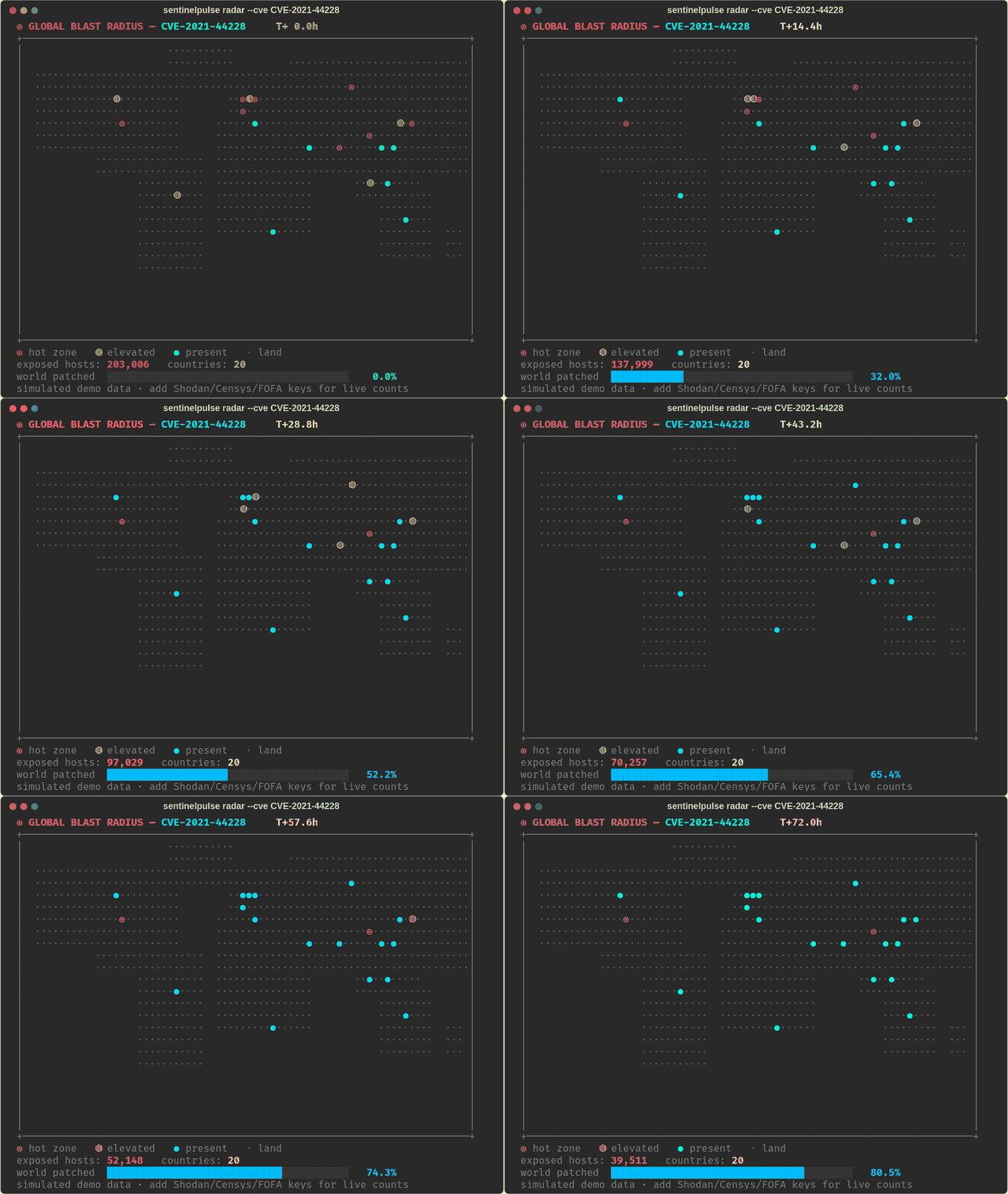
The world map watching global exposure to a CVE drain away hour by hour as the world patches (simulated demo data, see docs/make_demo_gif.py).
pip install sentinelpulse
💡 Why this exists
A new CVE disclosure is a global race condition. The moment it's published, the internet turns into a leaderboard: attackers mass-scan for vulnerable systems, defenders scramble to patch, and whoever moves first wins. Humans usually find out the next morning. Bots find out in seconds.
SentinelPulse puts you on the fast side of that race:
- 🧠 It remembers every CVE it has seen, enriched with real exploitation signals (CISA KEV, EPSS).
- 👁️ It watches NVD around the clock and spots new disclosures within one poll interval.
- 🎯 It checks your world first: your saved hosts and the tech stack they actually run.
- 🌐 It maps the global blast radius: how many systems worldwide are exposed, and where.
- 📣 It alerts you on Slack, Discord or email the moment something hits your stack.
- 🔧 It drafts the fix: Dockerfile, Ansible playbook, WAF virtual patch and Kubernetes guardrail.
It's not a scanner. It's a CVE first-responder that lives in your terminal.
✨ Features at a glance
| Feature | What it does | |
|---|---|---|
| 🧠 | RAG brain | Local, portable SQLite + full-text memory of CVEs from NVD, enriched with CISA KEV (actively exploited?) and FIRST EPSS (exploit probability). |
| 🛰️ | Radar | One command: recall/fetch a CVE → global exposure map → check your hosts → AI briefing → patch files. |
| 🌐 | Worldwide exposure | Asks Shodan, Censys and FOFA how many hosts worldwide are exposed, by country, and draws a colour-coded ASCII world map. |
| 🎯 | Targeted passive analysis | Reads the service banners your own hosts advertise (HTTP, SSH, FTP, SMTP…) and matches them against the brain. No exploits, no payloads. |
| 🗂️ | Asset inventory | Save your hosts and tech stack once; every run checks them automatically. |
| 🔍 | Stack auto-discovery | Builds your tech stack for you from your hosts' banners (e.g. Apache/2.4.52, OpenSSH_8.9p1, PHP/8.1.2). |
| 👁️ | Live watch mode | A daemon that polls NVD for brand-new CVEs and runs the whole pipeline on the ones that hit your stack. |
| 📣 | Watch alerts | Slack, Discord and email (any SMTP provider). Flood-protected and failure-isolated. |
| 🔧 | Patch artifacts | Generates Dockerfile, Ansible playbook.yml, ModSecurity WAF rule, Kubernetes ValidatingAdmissionPolicy and REMEDIATION.md. |
| 🤖 | AI reasoning (BYOK) | One --llm flag: byok-openai, byok-anthropic, byok-deepseek or your local claude-code. |
📸 See it in action
All screenshots below are real output from the CLI, regenerated with
docs/make_screenshots.py.
🛰️ Radar: one CVE, from intel to world map to patch files
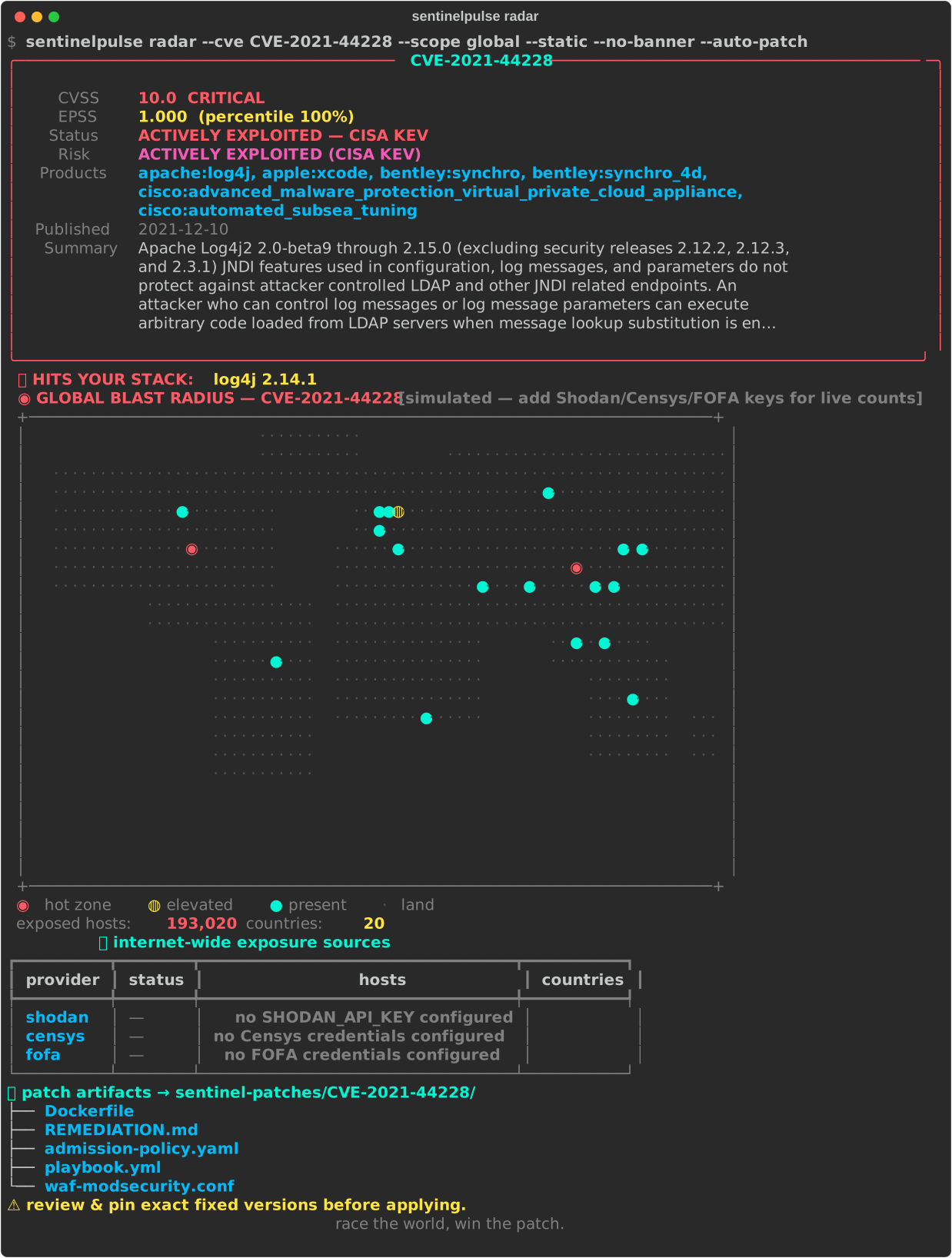
The exposure map here is simulated because no Shodan/Censys/FOFA keys were configured. The CLI labels this clearly. With keys, the counts are live.
🎯 Your hosts: passive banner analysis, matched to the CVE
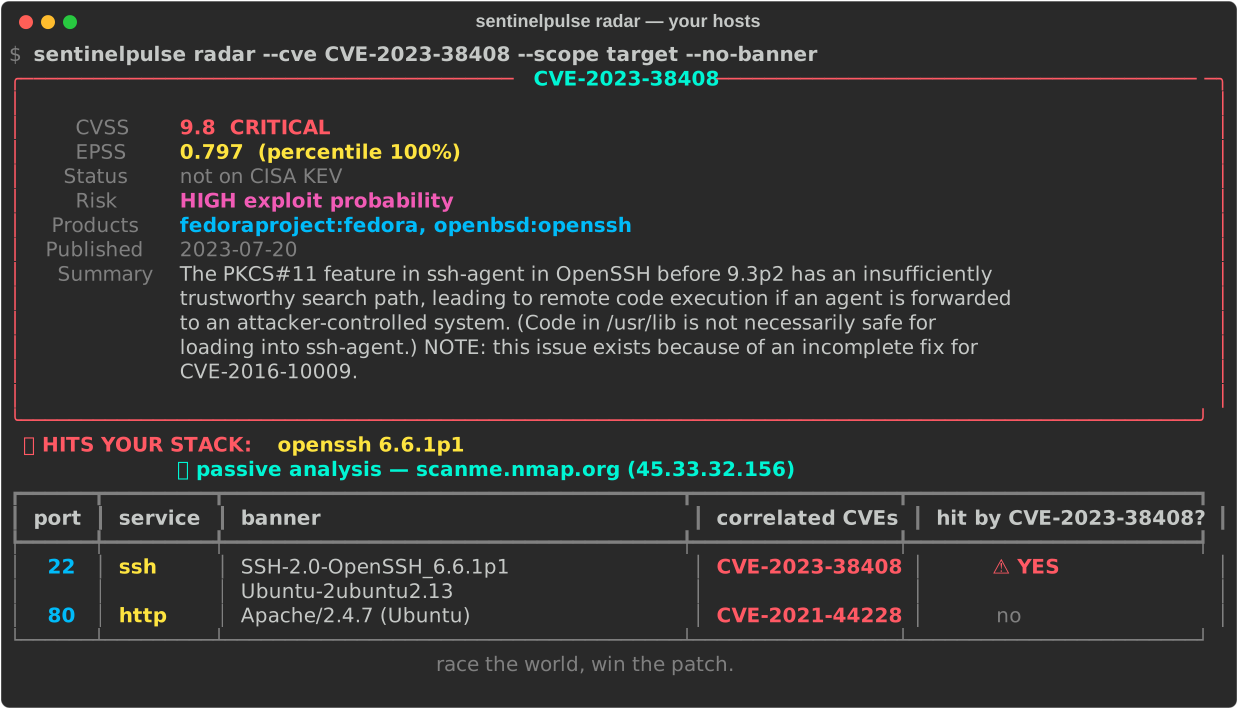
scanme.nmap.org is the host the Nmap project provides for scan testing.
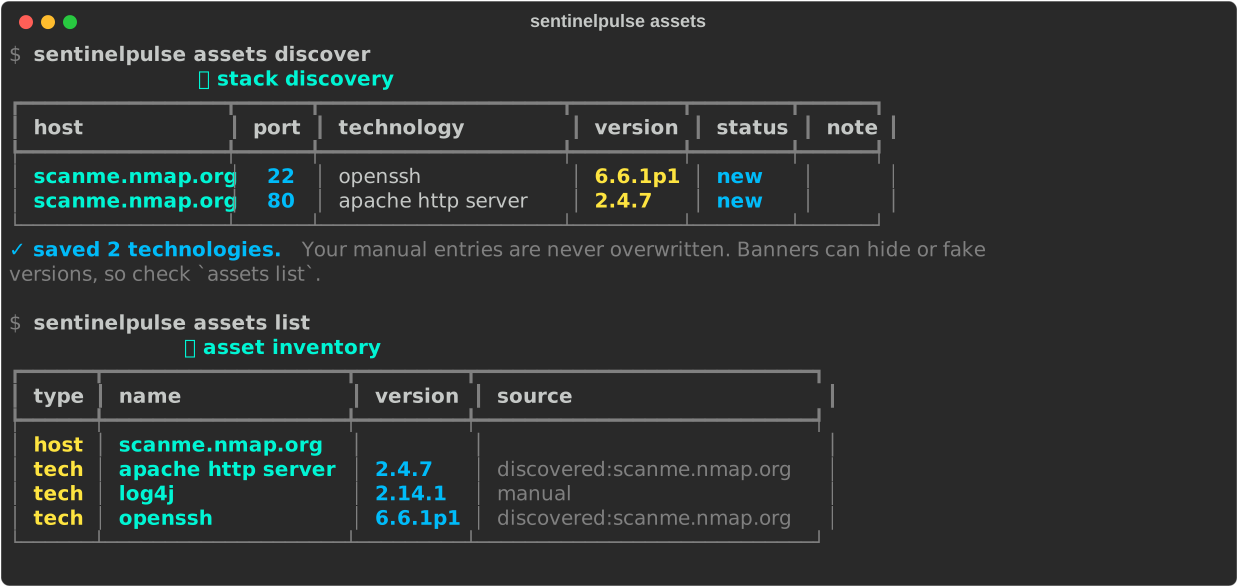
🔍 Stack auto-discovery + asset inventory
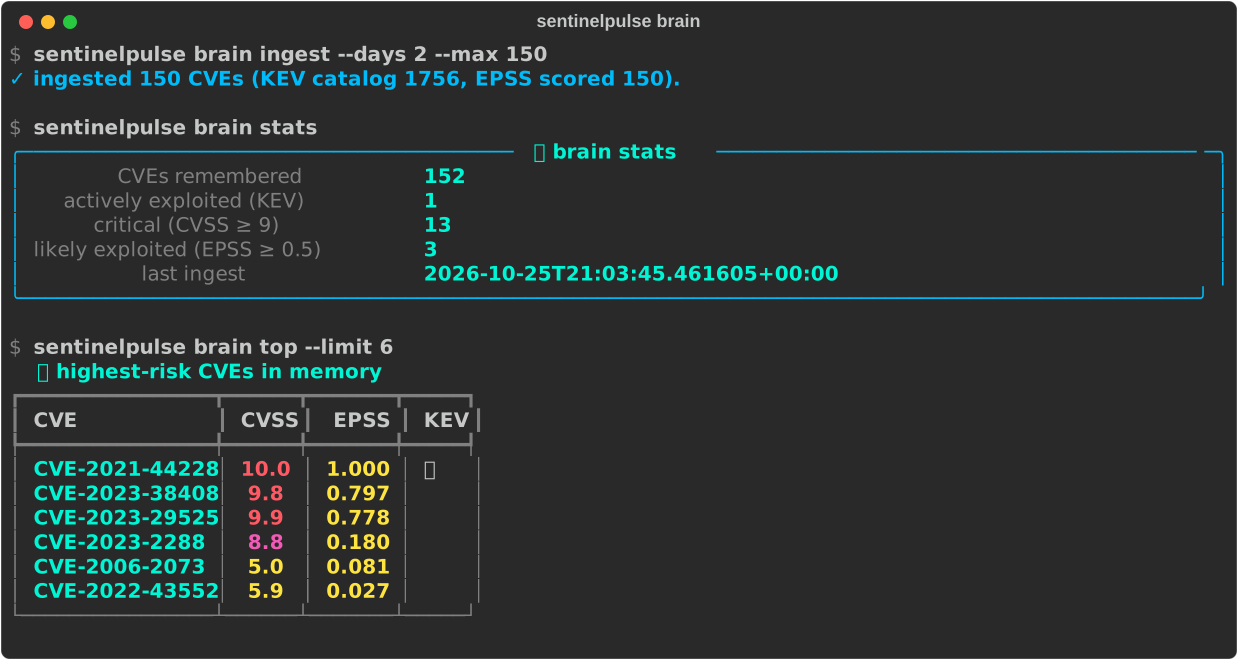
🧠 The RAG brain: ingest, stats and top risks
🏗️ How it works
flowchart LR
NEW([🚨 New CVE on NVD]) --> WATCH{{👁️ watch mode}}
USER([👩💻 you]) --> RADAR{{🛰️ radar}}
WATCH --> RADAR
subgraph INTEL [Free public intel feeds]
NVD[NVD 2.0 API] & KEV[CISA KEV catalog] & EPSS[FIRST EPSS]
end
INTEL --> BRAIN[(🧠 RAG brain<br/>SQLite + FTS5<br/>~/.sentinelpulse/brain.db)]
subgraph ASSETS [Your inventory]
HOSTS[saved hosts] & STACK[tech stack]
end
HOSTS -- 🔍 auto-discovery --> STACK
RADAR --> BRAIN
RADAR --> WW[🌐 Worldwide exposure<br/>Shodan · Censys · FOFA]
RADAR --> TGT[🎯 Passive banner analysis]
ASSETS --> TGT
ASSETS --> MATCH{hits your stack?}
BRAIN --> MATCH
BRAIN & WW & TGT --> LLM[🤖 AI briefing<br/>BYOK / claude-code]
LLM --> PATCH[🔧 Patch artifacts<br/>Docker · Ansible · WAF · K8s]
MATCH -- yes --> ALERT[📣 Slack · Discord · Email]
The pipeline for every CVE:
recall from brain (or fetch live) ─▶ match your stack ─▶ world exposure map ─▶ scan your hosts
                                  ─▶ AI briefing (optional) ─▶ patch files (optional) ─▶ alerts (watch)
Data sources
| Source | Used for | Key needed? | Cost |
|---|---|---|---|
| NVD 2.0 API | CVE details, CVSS, CWE, affected products (CPE) | Optional (higher rate limits) | Free |
| CISA KEV | "Is this being exploited right now?" | No | Free |
| FIRST EPSS | Probability of exploitation in the next 30 days | No | Free |
| Shodan | Worldwide exposed-host counts by country | Yes | Plan with the vuln: filter |
| Censys | Worldwide exposed-host counts by country | Yes (API ID + secret) | Free tier / paid |
| FOFA | Worldwide exposed-host counts by country | Yes (email + key) | Membership |
📋 Requirements
| Requirement | Details |
|---|---|
| Python | 3.11 or newer (uses the built-in tomllib). Check with python3 --version. |
| OS | Linux, macOS or Windows (Windows Terminal or WSL recommended for colours and emoji). |
| Network | Outbound HTTPS to NVD, CISA and FIRST. Reachability of your own hosts for targeted scans. |
| Terminal | Any modern terminal with UTF-8 and true colour (iTerm2, Windows Terminal, GNOME Terminal, Alacritty…). |
| Dependencies | Only three: typer, rich, requests. Installed automatically. |
| Optional | API keys for Shodan / Censys / FOFA, an LLM key, Slack/Discord webhooks, an SMTP account. Nothing is required to start. |
🚀 Installation
Option A: from PyPI (one command)
pip install sentinelpulse # or: pipx install sentinelpulse
Tip: use a virtual environment (
python3 -m venv .venv && source .venv/bin/activate) or pipx so SentinelPulse's dependencies stay separate from your system Python.
Option B: from source (to hack on it)
git clone https://github.com/sriroopchakraborty1991-lang/sentinelpulse.git
cd sentinelpulse

python3 -m venv .venv
source .venv/bin/activate          # Windows: .venv\Scripts\activate

pip install -e ".[dev]"
Upgrade / uninstall
pip install --upgrade sentinelpulse
pip uninstall sentinelpulse          # your brain + config in ~/.sentinelpulse stay untouched
Verify
sentinelpulse version              # → SentinelPulse v0.1.0
sentinelpulse --help
spulse --help                      # short alias, same CLI
⚡ Quick start (5 minutes)
# 1. Create your config file (all keys optional)
sentinelpulse config init

# 2. Feed the brain the last 3 days of CVEs (free feeds, no keys)
sentinelpulse brain ingest --days 3

# 3. Radar a famous CVE: intel, world map, patch files
sentinelpulse radar --cve CVE-2021-44228 --auto-patch

# 4. Tell it what you own (hosts you're authorised to assess)
sentinelpulse assets add-host mycompany.com
sentinelpulse assets discover          # fills your tech stack from banners
sentinelpulse assets add-tech log4j 2.14.1   # add anything banners can't show

# 5. Arm the 24/7 first-responder
sentinelpulse radar --watch --discover --auto-patch
That's it. Steps 1–3 work with zero API keys.
⚙️ Configuration
SentinelPulse reads settings from environment variables first, then from
~/.sentinelpulse/config.toml. Run sentinelpulse config init to create the file, and
sentinelpulse config show to see what's set up (values are never printed).
📄 Full config.toml reference
[intel]
nvd_api_key = ""               # optional: faster NVD ingestion

[shodan]
api_key = ""                   # worldwide exposure

[censys]
api_id = ""                    # worldwide exposure (Search API v2 credentials)
api_secret = ""

[fofa]
email = ""                     # worldwide exposure
key = ""

[llm]
openai_api_key = ""            # --llm byok-openai
anthropic_api_key = ""         # --llm byok-anthropic
deepseek_api_key = ""          # --llm byok-deepseek

[alerts]
slack_webhook_url = ""         # Slack incoming webhook
discord_webhook_url = ""       # Discord channel webhook
email_to = "you@example.com, oncall@example.com"
email_from = "sentinelpulse@example.com"

[smtp]
host = "smtp.gmail.com"        # any SMTP provider
port = 587
user = "you@gmail.com"
password = "your-app-password"
security = "starttls"          # starttls (587) | ssl (465) | none
Environment variables & where to get each key
| Env var | What it unlocks | Where to get it |
|---|---|---|
NVD_API_KEY |
Faster brain ingestion (≈10× NVD rate limit) | nvd.nist.gov: request a key (free) |
SHODAN_API_KEY |
Live worldwide counts | account.shodan.io |
CENSYS_API_ID + CENSYS_API_SECRET |
Live worldwide counts | search.censys.io/account/api |
FOFA_EMAIL + FOFA_KEY |
Live worldwide counts | en.fofa.info → personal center |
OPENAI_API_KEY |
--llm byok-openai |
platform.openai.com/api-keys |
ANTHROPIC_API_KEY |
--llm byok-anthropic |
console.anthropic.com |
DEEPSEEK_API_KEY |
--llm byok-deepseek |
platform.deepseek.com |
| (none, local CLI) | --llm claude-code |
Install Claude Code so claude is on your PATH |
SLACK_WEBHOOK_URL |
Slack alerts | Slack incoming webhooks |
DISCORD_WEBHOOK_URL |
Discord alerts | Discord → Server Settings → Integrations → Webhooks |
SMTP_HOST SMTP_PORT SMTP_USER SMTP_PASSWORD SMTP_SECURITY |
Email alerts | Your mail provider (Gmail needs an app password) |
ALERT_EMAIL_TO ALERT_EMAIL_FROM |
Email recipients / sender | Comma-separate multiple recipients |
SENTINELPULSE_HOME |
Where the brain and config live | Default ~/.sentinelpulse |
SENTINELPULSE_CONFIG |
Use a different config file | Default $SENTINELPULSE_HOME/config.toml |
🔐 Keep
config.tomlprivate (chmod 600 ~/.sentinelpulse/config.toml) and never commit it.
📖 Feature guide
🛰️ Radar: race the world on one CVE
sentinelpulse radar --cve CVE-2021-44228                          # intel + world map
sentinelpulse radar --cve CVE-2021-44228 --target mycompany.com    # + your host
sentinelpulse radar --cve CVE-2021-44228 --auto-patch --llm byok-anthropic
--scope |
Meaning |
|---|---|
auto (default) |
both if you have a target or saved hosts, otherwise global |
global |
World exposure only |
target |
Your hosts only |
both |
Everything |
If the CVE isn't in the brain yet, radar fetches it live from NVD/KEV/EPSS and remembers it
forever. Use --static for a non-animated map (handy for logs and CI) and --no-banner to skip the logo.
🧠 The RAG brain
sentinelpulse brain ingest --days 7 --max 500    # last week of CVE activity
sentinelpulse brain stats                        # what it remembers
sentinelpulse brain query "apache log4j jndi"    # full-text search
sentinelpulse brain top --kev                    # most dangerous, actively exploited
sentinelpulse brain recall CVE-2023-38408        # one CVE (fetched live on a miss)
The brain is a single SQLite file (~/.sentinelpulse/brain.db) with an FTS5 full-text index. Results
are ranked by EPSS then CVSS. It also stores your asset inventory and the watch-mode poll position, so
back up or copy this one file to move SentinelPulse to another machine.
🌐 Worldwide exposure
With any of the Shodan / Censys / FOFA keys set, radar asks each provider for the CVE's exposed-host count by country. It merges them (taking the highest count per country, so nothing is double-counted) and draws a world map:
◉ hot zone · ◍ elevated · ● present · · land
These are lookups in each provider's existing data. SentinelPulse never contacts the exposed hosts. With no keys, the map uses a clearly labelled simulated distribution so the radar still runs.
🎯 Targeted passive analysis
sentinelpulse scan mycompany.com
It connects to 13 common service ports (21, 22, 25, 80, 110, 143, 443, 3306, 5432, 6379, 8080, 8443,
9200), reads only what each service volunteers (HTTP Server / X-Powered-By headers, SSH/FTP/SMTP
greetings), extracts product + version, and matches them against the brain.
🗂️ Asset inventory
sentinelpulse assets add-host mycompany.com api.mycompany.com
sentinelpulse assets add-tech nginx 1.18.0
sentinelpulse assets add-tech "http server"      # multi-word names work
sentinelpulse assets list
sentinelpulse assets check                        # CVEs in memory that hit your stack
sentinelpulse assets remove nginx
Once saved, every radar run shows a 🎯 HITS YOUR STACK line and flags it when your exact version
is named in the advisory. Saved hosts are scanned automatically (no --target needed). A "hit by
this CVE?" column shows which of your services are affected. Use --no-assets to ignore the inventory.
🔍 Stack auto-discovery
sentinelpulse assets discover                  # all saved hosts
sentinelpulse assets discover new-host.io      # scan + save a new host
sentinelpulse assets discover --dry-run        # preview, change nothing
sentinelpulse radar --cve CVE-... --discover   # refresh stack first
- Picks up several products from one banner (
Apache/2.4.52 (Ubuntu); PHP/8.1.2→ two entries). - Converts banner names to the names NVD uses (
Apache→apache http server,Microsoft-IIS→iis). - Never overwrites what you typed. Manual entries show as
kept-yours. Discovered entries update when the version changes. - CDN / edge fronts (Cloudflare, CloudFront, Fastly, BunnyCDN…) are reported but not saved, since they hide the real software behind them.
assets listshows where every entry came from:manualordiscovered:<host>.
👁️ Live watch mode
sentinelpulse radar --watch --discover --auto-patch --interval 300
sentinelpulse radar --watch --min-cvss 9 --keyword "openssl,nginx"
Every --interval seconds it fetches CVEs published since the last poll. It saves them all to the
brain with KEV + EPSS scores, then runs the full pipeline on the matching ones, highest-risk first. With
a saved stack, only CVEs that hit your stack fire (--all-cves to fire on everything). The poll
position is saved, so after a restart it carries on without repeat alerts. Ctrl+C stops it cleanly.
| Flag | Default | Meaning |
|---|---|---|
--interval |
300 |
Seconds between polls (min 30) |
--lookback |
60 |
Minutes to look back on the very first poll |
--min-cvss |
0 |
Only fire at or above this CVSS |
--keyword, -k |
– | Comma-separated terms (description / products) |
--max-per-cycle |
5 |
Max full pipelines per poll (the rest stay in the brain) |
--max-cycles |
0 |
Stop after N polls (0 = forever) |
--all-cves |
off | Don't limit to your stack |
--discover |
off | Re-discover your stack at the start of every poll |
--alert |
auto |
auto (all configured) · none · slack,discord,email |
--max-alerts |
10 |
Individual alerts per poll; extras go into one summary |
💡 Brand-new CVEs often have no CVSS score yet ("awaiting analysis"). Prefer
--keywordor your saved stack over a high--min-cvssso you don't miss day-zero entries.
📣 Watch alerts
Configure any of Slack, Discord or SMTP email (see Configuration), then:
sentinelpulse alerts test          # sample alert to every configured channel
sentinelpulse alerts test -c email # one channel
Each alert contains the CVE, CVSS and severity, EPSS, CISA KEV status, your affected technologies
(and whether your version is named), your affected hosts, the patch folder (with --auto-patch)
and an NVD link. Slack gets formatted blocks, Discord a colour-coded embed, and email a text + HTML message.
- 🌊 Flood-proof: at most
--max-alertsindividual alerts per poll. Extra hits go into one summary. - 🧯 Fail-safe: if one channel is down, the others still send and watch keeps running.
🔧 Patch artifacts
--auto-patch writes a bundle to ./sentinel-patches/<CVE-ID>/ in your current directory:
| File | Purpose |
|---|---|
Dockerfile |
Rebuild on a patched, version-pinned base image |
playbook.yml |
Ansible play to upgrade the package fleet-wide and restart the service |
waf-modsecurity.conf |
ModSecurity virtual patch to buy time before the real fix |
admission-policy.yaml |
Kubernetes ValidatingAdmissionPolicy that blocks vulnerable images |
REMEDIATION.md |
Human-readable plan: scores, references, and the AI briefing when --llm is used |
⚠️ These are review-first templates with placeholder versions (
REPLACE_WITH_FIXED_VERSION). Fill in the fixed release from the vendor advisory. Nothing is applied or deployed automatically.
🤖 AI reasoning (bring your own LLM)
--llm |
Needs | Default model |
|---|---|---|
byok-openai |
OPENAI_API_KEY |
gpt-4o |
byok-anthropic |
ANTHROPIC_API_KEY |
claude-3-5-sonnet-latest |
byok-deepseek |
DEEPSEEK_API_KEY |
deepseek-chat |
claude-code |
the claude CLI on your PATH |
your Claude Code default |
Use --model <name> to pick any model your provider offers (recommended if a default has been retired).
The AI produces a defensive remediation briefing (it is instructed never to produce exploit code).
The briefing is shown in the terminal and saved into REMEDIATION.md. No key? The AI step is skipped
and everything else still runs.
🕰️ Running watch mode 24/7
Linux: systemd user service
~/.config/systemd/user/sentinelpulse.service
[Unit]
Description=SentinelPulse watch mode
After=network-online.target
Wants=network-online.target

[Service]
WorkingDirectory=%h/sentinelpulse-work
ExecStart=%h/sentinelpulse/.venv/bin/sentinelpulse radar --watch --discover --auto-patch --static --no-banner
Restart=on-failure
RestartSec=30

[Install]
WantedBy=default.target
mkdir -p ~/sentinelpulse-work
systemctl --user daemon-reload
systemctl --user enable --now sentinelpulse
journalctl --user -u sentinelpulse -f        # live logs
loginctl enable-linger $USER                 # keep running after logout
Any OS: tmux / screen / nohup
tmux new -s sentinel 'sentinelpulse radar --watch --discover --auto-patch'
# or
nohup sentinelpulse radar --watch --discover --static --no-banner > sentinel.log 2>&1 &
🗂️ Command reference
sentinelpulse radar   --cve <id> [--scope auto|global|target|both] [--target <host>]
                      [--llm <provider>] [--model <name>] [--auto-patch] [--static] [--no-banner]
                      [--discover] [--assets/--no-assets]
sentinelpulse radar   --watch [--interval 300] [--lookback 60] [--min-cvss 0] [--keyword a,b]
                      [--max-per-cycle 5] [--max-cycles 0] [--all-cves] [--discover]
                      [--alert auto|none|slack,discord,email] [--max-alerts 10] [...radar flags]
sentinelpulse scan    <host> [--ingest]
sentinelpulse brain   ingest [--days 3] [--max 300] | recall <cve> | query <text> [-n 8]
                      | top [--kev] [-n 10] | stats
sentinelpulse assets  add-host <host...> | add-tech <name> [version] | remove <name>
                      | list | check [-n 15] | discover [host...] [--dry-run] [--no-save-hosts]
sentinelpulse alerts  test [-c auto|slack|discord|email]
sentinelpulse config  init | show
sentinelpulse version
Every command has --help. spulse is a short alias for sentinelpulse.
🔐 Data & privacy: what leaves your machine
SentinelPulse has no backend, no telemetry and no account. Everything is stored locally in
~/.sentinelpulse/. Network traffic only goes where you point it:
| Destination | What is sent | When |
|---|---|---|
| NVD, CISA, FIRST | CVE IDs and date ranges (public data) | Ingest, recall, watch polls |
| Shodan / Censys / FOFA | The CVE ID being looked up, plus your key | Global scope, if keys set |
| Your own hosts | A TCP connect + HEAD / request on common ports |
Targeted scans / discovery |
| Your LLM provider | The CVE's details, world exposure summary, your affected tech names/versions and host banners | Only with --llm |
| Slack / Discord / SMTP | Alert content incl. your affected tech and host names | Watch mode, if configured |
🛡️ Scope, safety & legal
SentinelPulse is a defensive tool built for blue teams, SREs and security researchers.
- ✅ Worldwide mode only looks up existing data in third-party databases. It never touches the hosts it counts.
- ✅ Targeted mode is passive: it reads banners that services publish to every visitor. No exploitation, no fuzzing, no payloads, no brute force.
- ✅ Patches are review-first files. Nothing is applied, deployed or pushed automatically.
- ⚠️ Only scan systems you own or are explicitly authorised to assess. Even passive connections
may break an acceptable-use policy or local law.
scanme.nmap.orgis a safe public test target. - ⚠️ Respect the terms of service of NVD, Shodan, Censys, FOFA and your LLM provider.
🧪 Honest limitations
- Simulated map without keys. The world map uses a demo distribution unless Shodan, Censys or FOFA keys are set. It is always labelled
[simulated]. - Name matching, not version ranges. "Hits your stack" means the CVE names your technology. It doesn't prove your exact version is in the affected range. Always confirm in the advisory (the version named flag helps).
- Banners can lie or hide. Hardened servers often show no version, and CDNs hide the origin. Treat discovery as a head start.
- NVD rate limits. Without
NVD_API_KEY, NVD allows about 5 requests per 30 seconds, so big ingests are slow (the CLI waits automatically). - Provider plans. Shodan's
vuln:filter and FOFA's stats API need paid plans. Censys uses the Search API v2 (API ID + secret). - Targeted scan speed. Closed or filtered ports wait for a timeout, so a full scan can take up to about a minute per host.
- AI defaults age. Model names get retired. Pass
--modelif your provider rejects a default.
🧭 Project structure
sentinelpulse/
├── cli.py              # Typer CLI: radar, watch, brain, scan, assets, alerts, config
├── banner.py           # gradient ASCII launch logo
├── console.py          # Rich theme + severity colours
├── config.py           # env + config.toml loading (BYOK)
├── worldmap.py         # ASCII world map + hotspots
├── alerts.py           # Slack / Discord / SMTP alerts, summary roll-up
├── intel/              # nvd.py · kev.py · epss.py (live feeds)
├── rag/                # store.py (SQLite+FTS5) · ingest.py · brain.py (retrieval, stack matching)
├── scan/               # worldwide.py · targeted.py (banners) · discover.py (auto-discovery)
├── patch/generators.py # Dockerfile · Ansible · WAF · K8s · REMEDIATION.md
└── llm/__init__.py     # OpenAI · Anthropic · DeepSeek · claude-code
tests/test_smoke.py     # unit + CLI smoke tests
docs/                   # README screenshots, animated demo + generator scripts
config.example.toml     # annotated config template
🛠️ Development
pip install -e ".[dev]"
pytest -q                                              # run the test suite

SENTINELPULSE_HOME=/tmp/sp_shots python docs/make_screenshots.py   # regenerate README screenshots
python docs/make_demo_gif.py                           # regenerate the animated demo (needs Chrome + Pillow)
Releasing a new version
# 1. bump `version` in pyproject.toml and `__version__` in sentinelpulse/__init__.py
rm -rf dist && python -m build && twine check dist/*
twine upload --repository testpypi dist/*   # try it on TestPyPI first
twine upload dist/*                         # then the real PyPI
Use a throwaway SENTINELPULSE_HOME while developing so your real brain and inventory stay untouched.
❓ Troubleshooting & FAQ
ModuleNotFoundError: No module named 'tomllib'
You're on Python 3.10 or older. Install Python 3.11+ and recreate the virtual environment.
sentinelpulse: command not found
Activate the virtual environment (source .venv/bin/activate), or run python -m sentinelpulse.
With pipx, make sure ~/.local/bin is on your PATH (pipx ensurepath). On Debian/Ubuntu, a bare
pip install may be blocked ("externally-managed-environment"). Use pipx or a virtual environment.
Brain ingest is slow / NVD returns 403 or 503
NVD is rate-limiting you. Add a free NVD_API_KEY, use a smaller --days/--max, or try again later.
The CLI already waits between pages.
The world map says "simulated"
No Shodan/Censys/FOFA keys are configured (or they were rejected). Check the provider table under the
map and run sentinelpulse config show.
Discovery finds nothing, or only "cloudflare"
The host doesn't advertise versions, or it sits behind a CDN. Add the real stack manually with
assets add-tech <name> <version>, or run discovery against the origin server if you're allowed to.
Watch mode fires nothing
With a saved stack, only CVEs hitting that stack fire. Check assets list, try a bigger --lookback
for the first run, or add --all-cves. New CVEs may have no CVSS yet, so lower --min-cvss.
Email alerts fail
Run sentinelpulse alerts test -c email to see the exact SMTP error. Gmail and Outlook need an
app password. Port 587 uses security = "starttls" and port 465 uses security = "ssl".
How do I reset everything?
Delete ~/.sentinelpulse/ (brain, inventory, watch position and config). Patch bundles live in
./sentinel-patches/ wherever you ran radar.
🤝 Contributing
Issues and pull requests are welcome. Please keep SentinelPulse defensive: contributions that add
exploitation, payload delivery or intrusive scanning won't be accepted. Run pytest -q before opening a PR.
📜 License
MIT © SentinelPulse contributors
🛰️ race the world, win the patch.
1 maintainer

Metadata
1 maintainer
Release files for sentinelpulse 0.1.0
For a detailed explanation of source distributions (sdists) and built distributions (wheels), please see the package formats documentation.
Source distribution (sdist)
| File | Size | Uploaded | Provenance | Actions |
|---|---|---|---|---|
| sentinelpulse-0.1.0.tar.gz | 74.0 kB | Without provenance | Details for sentinelpulse-0.1.0.tar.gz |
Built distribution (wheel)
| File | Interpreter | ABI | Platform | Actions Reset |
|---|---|---|---|---|
| sentinelpulse-0.1.0-py3-none-any.whl | Python 3 | none | any | Details for sentinelpulse-0.1.0-py3-none-any.whl |
Total release size: 129.2 kB
Release files / sentinelpulse-0.1.0.tar.gz
| Download URL | sentinelpulse-0.1.0.tar.gz |
|---|---|
| Size | 74.0 kB |
| Tags | Source |
|
SHA-256 checksum How to use checksums |
ceab30ad558b17b1001799e576005a4133dfcfa38bf23db2333b84a8f2ccfbec
|
|
BLAKE2b-256 checksum How to use checksums |
7638b18d4484d05baa6f959ecfc87157c6a03a00371442eae10be5b0fdfaa5cf
|
| Upload date | |
|
Uploaded using Trusted Publishing? What is trusted publishing? |
No |
| Uploaded via |
twine/7.0.0 CPython/3.11.18
|
Release files / sentinelpulse-0.1.0-py3-none-any.whl
| Download URL | sentinelpulse-0.1.0-py3-none-any.whl |
|---|---|
| Size | 55.1 kB |
| Tags | Python 3 |
|
SHA-256 checksum How to use checksums |
50cfc77019b2d0fcf10a4b2d790f0c3619bd26084b6bbfce49ba4431e7e38743
|
|
BLAKE2b-256 checksum How to use checksums |
884f225a91774cebcac4dbe0facce64e29232924947b6721fb2d93d9f02edc58
|
| Upload date | |
|
Uploaded using Trusted Publishing? What is trusted publishing? |
No |
| Uploaded via |
twine/7.0.0 CPython/3.11.18
|
Security for sentinelpulse 0.1.0
Provenance
Provenance describes where a file came from. On PyPI, provenance is shared via attestations, which provide a verifiable record of the build or publishing details. View details, limitations and caveats.
No provenance found
None of the files in this release were uploaded with provenance metadata.
A note on package security
PyPI is a repository for distributing packages, not a service for auditing them. While third-party security researchers and our staff do their best to detect and remove malicious packages, PyPI cannot guarantee the quality, security or suitability of any given package.
To learn more about protecting yourself from malicious actors, visit our package security documentation.













