
A deep learning-based medical image blood vessel tracking and segmentation tool.

Project description



SeqSeg: Sequential Vessel Segmentation and Tracking
Automatic tracking and segmentation of blood vessels in CT and MR images using deep learning and geometric tracking
News (2.x): Structured CLI subcommands, a Python library API for in-memory
sitk.Imagetracing, and single-volume runs without hand-building a dataset tree. See What's new in 2.x. SimVascular project output (simvascular/) remains available for batch and tracing runs.




Abstract
SeqSeg is a novel method for automatic vessel segmentation that combines local deep learning predictions with geometric tracking algorithms. The approach segments vessels sequentially by taking steps along vessel centerlines and detecting bifurcations, enabling robust segmentation of complex vascular trees from minimal initialization.
Key Features:
- Minimal supervision: Requires only 1-2 seed points for initialization
- Robust bifurcation detection: Automatically identifies and follows vessel branches
- Multi-modal support: Works with CT and MR 3D medical imaging modalities
- Scalable: Handles vessels from small coronaries to large aortas
- Clinical validation: Tested on diverse vascular anatomies including coronary, aortic, cerebral, and pulmonary vessels (pre-trained weights released for aorta CT/MR and coronary CT)
- Library use (2.x): In-memory
sitk.Imagein, probability segmentation out viarun_tracing(see What's new in 2.x)
Performance Highlights:
- Dice similarity coefficient: >0.9 on validation datasets
- Processing time: ~2-10 minutes per case (depending on vessel complexity)
- Computational requirements: Standard CPU and GPU (for faster inference) hardware

Table of Contents
- What's new in 2.x
- Quick Start
- Algorithm Overview
- Installation
- Usage
- Performance & Benchmarks
- Configuration
- Research & Development
- Citation
What's new in 2.x
SeqSeg 2.0 refactors the package around a clearer CLI and a stable Python API. Existing batch workflows still work; legacy invocations without a subcommand (e.g. seqseg -data_dir ...) are rewritten to seqseg run batch automatically.
Command-line interface
| Feature | Description |
|---|---|
seqseg run batch |
Classic dataset batch tracing (preferred entry point) |
seqseg run single |
One volume + seeds: stages under <outdir>/_seqseg_single_staging/, then runs like batch |
seqseg run plus batch |
Global nnU-Net sweep, then SeqSeg (replaces monolithic seqseg_plus script flow) |
seqseg init dataset |
Scaffold images/, centerlines/, truths/, and template seeds.json |
seqseg doctor |
Check imports (SimpleITK, vtk, nnunetv2, scipy) and optional nnU-Net trainer folder |
seqseg config dump / fingerprint |
Inspect or diff packaged YAML configs |
seqseg post global-centerline |
Post-process segmentations into global centerlines |
seqseg simvascular init |
Create or refresh SimVascular project layout under a case directory |
seqseg --version |
Print installed package version |
Python library API
Embed tracing in other Python code without writing SeqSeg output files:
seqseg.api.run_tracing— pass asitk.Image, seed definitions, and an nnU-Net trainer folder; get aTracingResultwith global probability segmentation atresult.assembly.assemblyTracingOptions(disk_io=False)— skip VTK/MHA debug trees on disk (nnU-Net weights still load frommodel_folder)BranchSeed,branch_seed_at_point,seeds_to_potential_branches— simple seed formats instead of hand-built step dictsTracingContext/trace_centerline_from_context— lower-level control with the same in-memory image support- Lazy re-exports from
import seqseg(seeseqseg/__init__.py)
Quick example (seeds and config known):
from seqseg.api import TracingOptions, branch_seed_at_point, run_tracing

result = run_tracing(
    my_sitk_image,
    [branch_seed_at_point([x, y, z], radius)],
    "/path/to/nnUNetTrainer__nnUNetPlans__3d_fullres",
    config="global",
    options=TracingOptions(disk_io=False),
)
prob_seg = result.assembly.assembly  # sitk.Image; threshold for binary masks
See High-level API (seqseg.api) for full detail.
Internal structure (for contributors)
- Pipeline modules:
seqseg.pipeline.classic,plus,post,single_trace - Typed config helpers:
AlgorithmConfig,NnUNetModelSpecinseqseg.config_models - Tracing core accepts
sitk.Imageor file paths for the reference volume and optional prior segmentation
Migrating from 1.x
- CLI: Prefer
seqseg run batch(or keep legacy flags — they still work). - Plus workflow: Use
seqseg run plus batchinstead ofpython -m seqseg.seqseg_pluswith the same nnU-Net path flags. - Library: Use
run_tracingorTracingContextrather than callingtrace_centerlinewith only file paths. - Version:
pip install -U seqsegand check withseqseg --version(expects 2.0.0).
Quick Start
For immediate use with pre-trained models:
# Install
pip install seqseg

# Download weights (see tutorial for links)
# Classic batch tracing (explicit subcommand)
seqseg run batch \
  -data_dir your_data/ \
  -nnunet_results_path path/to/weights/ \
  -outdir output_run/ \
  -img_ext .nii.gz \
  -config_name aorta_tutorial

# Legacy: the same flags without ``run batch`` are still accepted
seqseg -data_dir your_data/ -nnunet_results_path path/to/weights/ -outdir output_run/ -img_ext .nii.gz -config_name aorta_tutorial

# Optional checks
seqseg doctor
seqseg doctor --model-folder /path/to/nnUNetTrainer__nnUNetPlans__3d_fullres

# Package version
seqseg --version

# Scaffold an on-disk dataset (images/, seeds.json template, …)
seqseg init dataset --path /path/to/new_dataset/

# Compare your merged config keys to the packaged default
seqseg config fingerprint --name global --baseline global_default

# Trace a single volume without hand-building the dataset tree
# (extension is inferred from --image; staging lives under <outdir>/_seqseg_single_staging/)
seqseg run single --image /path/to/case.nii.gz --outdir /path/to/run/ \
  --model-folder /path/to/nnUNet_results/Dataset005_.../nnUNetTrainer__nnUNetPlans__3d_fullres \
  --seed 0 0 5 1.0 --train-dataset Dataset005_SEQAORTANDFEMOMR
See also: seqseg run plus batch (global sweep + SeqSeg), seqseg simvascular init, and seqseg post global-centerline.
📖 Complete Tutorial: Step-by-step guide with example data and detailed instructions.
Algorithm Overview
Methodology
SeqSeg employs a sequential tracking approach that combines:
- Local CNN Segmentation: nnU-Net provides probabilistic segmentation of local 3D patches
- Geometric Tracking: Vessel-specific tracking algorithm follows centerlines and detects bifurcations
- Iterative Refinement: Sequential processing builds complete vascular trees from seed points
Technical Workflow
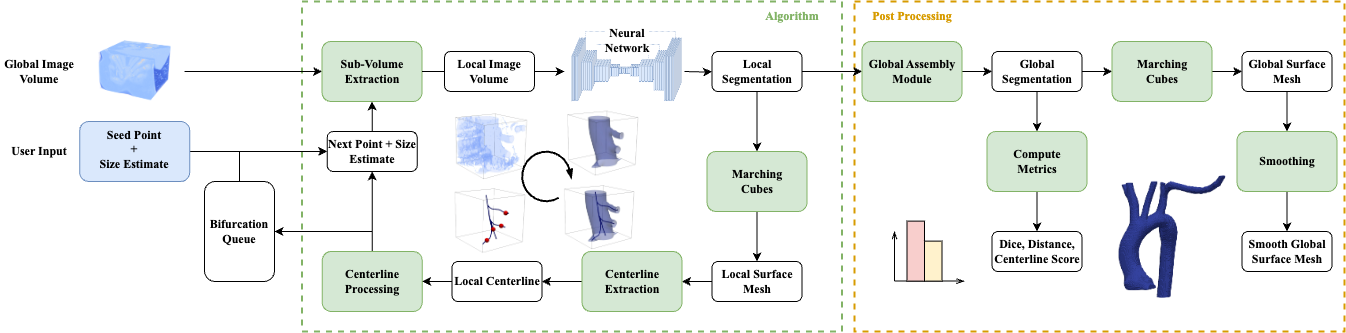
Step-by-step process:
- Initialization: Place seed points manually or from prior centerlines
- Local Segmentation: Extract and segment 3D patches using trained nnU-Net
- Centerline Extraction: Compute local vessel centerlines and orientations
- Step Planning: Determine next position along vessel direction
- Bifurcation Detection: Identify and queue branch points
- Iteration: Repeat until vessel termination or max steps reached
Training Strategy
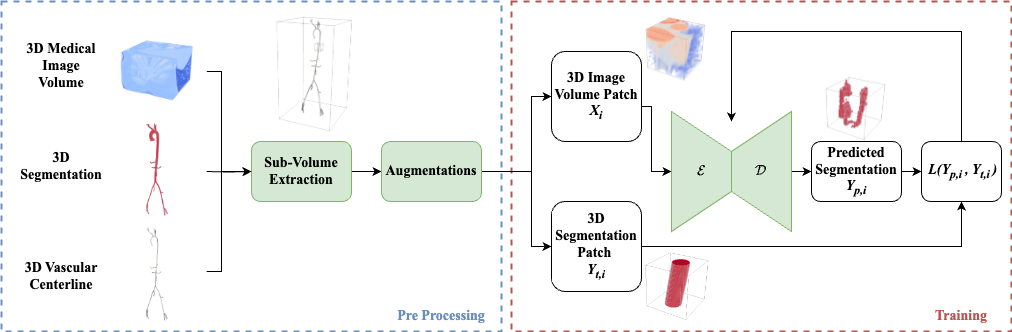
The neural network is trained on local subvolume patches extracted from annotated vessel datasets, enabling:
- Generalization across different vessel scales and orientations
- Efficient training with limited annotated data
- Real-time inference on standard GPUs
Key Algorithmic Innovations
- Adaptive patch sizing: Automatically adjusts to vessel diameter
- Multi-scale processing: Handles vessels from 1mm to 30mm diameter
- Topology preservation: Maintains vessel connectivity during segmentation
- Branch prioritization: Intelligent exploration of vessel trees
Installation
System Requirements
- OS: Linux, macOS, Windows
- Python: ≥3.9 (3.11 recommended)
- GPU: CUDA-compatible GPU with ≥8GB VRAM (recommended for faster inference; can also run on CPU only)
Option 1: pip Installation (Recommended)
pip install seqseg
seqseg --help  # Verify installation
Optional plotting (matplotlib):
pip install "seqseg[viz]"
Option 2: Development Installation
git clone https://github.com/numisveinsson/SeqSeg.git
cd SeqSeg
pip install -e ".[dev]"   # includes pytest
# optional: pip install -e ".[dev,viz]"
Option 3: Conda Environment
conda create -n seqseg python=3.11
conda activate seqseg
pip install seqseg
Dependencies
Core Dependencies:
nnunetv2                 # Deep learning segmentation
torch                    # PyTorch backend
SimpleITK                # Medical image I/O
vtk                      # 3D visualization and processing
PyYAML                   # Configuration management
scipy                    # Scientific computing
Optional Dependencies:
matplotlib               # Plotting and visualization (install with ``pip install "seqseg[viz]"``)
vmtk                    # Advanced vascular modeling tools
Model Weights
Pre-trained weights are required for inference:
- Download:
- Aortic and femoral (MR/CT): Pre-trained models (nnUNet_results folder)
- Coronary CT (CCTA): SeqSeg nnU-Net weights — CT coronary segmentation (
nnUNet_results_coronary.zip,Dataset010_SEQCOROASOCACT)
- Extract: Unzip to desired location
- Reference: Use
-nnunet_results_pathto specify path
Available Models:
Dataset005_SEQAORTANDFEMOMR: Aortic and femoral vessels (MR)Dataset006_SEQAORTANDFEMOCT: Aortic and femoral vessels (CT)Dataset010_SEQCOROASOCACT: Coronary lumen (CT angiography) — nnU-Net weights on Zenodo- Additional models for cerebral and pulmonary vessels available upon request
Usage
Command-line interface
After installation, the seqseg console script is available:
| Command | Purpose |
|---|---|
seqseg --version |
Print the installed package version |
seqseg run batch ... |
Classic SeqSeg batch tracing (nnU-Net + sequential tracking) |
seqseg run single ... |
One volume: stages <outdir>/_seqseg_single_staging/ then runs like batch (--image, --outdir, --model-folder; seeds via --seed or --seeds-json) |
seqseg run plus batch ... |
Global sweep model then SeqSeg (same workflow as python -m seqseg.seqseg_plus) |
seqseg init dataset --path DIR |
Create images/, centerlines/, truths/, and a template seeds.json |
seqseg simvascular init --case-dir DIR |
Create / refresh simvascular/ project layout (optional --source-image to rewrite Images/*.vti) |
seqseg simvascular init-batch --parent-dir DIR [--case-glob '*'] |
Run init on each child directory |
seqseg post global-centerline single |
Global centerline from one segmentation + dataset seeds.json |
seqseg post global-centerline batch |
Same over many segmentations matched by glob |
seqseg config dump --name global |
Print merged YAML as JSON |
seqseg config fingerprint [--name global] [--baseline global_default] |
List YAML keys whose values differ from a baseline packaged config |
seqseg doctor [--model-folder PATH] |
Verify imports (SimpleITK, vtk, nnunetv2, scipy), print nnU-Net env vars, optionally check a trainer folder |
Omitting the subcommand (e.g. seqseg -data_dir ...) is treated as seqseg run batch for backward compatibility.
Python API: stable names are re-exported lazily from the top-level package (see seqseg/__init__.py), including tracing types, batch runners, post-processing helpers, and the high-level helpers below.
High-level API (seqseg.api)
For library use, prefer run_tracing: it accepts a sitk.Image, simple seed definitions, and an nnU-Net trainer folder on disk (weights are still loaded from disk inside the predictor). Seeds can be BranchSeed instances, mappings with old_point / new_point / radius, (old, new, radius) tuples, or (point, radius) pairs (old point is derived along a tangent; see branch_seed_at_point).
import SimpleITK as sitk
from seqseg.api import TracingOptions, branch_seed_at_point, run_tracing

image = sitk.ReadImage("case.nii.gz")  # or any in-memory sitk.Image
opts = TracingOptions(disk_io=False, max_n_steps=200)  # optional: no case output tree
result = run_tracing(
    image,
    [branch_seed_at_point([0.0, 0.0, 5.0], 1.1)],
    "/path/to/nnUNet_results/Dataset005_.../nnUNetTrainer__nnUNetPlans__3d_fullres",
    case="case1",
    config="global",
    options=opts,
    output_folder="",
)
prob = result.assembly.assembly
Lower-level control unchanged: from seqseg import TracingContext, trace_centerline_from_context, AlgorithmConfig (and the in-memory example further below).
In-memory volumes (no SeqSeg output files): pass a sitk.Image as TracingContext.image_file (and optionally seg_file when SEGMENTATION is true), set disk_io=False, and set output_folder to any string (paths are not created when disk_io is false). nnU-Net still loads weights from model_folder on disk. Example:
from seqseg import AlgorithmConfig, TracingContext, trace_centerline_from_context
from seqseg.modules.assembly import create_step_dict
import numpy as np

step = create_step_dict(np.zeros(3), 1.0, np.array([1.0, 0.0, 0.0]), 1.0, None)
step["connection"] = [0, 0]
ctx = TracingContext(
    output_folder="",
    image_file=my_sitk_image,
    case="mem",
    model_folder="/path/to/nnUNet/results/...",
    fold="all",
    potential_branches=[step],
    max_step_size=100,
    max_n_branches=20,
    max_n_steps_per_branch=50,
    global_config=AlgorithmConfig.from_name("global"),
    write_samples=False,
    disk_io=False,
)
result = trace_centerline_from_context(ctx)
prob_seg = result.assembly.assembly
Data Preparation
Directory Structure
your_project/
├── images/              # Medical images (.nii.gz, .mha, .nrrd)
├── seeds.json          # Seed point coordinates
├── centerlines/        # Optional: existing centerlines
└── truths/            # Optional: ground truth segmentations
Supported Image Formats
- NIfTI:
.nii,.nii.gz - MetaImage:
.mha,.mhd - NRRD:
.nrrd - DICOM: Via SimpleITK readers
- Others: Any SimpleITK-supported format
Seed Point Specification
Seeds can be provided via:
Typical seed point radius estimates:
- Coronary vessels:
0.2 cm(2 mm) - Aortic root:
1.1 cm(11 mm)
- JSON file (recommended):
[
    {
        "name": "case_001",
        "seeds": [
            [[-2.07, -2.20, 13.43], [-1.17, -1.34, 12.24], 1.1]
        ]
    }
]
Format: [[start_point], [direction_point], radius_estimate]
- Existing centerlines: Automatic initialization from first points
- Cardiac meshes: Aortic valve (Region 8) and LV (Region 7) labels
Basic Usage
seqseg \
    -data_dir /path/to/data/ \
    -nnunet_results_path /path/to/nnUNet_results/ \
    -nnunet_type 3d_fullres \
    -train_dataset Dataset005_SEQAORTANDFEMOMR \
    -fold all \
    -img_ext .mha \
    -config_name aorta_tutorial \
    -outdir results/
Advanced Usage Examples
Debugging mode (write out intermediate results):
seqseg -data_dir data/ -max_n_steps 100 -max_n_branches 10 -write_steps 1
Batch processing:
seqseg -data_dir data/ -start 0 -stop 50 # Process cases 0-49
Scale adjustment:
seqseg -data_dir data/ -unit mm -scale 0.1 # Model trained in cm, data in mm
Command Line Arguments
| Argument | Type | Default | Description |
|---|---|---|---|
data_dir |
str | - | Path to data directory containing images and seeds.json |
nnunet_results_path |
str | - | Path to nnUNet model weights directory |
nnunet_type |
str | 3d_fullres |
nnUNet model architecture (3d_fullres, 2d) |
train_dataset |
str | Dataset010_SEQCOROASOCACT |
Dataset name used for training (e.g., Dataset005_SEQAORTANDFEMOMR) |
fold |
str | all |
Cross-validation fold (all, 0, 1, 2, 3, 4) |
img_ext |
str | - | Image file extension (.nii.gz, .mha, .nrrd) |
config_name |
str | global |
Configuration file name |
outdir |
str | - | Output directory for results |
unit |
str | cm |
Image coordinate units (mm, cm) |
scale |
float | 1.0 |
Scaling factor for unit conversion |
max_n_steps |
int | 1000 |
Maximum tracking steps |
max_n_steps_per_branch |
int | 100 |
Maximum steps per vessel branch |
max_n_branches |
int | 100 |
Maximum number of branches to follow |
start |
int | 0 |
Starting case index for batch processing |
stop |
int | -1 |
Ending case index (-1 for all) |
write_steps |
int | 0 |
Save intermediate results (0/1) |
extract_global_centerline |
int | 0 |
Extract final centerline (0/1) |
cap_surface_cent |
int | 0 |
Cap vessel surface ends (0/1) |
pt_centerline |
int | 50 |
Centerline point spacing for seed extraction |
num_seeds_centerline |
int | 1 |
Number of seeds for centerline initialization |
Output Files
SeqSeg generates several output files for each processed case. Filenames include {test_name} (e.g. 3d_fullres):
| File | Description |
|---|---|
{case}_segmentation_{test_name}_{steps}_steps.mha |
Final binary segmentation |
{case}_surface_mesh_{test_name}_{steps}_steps.vtp |
Smoothed 3D surface mesh |
{case}_centerline_{test_name}_{steps}_steps.vtp |
Extracted vessel centerlines (only when extract_global_centerline=1) |
{case}_binary_seg_*.mha |
Raw binary segmentation |
{case}_prob_seg_*.mha |
Probabilistic segmentation |
simvascular/ |
Directory with SimVascular-compatible files |
For debugging (when write_steps=1):
volumes/: Local image patchespredictions/: nnUNet predictionscenterlines/: Intermediate centerlinessurfaces/: Intermediate surfacespoints/: Tracking points
Performance & Benchmarks
Aortic segmentation example
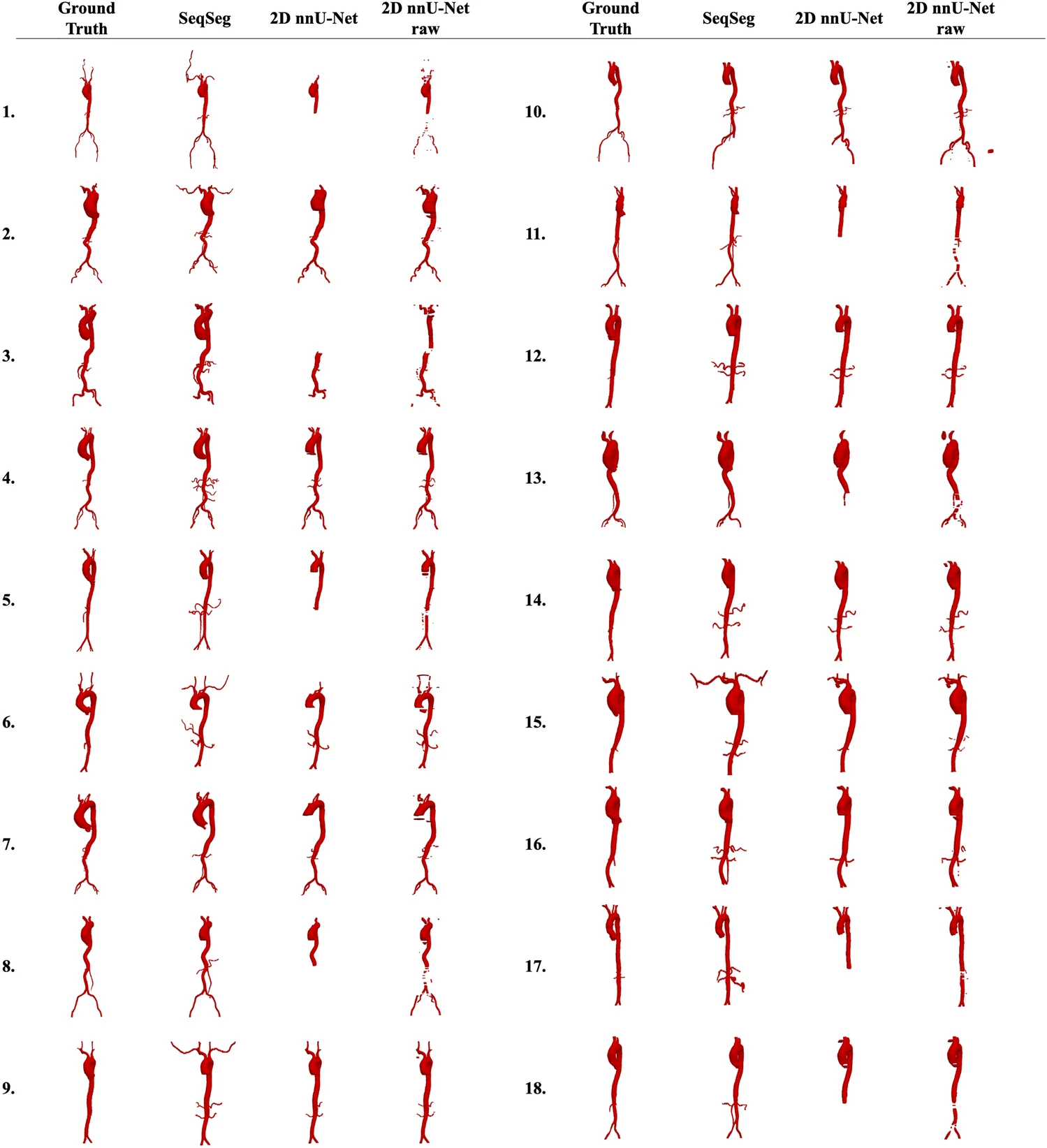
Qualitative comparison on 18 cases: ground truth, SeqSeg, 2D nnU-Net (with post-processing), and 2D nnU-Net raw predictions. SeqSeg tends to preserve a continuous aortic tree and peripheral branches where the 2D nnU-Net baselines are more fragmented or incomplete.
Coronary segmentation example
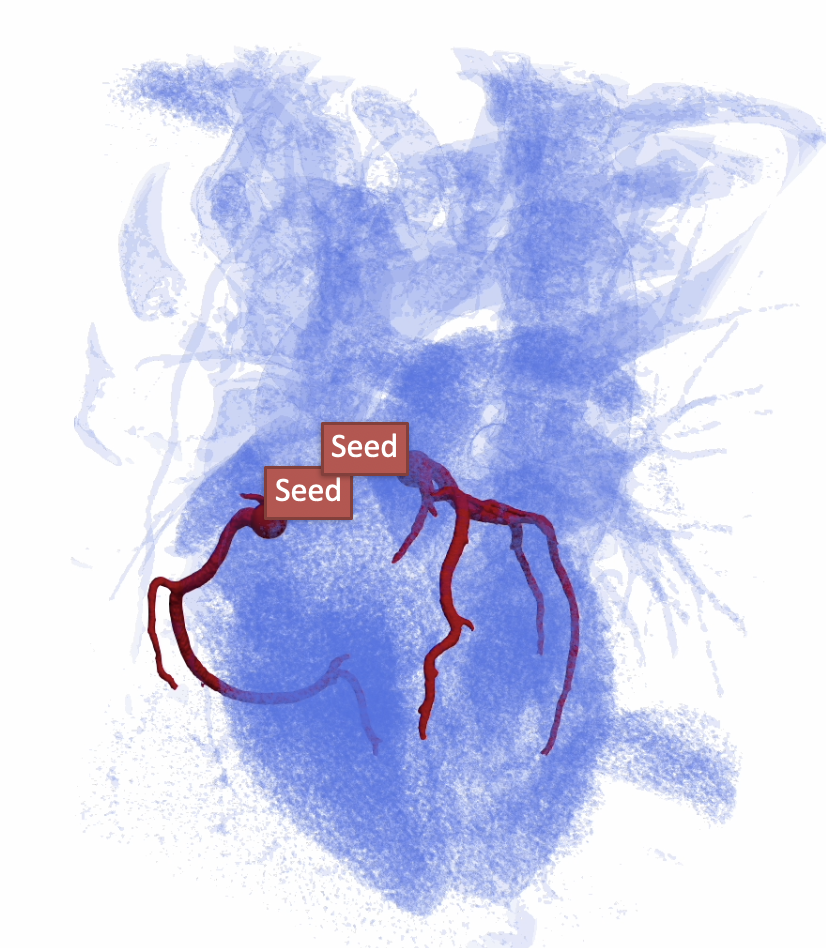
3D visualization: coronary tree segmented with SeqSeg (red) overlaid on the heart (transparent blue). Seed markers show the minimal initialization points used to grow the left and right coronary systems.
Performance Metrics
Processing Times (Local CPU, typical cases):
- Simple vessel (aorta): ~2-5 minutes
- Complex tree (coronary): ~5-15 minutes
- Full cerebral vasculature: ~10-30 minutes
Accuracy (validation on held-out test sets):
- Dice Similarity Coefficient: >0.9
- Hausdorff Distance: <35 pixels
- Centerline accuracy: >0.9
Scalability:
- Tested on images up to 512³ voxels
- Handles vessel diameters from 1mm to 30mm
- Supports vessel trees with 50+ branches
Configuration
Configuration Files
SeqSeg uses YAML configuration files located in seqseg/config/:
| Config File | Purpose |
|---|---|
global.yaml |
Default settings |
aorta_tutorial.yaml |
Aortic vessel segmentation |
global_coro.yaml |
Coronary arteries |
global_cereb.yaml |
Cerebral vessels |
global_pulm.yaml |
Pulmonary vessels |
Key Configuration Parameters
# Volume extraction
VOLUME_SIZE_RATIO: 5              # Local volume size vs radius (4.9 for aorta, 5.5 for coronaries)
MAGN_RADIUS: 1                    # Radius magnification factor
ADD_RADIUS: 0.3                   # Additional radius for volume extraction (mm)
MIN_RADIUS: 0.3                   # Minimum vessel radius before stopping (mm)

# Tracing control
NR_CHANCES: 2                     # Retry attempts for failed steps
NR_ALLOW_RETRACE_STEPS: 5         # Steps allowed inside existing vessels before stopping
PREVENT_RETRACE: True             # Avoid tracing already segmented areas
ASSEMBLY_EVERY_N: 20              # Combine predictions into assembly every N steps

# Early stopping
STOP_PRE: True                    # Enable premature stopping
STOP_RADIUS: 0.46                 # Stop tracing if radius drops below this (mm)
MAX_STEPS_BRANCH: 1000            # Max steps per branch

# Centerline extraction
CENTERLINE_EXTRACTION_VMTK: False # Use VMTK (True) or built-in FMM (False) for centerlines
Custom Configuration
- Copy existing config:
cp seqseg/config/global.yaml seqseg/config/my_config.yaml - Modify parameters for your specific use case
- Run with:
seqseg -config_name my_config ...
Research & Development
Extending SeqSeg
Custom Neural Networks
# Replace nnUNet with custom segmentation model
from seqseg.modules.prediction import CustomPredictor

class MyPredictor(CustomPredictor):
    def predict_patch(self, image_patch):
        # Implement custom prediction logic
        return segmentation_prediction
Training New Models
To train nnUNet models on custom datasets:
- Prepare data in nnUNet format:
nnUNet_raw/Dataset999_MYCUSTOM/
├── imagesTr/          # Training images
├── labelsTr/          # Training labels
├── imagesTs/          # Test images (optional)
└── dataset.json      # Dataset metadata
- Train model:
nnUNetv2_plan_and_preprocess -d 999
nnUNetv2_train 999 3d_fullres 0  # Train fold 0
- Use with SeqSeg:
seqseg -train_dataset Dataset999_MYCUSTOM -fold 0
Integration with Other Tools
SimVascular Integration
SeqSeg outputs are compatible with SimVascular for CFD modeling:
# Output .vtp files can be directly imported into SimVascular
# for mesh generation and flow simulation
SeqSeg also provides a simvascular/Paths/ directory with pre-formatted path files.
3D Slicer Integration
# Load SeqSeg results in 3D Slicer for visualization
import slicer
segmentation = slicer.util.loadSegmentation("result.mha")
Citation
When using SeqSeg, please cite the following paper:
@Article{SveinssonCepero2024,
author={Sveinsson Cepero, Numi
and Shadden, Shawn C.},
title={SeqSeg: Learning Local Segments for Automatic Vascular Model Construction},
journal={Annals of Biomedical Engineering},
year={2024},
month={Sep},
day={18},
issn={1573-9686},
doi={10.1007/s10439-024-03611-z},
url={https://doi.org/10.1007/s10439-024-03611-z},
}
Release history Release notifications | RSS feed


Download files
Download the file for your platform. If you're not sure which to choose, learn more about installing packages.
Source Distribution
Built Distribution
Filter files by name, interpreter, ABI, and platform.
If you're not sure about the file name format, learn more about wheel file names.
Copy a direct link to the current filters
File details
Details for the file seqseg-2.0.0.tar.gz.
File metadata
- Download URL: seqseg-2.0.0.tar.gz
- Upload date:
- Size: 169.9 kB
- Tags: Source
- Uploaded using Trusted Publishing? No
- Uploaded via: twine/6.2.0 CPython/3.9.6
File hashes
| Algorithm | Hash digest | |
|---|---|---|
| SHA256 |
d775c8be163884333c45c327283b590251082c6ab3208d668e59d76a19f16a93
|
|
| MD5 |
19e97b29f9b2a9a3dc93d1e518e9fbbe
|
|
| BLAKE2b-256 |
4d3de8411e042c47ce9511c3f2fc260b2703440f33a6eea8d6d667234e681dd8
|
File details
Details for the file seqseg-2.0.0-py3-none-any.whl.
File metadata
- Download URL: seqseg-2.0.0-py3-none-any.whl
- Upload date:
- Size: 205.7 kB
- Tags: Python 3
- Uploaded using Trusted Publishing? No
- Uploaded via: twine/6.2.0 CPython/3.9.6
File hashes
| Algorithm | Hash digest | |
|---|---|---|
| SHA256 |
b0c75a81515620801946fe8792b52f6f8f0ec8d97d50c71b88452e1e0c88c291
|
|
| MD5 |
44426e6e006277b8f651826a80d38099
|
|
| BLAKE2b-256 |
c8a020315a28b5b5f39f3c017eec3d0659f3c083569d744c8e5306316d11714d
|






