
This is the nanocap pipeline from the Sequana project




- Overview:
Adaptive-sampling nanopore quality control. Maps long reads onto a reference (raw and fastp-filtered), computes per-base coverage with sequana_coverage, and aggregates the results in a summary.html entry point and a MultiQC report.
- Input:
A directory of single-end FastQ files (*.fastq.gz) and a reference FASTA.
- Output:
summary.html (main entry point), per-sample HTML coverage reports (raw + filtered), a combined nanocap.html per sample, and a global MultiQC report.
- Status:
production
- Citation:
Cokelaer et al, (2017), ‘Sequana’: a Set of Snakemake NGS pipelines, Journal of Open Source Software, 2(16), 352, JOSS DOI doi:10.21105/joss.00352
Installation
Install the pipeline with pip:
pip install sequana_nanocap --upgrade
You also need the tools listed in the Requirements section below. The easiest way to get them is the bundled conda environment:
conda env create -f environment.yml
conda activate nanocap
Apptainer images referenced in config.yaml are an alternative to installing the tools locally — pass --apptainer-prefix <dir> to sequana_nanocap (see Usage).
Usage
sequana_nanocap --help
sequana_nanocap --input-directory DATAPATH --reference-file reference.fa
This creates a working directory with the Snakemake workflow and a generated config.yaml. The reference file is copied into the references/ sub-directory of the working directory (for book keeping) and the pipeline uses that copy. Launch the pipeline with:
cd nanocap
bash nanocap.sh     # local run (bash, not sh — pipefail is a bashism)
To run with apptainer containers (no local tool install needed):
sequana_nanocap --input-directory DATAPATH \
                --reference-file reference.fa \
                --apptainer-prefix ~/.sequana/apptainers
cd nanocap
bash nanocap.sh
If you are familiar with Snakemake, you can edit the generated files and invoke Snakemake directly:
snakemake -s nanocap.rules --configfile config.yaml --cores 4 --stats stats.txt
Requirements
This pipeline requires the following executables:
fastp
graphviz
minimap2
multiqc
samtools
sequana_coverage (ships with sequana)
All of them can be installed via conda using the bundled environment.yml, or pulled on demand via the apptainer images declared in config.yaml.
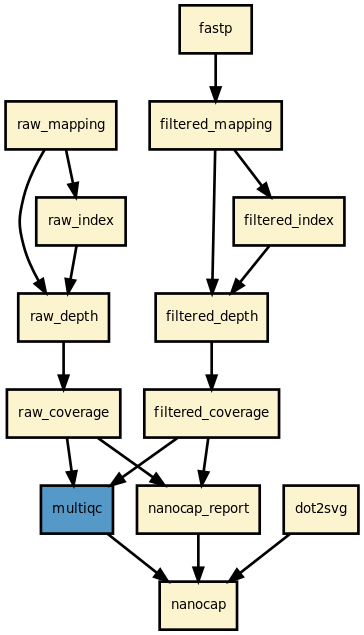
Details
For each input FastQ the pipeline runs two branches in parallel:
raw — map reads to the reference with minimap2 (-ax map-ont), sort with samtools, index, compute per-base depth with samtools depth, run sequana_coverage for ROI detection.
filtered — same flow, after quality/length filtering with fastp (defaults: -q 0 -e 9 -l 1000).
A per-sample {sample}/nanocap.html page aggregates both coverage reports (with a link back to summary.html), and a top-level multiqc/multiqc_report.html combines the fastp and sequana_coverage outputs across all samples.
Once the pipeline is finished, open summary.html in the working directory. This is the main entry point. It follows the standard Sequana report layout and contains:
an overview with the (relative) path to the reference and a link to the MultiQC report;
a per-sample table: number of reads before and after fastp filtering, percentage of reads kept, number of mapped alignments (raw and filtered), and links to the Nanocap, fastp and sequana_coverage (raw and filtered) reports;
the workflow (DAG), with links to the Snakemake and configuration files;
the dependencies and the command used to set up the pipeline.
Rules and configuration details
Here is the latest documented configuration file to be used with the pipeline. Each rule used in the pipeline may have a section in the configuration file.
Changelog
Version |
Description |
|---|---|
0.6.0 |
|
0.5.0 |
|
0.3.0 |
|
0.2.0 |
|
0.1.0 |
First release. |
1 maintainer

Metadata
1 maintainer
Release files for sequana-nanocap 0.6.0
For a detailed explanation of source distributions (sdists) and built distributions (wheels), please see the package formats documentation.
Source distribution (sdist)
| File | Size | Uploaded | Provenance | Actions |
|---|---|---|---|---|
| sequana_nanocap-0.6.0.tar.gz | 71.5 kB | Without provenance | Details for sequana_nanocap-0.6.0.tar.gz |
Release files / sequana_nanocap-0.6.0.tar.gz
| Download URL | sequana_nanocap-0.6.0.tar.gz |
|---|---|
| Size | 71.5 kB |
| Tags | Source |
|
SHA-256 checksum How to use checksums |
8912881139498513beb2a4fe81fdf32c8d483190db5d52beeb6ff0ce184ee6cc
|
|
BLAKE2b-256 checksum How to use checksums |
1086c8dc8ceac31391d6080809b93879d7635994376a6bfe7cca5d28252db07b
|
| Upload date | |
|
Uploaded using Trusted Publishing? What is trusted publishing? |
No |
| Uploaded via |
twine/6.2.0 CPython/3.11.15
|
Security for sequana-nanocap 0.6.0
Provenance
Provenance describes where a file came from. On PyPI, provenance is shared via attestations, which provide a verifiable record of the build or publishing details. View details, limitations and caveats.
No provenance found
None of the files in this release were uploaded with provenance metadata.
A note on package security
PyPI is a repository for distributing packages, not a service for auditing them. While third-party security researchers and our staff do their best to detect and remove malicious packages, PyPI cannot guarantee the quality, security or suitability of any given package.
To learn more about protecting yourself from malicious actors, visit our package security documentation.













