




This is the superin pipeline from the Sequana project
- Overview:
Study the insertions and deletions (INDELs) of super integrons (SI) in Nanopore reads
- Input:
filtered Nanopore FASTQ files and BAM files (e.g. from sequana_nanocap), a samplesheet, the SI reference and the plasmid references (FASTA)
- Output:
INDEL tables (CSV), plots (PNG), reads with INDELs (FASTQ/FASTA), BAM files, and an HTML report
- Status:
beta
- Citation:
Cokelaer et al, (2017), ‘Sequana’: a Set of Snakemake NGS pipelines, Journal of Open Source Software, 2(16), 352, JOSS DOI doi:10.21105/joss.00352
Principle
Excisions of cassettes from a super integron (SI) can be seen from two sides:
Deletions are found directly in the reads mapped onto the SI (reads of type SI1-D-SI2).
Insertions are found in the reads mapped onto the plasmid that received the excised sequence (reads of type P1-I-P2). The inserted sequences are then extracted and mapped back onto the SI to find where they come from.
Only large INDELs are kept (see INDELs_filter below). Low-complexity INDELs (e.g. GTGTGT…), most probably Nanopore errors, are discarded using the Shannon entropy of their sequence.
Installation
sequana_superin is based on Python3. Install the package as follows:
pip install sequana_superin --upgrade
or from the sources:
poetry install
Third-party software (minimap2, samtools, graphviz) can be installed with conda (see environment.yml) or used through Apptainer images (see below).
Usage
Three inputs are required in addition to the reads:
- --samplesheet
a CSV file with 3 columns: sample, plasmid, reference. sample must match the FASTQ file names (SAMPLE.fastq.gz) and the BAM file names (SAMPLE.sorted.bam). plasmid is the name of the plasmid sequence in the reference and reference is the FASTA file (without directory) containing that plasmid. If no plasmid was used, leave the plasmid column empty: only the analysis on the SI is performed.
- --SI-reference-file
the FASTA file of the super integron.
- --plasmids-directory
the directory where the plasmid references listed in the samplesheet are found.
Example of samplesheet:
sample,plasmid,reference
Y305,pV827,pV827.fa
Y308,pV830,pV830.fa
Y306,pV827,pV827.fa
Initialise the pipeline:
sequana_superin --input-directory data/fastq --input-bam-pattern data/bam \
    --samplesheet samplesheet.csv --SI-reference-file SI.fa \
    --plasmids-directory references/
--input-directory is the directory with the FASTQ files and --input-bam-pattern the directory with the BAM files. Use --help to see all the options (e.g. SLURM options).
The FASTQ files are the filtered reads produced by sequana_nanocap, i.e. the files nanocap/SAMPLE/fastp/SAMPLE.fastq.gz (not the raw reads). The pipeline expects them in a single flat directory, named SAMPLE.fastq.gz, where SAMPLE matches the sample names of the BAM files and of the samplesheet. Since nanocap stores one sub-directory per sample, gather them with symbolic links:
mkdir -p data/fastq
for f in nanocap/*/fastp/*.fastq.gz; do ln -s "$(realpath $f)" data/fastq/; done
This creates a directory (called superin by default) with the pipeline and its configuration file. The references and the samplesheet are copied in this directory for book keeping. You then need to execute the pipeline:
cd superin
bash superin.sh  # for a local run
This launches a snakemake pipeline. If you are familiar with snakemake, you can retrieve the pipeline itself and its configuration files and then execute the pipeline yourself with specific parameters:
snakemake -s superin.rules -c config.yaml --cores 4 --stats stats.txt
Or use sequanix interface.
Usage with apptainer
With Apptainer, initiate the working directory as follows:
sequana_superin --apptainer-prefix ~/.sequana/apptainers [other options]
Images are downloaded once in the directory given by --apptainer-prefix. Then:
cd superin
bash superin.sh
If you decide to use snakemake manually, do not forget to add the apptainer options:
snakemake -s superin.rules -c config.yaml --cores 4 --stats stats.txt --use-apptainer --apptainer-prefix ~/.sequana/apptainers --apptainer-args "-B /home:/home"
By default, the home is already set for you. Additional binding paths can be set using environment variables e.g.:
export APPTAINER_BINDPATH=" -B /pasteur"
Requirements
This pipeline requires the following executables:
minimap2
samtools
graphviz
and the Python packages sequana, sequana_pipetools, pysam, pandas, matplotlib and plotly.
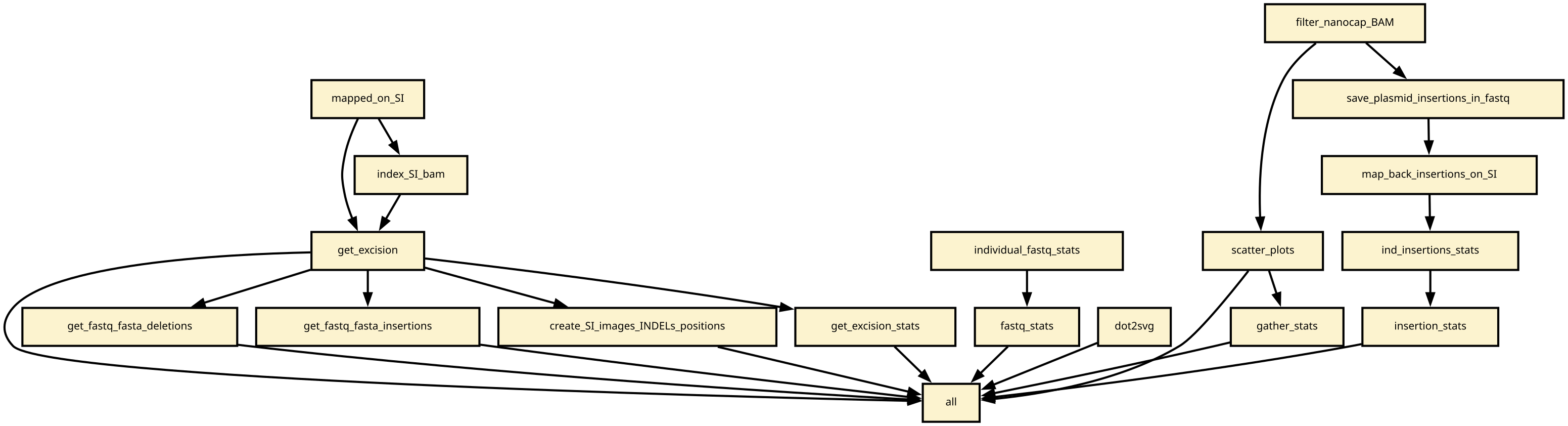
Details
The pipeline runs the following steps for each sample of the samplesheet:
Map onto the SI: the reads are mapped onto the SI reference with minimap2 (SI/SAMPLE.sorted.bam).
Deletions and insertions on the SI: INDELs are extracted from the BAM file and filtered (length, entropy, position). Reads with INDELs are saved as FASTQ and FASTA files in SI/fastq and SI/fasta.
Plasmid analysis (only if plasmids are given in the samplesheet): the BAM files are filtered to keep the reads mapped on the plasmid (filtered_BAM_files). Insertions and deletions are extracted and shown as scatter plots (position on the plasmid versus length) in plasmids/. The sequences of the insertions are mapped back onto the SI (mapped_insertions_on_SI).
Summary tables (CSV) and an HTML report (summary.html) combining the tables and figures, including the localisation of the INDELs along the SI.
Main outputs:
File or directory |
Description |
|---|---|
summary.html |
final report |
SI/distribution_entropy_of_deletions_insertions_on_SI.csv |
INDEL counts on the SI per sample |
SI/position_deletions.png, position_insertions.png |
INDEL positions on the SI |
SI/fastq, SI/fasta |
reads with deletions/insertions on the SI |
plasmids/deletions_insertions_stats.csv |
INDEL counts on the plasmids per sample |
plasmids/SAMPLE_*_distribution.{png,csv} |
INDELs on the plasmids |
mapped_insertions_on_SI/insertions_summary.csv |
plasmid insertions mapped back onto the SI |
nanocap_filtered_fastqs/stats.csv |
statistics on the input FASTQ files |
Rules and configuration details
Here is the latest documented configuration file to be used with the pipeline. Each rule used in the pipeline may have a section in the configuration file.
The main parameters are:
minimap2: threads and options (default -x map-ont) used to map onto the SI.
INDELs_filter:
minimal_indel_length (default 100): INDELs shorter than this (bp) are ignored.
entropy_above (default 1.2): INDELs with a lower sequence entropy are ignored (natural logarithm; maximum is ln(4)=1.39).
SI_start_position (default 10500): INDELs located before this position on the SI are ignored.
Changelog
Version |
Description |
|---|---|
0.1.2 |
Fix README rendering on PyPI; document that the input FASTQ files are the nanocap fastp-filtered reads (README and --input-directory help). |
0.1.1 |
Fix deleted sequences taken from the first contig of the reference instead of the contig the read is mapped on. |
0.1.0 |
First release. |
Contribute & Code of Conduct
To contribute to this project, please take a look at the Contributing Guidelines first. Please note that this project is released with a Code of Conduct. By contributing to this project, you agree to abide by its terms.
1 maintainer

Metadata
1 maintainer
Release files for sequana-superin 0.1.2
For a detailed explanation of source distributions (sdists) and built distributions (wheels), please see the package formats documentation.
Source distribution (sdist)
| File | Size | Uploaded | Provenance | Actions |
|---|---|---|---|---|
| sequana_superin-0.1.2.tar.gz | 174.6 kB | Without provenance | Details for sequana_superin-0.1.2.tar.gz |
Release files / sequana_superin-0.1.2.tar.gz
| Download URL | sequana_superin-0.1.2.tar.gz |
|---|---|
| Size | 174.6 kB |
| Tags | Source |
|
SHA-256 checksum How to use checksums |
e722ec894094eb4a11a5552ca27b623550d3de3e9257bcc00783d1ef193531fa
|
|
BLAKE2b-256 checksum How to use checksums |
b13e5f0d7a46c9070f3cacf25a5b2159cf393e51f658ddbff56d75d3da63624b
|
| Upload date | |
|
Uploaded using Trusted Publishing? What is trusted publishing? |
No |
| Uploaded via |
twine/6.2.0 CPython/3.11.15
|
Security for sequana-superin 0.1.2
Provenance
Provenance describes where a file came from. On PyPI, provenance is shared via attestations, which provide a verifiable record of the build or publishing details. View details, limitations and caveats.
No provenance found
None of the files in this release were uploaded with provenance metadata.
A note on package security
PyPI is a repository for distributing packages, not a service for auditing them. While third-party security researchers and our staff do their best to detect and remove malicious packages, PyPI cannot guarantee the quality, security or suitability of any given package.
To learn more about protecting yourself from malicious actors, visit our package security documentation.














