
A simple serial based python library to control arduino with (or without) 74hc595 microprocessor

Project description
Serialduino
Easy to use python arduino lib with (optional) 74HC595 microprocessor
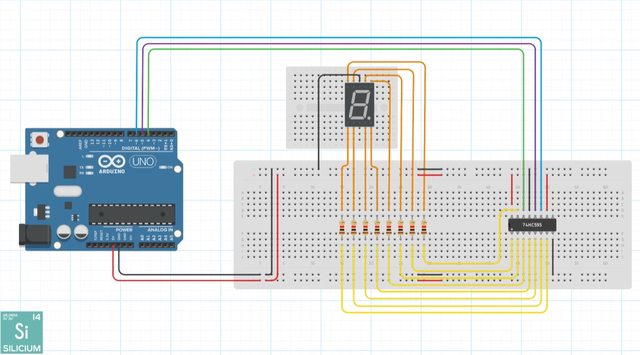
Serialduino makes it easy to control your arduino using python
- Install .ino program
- Install package with pip
- ✨Magic ✨
Installation
Dillinger requires pyserial to run.
pip install serialduino
Usage
Initialize board
from serialduino import Arduino
board = Arduino(port="COM3", baudrate=9600, timeout=.1)
Create clock:
from serialduino import Arduino
board = Arduino(port="COM3", baudrate=9600, timeout=.1)

def tick(arduino: Arduino, arg1, arg2):
    #Do stuff
    return (arg1, arg2) #IMPORTANT

#Example usage
board.tick(tick, (1, 2), 5)
Send message: (not to be used, but-in functions are made for something)
from serialduino import Arduino, protocols
board = Arduino(port="COM3", baudrate=9600, timeout=.1)
#Example usage
board.setup_microprocessor(4, 5, 6)
board.send_message(protocols["MP_SHIFT_OUT"], 5)
For more infos see built-in functions and docstring
Arduino code
//Configurable
unsigned int PIN_DS_DATA = 4;
unsigned int PIN_STCP_LATCH = 5;
unsigned int PIN_SHCP_CLOCK = 6;

bool MICROPROCESSOR_ENABLED = false;

#define SERIAL_BAUDRATE 9600
#define SERIAL_TIMEOUT 1

//Not configurable
#define UNKNOWN_PIN 0xFF

#define MP_SHIFT_OUT 0
#define MP_WRITE 1
#define DIGITAL_READ 2
#define DIGITAL_WRITE 3
#define PIN_MODE 4
#define GET_PIN_MODE 5
#define PING 6
#define MP_READ_GLOBAL 7
#define MP_READ_PIN 8
#define SEND_PULSE_READ_ECHO 9
#define SEND_IMPULSION 10
#define MP_SETUP 11

//Store pins binary
const int pinValues[] = {1, 2, 4, 8, 16, 32, 64, 128};

//Max array length for message
const unsigned int MAX_MESSAGE_LENGTH = 12;

//Buffer for serial message
char message[MAX_MESSAGE_LENGTH][MAX_MESSAGE_LENGTH];
//Array positions
unsigned int message_pos = 0;
unsigned int array_pos = 0;

//Current binary 0-255
int currentMicroprocessorValue = 0;

const String sep_string = String(":");

//Message id
int msg;
//Used often so put in variable
int pin;
int values[MAX_MESSAGE_LENGTH];

//Util function to get pin mode
uint8_t getPinMode(uint8_t pin)
{
  uint8_t bit = digitalPinToBitMask(pin);
  uint8_t port = digitalPinToPort(pin);

  if (NOT_A_PIN == port) return UNKNOWN_PIN;

  if (0 == bit) return UNKNOWN_PIN;

  if (bit & bit - 1) return UNKNOWN_PIN;

  volatile uint8_t *reg, *out;
  reg = portModeRegister(port);
  out = portOutputRegister(port);

  if (*reg & bit)
    return OUTPUT;
  else if (*out & bit)
    return INPUT_PULLUP;
  else
    return INPUT;
}

//Set microprocessor's binary
void setMicroprocessorState(int val) {
  //Stops if microporcessor not enabled
  if(!MICROPROCESSOR_ENABLED)
    return;

  //Make sure latch is low
  digitalWrite(PIN_STCP_LATCH, 0);
  //Send binary at interval, see 74hc595 doc
  shiftOut(PIN_DS_DATA, PIN_SHCP_CLOCK, LSBFIRST, val);
  //Put latch on high to apply changes
  digitalWrite(PIN_STCP_LATCH, 1);
}

//Set specific microprocessor's pin status
void setMicroprocessorPin(int pin, int val) {
  //Stops if microporcessor not enabled
  if(!MICROPROCESSOR_ENABLED)
    return;

  //Get current pin's value
  int currentPinValue = getMicroprocessorPin(pin);

  //Stops if current value is equal to requested value (no change needed)
  if(currentPinValue != val) {

    //Add / substract pin value to total
    currentMicroprocessorValue += (val == 1 ? 1 : -1) * pinValues[pin];

    //Send changes
    setMicroprocessorState(currentMicroprocessorValue);
  }
}

//Send a pulse of x millis in a pin
void sendPulse(int pin, int duration) {
  //Make sure pin is low
  digitalWrite(pin, LOW);
  delayMicroseconds(2);

  //Set high and wait time
  digitalWrite(pin, HIGH);
  delayMicroseconds(duration);

  //Set back to low
  digitalWrite(pin, LOW);
}

//Get a microprocessor pin's value
int getMicroprocessorPin(int pin) {
  //Stops if microporcessor not enabled
  if(!MICROPROCESSOR_ENABLED)
    return 0;

  return (currentMicroprocessorValue >> pin) & 1;
}
//Handle a
void handleMessage(char data[MAX_MESSAGE_LENGTH][MAX_MESSAGE_LENGTH]) {
  msg = atoi(data[0]);

  //Handle message differently depending on id
  switch(msg) {
    //Set microprocessor binary
    case MP_SHIFT_OUT:
      //Stops if microporcessor not enabled
      if(!MICROPROCESSOR_ENABLED) {
        Serial.println("mp_not_setup");
        return;
      }

      //Change current value
      currentMicroprocessorValue = atoi(data[1]);
      //Apply changes
      setMicroprocessorState(currentMicroprocessorValue);
      Serial.println(msg + sep_string + currentMicroprocessorValue);
      break;
    //Set microprocessor pin
    case MP_WRITE:
      //Stops if microporcessor not enabled
      if(!MICROPROCESSOR_ENABLED) {
        Serial.println("mp_not_setup");
        return;
      }

      //Apply changes
      pin = atoi(data[1]);
      values[0] = atoi(data[2]);
      setMicroprocessorPin(pin, values[0]);
      Serial.println(msg + sep_string + pin + sep_string + values[0]);
      break;
    //Read digital pin
    case DIGITAL_READ:
      //Read pin id
      pin = atoi(data[1]);

      //Send message back through serial
      Serial.println(msg + sep_string +  pin + sep_string + digitalRead(pin));
      break;
    //Write digital pin
    case DIGITAL_WRITE:
      //Read pin id
      pin = atoi(data[1]);

      //Check if pin is in output mode, else set in output mode
      if(getPinMode(pin) != OUTPUT)
        pinMode(pin, OUTPUT);

      //Apply changes and send callback
      values[0] = atoi(data[2]);
      digitalWrite(pin, values[0]);
      Serial.println(msg + sep_string + pin + sep_string + values[0]);
      break;
    //Set digital pin mode
    case PIN_MODE:
      //Read pin id
      pin = atoi(data[1]);
      //Apply changes
      values[0] = atoi(data[2]);
      pinMode(pin, values[0]);
      Serial.println(msg + sep_string + pin + sep_string + values[0]);
      break;
    //Get digital pin mode
    case GET_PIN_MODE:
      //Read pin id
      pin = atoi(data[1]);

      //Send message back through serial
      Serial.println(msg + sep_string + pin + sep_string + getPinMode(pin));
      break;
    //Ping to init communication
    case PING:
      //Pong
      Serial.println("Pong :)");
      break;
    //Read microprocessor binary
    case MP_READ_GLOBAL:
    //Stops if microporcessor not enabled
      if(!MICROPROCESSOR_ENABLED) {
        Serial.println("mp_not_setup");
        return;
      }
      //Send message back through serial
      Serial.println(msg + sep_string + currentMicroprocessorValue);
      break;
    //Read microprocessor value
    case MP_READ_PIN:
      //Stops if microporcessor not enabled
      if(!MICROPROCESSOR_ENABLED) {
        Serial.println("mp_not_setup");
        return;
      }
      //Read pin id
      pin = atoi(data[1]);

      //Send message back through serial
      Serial.println(msg + sep_string + pin + sep_string + getMicroprocessorPin(pin));
      break;
    //Get pulse duration on pin
    case SEND_PULSE_READ_ECHO:
      //Read pin id
      pin = atoi(data[1]);
      values[0] = atoi(data[2]);
      values[1] = atoi(data[3]);

      sendPulse(pin, values[1]);

      //Send message back through serial
      Serial.println(msg + sep_string + pin + sep_string + getPulseIn(values[0]));
      break;
    //Send impulsion of X milliseconds on pin
    case SEND_IMPULSION:
      //Read pin id
      pin = atoi(data[1]);
      values[0] = atoi(data[2]);

      //Send pulse
      sendPulse(pin, values[0]);

      //Send data back through serial
      Serial.println(msg + sep_string + pin + sep_string + values[0]);
      break;
    //Setup microprocessor
    case MP_SETUP:
      //Read data
      PIN_DS_DATA = atoi(data[1]);
      PIN_STCP_LATCH = atoi(data[2]);
      PIN_SHCP_CLOCK = atoi(data[3]);

      //Set pins mode
      pinMode(PIN_DS_DATA, OUTPUT);
      pinMode(PIN_STCP_LATCH, OUTPUT);
      pinMode(PIN_SHCP_CLOCK, OUTPUT);

      MICROPROCESSOR_ENABLED = true;

      //Reset state
      setMicroprocessorState(0);

      //Send callback through serial
      Serial.println(msg + sep_string + PIN_DS_DATA + sep_string + PIN_STCP_LATCH + sep_string + PIN_SHCP_CLOCK);
  }
}

//Get pin's high time
int getPulseIn(int pin) {
  return pulseIn(pin, HIGH);
}

//Handle serial input
void handleSerial() {
  //If data in Serial
  if(Serial.available() > 0) {
    //Get recieved char
    char c = char(Serial.read());

    //Check if $ (stop char)
    if(c == 36 /*$*/) {
      //Handles message
      handleMessage(message);

      //Clear buffer / array positions
      clearMessage();
    } else {
      //Add char to message
      appendMessage(c);
    }
  }
}

//Clear message array
void clearMessage() {
  //Clear array
  memset(message, 0, sizeof message);
  //Reset array positions
  message_pos = 0;
  array_pos = 0;
}

//Handle new char
void appendMessage(char c) {
  //If char is : (split sign)
  if(c == 58) {
    //Add 1 to array pos
    array_pos ++;
    //Set text pos to 0
    message_pos = 0;
  } else {
    //Set char in message array
    message[array_pos][message_pos] = c;
    //Set text pos to 0
    message_pos ++;
  }
}

//Setups serial communication
void initSerial() {
  Serial.begin(SERIAL_BAUDRATE);
  Serial.setTimeout(SERIAL_TIMEOUT);
}

//Arduino setup
void setup() {
  //Init serial
  initSerial();
}

//Arduino loop
void loop() {
  //Handle serial inputs
  handleSerial();
}
Release history Release notifications | RSS feed


Download files
Download the file for your platform. If you're not sure which to choose, learn more about installing packages.
Source Distribution
Built Distribution
Filter files by name, interpreter, ABI, and platform.
If you're not sure about the file name format, learn more about wheel file names.
Copy a direct link to the current filters
File details
Details for the file serialduino-0.2.tar.gz.
File metadata
- Download URL: serialduino-0.2.tar.gz
- Upload date:
- Size: 8.7 kB
- Tags: Source
- Uploaded using Trusted Publishing? No
- Uploaded via: twine/4.0.2 CPython/3.9.8
File hashes
| Algorithm | Hash digest | |
|---|---|---|
| SHA256 |
6034b70af41eed261e6d1754fb20146fefa08696bd2cd5d034cd32ba3d3e84f9
|
|
| MD5 |
a64a9d1c6ec888cadda1b6100d2500e6
|
|
| BLAKE2b-256 |
510388b1b875de632fa8dce43922e8ea5ccb61e71a8d5f85d2274454bf4a76cf
|
File details
Details for the file serialduino-0.2-py3-none-any.whl.
File metadata
- Download URL: serialduino-0.2-py3-none-any.whl
- Upload date:
- Size: 8.8 kB
- Tags: Python 3
- Uploaded using Trusted Publishing? No
- Uploaded via: twine/4.0.2 CPython/3.9.8
File hashes
| Algorithm | Hash digest | |
|---|---|---|
| SHA256 |
e5a8250eb9a16daacdc5220294c4bdc76d8b53c21f7961de5b56e94a0b878733
|
|
| MD5 |
b67daee89733c39741d81bf32376483f
|
|
| BLAKE2b-256 |
abedeaff00d4b6403bbb0a62a6f550e35195ecaebfb5f73df49afa2b734ed918
|






