
servebench



Load-test any OpenAI-compatible LLM endpoint (Ollama, llama.cpp server, vLLM, SGLang, your own engine) and get the numbers that matter for serving: TTFT, TPOT, inter-token latency, throughput and goodput, at p50/p90/p99, over a sweep of load levels, with charts and side-by-side comparison of runs.
No GPU or engine install is needed on the client: it is one async Python process talking HTTP.
Quickstart
Installation
Install from PyPI:
pip install servebench
Or with uv:
uv tool install servebench
Instant Local Benchmark (servebench quick)
servebench quick looks for Ollama, llama.cpp, LM Studio, vLLM, and SGLang on their usual ports,
picks the loaded model, measures, and answers in plain language (~1 minute):
servebench quick
A real run (Ollama with OLLAMA_NUM_PARALLEL=4 on a laptop):
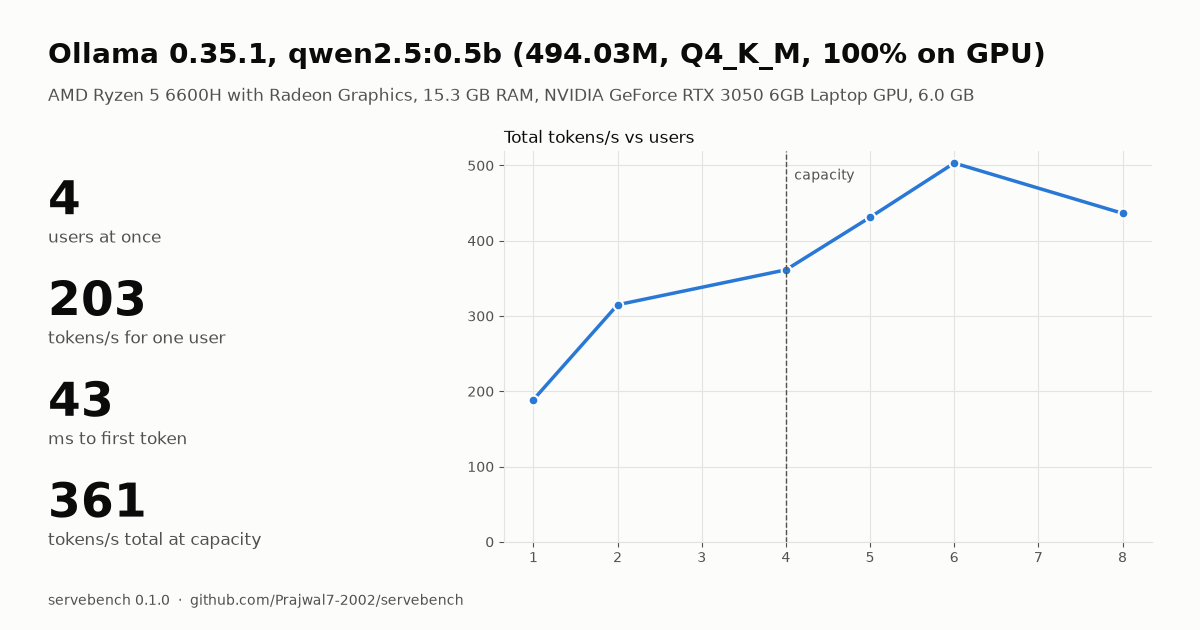
servebench quick: Ollama 0.35.1 at http://127.0.0.1:11434/v1, model qwen2.5:0.5b
...
Ollama 0.35.1, qwen2.5:0.5b on AMD Ryzen 5 6600H, 15.3 GB RAM, NVIDIA GeForce RTX 3050 6GB Laptop GPU
One user:    first token in 43 ms, then 203 tokens/s
Capacity:    4 users at once (first token < 500 ms and >= 20 tokens/s each, for 90% of requests)
At 4 users:  361 tokens/s in total, 136 tokens/s each, first token p99 161 ms
With default Ollama settings it also explains why the limit is where it is ("requests
queue: the server works on about 1 at once") and suggests the fix. Then
servebench share <run.json> prints a Markdown table to paste into a post or issue and
makes a result card:
Full control:
# sweep a running server, e.g. Ollama (on Windows use 127.0.0.1, not localhost)
servebench run --url http://127.0.0.1:11434/v1 --model qwen2.5:0.5b \
    --concurrency 1,2,4,8 --input-len 256 --output-len 128 --out runs/ollama.json

# how many concurrent users fit your latency targets?
servebench find-capacity --url http://127.0.0.1:11434/v1 --model qwen2.5:0.5b \
    --out runs/ollama-cap.json

# compare multiple runs side by side, with charts and GPU telemetry
servebench compare-models runs/model-q4.json runs/model-fp16.json

# CI performance regression gate (fails with exit code 1 on regressions)
servebench check candidate.json --baseline baseline.json \
    --max-ttft-degradation-pct 15.0 --max-throughput-degradation-pct 10.0

# live terminal UI monitor (GPU wattage, VRAM, Tokens/Joule, queue depth)
servebench top --url http://127.0.0.1:11434/v1

# hardware roofline model (MFU %, MBU %, operational intensity, ASCII curve)
servebench roofline runs/ollama.json --gpu-name "RTX 3050 Laptop"

# automated engine auto-tuner & launch flag generator
servebench tune runs/ollama.json --engine ollama

# generate interactive HTML report
servebench report runs/ollama.json runs/llamacpp.json --out report.html
Python API
Use Servebench programmatically in your own evaluation harnesses or notebooks:
import servebench

res = servebench.benchmark(
    url="http://127.0.0.1:8000/v1",
    model="llama-3-8b",
    levels=[1, 2, 4, 8],
    preset="chat",
    gpu_telemetry=True,
)
print(f"Peak: {max(lv.summary.output_throughput for lv in res.levels):.1f} tok/s")

# Evaluate CI performance regression
report = servebench.check_regression("candidate.json", "baseline.json")
assert report.passed, "Serving latency regressed!"
Hardware Roofline Analysis (servebench roofline)
Analyze whether your LLM serving bottleneck is Memory-Bandwidth Bound (typical during token generation / decode) or Compute Bound (large-batch prefill), and calculate your exact hardware utilization:
- MBU (Memory Bandwidth Utilization %): Percentage of theoretical memory bus throughput achieved reading model weights ($\text{tok/s} \times \text{model_bytes} / \text{bus_bw}$).
- MFU (Model FLOPs Utilization %): Percentage of theoretical peak FP16/BF16 TFLOPs achieved by GEMM matrix operations.
- Built-in hardware specs database: NVIDIA RTX 3050–4090, A100, H100, T4, and Apple Silicon M-series.
servebench roofline runs/ollama.json --gpu-name "RTX 3050 Laptop"
Outputs an ASCII roofline curve and bottleneck verdict:
+------------------------------------------------------------+
| Roofline Model: NVIDIA GeForce RTX 3050 Laptop (qwen2.5:0.5b)
| Peak Bandwidth: 192 GB/s | Peak Compute: 14.6 TFLOPs | Ridge: 758.1 FLOP/B
+------------------------------------------------------------+
14.6 T |                                             ----------------
       |                                            /
       |                                           /
       |                                          /
       |                                         /
 0.1 T |                 * (c=4)                /
       |           * (c=1)                     /
       +------------------------------------------------------
      0.1        1.0       10.0      100.0     1000.0   (FLOPs/Byte)

[Verdict] Operating in Memory-Bandwidth Bound regime.
          Peak MBU: 51.0%  |  Peak MFU: 0.3%
Production Auto-Tuning (servebench tune)
Don't guess serving configuration flags. servebench tune evaluates your concurrency sweeps, detects latency degradation knees and batching saturation points, and generates exact copy-pasteable launch flags:
servebench tune runs/ollama.json --engine ollama --slo-ttft-ms 500 --slo-tpot-ms 50
Generates recommended flags and environment variables tailored to your engine:
======================================================================
  Auto-Tuning Recommendations: ollama
======================================================================
  Recommended Concurrency : 4
  Achieved Throughput     : 384.6 tokens/s
  Marginal Gain at Knee   : +40.4% throughput over previous level
  SLO Attainment          : 100.0% within latency budget

Engine Launch Directives:
  export OLLAMA_NUM_PARALLEL=4
  export OLLAMA_MAX_LOADED_MODELS=1
  ollama serve
======================================================================
Supported engines: ollama, vllm, llamacpp, and mini-infer.
Real-Time Serving Monitor (servebench top)
Like htop or nvtop, but specifically designed for LLM inference serving. Displays an interactive terminal UI streaming:
- GPU Telemetry: Real-time wattage (W), VRAM allocation (MB), GPU core utilization (%), and live energy efficiency in Tokens per Joule.
- Prometheus Scraper: Active running requests, waiting queue depth, and prefix KV cache hit ratio.
- Dynamic Sparklines: Live token throughput and TTFT latency progression.
servebench top --url http://127.0.0.1:11434/v1 --interval 1.0
No model at hand? uv tool install "servebench[mock]" (or pip install "servebench[mock]") adds
servebench mock-server, a stand-in server with set timings, so you can try every command without a GPU
(see How it's tested).
Learn LLM inference by measuring it
Want to understand how inference engines, batching, and queueing behave under the hood? Follow our hands-on guide: docs/learn-inference.md.
It walks through 7 reproducible experiments with Ollama:
- Prefill scaling: Why TTFT scales linearly with prompt length (~100 ms / 1k tokens).
- Decode bottleneck: Why TPOT is constant (~4.9 ms/tok, ~200 tok/s) regardless of prompt length.
- Batching & slots: Why
OLLAMA_NUM_PARALLEL=4doubles throughput to 385 tok/s, and why 8 slots plateaus. - The p99 latency knee: Why p50 hides queues while p99 spikes 5× (197 ms → 943 ms) when slots fill.
- Little's Law in practice: Proving $L = \lambda W$ with real serving numbers.
- Closed vs. open loop: Why concurrency sweeps mask production breaking points.
- Benchmarking pitfalls: Prompt cache hits, connection resets, and warm-up bias.
Results
Ollama on a laptop GPU: what OLLAMA_NUM_PARALLEL buys
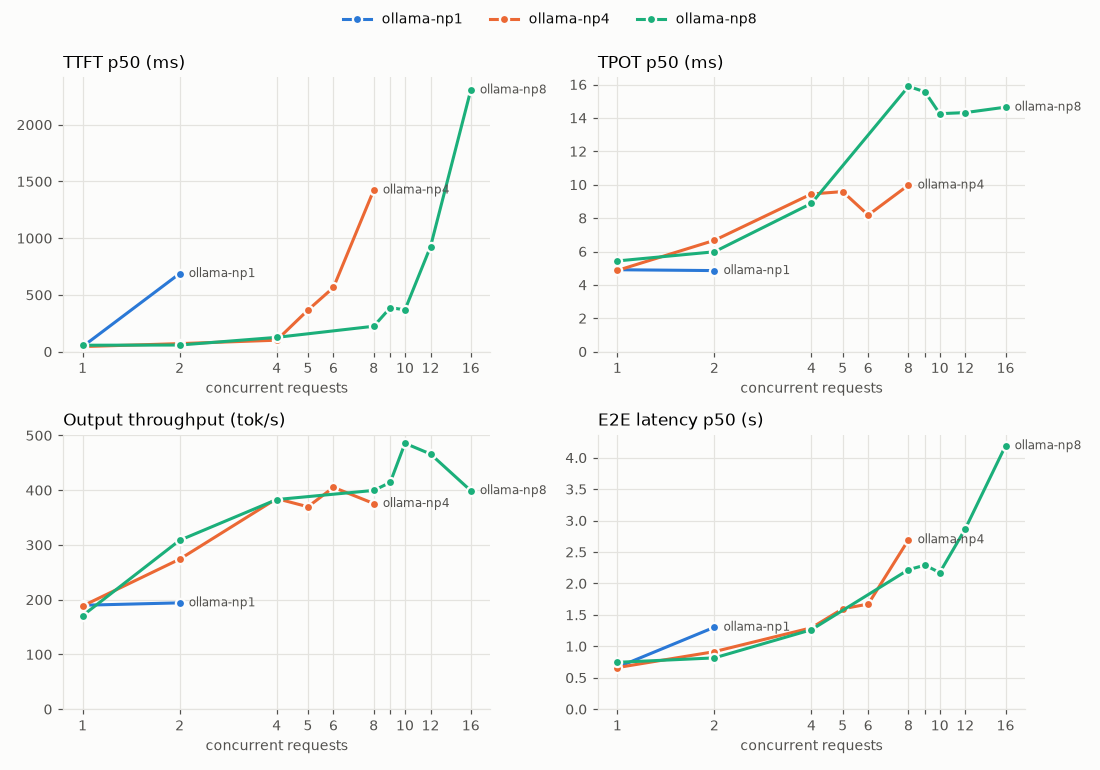
Qwen2.5-0.5B (Q4_K_M) on Ollama 0.35.1, fully on an RTX 3050 6 GB laptop GPU. Synthetic
prompts of 256 tokens, 128 output tokens, 64 requests per level, find-capacity with
SLO TTFT < 500 ms and TPOT < 50 ms for 90% of requests. Only OLLAMA_NUM_PARALLEL changes.
| Slots | Capacity (concurrent requests) | Completed req/s at capacity | Output tok/s | TTFT p50 / p99 | TPOT p50 | E2E p50 |
|---|---|---|---|---|---|---|
| 1 | 1 | 1.51 | 190 | 45 / 59 ms | 4.9 ms | 0.67 s |
| 4 | 4 | 3.16 | 385 | 101 / 197 ms | 9.4 ms | 1.30 s |
| 8 | 8 | 3.30 | 400 | 224 / 386 ms | 16 ms | 2.22 s |
- Capacity follows the slot count exactly. With one slot, a second request waits for the whole first answer (TTFT 688 ms at c=2), so only one user fits the SLO.
- The GPU saturates at about 400 tok/s with 4 streams. Going from 4 to 8 slots doubles the users who fit the SLO, but finishes only 4% more requests per second; each answer takes 71% longer (TPOT 9.4 → 16 ms) because the same GPU time is split more ways.
- So for this model and GPU, 4 slots maximise work done; 8 slots only help if you need more simultaneous users within the TTFT target and can accept slower answers.
Full report with every level: results/ollama-parallel.md.
Raw data: results/ollama-np{1,4,8}.json (every request's timings). Next: llama.cpp server
on the same GPU, and vLLM on a free Kaggle T4.
Metrics
| Metric | Meaning |
|---|---|
| TTFT | Request sent → first streamed chunk with non-empty content (role-only and empty chunks don't count) |
| TPOT | (E2E − TTFT) / (output tokens − 1) |
| ITL | Gaps between consecutive content chunks. Some servers put several tokens in one chunk; the report shows tok/chunk so you can tell |
| E2E | Request sent → end of stream |
| req/s, out tok/s | Completed requests and output tokens per second of wall time for the level |
| Goodput | Requests/s that meet the SLOs (default TTFT < 500 ms and TPOT < 50 ms; change with --slo-ttft-ms/--slo-tpot-ms, also at report time) |
| Errors | Failed requests grouped by kind (HTTP 500, timeout, ConnectError, ...) |
Token counts come from the server's usage (requested with stream_options.include_usage).
If the server sends none, servebench counts with a Hugging Face tokenizer if you pass
--tokenizer Qwen/Qwen2.5-0.5B-Instruct (install the hf extra: servebench[hf]), or falls back to
counting chunks. Every request records which source was used, and the report warns about
chunk counts.
Load modes
- Concurrency sweep (
--concurrency 1,2,4,8, closed loop): exactly N requests in flight until the level's requests are done. Shows how latency degrades as load grows. - Request rate (
--rate 0.5,1,2,inf, open loop): Poisson arrivals at R req/s, whether or not earlier requests finished;infsends everything at once,--max-concurrencycaps it. This is how you find the point where a server falls over.
Each level gets --num-requests requests (default max(16, 4N) for concurrency, 64 for
rate). Two warm-up requests run first and are not measured. Each run uses a new random
prompt seed (printed and saved in run.json): with a fixed seed, a second run sends the same
prompts and a server with prompt caching skips prefill (on Ollama TTFT dropped from 43 ms to
20 ms), so you would measure the cache. Pass --seed N to repeat a run exactly.
Find capacity
find-capacity answers "how much load can this server take within my latency targets?"
with one number:
Real run: Ollama with OLLAMA_NUM_PARALLEL=4 on the RTX 3050 from the results above.
servebench find-capacity --url http://127.0.0.1:11434/v1 --model qwen2.5:0.5b \
    --max 64 --num-requests 64 --out results/ollama-np4.json
         c=1  64 ok, 0 failed, 188.5 tok/s, TTFT p50 45 ms, 100% in SLO  -> pass
         c=2  64 ok, 0 failed, 274.0 tok/s, TTFT p50 71 ms, 100% in SLO  -> pass
         c=4  64 ok, 0 failed, 384.6 tok/s, TTFT p50 101 ms, 100% in SLO  -> pass
         c=8  64 ok, 0 failed, 375.7 tok/s, TTFT p50 1424 ms, 6% in SLO  -> FAIL
         c=6  64 ok, 0 failed, 405.2 tok/s, TTFT p50 566 ms, 47% in SLO  -> FAIL
         c=5  64 ok, 0 failed, 369.8 tok/s, TTFT p50 367 ms, 72% in SLO  -> FAIL
...
Capacity: 4 concurrent requests. At 4, 100% met the SLO; at 5, only 72%.
SLO: TTFT < 500 ms and TPOT < 50 ms for 90% of requests.
- A level passes when no request failed and at least
--target(default 90%) of the requests met--slo-ttft-msand--slo-tpot-ms. - The search doubles the load from
--start(1, 2, 4, 8, ...) until a level fails, then binary-searches between the last pass and the first fail until the gap is within--tolerance(10%) of the passing value. It never goes above--max(256). --mode ratesearches Poisson arrival rates (req/s) instead of concurrency.- Every level it tried is saved, so
servebench reportcharts it like any sweep. - Each level is measured once and the search assumes latency grows with load. Near the limit a noisy server can pass a level above one that failed; rerun to confirm.
Prompts
--prompts synthetic(default):--input-lentokens of random common words, a different prompt per request so prefix caches cannot reuse one prompt's work for the next.--ignore-eos(on by default) asks the server to always generate--output-lentokens; vLLM, SGLang and llama.cpp honour it, and servers that don't know it ignore it, so checkout tok/sagainst--output-lenwhen comparing.--prompts dolly: real prompts from databricks-dolly-15k (CC BY-SA 3.0, © Databricks), downloaded once (12.8 MB) into~/.cache/servebench(setSERVEBENCH_CACHEto move it). Not bundled with this repo.--input-lencaps the prompt length in words.--prompts my_prompts.jsonl({"prompt": ...}per line) or a.txtfile, one prompt per line.
How it works
prompts.py ──► load.py ─────────────► client.py ──HTTP/SSE──► server
 synthetic      concurrency workers    one streaming request,
 dolly          or Poisson arrivals    perf_counter per chunk
 file           + event-loop lag check
                     │
                     ▼
               metrics.py ──► run.json ──► report.py
               percentiles,               terminal table,
               goodput                    PNG charts, MD / HTML
- One
asyncioprocess withaiohttp(the HTTP client vLLM's and SGLang's own serving benchmarks use). Timings usetime.perf_counter(). servebench started onhttpx; profiling showed its connection pool re-checks every connection on every request, so at 128 concurrent requests the client capped out at ~45 req/s and inflated TTFT from 100 ms to 1.6 s. With aiohttp the same test reaches ~400 req/s with TTFT 135 ms. - Every request's chunk arrival times are saved in
run.json, so reports can be recomputed (for example with different SLOs) without rerunning anything. - The client checks itself: a background task measures how long a ready callback waits for the event loop. If the p99 is above 10 ms, the report warns that the client, not the server, may be the bottleneck.
How it's tested
You can't check a benchmark's numbers against a real model, because nobody knows the true
answer in advance. So the tests use servebench mock-server: a FastAPI server that speaks the
same OpenAI streaming API but, instead of running a model, sends placeholder tokens with
timings we set exactly (TTFT, time per token, tokens per chunk, slowdown under load). The
tests then check servebench measures what was set:
- TTFT and TPOT within a few ms of the set delays, on Linux and Windows (CI on both)
- role-only and empty chunks don't count as the first token; several tokens per chunk
- N concurrent requests really means N in flight (the mock counts them); Poisson arrival rates
- connections are reused (the mock counts TCP connections: 4 requests, 1 connection)
find-capacityfinds the known limit: with TTFT = 80 ms × requests in flight and a 360 ms target, capacity must be exactly 4
Example: a mock set to TTFT 80 ms, 15 ms per token and 15% slowdown per extra request in flight should show TPOT 15 × (1 + 0.15 × 15) ≈ 49 ms at 16 concurrent requests, and servebench measures 49 ms (examples/report.md). The mock is a test tool only; every number under Results comes from a real server.
Limitations
- One client process. Measured on a laptop (Ryzen 5 6600H, Windows) against the mock server: accurate to ~128 concurrent requests / ~400 req/s / ~12k streamed tokens/s (client loop lag p99 under 10 ms); at 256 concurrent it starts to work hard (lag ~20 ms). That covers what a single GPU serves; it is not a multi-machine load generator. The lag check warns when the client is struggling.
- The first requests of each level include opening TCP connections, as a real client would.
- TPOT and ITL are only as good as the token counts: without
usageor--tokenizer, a server that sends several tokens per chunk will look slower per token than it is. - Measures what the client sees over HTTP, including network and serialization, not the engine's internal timings.
- Text endpoints only (chat and completions); no images, tool calls or embeddings.
Related tools
servebench does not try to replace the bigger tools; use them if they fit:
vLLM's vllm bench serve,
NVIDIA GenAI-Perf,
guidellm,
LLMPerf.
servebench is a small install that works against any engine, makes clean multi-run
comparisons, and is used to measure the rest of this series of projects on free hardware.
Development
uv sync                      # creates .venv and installs the package + dev tools
uv run ruff check src tests
uv run pytest -q
No need to create or activate a virtualenv yourself; uv run uses the project's .venv.
License
Apache 2.0 — Copyright (c) 2026 Prajwal Pujari. Free for commercial, research, and educational use. See LICENSE for details. The dolly-15k dataset, if you use it, is CC BY-SA 3.0 and is downloaded from Hugging Face at runtime, not distributed here.
Citation
If you use servebench in your research, capacity benchmarking, or systems evaluations, please cite it as:
@software{pujari2026servebench,
  author = {Prajwal Pujari},
  title = {servebench: Production Capacity Profiler and Load-Testing Harness for Local LLM Serving Endpoints},
  year = {2026},
  url = {https://github.com/Prajwal7-2002/servebench}
}
1 maintainer

Metadata
1 maintainer
Release files for servebench 1.1.0
For a detailed explanation of source distributions (sdists) and built distributions (wheels), please see the package formats documentation.
Source distribution (sdist)
| File | Size | Uploaded | Provenance | |
|---|---|---|---|---|
| servebench-1.1.0.tar.gz | 91.7 kB | With provenance | Details |
Built distribution (wheel)
| File | Interpreter | ABI | Platform | Reset |
|---|---|---|---|---|
| servebench-1.1.0-py3-none-any.whl | Python 3 | none | any | Details |
Total release size: 185.4 kB
Release files / servebench-1.1.0.tar.gz
| Download URL | servebench-1.1.0.tar.gz |
|---|---|
| Size | 91.7 kB |
| Tags | Source |
|
SHA-256 checksum How to use checksums |
03fdb3fc1036c25d6d948b8a105c697ba8bd3fb3b60f6ce3427c530341e6cf90
|
|
BLAKE2b-256 checksum How to use checksums |
aada6981bdea4ffb20fb1d098e90003efb7e27b3fa8bb854e950611e2e1446e0
|
| Upload date | |
|
Uploaded using Trusted Publishing? What is trusted publishing? |
Yes |
| Uploaded via |
twine/7.0.0 CPython/3.13.16
|
Provenance
Provenance describes where a file came from. On PyPI, provenance is shared via attestations, which provide a verifiable record of the build or publishing details. View details, limitations and caveats.


PyPI Publish Attestation
PyPI verified that this artifact, at this checksum, originated from the publisher listed below.
Signed by GitHub Actions, verified by PyPI on Oct 22, 2026.
Transparency logRelease files / servebench-1.1.0-py3-none-any.whl
| Download URL | servebench-1.1.0-py3-none-any.whl |
|---|---|
| Size | 93.7 kB |
| Tags | Python 3 |
|
SHA-256 checksum How to use checksums |
3ecc36afdd4b9e5b99c84cd0ee7c0620031d3398573229a044bee9bb2d096dbf
|
|
BLAKE2b-256 checksum How to use checksums |
898e4e02fde36c0833114fecc6b6f9a043a52ec8d36fc7797c42f4158e808ade
|
| Upload date | |
|
Uploaded using Trusted Publishing? What is trusted publishing? |
Yes |
| Uploaded via |
twine/7.0.0 CPython/3.13.16
|
Provenance
Provenance describes where a file came from. On PyPI, provenance is shared via attestations, which provide a verifiable record of the build or publishing details. View details, limitations and caveats.
PyPI Publish Attestation
PyPI verified that this artifact, at this checksum, originated from the publisher listed below.
Signed by GitHub Actions, verified by PyPI on Oct 22, 2026.
Transparency logSecurity for servebench 1.1.0
Provenance
Provenance describes where a file came from. On PyPI, provenance is shared via attestations, which provide a verifiable record of the build or publishing details. View details, limitations and caveats.
Full provenance
All 2 files in this release have been uploaded with provenance metadata.
Attestation for servebench-1.1.0.tar.gz
PyPI Publish Attestation
PyPI verified that this artifact, at this checksum, originated from the publisher listed below.
Signed by GitHub Actions, verified by PyPI on Oct 22, 2026.
Transparency logA note on package security
PyPI is a repository for distributing packages, not a service for auditing them. While third-party security researchers and our staff do their best to detect and remove malicious packages, PyPI cannot guarantee the quality, security or suitability of any given package.
To learn more about protecting yourself from malicious actors, visit our package security documentation.














