
A utility that uses commonly available, low-cost RC/hobbyist servos to provide a tiered sorting function
Verified details
These details have been verified by PyPIProject links
GitHub Statistics
Maintainers

Project description
ServoSorter is a utility that uses commonly available, low-cost RC/hobbyist servos to provide a tiered sorting function.
- Overview and Terminology
- Installation
- Usage
- Software Dependencies
- Hardware Requirements
- Other Requirements
- 3D-Printed Assets
- Future Plans
- Additional Information
Overview and Terminology
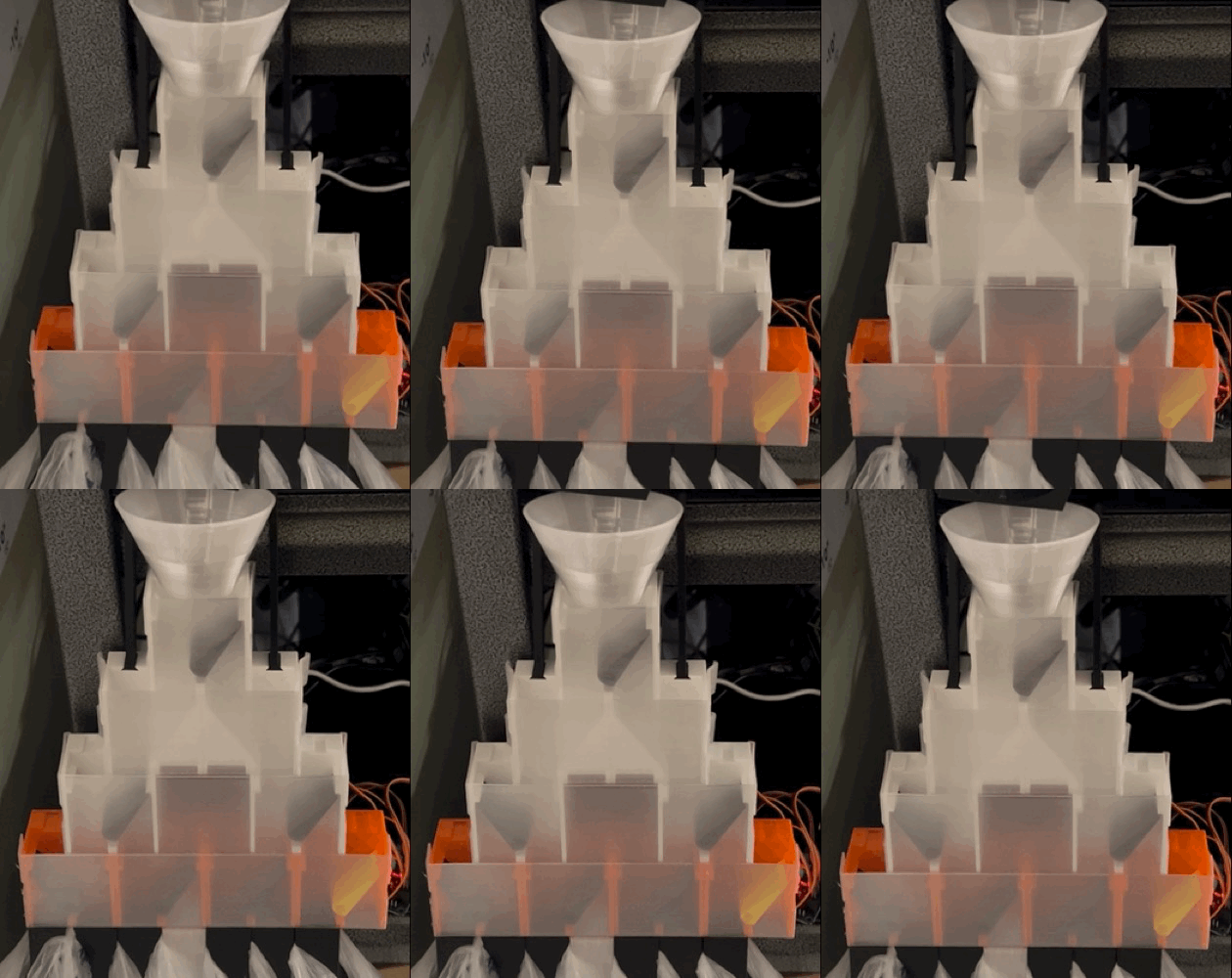
This solution requires a controlling program to detect/declare an object's "sort attribute" prior to sending an object into the sorter. A simple example to consider is sorting marbles using a sort attribute of color. Your controlling program would detect the marble's color and tell that color to ServoSorter. ServoSorter would then configure the servos accordingly prior to the marble being dropped into the sorting device. The marble would then drop into the bin assigned to that color.
Each servo is installed in a housing ("chute") and attached to a deflector arm ("flap") that directs an object one way ("main") or another ("alt"). The process requires gravity to move the object through the process. Once the object goes through the servo's chute, the object is sent either into another chute or into its final, sorted location ("bin"). Each chute is organized into a tier ("layer"). Each layer doubles in size compared to the prior layer.
In the video above, you can see an object dropping into bin 2 and then the machine preparing for the next object by moving the servos to point to bin 3.
Installation
ServoSorter is available as a Python package on PyPI. To install:
-
Navigate to your project folder
cd /path/to/your/project
-
Create a virtual environment (named ".venv" by convention, but can be named anything)
python3 -m venv .venv
-
Activate the virtual environment
source .venv/bin/activate
-
Install the package from the (.venv) $ prompt
python3 -m pip install servo-sorter
Usage
In your controlling Python logic, instantiate the ServoSorter class with the following arguments:
- sorter_name - a unique name of your choice to distinguish it from any other ServoSorter-consuming processes
- servo_count - the number of servos your sorting process is using (the number of available bins will always be equal to the servo_count + 1)
- driver_i2c_addresses - a list of i2c addresses associated to your PCA9685 servo drivers
- actuation_ranges - a "list of lists" containing the actuation ranges (e.g. 90, 180, etc. depending on what types of micro servos you're using)
- main_angles - a "list of lists" containing the "main" angle values for each servo being used
- alt_angles - a "list of lists" containing the "alt" angle values for each servo being used
- (optional) servo_sleep_duration_seconds - the number of seconds between each servo movement; defaults to 0; partial seconds are allowed (e.g. .5)
- (optional) avoid_unnecessary_servo_movement - determines whether to move only the servos necessary for the specified bin (True) or move all servos (False); defaults to True
import servo_sorter

# assumes you have 7 servos, three attached to the first driver, four attached to the second driver
# the first driver's address is 0x40 (which is the board's default)
# the second driver's address is 0x41 (accomplished via soldering a jumper on the board)
# all servos have a 90 degree actuation range except the second one, which has a 180 degree actuation range
my_sorter = servo_sorter.ServoSorter("TestSorter", 7, [0x40, 0x41], \
                     [[90, 180, 90], [90, 90, 90, 90]], \
                     [[20,  24, 16], [12, 14, 10, 12]], \
                     [[76, 148, 74], [66, 70, 66, 66]], \
                     0, True)
When your logic wants to move the sorting device to point to a bin associated to a particular sort attribute, use the move_servos_to_sort_attribute_bin method. The provided sort attribute value can be any text value of your choice (e.g. colors, types, etc.) depending on what you're sorting. [NOTE: if ServoSorter "runs out" of bins and cannot assign one for the sort attribute you're passing in, it will use bin 1 as the default.]
found_bin_boolean, assigned_bin_boolean, bin_value, sort_attribute =
my_sorter.move_servos_to_sort_attribute_bin("green")
When your logic wants to control bin assignments directly and point to a specific bin number, use the move_servos_directly_to_bin method:
configured_bin_number = my_sorter.move_servos_directly_to_bin(4)
If your logic wants to reset a bin assignment, use the reset_bin method:
reset_bin_successful_boolean = my_sorter.reset_bin(4)
If your logic wants to reset all bin assignments, use the reset_all_bins method:
reset_all_bins_successful_boolean = my_sorter.reset_all_bins()
Bin assignments can be seen in the JSON file created by servo-sorter. The filename will be formatted as [sorter_name].servosorter_db.json and it will look something like this:
{
    "bins": [
        "DEFAULT",
        "OPEN",
        "OPEN",
        "green",
        "red",
        "blue",
        "white"
    ]
}
Software Dependencies
This package leverages the adafruit-circuitpython-servokit Python package (which will be installed automatically).
Your controlling logic environment must be running Python 3.11 or later and have an i2c interface enabled.
Hardware Requirements
ServoSorter operates on a Python-supported device (e.g. a Raspberry Pi running the Raspberry Pi OS / Debian Linux).
It requires the attachment of one or more 16-channel PCA9685 PWM/Servo drivers (each of which can manage up to 16 servos). The PCA9685 is required because a typical device like a Raspberry Pi cannot provide enough power to reliably actuate servos. PCA9685 devices each leverage their own power supply (which need to be purchased separately) and can be chained together, so the solution requires that only a single PCA9685 be connected to your controlling device. The PCA9685 utilizes i2c for communication, so your device must also support i2c. You can buy the PCA9685 directly from Adafruit here. You can also get generic versions from Micro Center or Amazon with the headers already attached. I've successfully used this power supply to power the PCA9685, but there are many options.
You need to use only positional rotation servos (e.g. 90-degree, 180-degree). Continuous rotation servos and linear servos are not supported. I recommend buying servos with clutches (even though they are a little more expensive). I've used this one from Maker's Supply (make sure to get the positional one, NOT the continuous rotation one). They get cheaper if you buy them in bulk. A servo with a clutch will better handle the scenario where your servo gets jammed/stalled and will adjust accordingly. The cheaper servos (I've used these from Micro Center and these from Amazon) will just burn out if they get jammed/stalled for any significant amount of time, which could lead to bigger issues (including spiked power consumption and even potential fires). If you go with the cheaper servos, you might consider adding a fuse to your solution.
Other Requirements
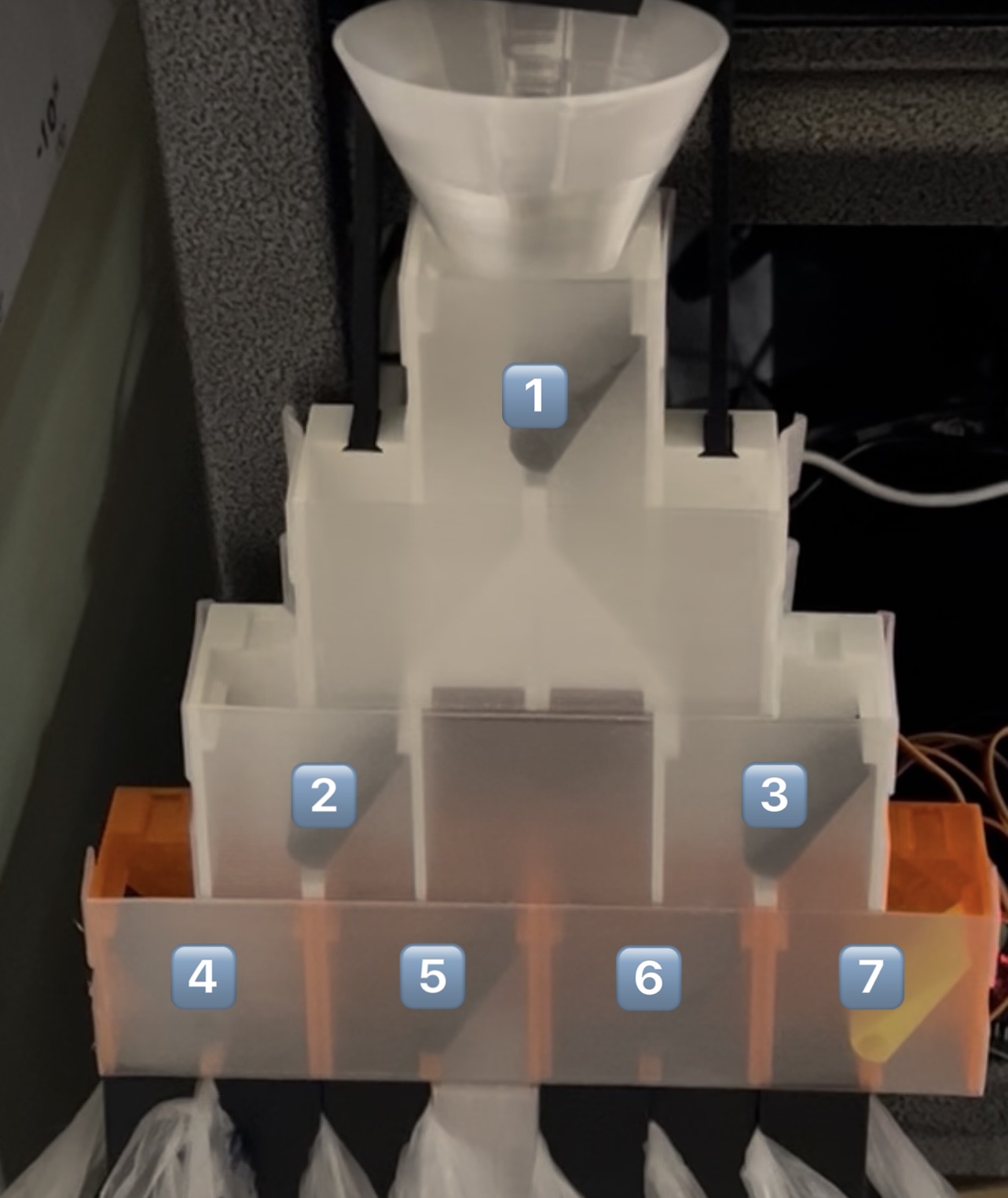
At present, servos must be organized into COMPLETE layers and in order by servo number from left to right. In the image above, you see a sorter with seven servos showing you the order in which the servos need to be configured. With each layer doubling the number of servos from the previous layer, the allowed number of servos is 1, 3, 7, 15, 31, 63, 127, 255, or 511. The maximum number of PCA9685 drivers supported by the ServoKit library is 62. With each driver supporting up to 16 servos, the theoretical maximum number of servos is 992, but the layer requirements described above cap the max number at 511. This equates to a maximum number of "bins" of 512 and a maximum number of drivers of 32.
Servos must be attached to a driver "in order". PCA9685 driver boards may label the servo connectors 0-15. So, the first servo must be attached to slot 0, the second servo to slot 1, the third servo to slot 2, etc. Because multiple servo drivers (the i2c addresses of which are passed into ServoSorter) can be used, it needs to know which servos are connected to which drivers. This is accomplished via the "list of lists" passed in for actuation ranges, main angles, and alt angles when instantiating the ServoSorter class. Values in the first list relate to servos attached to the first driver. Values in the second list relate to servos attached to the second driver, and so on. It is ok not to "fill up" a driver with servos, but the rules above must be adhered to.
If multiple servo drivers are to be used, you must solder the jumpers on the second driver (and beyond) to create unique i2c addresses for them. Refer to this Adafruit article for details on how to do that.
A sorted object must complete its sorting procedure before the next object is sorted. In other words, an object cannot still be in the sorting device when the next object is sent in to be sorted.
Servos need to be calibrated. Due to variations in servo actuation angle ranges (as well as any variations in the housings you might use), it is required to calibrate each servo so that ServoSorter knows its precise "main" and "alt" angle values. The calibration results will dictate the numbers you plug into the "main angle" and "alt angle" lists that are passed in when instantiating the ServoSorter class. You can use logic like this (after installing the servo-sorter package and adding some horns/arms to your servos) to do your calibrations to determine what your main/alt values should be for your scenario:
from adafruit_servokit import ServoKit
i2c_address = 0x40
kit = ServoKit(channels=16, address=i2c_address)

servo_slot = 0 # assumes servo is connected to PCA9685's first slot
actuation_range = 90 # assumes the servo's actuation range is 90 degrees

kit.servo[servo_slot].actuation_range = actuation_range

kit.servo[servo_slot].angle = 0 # try different angle values between 0 and the servo's actuation range
3D-Printed Assets
I have published this model, which is basically what's shown in the above pictures/video. You can also use this model as a starting point if you want to build your own servo housings and flaps/arms.
Future Plans
The following are being considered for future enhancements:
-
Create an admin tool using Textual (a Python text-based UI platform) to help with things like calibration.
-
Support when a given layer has just a few servos (eliminating the requirement for exactly 1, 3, 7, 15, 31, 63, 127, 255, or 511 servos).
-
Add support for "break beam" sensors to confirm when a sorted object leaves the sorting device.
-
Feature to "re-do" servo movements in order in case the sorted object gets stuck in the sorting device (in an attempt to free/dislodge the object).
-
Allow "locking" of bin assignments.
-
Arduino support (Arduino language based on C++)
-
Microcontroller support (MicroPython or C/C++)
-
CyberBrick support (Bambu Lab ecosystem)
Additional Information
Here is a full list of valid i2c addresses that can be provided for the PCA9685 address values (controllable per driver by using soldered jumpers on each PCA9685 board):
0x40, 0x41, 0x42, 0x43, 0x44,
0x45, 0x46, 0x47, 0x48, 0x49,
0x4a, 0x4b, 0x4c, 0x4d, 0x4e,
0x4f, 0x50, 0x51, 0x52, 0x53,
0x54, 0x55, 0x56, 0x57, 0x58,
0x59, 0x5a, 0x5b, 0x5c, 0x5d,
0x5e, 0x5f, 0x60, 0x61, 0x62,
0x63, 0x64, 0x65, 0x66, 0x67,
0x68, 0x69, 0x6a, 0x6b, 0x6c,
0x6d, 0x6e, 0x6f, 0x70, 0x71,
0x72, 0x73, 0x74, 0x75, 0x76,
0x77, 0x78, 0x79, 0x7a, 0x7b,
0x7c, 0x7d, 0x7e, 0x7f
Project details
Verified details
These details have been verified by PyPIProject links
GitHub Statistics
Maintainers


Download files
Download the file for your platform. If you're not sure which to choose, learn more about installing packages.
Source Distribution
Built Distribution
Filter files by name, interpreter, ABI, and platform.
If you're not sure about the file name format, learn more about wheel file names.
Copy a direct link to the current filters
File details
Details for the file servo_sorter-0.0.4.tar.gz.
File metadata
- Download URL: servo_sorter-0.0.4.tar.gz
- Upload date:
- Size: 10.4 kB
- Tags: Source
- Uploaded using Trusted Publishing? Yes
- Uploaded via: twine/6.1.0 CPython/3.13.12
File hashes
| Algorithm | Hash digest | |
|---|---|---|
| SHA256 |
ce4eca560781a744ea424cdee8a18c817dbe5525614b18915ca6c342ee8efe80
|
|
| MD5 |
f70cfe47b767c8f0c139ac8ed393bcae
|
|
| BLAKE2b-256 |
7001493c43161a717af18c1a18367035d77cea5ab367fd9de35bceb85b40aba9
|
Provenance
The following attestation bundles were made for servo_sorter-0.0.4.tar.gz:
Publisher:
publish.yml on billsidea/servo-sorter
-
Statement:
-
Statement type:
https://in-toto.io/Statement/v1 -
Predicate type:
https://docs.pypi.org/attestations/publish/v1 -
Subject name:
servo_sorter-0.0.4.tar.gz -
Subject digest:
ce4eca560781a744ea424cdee8a18c817dbe5525614b18915ca6c342ee8efe80 - Sigstore transparency entry: 1886509380
- Sigstore integration time:
-
Permalink:
billsidea/servo-sorter@ed602f28069c80301ee05ac9ccca0d5eda8842fa -
Branch / Tag:
refs/tags/v0.0.4 - Owner: https://github.com/billsidea
-
Access:
public
-
Token Issuer:
https://token.actions.githubusercontent.com -
Runner Environment:
github-hosted -
Publication workflow:
publish.yml@ed602f28069c80301ee05ac9ccca0d5eda8842fa -
Trigger Event:
push
-
Statement type:
File details
Details for the file servo_sorter-0.0.4-py3-none-any.whl.
File metadata
- Download URL: servo_sorter-0.0.4-py3-none-any.whl
- Upload date:
- Size: 12.2 kB
- Tags: Python 3
- Uploaded using Trusted Publishing? Yes
- Uploaded via: twine/6.1.0 CPython/3.13.12
File hashes
| Algorithm | Hash digest | |
|---|---|---|
| SHA256 |
1f2f4dc8b4409732606b8e1a158194b598cdce0d3d112d5cb06f10cc5f562868
|
|
| MD5 |
2c1ee260925dfef78006b1b5b9737f30
|
|
| BLAKE2b-256 |
842ceb3d7f0cf9d41858b09765889f49963ecaa7ed2b7535226f0568754c53d1
|
Provenance
The following attestation bundles were made for servo_sorter-0.0.4-py3-none-any.whl:
Publisher:
publish.yml on billsidea/servo-sorter
-
Statement:
-
Statement type:
https://in-toto.io/Statement/v1 -
Predicate type:
https://docs.pypi.org/attestations/publish/v1 -
Subject name:
servo_sorter-0.0.4-py3-none-any.whl -
Subject digest:
1f2f4dc8b4409732606b8e1a158194b598cdce0d3d112d5cb06f10cc5f562868 - Sigstore transparency entry: 1886509418
- Sigstore integration time:
-
Permalink:
billsidea/servo-sorter@ed602f28069c80301ee05ac9ccca0d5eda8842fa -
Branch / Tag:
refs/tags/v0.0.4 - Owner: https://github.com/billsidea
-
Access:
public
-
Token Issuer:
https://token.actions.githubusercontent.com -
Runner Environment:
github-hosted -
Publication workflow:
publish.yml@ed602f28069c80301ee05ac9ccca0d5eda8842fa -
Trigger Event:
push
-
Statement type:






