
This project has been archived by its maintainers, and is no longer receiving any updates.
Servotester
Just another program to test servos if they work
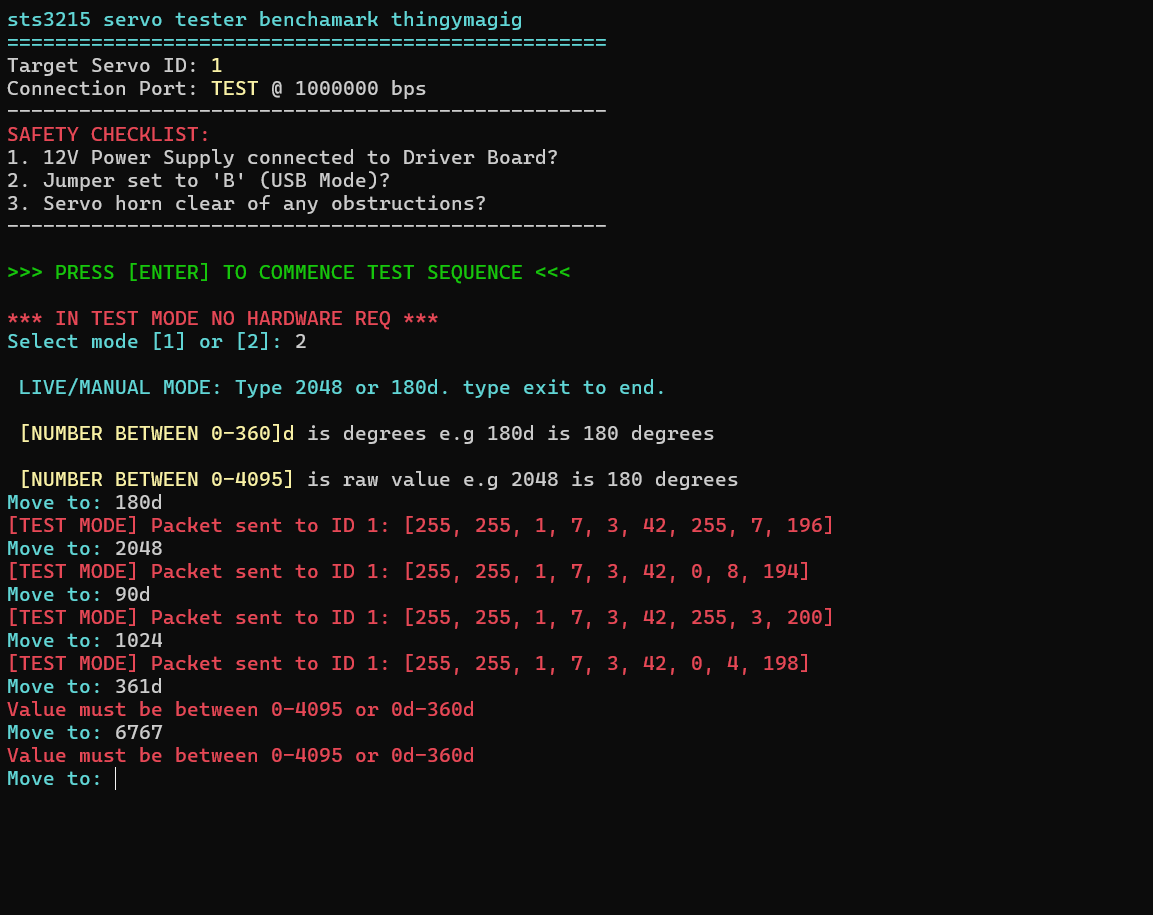
This Project is a multi purpose diognostic tool for testing sts3215 servos (also standard pwm servos [i think]). I needed a way to bench mark my servos for my other projects to test if they even work.
YOU WILL NEED
STS3215 servos (obviously) Wonrabai/Waveshare bus servo Adapter (A): (Jumper set to Mode B) like this one https://www.amazon.com/Waveshare-Integrates-Control-Circuit-Supports/dp/B0CTMM4LWK/ (now optional! just enter test mode)
- USB-C cable
- 12V power supply (for the servo)
Safety: The servos are quite storong so please remove any obstructions and it has safety features like overcurrent protection and overtemperature protection BUT it can still break if you abuse it enough. Guardrails: Integrated error handling for disconnected hardware or serial collisions.
Installation
Installation
pip install servo_tester
servotest
Update the PORT variable in main.py to match your Device Manager (e.g., COM3 or /dev/ttyUSB0).
Configuration
Open Servo_Benchmark_tester.py in your text editor and check the top of the script:
-
Hardware Mode: Change PORT to match your Device Manager (e.g., COM3 on Windows or /dev/ttyUSB0 on Linux).
-
Test Mode: Change PORT to "TEST". This lets you run the script without any hardware connected. It will skip the serial check and print the raw hex packets to your screen in BRIGHT RED so you can verify the math and logic.
Select Your Mode
Run the script
-
Option [1] Automatic Benchmark: The script performs a "sanity check" sequence. It tests the absolute minimum (0), the absolute maximum (4095), and runs a "sweep-swoop" rapid response test before returning the servo to neutral.
-
Option [2] Live/Manual Mode: * Raw: Type a number between 0-4095 to move to a specific register position.
Degrees: Type a number followed by d (e.g., 180d or 90.5d) to move to a specific angle.
Exit: Type exit to return to the main menu.
-
[3] Macro mode: it will copy all the instrucitons made in the live mode and replay them in the same order.
-
[4] Clear Macro & Reset: it will clear all the instrucitons made in the live mode and replay them in the same order.
TROUBLESHOOTING
If you see a [GUARDRAIL] ERROR, check the following common issues:
-
Power: Is the 12V Power Supply actually plugged into the Driver Board? (USB alone won't move the servos).
-
Jumper: Is the jumper on the Waveshare board set to Mode B (USB Mode)?
-
Port Busy: Is another program (like Arduino IDE, Serial Monitor, or another Python instance) using your COM port?
-
Drivers: If the COM port doesn't show up in your Device Manager, you may need to install the CH340/CP2102 drivers for the adapter board.
1 maintainer

Metadata
1 maintainer
Release files for servo-tester 0.1.5
For a detailed explanation of source distributions (sdists) and built distributions (wheels), please see the package formats documentation.
Source distribution (sdist)
| File | Size | Uploaded | |
|---|---|---|---|
| servo_tester-0.1.5.tar.gz | 6.4 kB | Details |
Built distribution (wheel)
| File | Interpreter | ABI | Platform | Reset |
|---|---|---|---|---|
| servo_tester-0.1.5-py3-none-any.whl | Python 3 | none | any | Details |
Total release size: 13.4 kB
Release files / servo_tester-0.1.5.tar.gz
| Download URL | servo_tester-0.1.5.tar.gz |
|---|---|
| Size | 6.4 kB |
| Tags | Source |
|
SHA-256 checksum How to use checksums |
8b90cb10dfcc9c077c8a161efe7c292a192125d2dde478702d8241b75fbad50e
|
|
BLAKE2b-256 checksum How to use checksums |
e1b6d862920a6bf2225a43094567ff4fc9af63d6e0761e6bbc313f9f1e7767c2
|
| Upload date | |
|
Uploaded using Trusted Publishing? What is trusted publishing? |
Yes |
| Uploaded via |
twine/6.1.0 CPython/3.13.7
|
Provenance
Provenance describes where a file came from. On PyPI, provenance is shared via attestations, which provide a verifiable record of the build or publishing details. View details, limitations and caveats.


PyPI Publish Attestation
PyPI verified that this artifact, at this checksum, originated from the publisher listed below.
Signed by GitHub Actions, verified by PyPI on Apr 7, 2026.
Transparency logRelease files / servo_tester-0.1.5-py3-none-any.whl
| Download URL | servo_tester-0.1.5-py3-none-any.whl |
|---|---|
| Size | 7.0 kB |
| Tags | Python 3 |
|
SHA-256 checksum How to use checksums |
7c68a70159ad738507fedb25e23d64f0317bcb43a2b61bc81e85d3df6401b67d
|
|
BLAKE2b-256 checksum How to use checksums |
fad92550a6ac1769a0f03ddfbd134b5a3798735548d9100f3a611e52fda07cc0
|
| Upload date | |
|
Uploaded using Trusted Publishing? What is trusted publishing? |
Yes |
| Uploaded via |
twine/6.1.0 CPython/3.13.7
|
Provenance
Provenance describes where a file came from. On PyPI, provenance is shared via attestations, which provide a verifiable record of the build or publishing details. View details, limitations and caveats.
PyPI Publish Attestation
PyPI verified that this artifact, at this checksum, originated from the publisher listed below.
Signed by GitHub Actions, verified by PyPI on Apr 7, 2026.
Transparency log













