
Servotest
A simple diagnostic + benchmarking tool for STS3215 serial servos
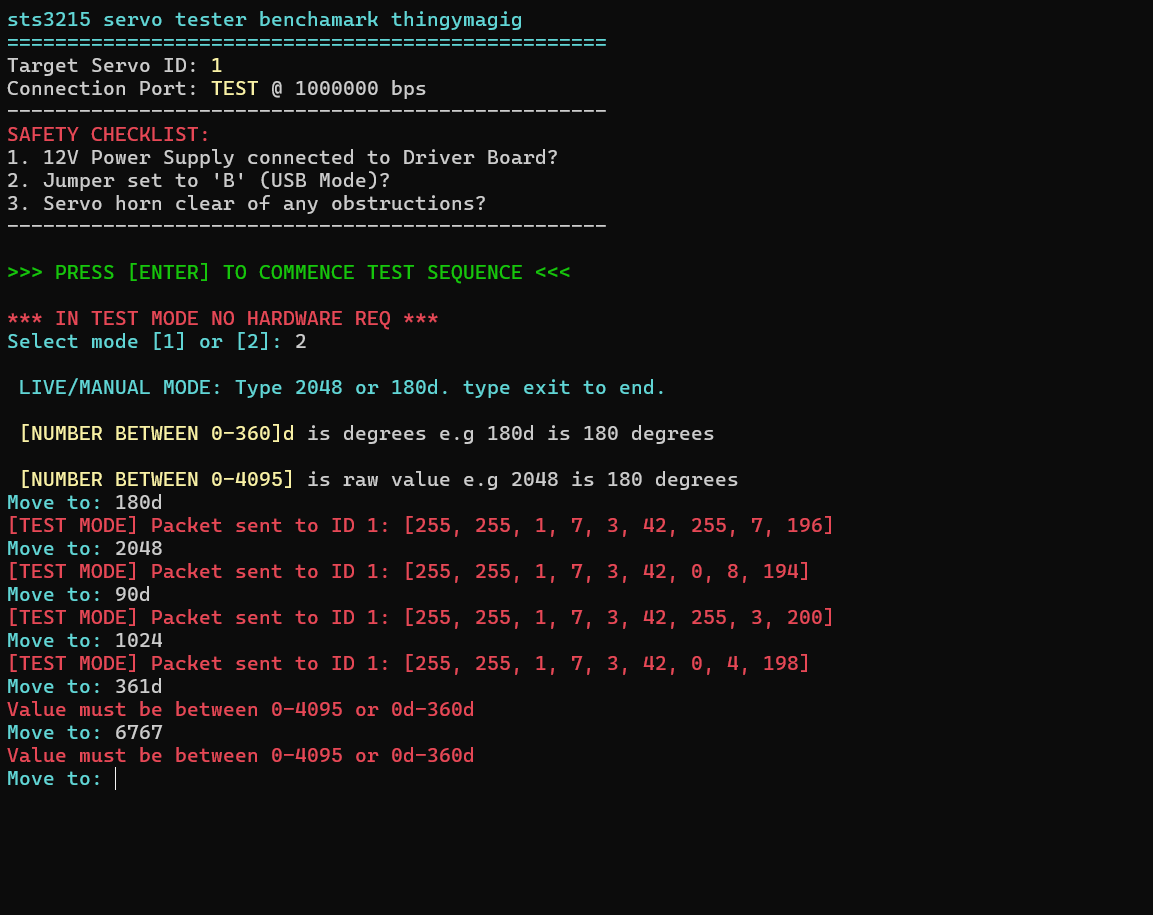
Overview
Servotest is a lightweight CLI tool for testing Feetech STS3215 bus servos.
It helps you quickly answer:
- Is the servo alive?
- Is communication working?
- Does it move correctly across its full range?
It also includes a test mode, so you can validate logic without hardware.
Features
- Full automatic benchmark sequence
- Live manual control (raw + degrees input)
- Macro recording and playback
- Real-time voltage telemetry
- Test mode (no hardware required)
- Robust serial handling (stable at 1 Mbps)
- Built-in guardrails for common failures
Requirements
Hardware
- STS3215 servo (7.4V or 12V)
- Bus servo adapter (Waveshare / Wonrabai recommended)
- USB cable
- External power supply (5v for 7.4v and 12v for 12v)
⚠️ USB alone will NOT power the servo
Setup
Install:
pip install servotest
servotest
The setup is like this:
                     ┌──────────────────────┐
                     │      COMPUTER        │
                     │  (Python Script)     │
                     └─────────┬────────────┘
                               │ USB-C
                               │
                               ▼
                  ┌──────────────────────────┐
                  │  BUS SERVO CONTROLLER    │
                  │ (Waveshare / Wonrabai)   │
                  │                          │
                  │   [USB / UART Interface] │
                  │          │               │
                  │          │ TTL Serial    │
                  │          ▼               │
                  │     Servo Bus Port       │
                  └───────▲───────────┬──────┘
                          │           │
            External      │           │ Servo Cable
            Power Supply              │ (3-wire TTL)
          (7.4V / 12V)                │
                                      ▼
                 ┌────────────────────────┐
                 │       STS3215 SERVO    │
                 │                        │
                 │   VCC  ───────────────┘
                 │   GND  ───────────────┘
                 │   DATA ◄───────────────┘
                 └────────────────────────┘
Signal Breakdown
USB-C → Controller
    - Power (logic side)
    - Serial communication (via USB-UART chip)

External PSU → Controller
    - Main power for servo (IMPORTANT)
    - Typically 5V or 12V

Controller → Servo
    - VCC (power)
    - GND
    - DATA (half-duplex serial bus)
Important Notes
-
⚠️ The servo is NOT powered by USB
-
⚠️ Always connect external power to the controller
-
⚠️ Set jumper to:
Mode B (USB Mode) -
✔ Communication is:
1 Mbps TTL serial (half-duplex)
Mental Model
[Your Code] → USB → [Controller] → Serial Bus → [Servo]
                          ↑
                    External Power
Modes
[1] Automatic Benchmark
Runs a full diagnostic sequence:
- Move to minimum (0)
- Move to maximum (4095)
- Rapid sweep test
- Return to neutral
Also prints voltage during operation.
[2] Live / Manual Mode
Control the servo interactively:
Raw position
2048
Degrees
180d
90.5d
Exit
exit
Displays:
- Live voltage
- Position bar
[3] Macro Replay
Replays movements recorded in Live Mode.
[4] Clear Macro
Clears recorded steps.
Telemetry
Currently supported:
Voltage
- Read directly from servo register
- Updated in real time
Example:
Voltage: 12.1V
Temperature (Removed)
Temperature reporting has been intentionally removed.
Reason:
- Some STS3215 firmware variants return constant
0 - Others do not expose temperature over serial
- Register mapping is inconsistent across batches
To avoid misleading data, it is not included.
Troubleshooting
Servo not moving
- Check external power supply
- Confirm correct voltage (7.4V / 12V)
No serial ports found
- Check USB cable
- Install CH340 / CP2102 drivers
Port busy error
Close other programs using the port:
- Arduino IDE
- Serial Monitor
- Other scripts
Permission denied (Linux)
sudo usermod -a -G dialout $USER
Then log out and back in.
Getting weird or unstable readings
- Ensure correct baud rate (1,000,000)
- Check wiring (TX/RX swapped is common)
- Verify adapter is in Mode B (USB mode)
Notes
- Protocol: Feetech STS serial protocol
- Baud rate: 1 Mbps
- Position range: 0–4095
- Telemetry: voltage only
Future Improvements
- Position feedback (readback)
- Load / current monitoring
- Multi-servo support
- Optional GUI
Why this exists
Because debugging servos shouldn’t take longer than building the robot.
1 maintainer

Metadata
1 maintainer
Release files for servotest 0.1.9
For a detailed explanation of source distributions (sdists) and built distributions (wheels), please see the package formats documentation.
Source distribution (sdist)
| File | Size | Uploaded | |
|---|---|---|---|
| servotest-0.1.9.tar.gz | 7.9 kB | Details |
Built distribution (wheel)
| File | Interpreter | ABI | Platform | Reset |
|---|---|---|---|---|
| servotest-0.1.9-py3-none-any.whl | Python 3 | none | any | Details |
Total release size: 16.5 kB
Release files / servotest-0.1.9.tar.gz
| Download URL | servotest-0.1.9.tar.gz |
|---|---|
| Size | 7.9 kB |
| Tags | Source |
|
SHA-256 checksum How to use checksums |
3cad0388ccb7d0bfaa3f4b7eae1810ea198bc76fba9d04d96e04f2ce8693f0b3
|
|
BLAKE2b-256 checksum How to use checksums |
593fbfdf5bce0b7949250c6d0f18d76acb6d07afdd80f267769f92fdf8e7e8ee
|
| Upload date | |
|
Uploaded using Trusted Publishing? What is trusted publishing? |
Yes |
| Uploaded via |
twine/6.1.0 CPython/3.13.12
|
Provenance
Provenance describes where a file came from. On PyPI, provenance is shared via attestations, which provide a verifiable record of the build or publishing details. View details, limitations and caveats.


PyPI Publish Attestation
PyPI verified that this artifact, at this checksum, originated from the publisher listed below.
Signed by GitHub Actions, verified by PyPI on Apr 20, 2026.
Transparency logRelease files / servotest-0.1.9-py3-none-any.whl
| Download URL | servotest-0.1.9-py3-none-any.whl |
|---|---|
| Size | 8.6 kB |
| Tags | Python 3 |
|
SHA-256 checksum How to use checksums |
402e9f92c052d9ab637e4567730c2ca3fcc9dcb8b2bdb286d6a7ad8e52ce5182
|
|
BLAKE2b-256 checksum How to use checksums |
98aea7c4ab18ab3d23e196d2df3fd646cc66a98efcd1a010ea8685047bf539ae
|
| Upload date | |
|
Uploaded using Trusted Publishing? What is trusted publishing? |
Yes |
| Uploaded via |
twine/6.1.0 CPython/3.13.12
|
Provenance
Provenance describes where a file came from. On PyPI, provenance is shared via attestations, which provide a verifiable record of the build or publishing details. View details, limitations and caveats.
PyPI Publish Attestation
PyPI verified that this artifact, at this checksum, originated from the publisher listed below.
Signed by GitHub Actions, verified by PyPI on Apr 20, 2026.
Transparency log













