
SessionCost
See where every token of your AI coding chat went, and what to fix to send fewer.



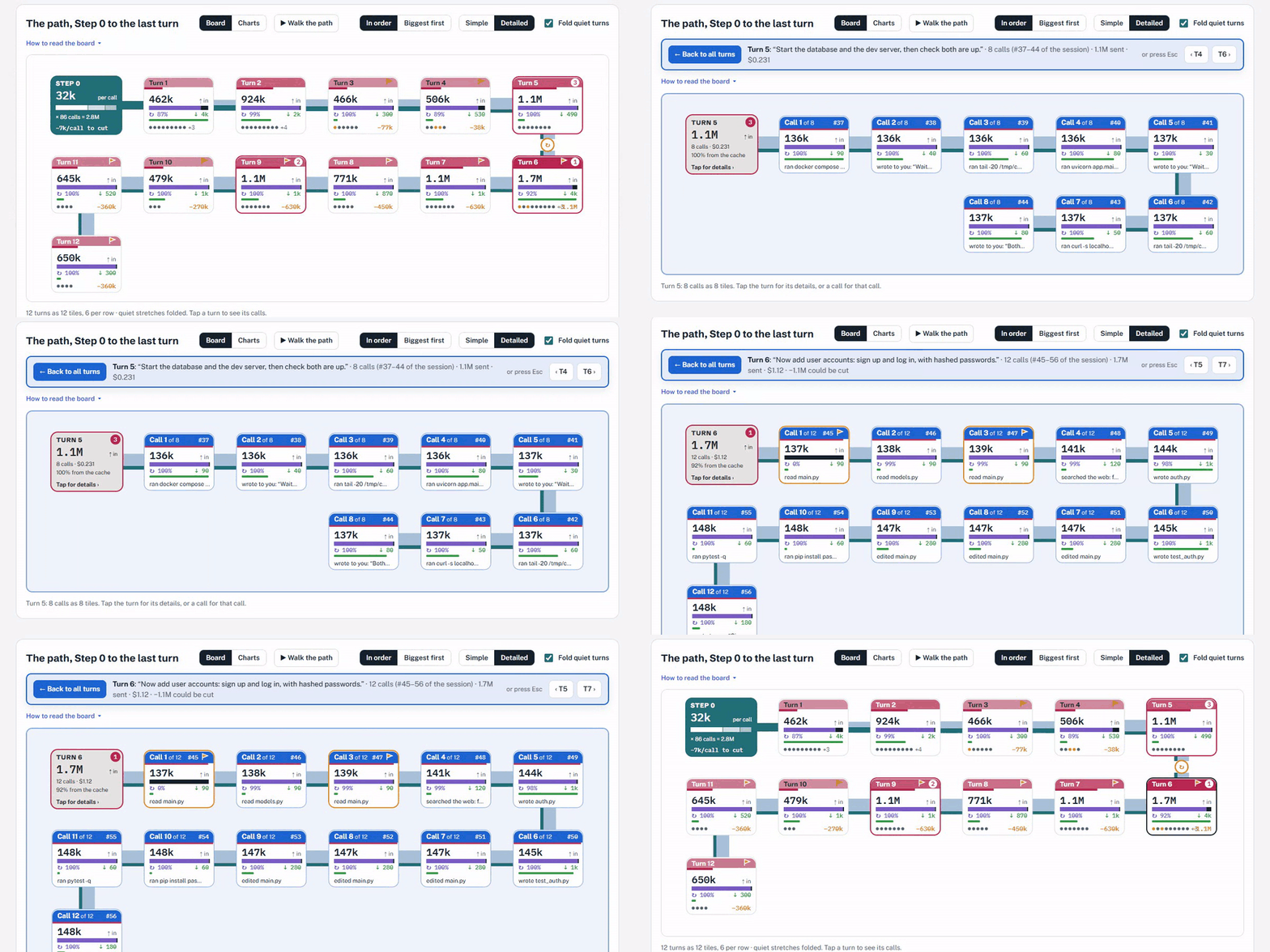
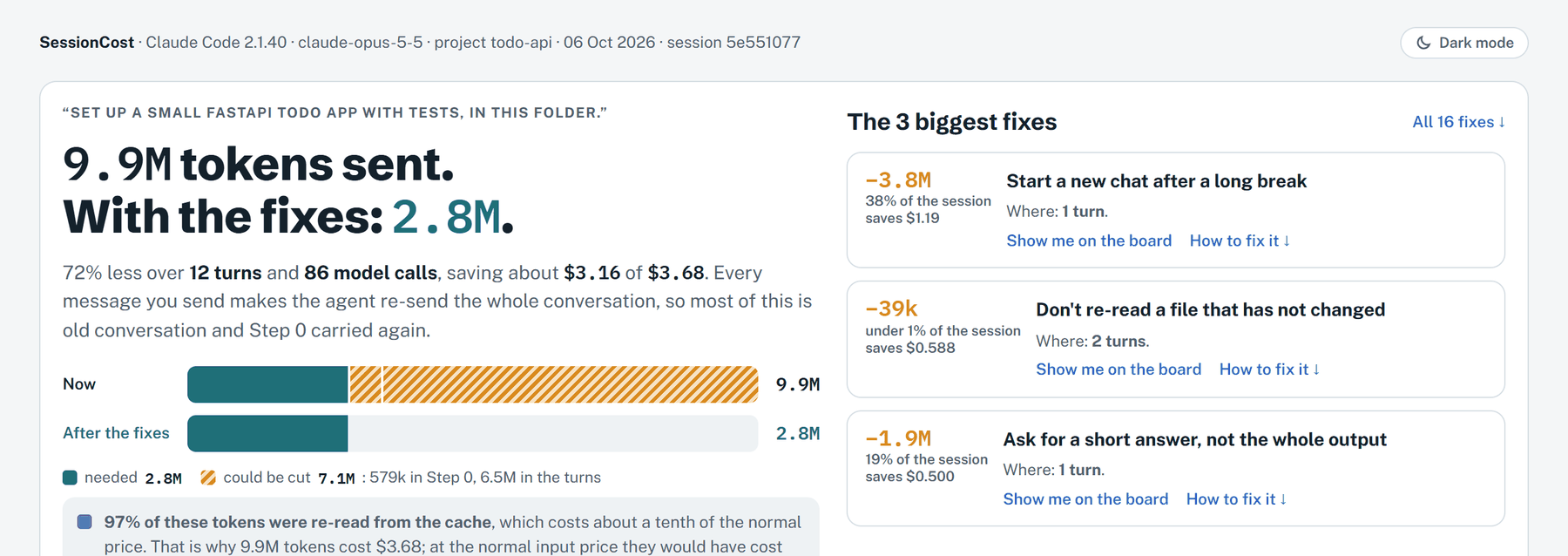
Every message you send makes the agent send the whole chat again. SessionCost shows each turn on one path, the calls inside it, and the fixes that would have sent less, measured from your own chat.
▶ Watch the 1-minute video tour on YouTube · pictures use a made-up demo chat
Install
Pick the way that suits you. Each one adds /sessioncost to every agent on your computer: Claude Code, Codex,
Cursor and Antigravity.
1. Not technical? One line, nothing else needed
-
Open a terminal. Windows: press the Windows key, type
powershell, press Enter. Mac: press Cmd + Space, typeterminal, press Enter. -
Paste the line for your computer and press Enter:
Windows irm https://raw.githubusercontent.com/kish21/sessioncost/main/install.ps1 | iexMac / Linux curl -fsSL https://raw.githubusercontent.com/kish21/sessioncost/main/install.sh | sh -
Wait about a minute. It ends with
/sessioncost addedfor each agent it found.
2. Use the command line? Install from PyPI
Needs Python 3.10 or newer.
python -m pip install -U sessioncost     # -U also updates an older copy
python -m sessioncost setup              # adds /sessioncost to your agents
On Mac or Linux use python3 if python is not found. python -m works even when Windows cannot find the
sessioncost command (common with the Microsoft Store Python). Prefer isolated tools? pipx install sessioncost or
uv tool install sessioncost, then sessioncost setup.
3. Prefer plugins? Add it from your agent's plugin list
Plugins need Python 3.10 or newer on the computer (way 1 does not).
| Agent | How |
|---|---|
| Claude Code | In a chat: /plugin marketplace add kish21/sessioncost, then /plugin install sessioncost@sessioncost. Or type /plugin, open Marketplaces, add kish21/sessioncost, and install sessioncost from the Plugins tab. (Needs Git.) |
| Codex | First, in a terminal: codex plugin marketplace add kish21/sessioncost. Then Codex app: open Customize → Plugins, choose sessioncost, click Install plugin. Codex CLI: type /plugins, pick sessioncost, install it. Start a new chat afterwards. |
| Cursor | Open Customize → Plugins, choose From GitHub Repository (or Add Marketplace), paste https://github.com/kish21/sessioncost, then install sessioncost and restart Cursor. If no plugin shows up (some Cursor versions import a repo without listing its plugins), use way 1. |
| Antigravity | With the Antigravity command line: agy plugin install https://github.com/kish21/sessioncost, then start a new chat. In the Antigravity app, use way 1 (it adds /sessioncost to Antigravity directly). |
Use one way per agent: with the plugin installed, you don't need the copy from way 1 or 2 in that agent.
Then, in your agent
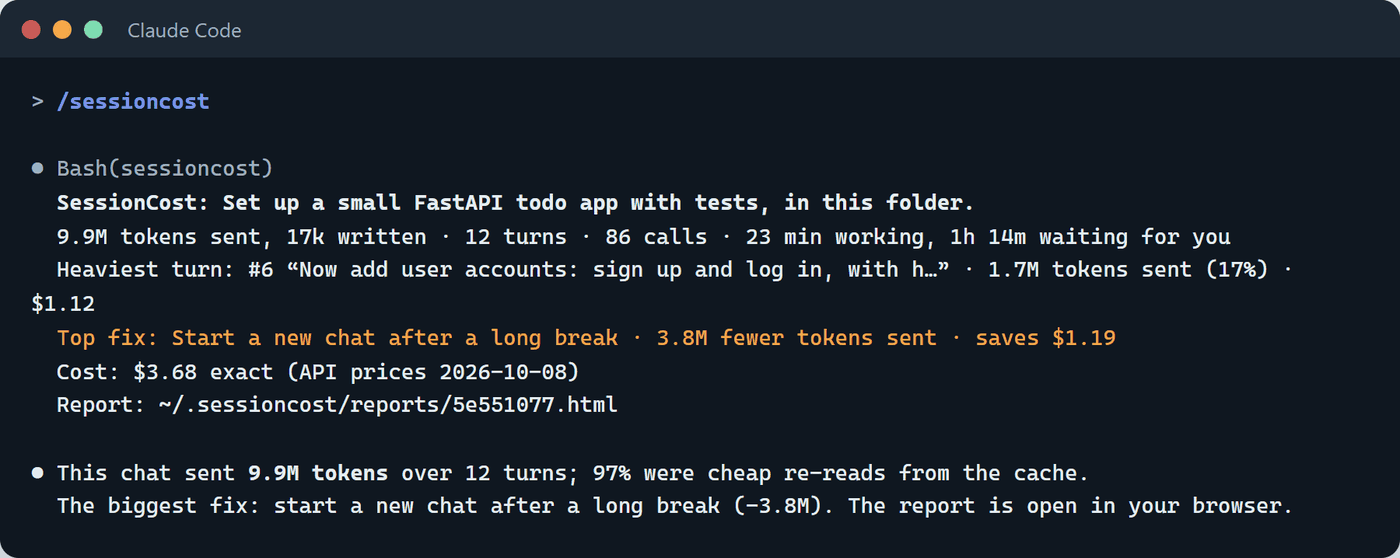
Restart the agent, open any chat, and type /sessioncost (or ask: "run sessioncost"). The report opens in
your browser.
| Agent | Where /sessioncost is added |
|---|---|
| Claude Code | ~/.claude/skills/sessioncost (or the plugin) |
| Codex (CLI, IDE, app) | ~/.codex/skills/sessioncost |
| Cursor | ~/.cursor/skills/sessioncost |
| Antigravity | ~/.gemini/config/skills/sessioncost |
Installed another agent later? Run sessioncost setup again (or paste the line from way 1 again).
What you get
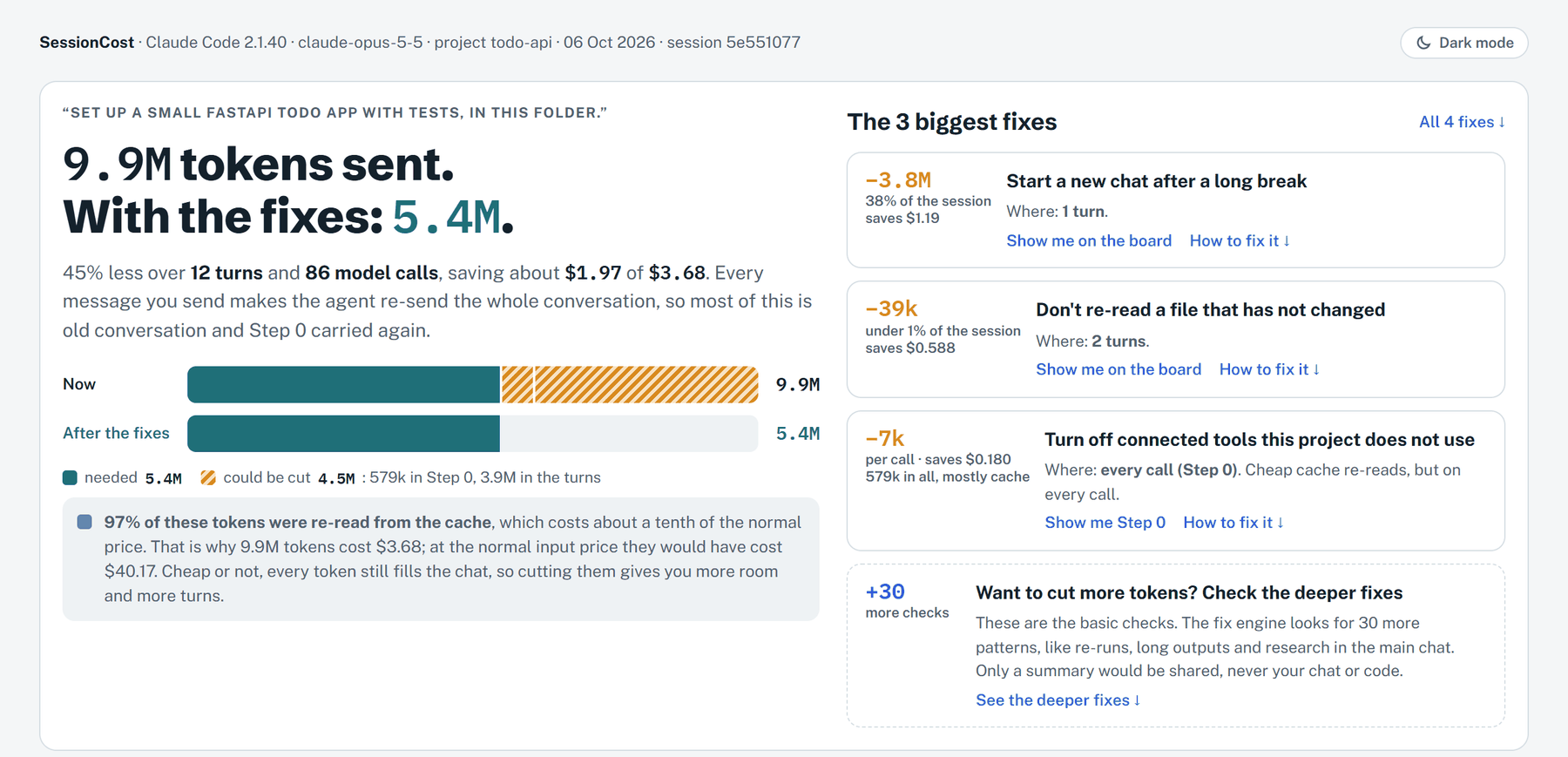
How much was sent, and how much the fixes would cut
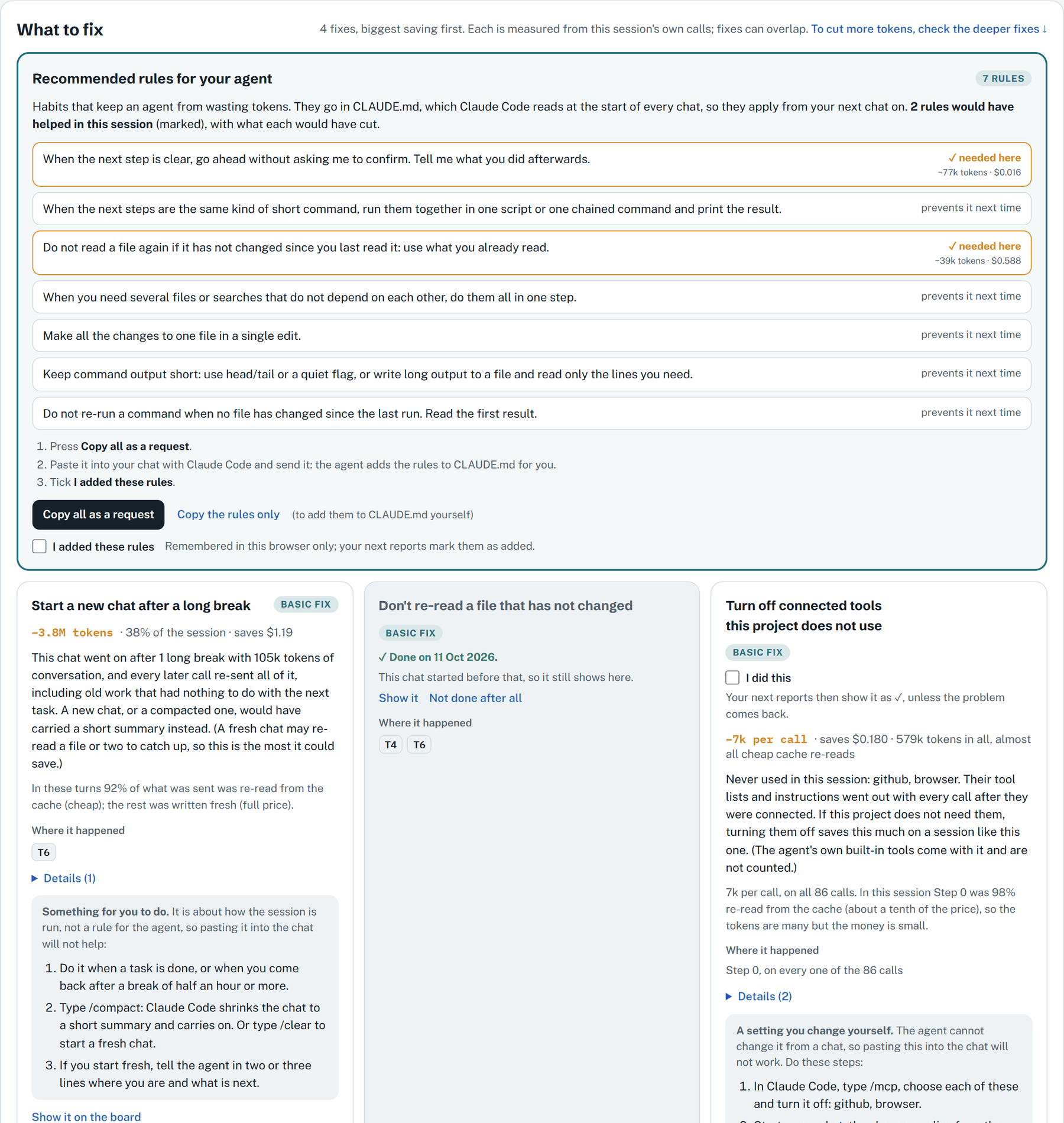
What to fix: each fix with its saving and the rule to paste to your agent. Tick "I did this" and it stops repeating.
Deeper fixes: one button checks 30 more patterns, from a catalog built on 200+ real agent sessions.
Private
- Reads your agent's log on your computer. No AI model is called.
- Nothing is sent unless you press Send the summary to the fix engine, and then only numbers and yes/no marks, never your chat, code or file names. The report shows the exact summary first.
- Don't want the button?
sessioncost --engine-url off.
More
Which agents, and how exact
| Agent | Tokens |
|---|---|
| Claude Code | exact, from its log |
| Codex | exact, from its log |
| Antigravity | exact, from its log |
| Cursor | estimated from text size; exact with your usage export (--cursor-usage file.csv) |
Use it from a terminal
sessioncost                 # the newest chat of this folder's project
sessioncost list            # recent chats
sessioncost 3f2a9c1e        # one chat, by the start of its id
sessioncost setup           # add /sessioncost to your agents again
sessioncost clean           # delete old reports, keep the latest
Options: --no-open, --json, --subscription (money as API-equivalent on Pro/Max plans), --design classic,
--engine-url off.
Update, or fix a problem
- Update: paste the install line again, then restart your agent.
/sessioncostdoes nothing: restart the agent after installing.- "sessioncost is not recognized" (Windows): use
python -m sessioncostinstead ofsessioncost. - Windows says scripts are disabled: run
powershell -ExecutionPolicy ByPass -c "irm https://raw.githubusercontent.com/kish21/sessioncost/main/install.ps1 | iex". - Updated with pip:
python -m pip install -U sessioncost, thenpython -m sessioncost setup. Plugin:/plugin→ Marketplaces → sessioncost → Update, then restart Claude Code. - "git not found" when adding the plugin: use way 1 instead; it needs neither Git nor Python.
- The deeper fixes take a while: the engine sleeps when idle; the first check can take up to a minute.
How the money is counted
Each kind of token is priced on its own: new input, written to the cache, re-read from the cache (about a tenth of
the price), and output. Prices are the public API's, dated in the report; override them in
~/.sessioncost/prices.json. On a subscription, --subscription labels the money as API-equivalent.
MIT license · made by kish21
1 maintainer

Metadata
1 maintainer
Release files for sessioncost 0.5.9
For a detailed explanation of source distributions (sdists) and built distributions (wheels), please see the package formats documentation.
Source distribution (sdist)
| File | Size | Uploaded | Provenance | |
|---|---|---|---|---|
| sessioncost-0.5.9.tar.gz | 139.8 kB | Without provenance | Details |
Built distribution (wheel)
| File | Interpreter | ABI | Platform | Reset |
|---|---|---|---|---|
| sessioncost-0.5.9-py3-none-any.whl | Python 3 | none | any | Details |
Total release size: 288.1 kB
Release files / sessioncost-0.5.9.tar.gz
| Download URL | sessioncost-0.5.9.tar.gz |
|---|---|
| Size | 139.8 kB |
| Tags | Source |
|
SHA-256 checksum How to use checksums |
99e6bf5e309c64419dccad300d7f82dca1a3ffc987933493b9dec1127cc22cc8
|
|
BLAKE2b-256 checksum How to use checksums |
77c525d17c8352895daae7499896f519e3d06d6042b68865c4db6e66739ed875
|
| Upload date | |
|
Uploaded using Trusted Publishing? What is trusted publishing? |
No |
| Uploaded via |
uv/0.12.16 {"installer":{"name":"uv","version":"0.12.16","subcommand":["publish"]},"python":null,"implementation":{"name":null,"version":null},"distro":null,"system":{"name":null,"release":null},"cpu":null,"openssl_version":null,"setuptools_version":null,"rustc_version":null,"ci":null}
|
Release files / sessioncost-0.5.9-py3-none-any.whl
| Download URL | sessioncost-0.5.9-py3-none-any.whl |
|---|---|
| Size | 148.4 kB |
| Tags | Python 3 |
|
SHA-256 checksum How to use checksums |
4900cd9b78981496b8eeb9aea84955f29e2e8930c1f584ca79df7695b029d383
|
|
BLAKE2b-256 checksum How to use checksums |
06d0fc91b371672600c299a4d65b4aee0adc21804fa73c378da493594bc85da5
|
| Upload date | |
|
Uploaded using Trusted Publishing? What is trusted publishing? |
No |
| Uploaded via |
uv/0.12.16 {"installer":{"name":"uv","version":"0.12.16","subcommand":["publish"]},"python":null,"implementation":{"name":null,"version":null},"distro":null,"system":{"name":null,"release":null},"cpu":null,"openssl_version":null,"setuptools_version":null,"rustc_version":null,"ci":null}
|
Security for sessioncost 0.5.9
Provenance
Provenance describes where a file came from. On PyPI, provenance is shared via attestations, which provide a verifiable record of the build or publishing details. View details, limitations and caveats.
No provenance found
None of the files in this release were uploaded with provenance metadata.
A note on package security
PyPI is a repository for distributing packages, not a service for auditing them. While third-party security researchers and our staff do their best to detect and remove malicious packages, PyPI cannot guarantee the quality, security or suitability of any given package.
To learn more about protecting yourself from malicious actors, visit our package security documentation.














