
🤗 Models | 📊 Datasets | 📕 Documentation | 📖 Blog | 📃 Paper
SetFit - Efficient Few-shot Learning with Sentence Transformers
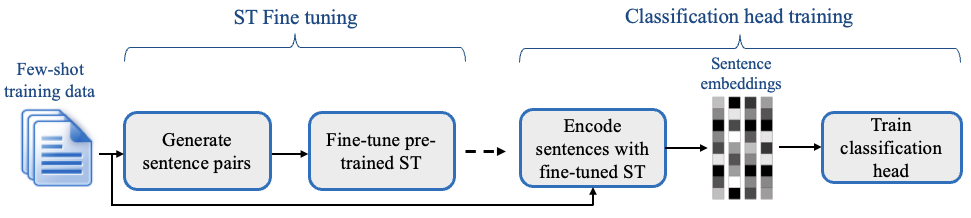
SetFit is an efficient and prompt-free framework for few-shot fine-tuning of Sentence Transformers. It achieves high accuracy with little labeled data - for instance, with only 8 labeled examples per class on the Customer Reviews sentiment dataset, SetFit is competitive with fine-tuning RoBERTa Large on the full training set of 3k examples 🤯!
Compared to other few-shot learning methods, SetFit has several unique features:
- 🗣 No prompts or verbalizers: Current techniques for few-shot fine-tuning require handcrafted prompts or verbalizers to convert examples into a format suitable for the underlying language model. SetFit dispenses with prompts altogether by generating rich embeddings directly from text examples.
- 🏎 Fast to train: SetFit doesn't require large-scale models like T0 or GPT-3 to achieve high accuracy. As a result, it is typically an order of magnitude (or more) faster to train and run inference with.
- 🌎 Multilingual support: SetFit can be used with any Sentence Transformer on the Hub, which means you can classify text in multiple languages by simply fine-tuning a multilingual checkpoint.
Check out the SetFit Documentation for more information!
Installation
Download and install setfit by running:
pip install setfit
If you want the bleeding-edge version instead, install from source by running:
pip install git+https://github.com/huggingface/setfit.git
Usage
The quickstart is a good place to learn about training, saving, loading, and performing inference with SetFit models.
For more examples, check out the notebooks directory, the tutorials, or the how-to guides.
Training a SetFit model
setfit is integrated with the Hugging Face Hub and provides two main classes:
SetFitModel: a wrapper that combines a pretrained body fromsentence_transformersand a classification head from eitherscikit-learnorSetFitHead(a differentiable head built uponPyTorchwith similar APIs tosentence_transformers).Trainer: a helper class that wraps the fine-tuning process of SetFit.
Here is a simple end-to-end training example using the default classification head from scikit-learn:
from datasets import load_dataset
from setfit import SetFitModel, Trainer, TrainingArguments, sample_dataset


# Load a dataset from the Hugging Face Hub
dataset = load_dataset("stanfordnlp/sst2")

# Simulate the few-shot regime by sampling 8 examples per class
train_dataset = sample_dataset(dataset["train"], label_column="label", num_samples=8)
eval_dataset = dataset["validation"].select(range(100))
test_dataset = dataset["validation"].select(range(100, len(dataset["validation"])))

# Load a SetFit model from Hub
model = SetFitModel.from_pretrained(
    "sentence-transformers/paraphrase-mpnet-base-v2",
    labels=["negative", "positive"],
)

args = TrainingArguments(
    batch_size=16,
    num_epochs=4,
    eval_strategy="epoch",
    save_strategy="epoch",
    load_best_model_at_end=True,
)

trainer = Trainer(
    model=model,
    args=args,
    train_dataset=train_dataset,
    eval_dataset=eval_dataset,
    metric="accuracy",
    column_mapping={"sentence": "text", "label": "label"}  # Map dataset columns to text/label expected by trainer
)

# Train and evaluate
trainer.train()
metrics = trainer.evaluate(test_dataset)
print(metrics)
# {'accuracy': 0.8691709844559585}

# Push model to the Hub
trainer.push_to_hub("tomaarsen/setfit-paraphrase-mpnet-base-v2-sst2")

# Download from Hub
model = SetFitModel.from_pretrained("tomaarsen/setfit-paraphrase-mpnet-base-v2-sst2")
# Run inference
preds = model.predict(["i loved the spiderman movie!", "pineapple on pizza is the worst 🤮"])
print(preds)
# ["positive", "negative"]
Reproducing the results from the paper
We provide scripts to reproduce the results for SetFit and various baselines presented in Table 2 of our paper. Check out the setup and training instructions in the scripts/ directory.
Developer installation
To run the code in this project, first create a Python virtual environment using e.g. Conda:
conda create -n setfit python=3.9 && conda activate setfit
Then install the base requirements with:
pip install -e '.[dev]'
This will install mandatory packages for SetFit like datasets as well as development packages like black and isort that we use to ensure consistent code formatting.
Formatting your code
We use black and isort to ensure consistent code formatting. After following the installation steps, you can check your code locally by running:
make style && make quality
Project structure
├── LICENSE
├── Makefile        <- Makefile with commands like `make style` or `make tests`
├── README.md       <- The top-level README for developers using this project.
├── docs            <- Documentation source
├── notebooks       <- Jupyter notebooks.
├── final_results   <- Model predictions from the paper
├── scripts         <- Scripts for training and inference
├── setup.cfg       <- Configuration file to define package metadata
├── setup.py        <- Make this project pip installable with `pip install -e`
├── src             <- Source code for SetFit
└── tests           <- Unit tests
Related work
- https://github.com/pmbaumgartner/setfit - A scikit-learn API version of SetFit.
- jxpress/setfit-pytorch-lightning - A PyTorch Lightning implementation of SetFit.
- davidberenstein1957/spacy-setfit - An easy and intuitive approach to use SetFit in combination with spaCy.
Citation
@misc{https://doi.org/10.48550/arxiv.2209.11055,
  doi = {10.48550/ARXIV.2209.11055},
  url = {https://arxiv.org/abs/2209.11055},
  author = {Tunstall, Lewis and Reimers, Nils and Jo, Unso Eun Seo and Bates, Luke and Korat, Daniel and Wasserblat, Moshe and Pereg, Oren},
  keywords = {Computation and Language (cs.CL), FOS: Computer and information sciences, FOS: Computer and information sciences},
  title = {Efficient Few-Shot Learning Without Prompts},
  publisher = {arXiv},
  year = {2022},
  copyright = {Creative Commons Attribution 4.0 International}
}


Release files for setfit 1.2.0
For a detailed explanation of source distributions (sdists) and built distributions (wheels), please see the package formats documentation.
Source distribution (sdist)
| File | Size | Uploaded | |
|---|---|---|---|
| setfit-1.2.0.tar.gz | 86.8 kB | Details |
Built distribution (wheel)
| File | Interpreter | ABI | Platform | Reset |
|---|---|---|---|---|
| setfit-1.2.0-py3-none-any.whl | Python 3 | none | any | Details |
Total release size: 163.9 kB
Release files / setfit-1.2.0.tar.gz
| Download URL | setfit-1.2.0.tar.gz |
|---|---|
| Size | 86.8 kB |
| Tags | Source |
|
SHA-256 checksum How to use checksums |
ed87e37cb7a35b04dac398c55e2dc9642a4b098d64cdf4b91a91d55dbae1de43
|
|
BLAKE2b-256 checksum How to use checksums |
ffb79f22b2b9d54da2de429c350be6a0c9c7d6615e3c7e5f74ff86535abd68b0
|
| Upload date | |
|
Uploaded using Trusted Publishing? What is trusted publishing? |
No |
| Uploaded via |
twine/6.0.1 CPython/3.9.16
|
Release files / setfit-1.2.0-py3-none-any.whl
| Download URL | setfit-1.2.0-py3-none-any.whl |
|---|---|
| Size | 77.1 kB |
| Tags | Python 3 |
|
SHA-256 checksum How to use checksums |
dcf9292f073f47252c3fea73b141c4f43dc1d01789e0c8e2de017337e0428e34
|
|
BLAKE2b-256 checksum How to use checksums |
2c8232260de73fd4ad41c3f25cbd55911d393e5d0df9a22d9fa8616470861f91
|
| Upload date | |
|
Uploaded using Trusted Publishing? What is trusted publishing? |
No |
| Uploaded via |
twine/6.0.1 CPython/3.9.16
|














