
No project description provided

Project description
setup-badge




😎 Why you need setup-badge?
Repository badges highlight your project's key aspects such as build status, code coverage percentage, software version, license and more.
setup-badge empowers you to create dynamic and static endpoint badges to showcase on your README file.
Note:
dynamic badge changes regularly over time (e.g. code coverage percentage and software version)
static badge doesn't change regularly over time (e.g. license and programming language)
⭐ How setup-badge works
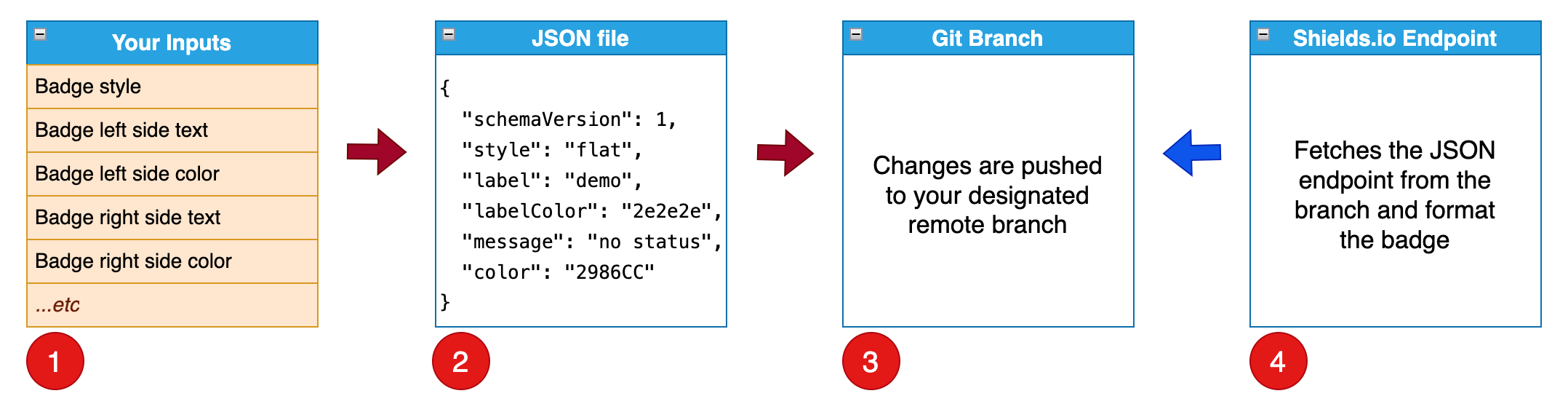
Under the hood, setup-badge creates a shields.io endpoint badge, which is composed of a shields.io endpoint and an URL to your JSON file (JSON Endpoint).

setup-badge workflow is outlined below.
- setup-badge runs with command line options.
- setup-badge adds/updates a json file from your options.
- setup-badge pushes a commit to the remote branch.
- endpoint badge is created with
shields.io endpointandyour json file.
Afterwards, you can put endpoint badge into your README file.
Use Case 1️⃣ - running on GitHub action
In this use case, you run our setup-badge-action in a workflow to create badge(s).
Please visit our GitHub action (setup-badge-action) on the GitHub Marketplace for details.
Use Case 2️⃣ - running locally on your computer
In this use case, you run setup-badge manually with the steps below:
- install setup-badge.
- run setup-badge.
🔆 install setup-badge
In the example below, we first install setup-badge in a Python virtual environment.
~/work/badge-test $ workon badge-test
(badge-test) ~/work/badge-test $ pip install -U setup-badge
🔍 run setup-badge
Next, we run setup-badge with different options and display the results.
🏃 Run to display command line options: --help
(badge-test) ~/work/badge-test $ setup-badge --help
Usage: setup-badge [OPTIONS]

Options:
  --badge-name TEXT       default: badge
  --badge-branch TEXT     default: badges
  --badge-url TEXT        default: ''
  --badge-style TEXT      default: flat (flat, flat-square, plastic, for-the-badge, social)
  --label TEXT            default: demo (badge left side text)
  --label-color TEXT      default: 2e2e2e (badge left side hex color)
  --message TEXT          default: no status (badge right side text)
  --message-color TEXT    default: 2986CC (badge right side hex color)
  --remote-name TEXT      default: origin
  --gitconfig-name TEXT   default: Mona Lisa
  --gitconfig-email TEXT  default: mona.lisa@github.com
  --version               Show the version and exit.
  --help                  Show this message and exit.
🏃 Run to create a demo badge: with default command line options
(badge-test) ~/work/badge-test $ setup-badge
🚀 Starting to create a badge.json in branch (badges)...
✅ validated inputs from command line options
✅ checkout local branch (badges)
✅ created badges/badge.json
✅ found changes ready to stage, commit, and push to origin
✅ pushed commit (f9c751c) to remote branch (badges)
🎉 Endpoint Badge: 
Endpoint Badge

🏃 Run to create a license badge: --badge-name license --label License --message MIT --message-color FFA500 --badge-url https://raw.githubusercontent.com/tagdots/setup-badge/refs/heads/main/LICENSE
(badge-test) ~/work/badge-test $ setup-badge --badge-name license --label License --message MIT --message-color FFA500 --badge-url https://raw.githubusercontent.com/tagdots/setup-badge/refs/heads/main/LICENSE
🚀 Starting to create a badge (license.json) in branch (badges)...
✅ validated inputs from command line options
✅ checkout local branch (badges)
✅ created badges/license.json
✅ found changes ready to stage, commit, and push to origin
✅ pushed commit (dd8906c) to remote branch (badges)
🎉 Endpoint Badge: [](https://raw.githubusercontent.com/tagdots/setup-badge/refs/heads/main/LICENSE)
Endpoint Badge

🏃 Run to create a marketplace badge: --badge-name marketplace --label Marketplace --message setup-badge-action --message-color FF6360 --badge-url https://github.com/marketplace/actions/setup-badge-action
(badge-test) ~/work/badge-test $ setup-badge --badge-name marketplace --label Marketplace --message setup-badge-action --message-color FF6360 --badge-url https://github.com/marketplace/actions/setup-badge-action
🚀 Starting to create a badge (marketplace.json) in branch (badges)...
✅ validated inputs from command line options
✅ checkout local branch (badges)
✅ created badges/marketplace.json
✅ found changes ready to stage, commit, and push to origin
✅ pushed commit (8991c28) to remote branch (badges)
🎉 Endpoint Badge: [](https://github.com/marketplace/actions/setup-badge-action)
Endpoint Badge
✨ Summary of running the above commands
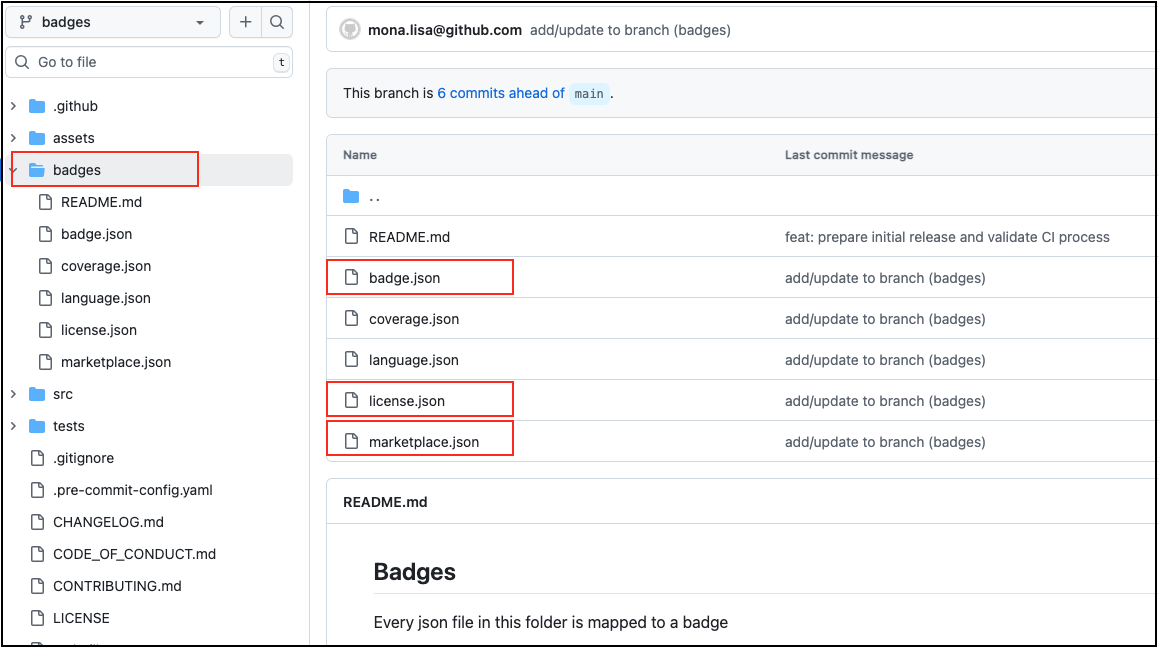
- badges branch can hold multiple JSON files.
- badges folder can hold json files from different branches.
🔔 What is next after creating the endpoint badge?
- copy and paste to your README file
- write a commit and merge your code
🔧 setup-badge command line options
| Input | Description | Default | Notes |
|---|---|---|---|
badge-name |
JSON endpoint filename | badge |
JSON endpoint filename |
branch-name |
Branch to hold JSON endpoint | badges |
a single branch can hold multiple JSON endpoint files |
badge-style |
Badge style | flat |
other options: flat-square, plastic, for-the-badge, social |
badge-url |
Badge URL | '' |
no default value (enter a url if necessary) |
label |
Left side text | demo |
- |
label-color |
Left side background color | 2e2e2e |
hex color |
message |
Right side text | no status |
place dynamic/static data here |
message-color |
Right side background color | 2986CC |
hex color |
remote-name |
Git remote source branch | origin |
leave it as-is in general |
gitconfig-name |
Git config user name | Mona Lisa |
need this option for CI or GitHub action |
gitconfig-email |
Git config user email | mona.lisa@github.com |
need this option for CI or GitHub action |
😕 Troubleshooting
Open an issue
🙏 Contributing
For pull requests to be accepted on this project, you should follow PEP8 when creating/updating Python codes.
See Contributing
🙌 Appreciation
If you find this project helpful, please ⭐ star it. Thank you.
📚 References


Download files
Download the file for your platform. If you're not sure which to choose, learn more about installing packages.
Source Distribution
Built Distribution
Filter files by name, interpreter, ABI, and platform.
If you're not sure about the file name format, learn more about wheel file names.
Copy a direct link to the current filters
File details
Details for the file setup_badge-1.0.11.tar.gz.
File metadata
- Download URL: setup_badge-1.0.11.tar.gz
- Upload date:
- Size: 12.5 kB
- Tags: Source
- Uploaded using Trusted Publishing? No
- Uploaded via: twine/6.1.0 CPython/3.12.9
File hashes
| Algorithm | Hash digest | |
|---|---|---|
| SHA256 |
30ee9d5cdfd8f87caa97d524cdf784452fb107e81a8b80c51ba9bc7f51ffc6fe
|
|
| MD5 |
ef2e9492dd203971b4fc0d4e751d4d87
|
|
| BLAKE2b-256 |
4f74091f82ea29efa5c9d2c78f15783fe050a74049f3f5ec5442d40c4d6f28f2
|
File details
Details for the file setup_badge-1.0.11-py3-none-any.whl.
File metadata
- Download URL: setup_badge-1.0.11-py3-none-any.whl
- Upload date:
- Size: 8.7 kB
- Tags: Python 3
- Uploaded using Trusted Publishing? No
- Uploaded via: twine/6.1.0 CPython/3.12.9
File hashes
| Algorithm | Hash digest | |
|---|---|---|
| SHA256 |
eed850e65f1ea12b2e882f0295e577af5d66817eb8a7ffe8920f6c096ad0233f
|
|
| MD5 |
e3cd3e191c18dbf8aae30d1943a7afce
|
|
| BLAKE2b-256 |
4060c6f8820eaff648cf779f1eb8736043daea41119292fd53ce50d1df27699e
|






