
A single file implementation of key-value database for Python 3

Project description
Single File Database (SFDB)
This is a Fork or [SingleFileDB](https://github.com/lllyasviel/SingleFileDB) which i have just fork it to maintain and upload to PyPi
A single file implementation of key-value database for Python 3.
I use this to store millions of image metadata in many machine learning projects.
SFDB is especially useful when I want to store millions of Stable Diffusion prompts. Its effectiveness is also validated in my many other projects.
Installation
Manual Solution
Just copy the single file sfdb.py to any project.
No installation. No dependencies.
The only one python file has less than 150 lines of codes and only uses Python 3 standard libraries.
Easiest Solution
install via PyPi
pip install sfdb
Just try this
import sfdb

# Will create a new file or open an existing file.
db = sfdb.Database(filename='test.db')

# Add or update items
db['hello'] = 1
db['123'] = 'hi'
db['a'] = [1, 2, 3]
db['bad'] = 'garbage'

# Delete items
del db['bad']

# Read items
print(db['123'])  # Will print "hi".
print(len(db))  # Will print "3".
And you will immediately get
1. Human-Readable Storage
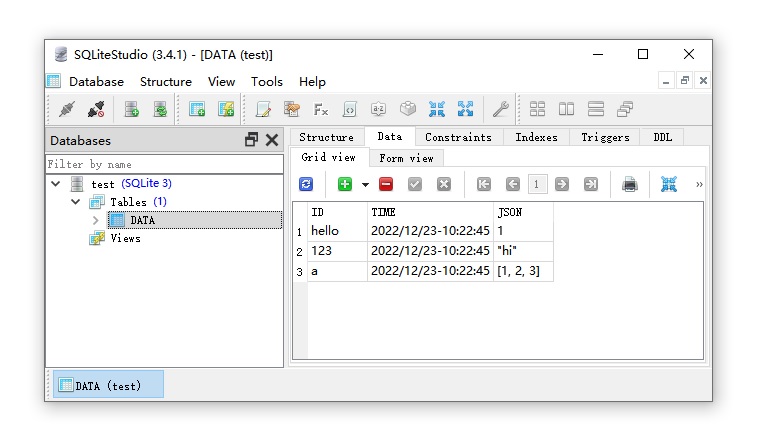
Your data is stored with sqlite format, so that you can view all your data with any sqlite viewers like SQLiteStudio or Jetbrain Datagrip.
All items are human-readable json text.
You can access all data even without using SFDB.
View (and even edit) your data anytime outside your project.
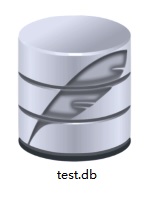
This is what you see in your file explorer:
2. Fast Access from Memory
If your database is small, you can just read everything to memory in various format with one line of code.
import sfdb

db = sfdb.Database(filename='test.db')

cache = db.tolist()
print(cache)
# [('hello', 1), ('123', 'hi'), ('a', [1, 2, 3])]

cache = db.todict()
print(cache)
# {'hello': 1, '123': 'hi', 'a': [1, 2, 3]}

cache = db.keys()
print(cache)
# ['123', 'a', 'hello']
3. Process 10TB Data with 10MB Memory
You can process any large data without loading everything to your memory.
import sfdb

# Oh god this database has 10 TB data.
db = sfdb.Database(filename='very_large_database_with_10TB.db')

# Update it without loading database to memory.
db['anything'] = 123456

# Search item without loading database to memory.
if 'another_thing' in db:
    print('Cool!')

# Get item
print(db['another_thing'])

# Try to get item with default value as None if item not found.
print(db.get('another_thing', default=None))

for key, value in db:
    # Read data items one-by-one.
    # This only requires very small memory.
    print(key)
    print(value)
4. Thread-Safe Everything
Everything is thread-safe.
Do anything you want to do.
Your data are safe.
5. Reliable Storage and Automatic Damage Repair
All data are valid if you only write valid data.
Quit you application with Ctrl+C does not damage the integrity of database structure.
A reference is here:
An SQLite database is highly resistant to corruption. If an application crash,
or an operating-system crash, or even a power failure occurs in the middle of a
transaction, the partially written transaction should be automatically rolled
back the next time the database file is accessed. The recovery process is fully
automatic and does not require any action on the part of the user or the application.
6. Minimal Hard Disk Write
The hard disk writing is optimized to speed up the processing and protect your SSD/HDD drive.
All data updating are updated immediately from the perspective of your python program (i.e., your code logic), but the actual writing to the hard disk only happens when
(1) your program quit/end, OR
(2) every 16384 (16 * 1024) updates, OR
(3) every 60 seconds.
You can force the current updates to be written to the hard disk with
db.commit() # But you do not need to do it.
but you do NOT need to do so, since it is slow, and we have already optimized it. Or you can use
db.close() # Close a database when you quit (but you do not need to do it).
or
del db # Dispose the instance when you quit (but you do not need to do it).
7. Professional Language Feature Support
If you want to look professional, you can use "with" context manager like
import sfdb

with sfdb.Database(filename='test.db') as db:
    print(db['hello'])
Or if you like "tqdm" you can use
import sfdb
from tqdm import tqdm

db = sfdb.Database(filename='test.db')

for key, value in tqdm(db):
    # You will have a nice progress bar provided by tqdm.
    print(key)
    print(value)
Licence
CC-By 4.0 - Do whatever you want to do.
Release history Release notifications | RSS feed

Download files
Download the file for your platform. If you're not sure which to choose, learn more about installing packages.
Source Distribution
Built Distribution
Filter files by name, interpreter, ABI, and platform.
If you're not sure about the file name format, learn more about wheel file names.
Copy a direct link to the current filters
File details
Details for the file sfdb-0.1.0.tar.gz.
File metadata
- Download URL: sfdb-0.1.0.tar.gz
- Upload date:
- Size: 4.3 kB
- Tags: Source
- Uploaded using Trusted Publishing? No
- Uploaded via: poetry/1.8.5 CPython/3.12.9 Linux/4.19.87-27102101
File hashes
| Algorithm | Hash digest | |
|---|---|---|
| SHA256 |
7bf33fa59abcddd186c995d711620a0823260c2f5404b60d84439bc7dbecb7e8
|
|
| MD5 |
ce68944d63b8814e65692bdf95aca4f9
|
|
| BLAKE2b-256 |
e48d1f74d0f64384e9dba982e1f66c60f190e620587aa311bca96a06af859695
|
File details
Details for the file sfdb-0.1.0-py3-none-any.whl.
File metadata
- Download URL: sfdb-0.1.0-py3-none-any.whl
- Upload date:
- Size: 4.7 kB
- Tags: Python 3
- Uploaded using Trusted Publishing? No
- Uploaded via: poetry/1.8.5 CPython/3.12.9 Linux/4.19.87-27102101
File hashes
| Algorithm | Hash digest | |
|---|---|---|
| SHA256 |
147223c6b42e1e39b349aa461f6a5757394776714b470f00e8cbc52a7f0b3711
|
|
| MD5 |
7f3cc191b32166a99858b518531fceef
|
|
| BLAKE2b-256 |
7aed6a9984347c5aacb7e9132abcb0dd3939365ad8ec5feb7051bad0f0d67502
|






