
SGR Agent Core — the first SGR open-source agentic framework for Schema-Guided Reasoning

Open-source agentic framework for building intelligent research agents using Schema-Guided Reasoning. The project provides a core library with a extendable BaseAgent interface implementing a two-phase architecture and multiple ready-to-use research agent implementations built on top of it.
The library includes extensible tools for search, reasoning, and clarification, real-time streaming responses, OpenAI-compatible REST API. Works with any OpenAI-compatible LLM, including local models for fully private research.
Why use SGR Agent Core?
- Schema-Guided Reasoning — SGR combines structured reasoning with flexible tool selection
- Multiple Agent Types — Choose from
SGRAgent,ToolCallingAgent, orSGRToolCallingAgent - Extensible Architecture — Easy to create custom agents and tools
- OpenAI-Compatible API — Drop-in replacement for OpenAI API endpoints
- Real-time Streaming — Built-in support for streaming responses via SSE
- Production Ready — Battle-tested with comprehensive test coverage and Docker support
Documentation
Get started quickly with our documentation:
- Project Docs - Complete project documentation
- Framework Quick Start Guide - Get up and running in minutes
- DeepSearch Service Documentation - REST API reference with examples
Quick Start
Running with Docker
The fastest way to get started is using Docker:
# Clone the repository
git clone https://github.com/vamplabai/sgr-agent-core.git
cd sgr-agent-core

# Create directories with write permissions for all
sudo mkdir -p logs reports
sudo chmod 777 logs reports

# Copy and edit the configuration file
cp examples/sgr_deep_research/config.yaml.example examples/sgr_deep_research/config.yaml
# Edit examples/sgr_deep_research/config.yaml and set your API keys:
# - llm.api_key: Your OpenAI API key
# - tools.web_search_tool.api_key: Your Tavily API key (optional)
# - tools.extract_page_content_tool.tavily_api_key: Your Tavily API key (optional)

# Run the container
docker run --rm -i \
  --name sgr-agent \
  -p 8010:8010 \
  -v $(pwd)/examples/sgr_deep_research:/app/examples/sgr_deep_research:ro \
  -v $(pwd)/logs:/app/logs \
  -v $(pwd)/reports:/app/reports \
  ghcr.io/vamplabai/sgr-agent-core:latest \
  --config-file /app/examples/sgr_deep_research/config.yaml \
  --host 0.0.0.0 \
  --port 8010
The API server will be available at http://localhost:8010 with OpenAI-compatible API endpoints. Interactive API documentation (Swagger UI) is available at http://localhost:8010/docs.
Installation
If you want to use SGR Agent Core as a Python library (framework):
pip install sgr-agent-core
See the Installation Guide for detailed instructions and the Using as Library guide to get started.
Running Research Agents
The project includes example research agent configurations in the examples/ directory. To get started with deep research agents:
- Copy and configure the config file:
cp examples/sgr_deep_research/config.yaml.example examples/sgr_deep_research/config.yaml
# Edit examples/sgr_deep_research/config.yaml and set your API keys:
# - llm.api_key: Your OpenAI API key
# - tools.web_search_tool.api_key: Your Tavily API key (optional)
# - tools.extract_page_content_tool.tavily_api_key: Your Tavily API key (optional)
- Run the API server using the
sgrutility:
sgr --config-file examples/sgr_deep_research/config.yaml
# or use short option
sgr -c examples/sgr_deep_research/config.yaml
Note: You can also run the server directly with Python:
python -m sgr_agent_core.server --config-file examples/sgr_deep_research/config.yaml
Using the CLI Tool (sgrsh)
For interactive command-line usage, you can use the sgrsh utility:
# Single query mode
sgrsh "Найди цену биткоина"

# With agent selection (e.g. sgr_agent, dialog_agent)
sgrsh --agent sgr_agent "What is AI?"

# With custom config file
sgrsh -c config.yaml -a sgr_agent "Your query"

# Interactive chat mode (no query argument)
sgrsh
sgrsh -a sgr_agent
The sgrsh command:
- Automatically looks for
config.yamlin the current directory - Supports interactive chat mode for multiple queries
- Handles clarification and dialog (intermediate results) requests from agents
- Works with any agent defined in your configuration (e.g.
sgr_agent,dialog_agent)
For more examples and detailed usage instructions, see the examples/ directory.
Agent Client Protocol (sgracp)
Editors and tools that speak the Agent Client Protocol can run SGR agents over stdio (newline-delimited JSON-RPC), using the same YAML configuration as the HTTP server.
sgracp --config examples/sgr_deep_research/config.yaml
Optional acp block in config.yaml selects which agents: entry to expose (if omitted, the first agent definition is used):
acp:
  agent: sgr_agent
Protocol details follow the official ACP specification, the Python SDK, and the agent-client-protocol package used by this binary.
Benchmarking

Performance Metrics on gpt-4.1-mini:
- Accuracy: 86.08%
- Correct: 3,724 answers
- Incorrect: 554 answers
- Not Attempted: 48 answers
More detailed benchmark results are available here.
Open-Source Development Team
All development is driven by pure enthusiasm and open-source community collaboration. We welcome contributors of all skill levels!
- SGR Concept Creator // @abdullin
- Project Coordinator & Vision // @VaKovaLskii
- Lead Core Developer // @virrius
- API Development // @EvilFreelancer
- DevOps & Deployment // @mixaill76
- Hybrid FC research // @Shadekss
If you have any questions - feel free to join our community chat↗️ or reach out Valerii Kovalskii↗️.
Special Thanks To:
This project is developed by the neuraldeep community. It is inspired by the Schema-Guided Reasoning (SGR) work and SGR Agent Demo↗️ delivered by "LLM Under the Hood" community and AI R&D Hub of TIMETOACT GROUP Österreich↗️

This project is supported by the AI R&D team at red_mad_robot, providing research capacity, engineering expertise, infrastructure, and operational support.
Learn more about red_mad_robot: redmadrobot.ai↗️ habr↗️ telegram↗️
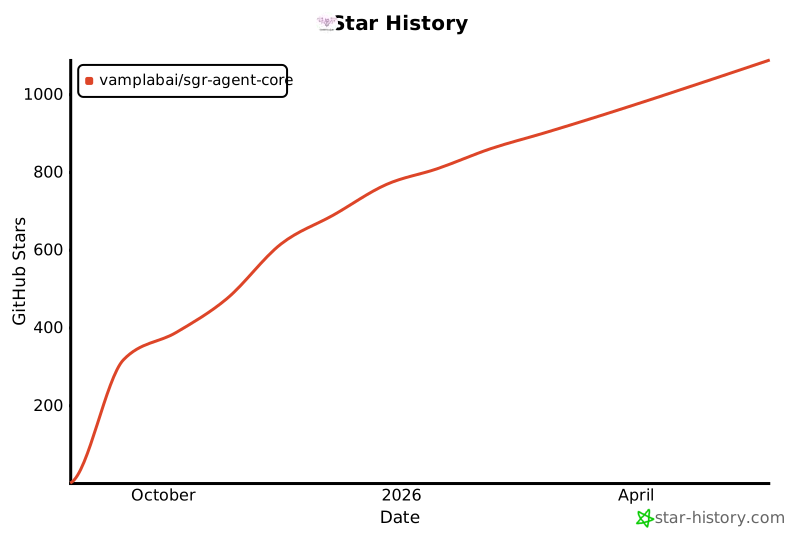
Star History
1 maintainer

Metadata
1 maintainer
Release files for sgr-agent-core 0.7.1
For a detailed explanation of source distributions (sdists) and built distributions (wheels), please see the package formats documentation.
Source distribution (sdist)
| File | Size | Uploaded | Provenance | |
|---|---|---|---|---|
| sgr_agent_core-0.7.1.tar.gz | 2.2 MB | Without provenance | Details |
Built distribution (wheel)
| File | Interpreter | ABI | Platform | Reset |
|---|---|---|---|---|
| sgr_agent_core-0.7.1-py3-none-any.whl | Python 3 | none | any | Details |
Total release size: 2.3 MB
Release files / sgr_agent_core-0.7.1.tar.gz
| Download URL | sgr_agent_core-0.7.1.tar.gz |
|---|---|
| Size | 2.2 MB |
| Tags | Source |
|
SHA-256 checksum How to use checksums |
8ca84bd992d5b9a2037dcb3eeae8e1006fb22f5598af52ec57f37db4d3743d28
|
|
BLAKE2b-256 checksum How to use checksums |
d4218f5a0f3d663f3bacf8d67cc7b8aa49f6bcf7061d075f2e69b061d5b20e1a
|
| Upload date | |
|
Uploaded using Trusted Publishing? What is trusted publishing? |
No |
| Uploaded via |
twine/6.1.0 CPython/3.13.12
|
Release files / sgr_agent_core-0.7.1-py3-none-any.whl
| Download URL | sgr_agent_core-0.7.1-py3-none-any.whl |
|---|---|
| Size | 102.6 kB |
| Tags | Python 3 |
|
SHA-256 checksum How to use checksums |
5b1c167dc55dcf624f50bb2b8a7ecef62fe2febd946c76e7a40a76efb26db284
|
|
BLAKE2b-256 checksum How to use checksums |
0b88764f7e82b3165807a378c8aa990d90af88ee97bcc8669e67f740a404c112
|
| Upload date | |
|
Uploaded using Trusted Publishing? What is trusted publishing? |
No |
| Uploaded via |
twine/6.1.0 CPython/3.13.12
|
Security for sgr-agent-core 0.7.1
Provenance
Provenance describes where a file came from. On PyPI, provenance is shared via attestations, which provide a verifiable record of the build or publishing details. View details, limitations and caveats.
No provenance found
None of the files in this release were uploaded with provenance metadata.
A note on package security
PyPI is a repository for distributing packages, not a service for auditing them. While third-party security researchers and our staff do their best to detect and remove malicious packages, PyPI cannot guarantee the quality, security or suitability of any given package.
To learn more about protecting yourself from malicious actors, visit our package security documentation.














