
SQLModel, SQL databases in Python, designed for simplicity, compatibility, and robustness.




Documentation: https://sqlmodel.tiangolo.com
Source Code: https://github.com/tiangolo/sqlmodel
SQLModel is a library for interacting with SQL databases from Python code, with Python objects. It is designed to be intuitive, easy to use, highly compatible, and robust.
SQLModel is based on Python type annotations, and powered by Pydantic and SQLAlchemy.
The key features are:
- Intuitive to write: Great editor support. Completion everywhere. Less time debugging. Designed to be easy to use and learn. Less time reading docs.
- Easy to use: It has sensible defaults and does a lot of work underneath to simplify the code you write.
- Compatible: It is designed to be compatible with FastAPI, Pydantic, and SQLAlchemy.
- Extensible: You have all the power of SQLAlchemy and Pydantic underneath.
- Short: Minimize code duplication. A single type annotation does a lot of work. No need to duplicate models in SQLAlchemy and Pydantic.
SQL Databases in FastAPI

SQLModel is designed to simplify interacting with SQL databases in FastAPI applications, it was created by the same author. 😁
It combines SQLAlchemy and Pydantic and tries to simplify the code you write as much as possible, allowing you to reduce the code duplication to a minimum, but while getting the best developer experience possible.
SQLModel is, in fact, a thin layer on top of Pydantic and SQLAlchemy, carefully designed to be compatible with both.
Requirements
A recent and currently supported version of Python (right now, Python supports versions 3.6 and above).
As SQLModel is based on Pydantic and SQLAlchemy, it requires them. They will be automatically installed when you install SQLModel.
Installation
$ pip install sqlmodel
---> 100%
Successfully installed sqlmodel
Example
For an introduction to databases, SQL, and everything else, see the SQLModel documentation.
Here's a quick example. ✨
A SQL Table
Imagine you have a SQL table called hero with:
idnamesecret_nameage
And you want it to have this data:
| id | name | secret_name | age |
|---|---|---|---|
| 1 | Deadpond | Dive Wilson | null |
| 2 | Spider-Boy | Pedro Parqueador | null |
| 3 | Rusty-Man | Tommy Sharp | 48 |
Create a SQLModel Model
Then you could create a SQLModel model like this:
from typing import Optional

from sqlmodel import Field, SQLModel


class Hero(SQLModel, table=True):
    id: Optional[int] = Field(default=None, primary_key=True)
    name: str
    secret_name: str
    age: Optional[int] = None
That class Hero is a SQLModel model, the equivalent of a SQL table in Python code.
And each of those class attributes is equivalent to each table column.
Create Rows
Then you could create each row of the table as an instance of the model:
hero_1 = Hero(name="Deadpond", secret_name="Dive Wilson")
hero_2 = Hero(name="Spider-Boy", secret_name="Pedro Parqueador")
hero_3 = Hero(name="Rusty-Man", secret_name="Tommy Sharp", age=48)
This way, you can use conventional Python code with classes and instances that represent tables and rows, and that way communicate with the SQL database.
Editor Support
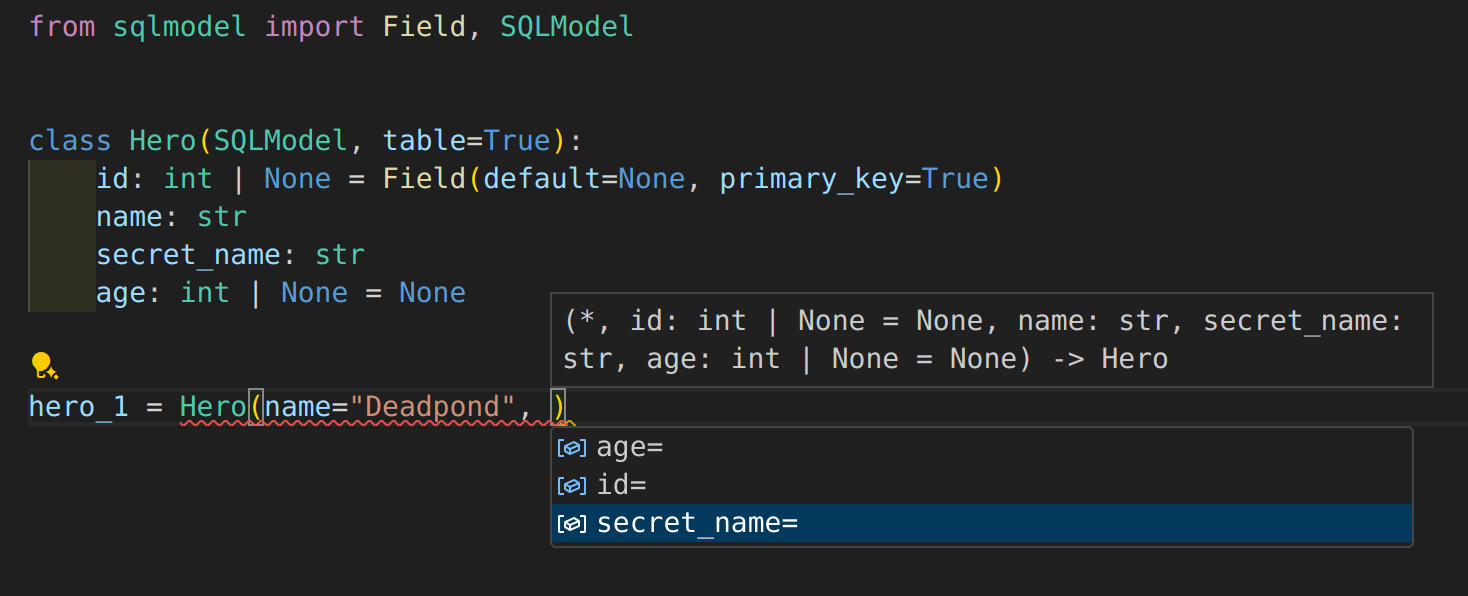
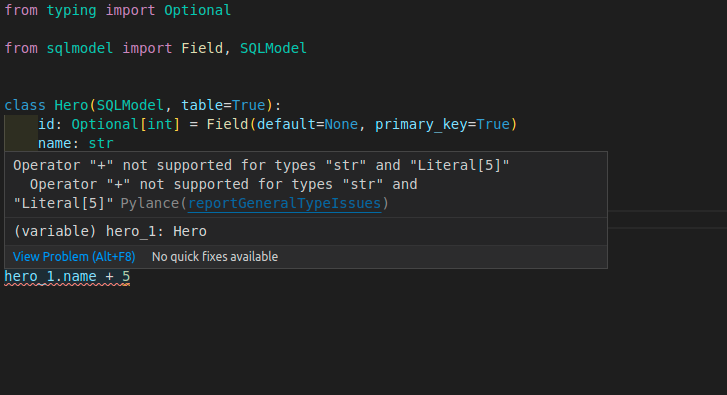
Everything is designed for you to get the best developer experience possible, with the best editor support.
Including autocompletion:
And inline errors:
Write to the Database
You can learn a lot more about SQLModel by quickly following the tutorial, but if you need a taste right now of how to put all that together and save to the database, you can do this:
from typing import Optional

from sqlmodel import Field, Session, SQLModel, create_engine


class Hero(SQLModel, table=True):
    id: Optional[int] = Field(default=None, primary_key=True)
    name: str
    secret_name: str
    age: Optional[int] = None


hero_1 = Hero(name="Deadpond", secret_name="Dive Wilson")
hero_2 = Hero(name="Spider-Boy", secret_name="Pedro Parqueador")
hero_3 = Hero(name="Rusty-Man", secret_name="Tommy Sharp", age=48)


engine = create_engine("sqlite:///database.db")


SQLModel.metadata.create_all(engine)

with Session(engine) as session:
    session.add(hero_1)
    session.add(hero_2)
    session.add(hero_3)
    session.commit()
That will save a SQLite database with the 3 heroes.
Select from the Database
Then you could write queries to select from that same database, for example with:
from typing import Optional

from sqlmodel import Field, Session, SQLModel, create_engine, select


class Hero(SQLModel, table=True):
    id: Optional[int] = Field(default=None, primary_key=True)
    name: str
    secret_name: str
    age: Optional[int] = None


engine = create_engine("sqlite:///database.db")

with Session(engine) as session:
    statement = select(Hero).where(Hero.name == "Spider-Boy")
    hero = session.exec(statement).first()
    print(hero)
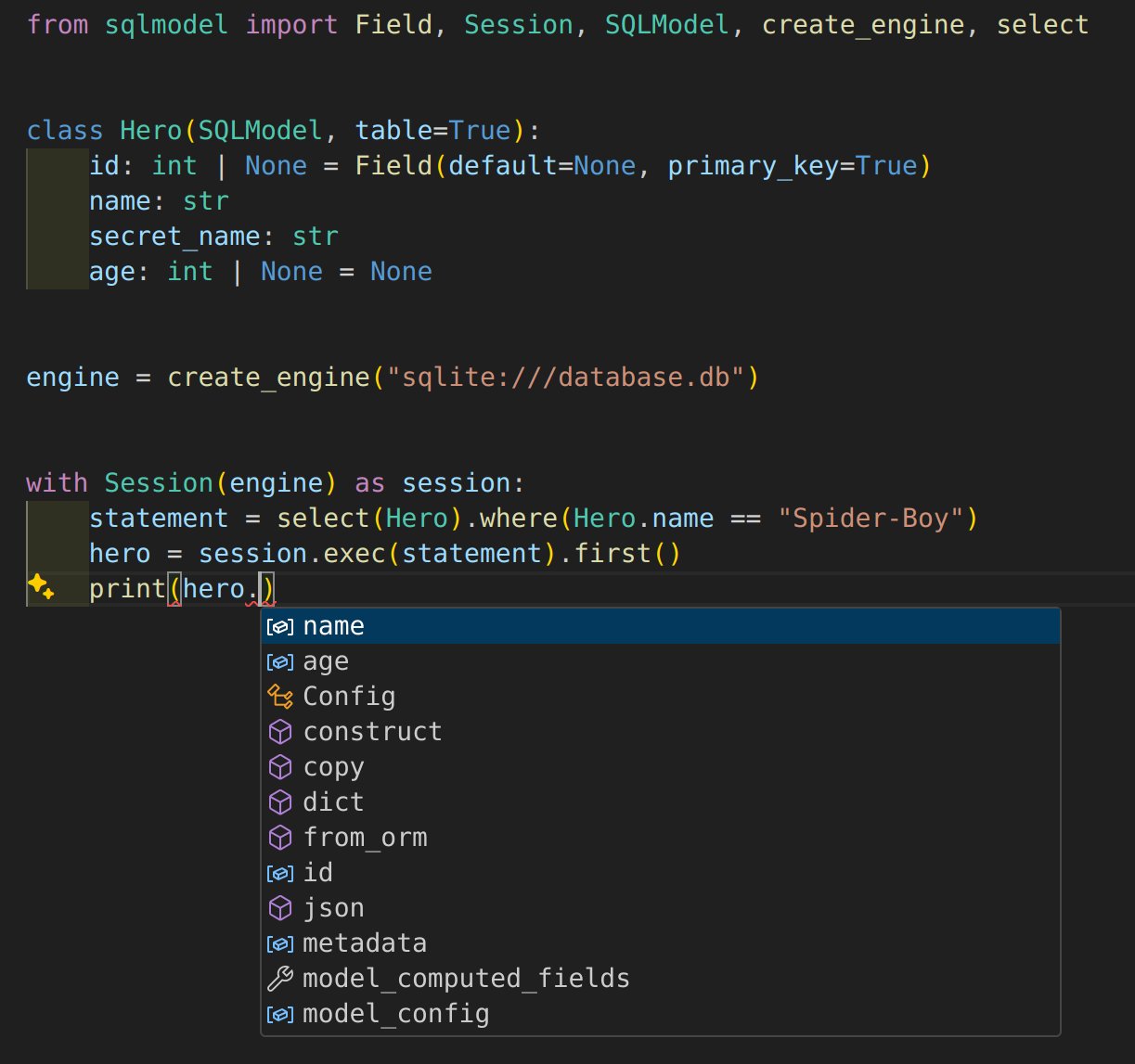
Editor Support Everywhere
SQLModel was carefully designed to give you the best developer experience and editor support, even after selecting data from the database:
SQLAlchemy and Pydantic
That class Hero is a SQLModel model.
But at the same time, ✨ it is a SQLAlchemy model ✨. So, you can combine it and use it with other SQLAlchemy models, or you could easily migrate applications with SQLAlchemy to SQLModel.
And at the same time, ✨ it is also a Pydantic model ✨. You can use inheritance with it to define all your data models while avoiding code duplication. That makes it very easy to use with FastAPI.
License
This project is licensed under the terms of the MIT license.
1 maintainer

Metadata
1 maintainer
Release files for shalion-sqlmodel 0.1.1
For a detailed explanation of source distributions (sdists) and built distributions (wheels), please see the package formats documentation.
Source distribution (sdist)
| File | Size | Uploaded | |
|---|---|---|---|
| shalion-sqlmodel-0.1.1.tar.gz | 22.3 kB | Details |
Built distribution (wheel)
| File | Interpreter | ABI | Platform | Reset |
|---|---|---|---|---|
| shalion_sqlmodel-0.1.1-py3-none-any.whl | Python 3 | none | any | Details |
Total release size: 45.5 kB
Release files / shalion-sqlmodel-0.1.1.tar.gz
| Download URL | shalion-sqlmodel-0.1.1.tar.gz |
|---|---|
| Size | 22.3 kB |
| Tags | Source |
|
SHA-256 checksum How to use checksums |
1d6de67b5efe7f1f0243539af999ee2bf0ab13fde3c30c94aa08fba53b2c0eff
|
|
BLAKE2b-256 checksum How to use checksums |
93fefa7b515951a593adb89c5010c549788edcf368817dac5524b6c629856cd0
|
| Upload date | |
|
Uploaded using Trusted Publishing? What is trusted publishing? |
No |
| Uploaded via |
poetry/1.1.12 CPython/3.6.9 Linux/5.4.0-100-generic
|
Release files / shalion_sqlmodel-0.1.1-py3-none-any.whl
| Download URL | shalion_sqlmodel-0.1.1-py3-none-any.whl |
|---|---|
| Size | 23.2 kB |
| Tags | Python 3 |
|
SHA-256 checksum How to use checksums |
efd3192310a8bdcdd87ddf80ec3c8d8f1012e20b1e1764a8b83a7e949b5ee0bf
|
|
BLAKE2b-256 checksum How to use checksums |
1680dd37f6a40fe23c3ed33101a2b523e984f2a391f82c471c9d2d1c74da7241
|
| Upload date | |
|
Uploaded using Trusted Publishing? What is trusted publishing? |
No |
| Uploaded via |
poetry/1.1.12 CPython/3.6.9 Linux/5.4.0-100-generic
|













