
Shapash is a Python library which aims to make machine learning interpretable and understandable by everyone.

Project description
Shapash






Shapash is a Python library which aims to make machine learning interpretable and understandable by everyone. It provides several types of visualization that display explicit labels that everyone can understand.
Data Scientists can more easily understand their models and share their results. End users can understand the decision proposed by a model using a summary of the most influential criteria.
The objectives of shapash:
- To display clear and understandable results: Plots and outputs use explicit labels for each feature and its values:
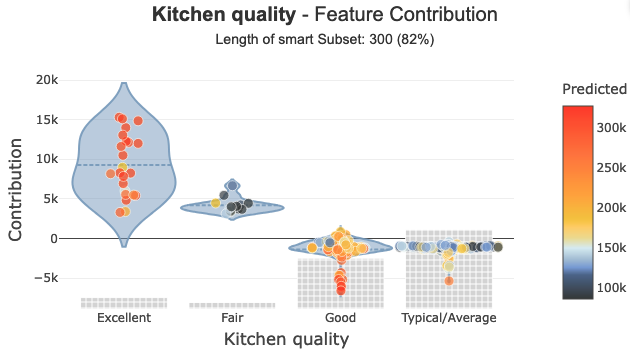
- To allow Data Scientists to quickly understand their models by using a webapp to easily navigate between global and local explainability, and understand how the different features contribute: Live Demo Shapash-Monitor

- To Summarize and export the local explanation:
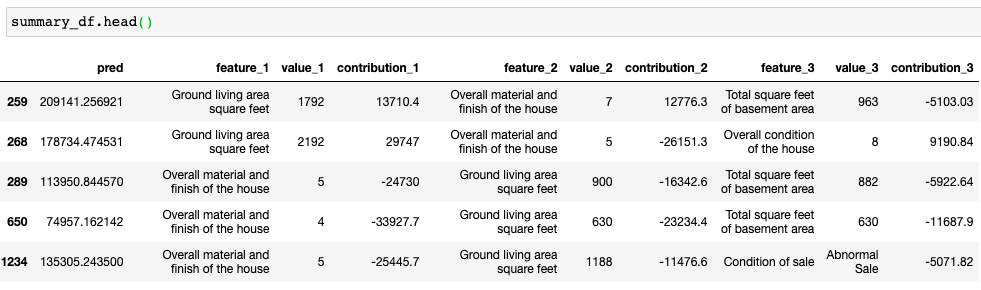
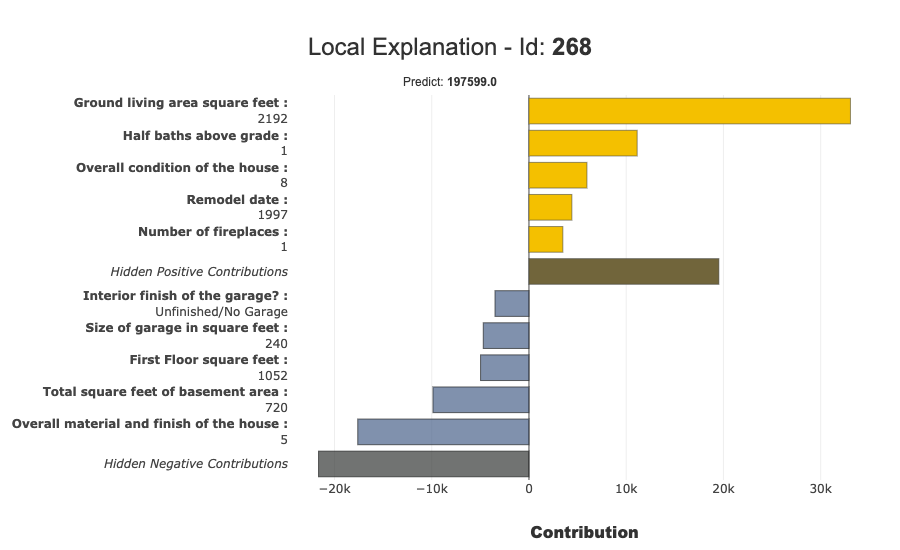
Shapash proposes a short and clear local explanation. It allows each user, whatever their Data backround, to understand a local prediction of a supervised model thanks to an summarized and explicit explanation
-
To discuss results: Shapash allows Data Scientists to easily share and discuss their results with non-Data users
-
Use Shapash to deploy interpretability part of your project: From model training to deployment (API or Batch Mode)
How does shapash work?
Shapash is an overlay package for libraries dedicated to the interpretability of models. It uses Shap or Lime backend to compute contributions. Shapash builds on the different steps necessary to build a machine learning model to make the results understandable
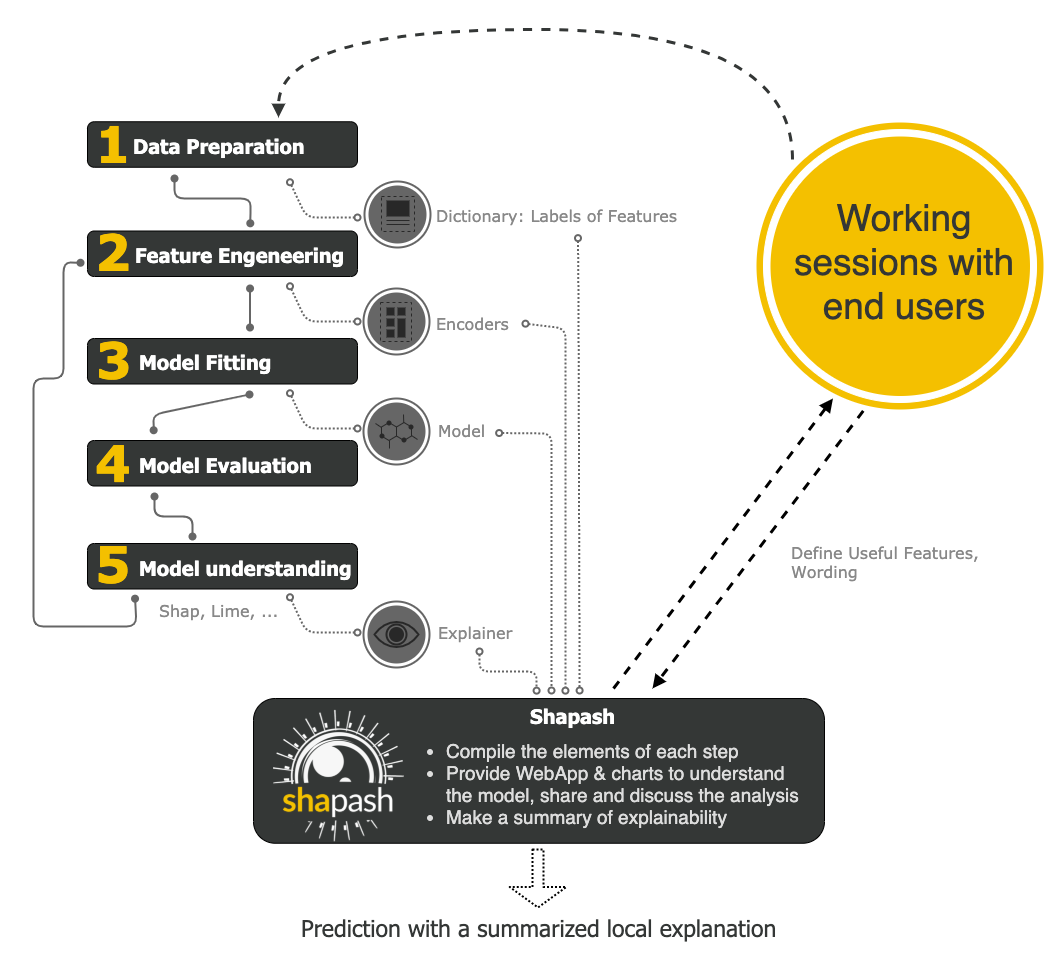
User Manual
Shapash works for Regression, Binary Classification or Multiclass problem.
It is compatible with many models: Catboost, Xgboost, LightGBM, Sklearn Ensemble, Linear models, SVM.
Shapash can use category-encoders object, sklearn ColumnTransformer or simply features dictionary.
- Category_encoder: OneHotEncoder, OrdinalEncoder, BaseNEncoder, BinaryEncoder, TargetEncoder
- Sklearn ColumnTransformer: OneHotEncoder, OrdinalEncoder, StandardScaler, QuantileTransformer, PowerTransformer
You can use Shap or Lime, compute your own local contributions and use Shapash to display plot or summarize it.
Using Shapash is simple and requires only a few lines of code.
Most parameters are optional, you can displays plots effortlessly.
But you can also tune plots and outputs, specifying labels dict, features dict, encoders, predictions, ... : The more you specify parameters, options, dictionaries and more the outputs will be understandable
Installation
pip install shapash
Getting Started: 3 minutes to Shapash
The 4 steps to display results:
- Step 1: Declare SmartExplainer Object
You can declare features dict here to specify the labels to display
from shapash.explainer.smart_explainer import SmartExplainer
xpl = SmartExplainer(features_dict=house_dict) # optional parameter
- Step 2: Compile Model, Dataset, Encoders, ...
There are 2 mandatory parameters in compile method: Model and Dataset
xpl.compile(
    x=Xtest,
    model=regressor,
    preprocessing=encoder, # Optional: compile step can use inverse_transform method
    y_pred=y_pred, # Optional
    postprocessing=postprocess # Optional: see tutorial postprocessing
)
- Step 3: Display output
There are several outputs and plots available. for example, you can launch the web app:
app = xpl.run_app()
- Step 4: From training to deployment : SmartPredictor Object
Shapash provides a SmartPredictor object to deploy the summary of local explanation for the operational needs. It is an object dedicated to deployment, lighter than SmartExplainer with additional consistency checks. SmartPredictor can be used with an API or in batch mode. It provides predictions, detailed or summarized local explainability using appropriate wording.
predictor = xpl.to_smartpredictor()
See the tutorial part to know how to use the SmartPredictor object
Tutorials
This github repository offers a lot of tutorials to allow you to start more concretely in the use of Shapash.
More Precise Overview
- Launch the webapp with a concrete use case
- Jupyter Overviews - The main outputs and methods available with the SmartExplainer object
- Shapash in production: From model training to deployment (API or Batch Mode)
More details about charts and plots
- Shapash Features Importance
- Contribution plot to understand how one feature affects a prediction
- Summarize, display and export local contribution using filter and local_plot method
- Contributions Comparing plot to understand why predictions on several individuals are different
The different ways to use Encoders and Dictionaries
- Use Category_Encoder & inverse transformation
- Use ColumnTransformers
- Use Simple Python Dictionnaries
Better displaying data with postprocessing
How to use shapash with Shap or Lime compute
- Compute Shapley Contributions using Shap
- Use Lime to compute local explanation, Sumarize-it with Shapash
Deploy local explainability in production
Release history Release notifications | RSS feed


Download files
Download the file for your platform. If you're not sure which to choose, learn more about installing packages.
Source Distribution
Built Distribution
Filter files by name, interpreter, ABI, and platform.
If you're not sure about the file name format, learn more about wheel file names.
Copy a direct link to the current filters
File details
Details for the file shapash-1.0.tar.gz.
File metadata
- Download URL: shapash-1.0.tar.gz
- Upload date:
- Size: 688.6 kB
- Tags: Source
- Uploaded using Trusted Publishing? No
- Uploaded via: twine/3.3.0 pkginfo/1.6.1 requests/2.25.1 setuptools/51.1.0 requests-toolbelt/0.9.1 tqdm/4.56.0 CPython/3.8.7
File hashes
| Algorithm | Hash digest | |
|---|---|---|
| SHA256 |
b23e7798bed46436b4c72de2a3c94dd4a345041560030b5497023e3b3188de80
|
|
| MD5 |
e6cae7017bd543c1191162fedc5794cd
|
|
| BLAKE2b-256 |
d75aa12a615183f4ffef1ebb91a458b12e289d49479b3c95f7bd698382a0f81e
|
File details
Details for the file shapash-1.0-py2.py3-none-any.whl.
File metadata
- Download URL: shapash-1.0-py2.py3-none-any.whl
- Upload date:
- Size: 835.7 kB
- Tags: Python 2, Python 3
- Uploaded using Trusted Publishing? No
- Uploaded via: twine/3.3.0 pkginfo/1.6.1 requests/2.25.1 setuptools/51.1.0 requests-toolbelt/0.9.1 tqdm/4.56.0 CPython/3.8.7
File hashes
| Algorithm | Hash digest | |
|---|---|---|
| SHA256 |
863f4a2f6028ed0a7a0d37f8d7e553d281b19a0962bdb1a3afa347d6e52503e7
|
|
| MD5 |
034e6320001c07167f528905729dd6d6
|
|
| BLAKE2b-256 |
12c1a30fa7d128d84ac97f248755c6f89c662c01278af0cfd65d75bd60719721
|






