
Shape Commentator

About
You can easily add numpy.ndarray.shape, torch.Size, other shape and type information at runtime to your script code as comments.
NumPyやPyTorchなどの配列のshape属性や,変数の型の実行時の情報を,スクリプトにコメントとして貼り付けるツールです.
Install
pip install -U shape_commentator
-U means upgrading.
Usage
This tool has two types of usage.
このツールには2つの使い方があります.
Usage 1. Execute this as a Module
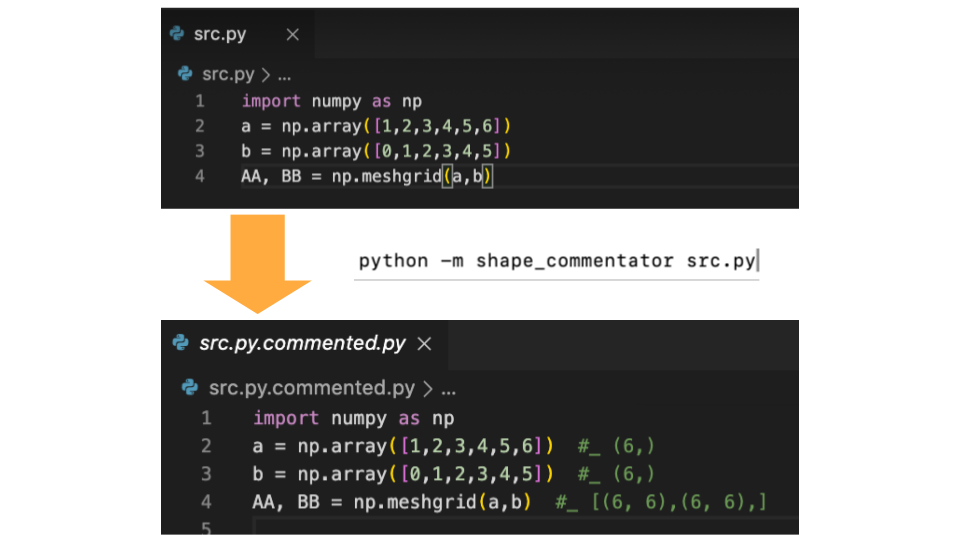
Create Commented Script
- Run this script as a module with argument of script name. Command line arguments to the target script are available.
Pythonのモジュールとしてshape_commentatorを実行してください.引数は,スクリプト名の後にスクリプトに渡したい引数を続けることもできます.
python -m shape_commentator src.py
python -m shape_commentator src.py arg1 arg2 arg3
- You get the commented script. For example, you execute shape_commentator to
src.py, you getsrc.py.commented.py.
src.pyというスクリプトに対して実行すると,src.py.commented.pyが生成されます.
src.py
import numpy as np
a = np.array([1,2,3,4,5,6])
b = np.array([0,1,2,3,4,5])
ab_h = np.hstack((a,b))
ab_v = np.vstack((a,b))
ab = np.dot(a,b)
AA, BB = np.meshgrid(a,b)
i = 1
f = 1.0
c = 1 + 1j
s = "string1"
class A():
    pass
a = A()
src.py.commented.py
import numpy as np
a = np.array([1,2,3,4,5,6])  #_ (6,)
b = np.array([0,1,2,3,4,5])  #_ (6,)
ab_h = np.hstack((a,b))  #_ (12,)
ab_v = np.vstack((a,b))  #_ (2, 6)
ab = np.dot(a,b)  #_ ()
AA, BB = np.meshgrid(a,b)  #_ [(6, 6),(6, 6),]
i = 1  #_ int
f = 1.0  #_ float
c = 1 + 1j  #_ complex
s = "string1"  #_ str
class A():
    pass
a = A()  #_ A
Usage 2. IPython / Jupyter Notebook (Magic Command)
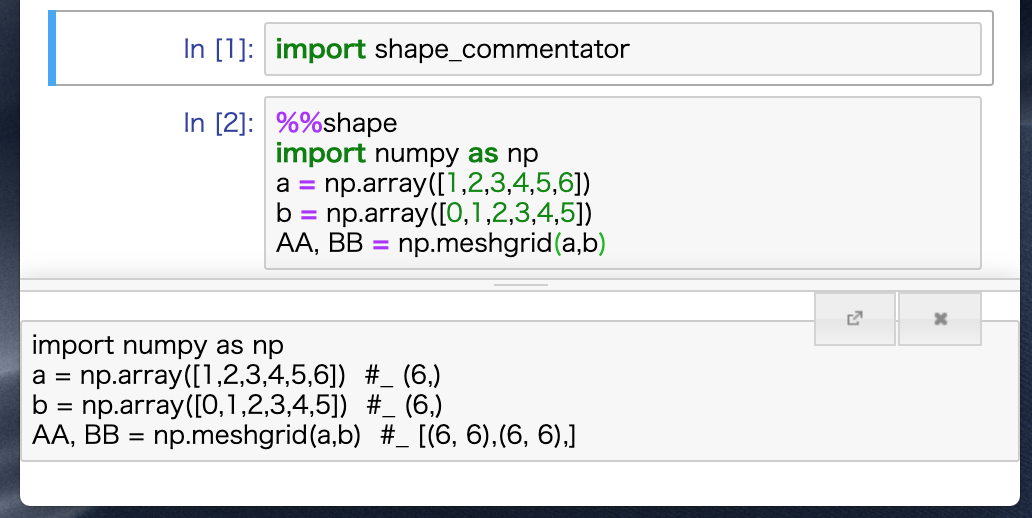
To use IPython / Jupyter Notebook magic command,
IPythonやJupyter Notebookでのマジックコマンドの使い方
import shape_commentator
Create Commented Script
コメントを付ける
%%shape
a = np.array([1,2,3,4,5,6])
output
a = np.array([1,2,3,4,5,6]) #_ (6,)
Delete Comments
コメントを消す
%%shape -d
a = np.array([1,2,3,4,5,6])  #_ (6,)
output
a = np.array([1,2,3,4,5,6])
Tested Python Version
Test scripts are written in these version of Python.
以下のバージョンがテストされています.
- 3.11.3
- 3.10.11
- 3.9.16
- 3.8.16
- 3.7.16
- 3.6.15
- 3.5.10
- 2.7.17
Blog
作った経緯などを書いた解説ブログはこちらにあります.
NumPyやPyTorchで使える超便利ツールを作った
1 maintainer

Metadata
1 maintainer
Release files for shape-commentator 0.8.0
For a detailed explanation of source distributions (sdists) and built distributions (wheels), please see the package formats documentation.
Source distribution (sdist)
| File | Size | Uploaded | Provenance | Actions |
|---|---|---|---|---|
| shape_commentator-0.8.0.tar.gz | 8.3 kB | Without provenance | Details for shape_commentator-0.8.0.tar.gz |
Release files / shape_commentator-0.8.0.tar.gz
| Download URL | shape_commentator-0.8.0.tar.gz |
|---|---|
| Size | 8.3 kB |
| Tags | Source |
|
SHA-256 checksum How to use checksums |
e536e39ca967151209e62b8fb4a236bf5ce080e828038dbac9e960587a560f71
|
|
BLAKE2b-256 checksum How to use checksums |
b28948a99d438168ea08665ac4eb9118dfdc42345688850e4eb1ae0330f57005
|
| Upload date | |
|
Uploaded using Trusted Publishing? What is trusted publishing? |
No |
| Uploaded via |
twine/4.0.2 CPython/3.11.3
|
Security for shape-commentator 0.8.0
Provenance
Provenance describes where a file came from. On PyPI, provenance is shared via attestations, which provide a verifiable record of the build or publishing details. View details, limitations and caveats.
No provenance found
None of the files in this release were uploaded with provenance metadata.
A note on package security
PyPI is a repository for distributing packages, not a service for auditing them. While third-party security researchers and our staff do their best to detect and remove malicious packages, PyPI cannot guarantee the quality, security or suitability of any given package.
To learn more about protecting yourself from malicious actors, visit our package security documentation.














