
ShapeFile2DB V 0.1.8
Exports US Census ZCTA (Zip Code Tabulation Area) shapefiles to a SQLite database via CLI or Python API.


Overview
ZipShapeFile2DB is a Python package for extracting, filtering, and exporting ZIP Code Tabulation Area (ZCTA) shapefiles into structured formats for geospatial analysis in a SQLite3 database file.
Designed for developers and data analysts, it offers a clean command-line interface and a modular API that integrates seamlessly into Python workflows.
Whether you're automating shapefile exports, building spatial dashboards, or prepping data for SQL-based queries, ZipShapeFile2DB provides a transparent, scriptable pipeline with real-time logging, schema validation, and flexible output options.
Shapefile Requirements
This module is designed to work with shapefiles derived from the 2020 ZCTA dataset provided by the US Census Bureau.
To download the official shapefiles, visit: https://www.census.gov/geographies/mapping-files/time-series/geo/tiger-line-files.2020.html
This download will provid a zipped file containing all of the shapefile components (several files)
Required Shapefile Components:
.shp (Shape Format):
    Contains the primary geometry data for each feature (points, lines, polygons).

.shx (Shape Index Format):
    Provides an index for efficient access to geometry records in the .shp file.

.dbf (dBASE Table Format):
    Stores attribute data linked to each geometry, such as ZIP code and classification.
Note: All three files (.shp, .shx, .dbf) are required for full shapefile functionality. The .shx file significantly improves performance when accessing large geometries.
Features
- CLI & API support for ZCTA shapefile export
- Modular architecture for easy extension and testing
- Google-style docstrings for clarity and discoverability
- Built-in validation for input paths and schema integrity
- Geospatial stack ready: works with
geopandas,shapely, andSQLAlchemy
Installation
pip install shapefile2db
Or for local development:
git clone https://github.com/rlapine/shapefile2db.git
cd shapefile2db
pip install -e .
Dependencies
- Python 3.8+
- geopandas==1.1.1",
- pandas==2.3.2",
- printpop==0.2.2",
- pyogrio==0.11.0",
- setuptools==80.9.0",
- Shapely==2.1.1",
- SQLAlchemy==2.0.43"
API Example
from shapefile2db import export_shapefile_to_db

export_shapefile_to_db(state="NY",
                      shape_file_name="tl_2020_us_zcta520.shp",
                      database_name="ny_address.db")
Example Output
Shape File: tl_2020_us_zcta520.shp
Read Start: 12:51:49:25
Read Timer: 03.20
Read End: 12:51:52:45
Total Rows: 33791

Filter 'NY' Start: 12:51:52:47
Filter End: 12:51:52:48
Total 'NY' Rows: 1826

Warning: Database file not found at: 'C:\Users\ryan\Visual Code Projects\shapefile\ny_address.db'
Warning: Database file created at: 'C:\Users\ryan\Visual Code Projects\shapefile\ny_address.db'

Database File: ny_address.db
Rows to Export: 1826
Export Start: 12:51:52:48
Rows Exported: 596 Time Remaining: 00:00:46.
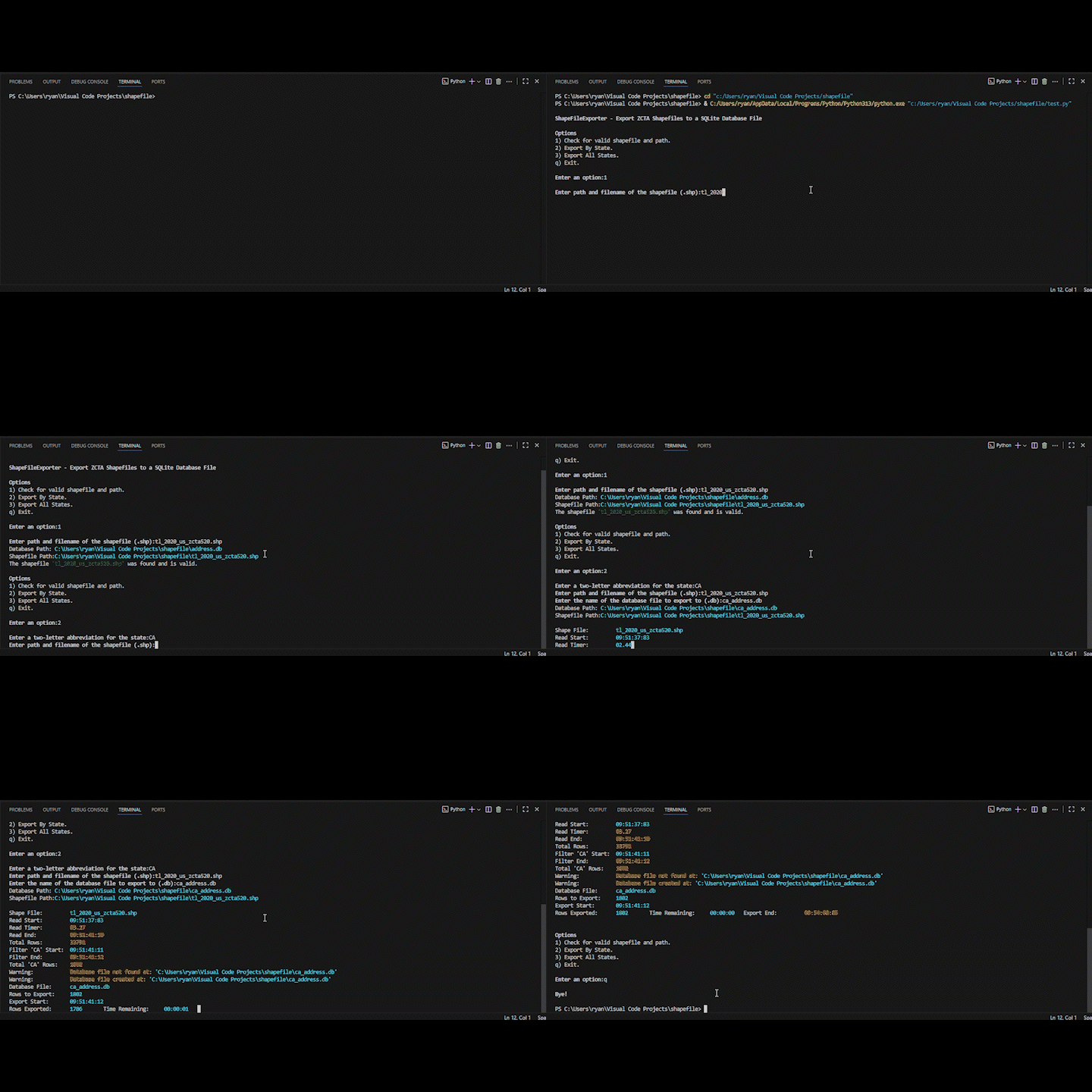
🖥️ CLI Demo
Project Structure
shapefile2db/
├── shapefile2db/
│   ├── cli.py                      # CLI entry point
│   ├── core.py                     # Main export logic
│   ├── shape_file_exporter.py      # Exporter class
│   ├── state_shape_file_exporter.py# Individual state exporter
│   └── address_db/                 # Subpackage for database logic
│       ├── __init__.py             # Address DB API exposure
│       ├── address_constants.py    # state constants
│       ├── address_database.py     # DB connection and export logic
│       └── address_models.py       # ORM models
├── cli.py                          # CLI entry point
├── core.py                         # Main export wrapper
├── __init__.py                     # API exposure
├── LICENSE                         # Project license
├── pyproject.toml                  # Build system and CLI entry points
├── requirements.txt                # Runtime dependencies
└── README.md                       # Project overview and usage
Contributing
Pull requests welcome! If you spot formatting quirks, want to add new named colors or extend features (like terminal detection or theme presets), feel free to collaborate.
To contribute:
Fork the repo
Add your changes with Google-style comments
Submit a pull request with a clear description
For style consistency, follow the Python Google Style Guide for functions and comments.
License
This project is licensed under the MIT License.
Author
Created by Ryan LaPine @rlapine — a technically skilled developer focused on clarity, maintainability, and audience-ready documentation. This class is part of a broader effort to build reusable, well-documented tools for data-driven projects.
Contact
Feel free to reach out with questions or collaboration ideas:
📧 github.stunt845@passinbox.com
🔗 GitHub: @rlapine
1 maintainer

Metadata
1 maintainer
Release files for shapefile2db 0.1.8
For a detailed explanation of source distributions (sdists) and built distributions (wheels), please see the package formats documentation.
Source distribution (sdist)
| File | Size | Uploaded | |
|---|---|---|---|
| shapefile2db-0.1.8.tar.gz | 2.3 MB | Details |
Built distribution (wheel)
| File | Interpreter | ABI | Platform | Reset |
|---|---|---|---|---|
| shapefile2db-0.1.8-py3-none-any.whl | Python 3 | none | any | Details |
Total release size: 4.6 MB
Release files / shapefile2db-0.1.8.tar.gz
| Download URL | shapefile2db-0.1.8.tar.gz |
|---|---|
| Size | 2.3 MB |
| Tags | Source |
|
SHA-256 checksum How to use checksums |
96c64d453702d45a370db5f7243f745a282906d4667ef20dc2568d4bc378626b
|
|
BLAKE2b-256 checksum How to use checksums |
012e7de2c73036904ba5ea2d1a4759f5bdf23b895c037ea6f034253ae8d202e8
|
| Upload date | |
|
Uploaded using Trusted Publishing? What is trusted publishing? |
No |
| Uploaded via |
twine/6.1.0 CPython/3.13.4
|
Release files / shapefile2db-0.1.8-py3-none-any.whl
| Download URL | shapefile2db-0.1.8-py3-none-any.whl |
|---|---|
| Size | 2.3 MB |
| Tags | Python 3 |
|
SHA-256 checksum How to use checksums |
7d60c6a1015d0042cfc7be22a101ebf0dce33477171c58cc17f5be4b3e8b71ba
|
|
BLAKE2b-256 checksum How to use checksums |
7663be7059ec87e2604f9a7699e4965e0e99375eaf15b4945051a15a7d0ce519
|
| Upload date | |
|
Uploaded using Trusted Publishing? What is trusted publishing? |
No |
| Uploaded via |
twine/6.1.0 CPython/3.13.4
|














