
ShareStats Item Editor



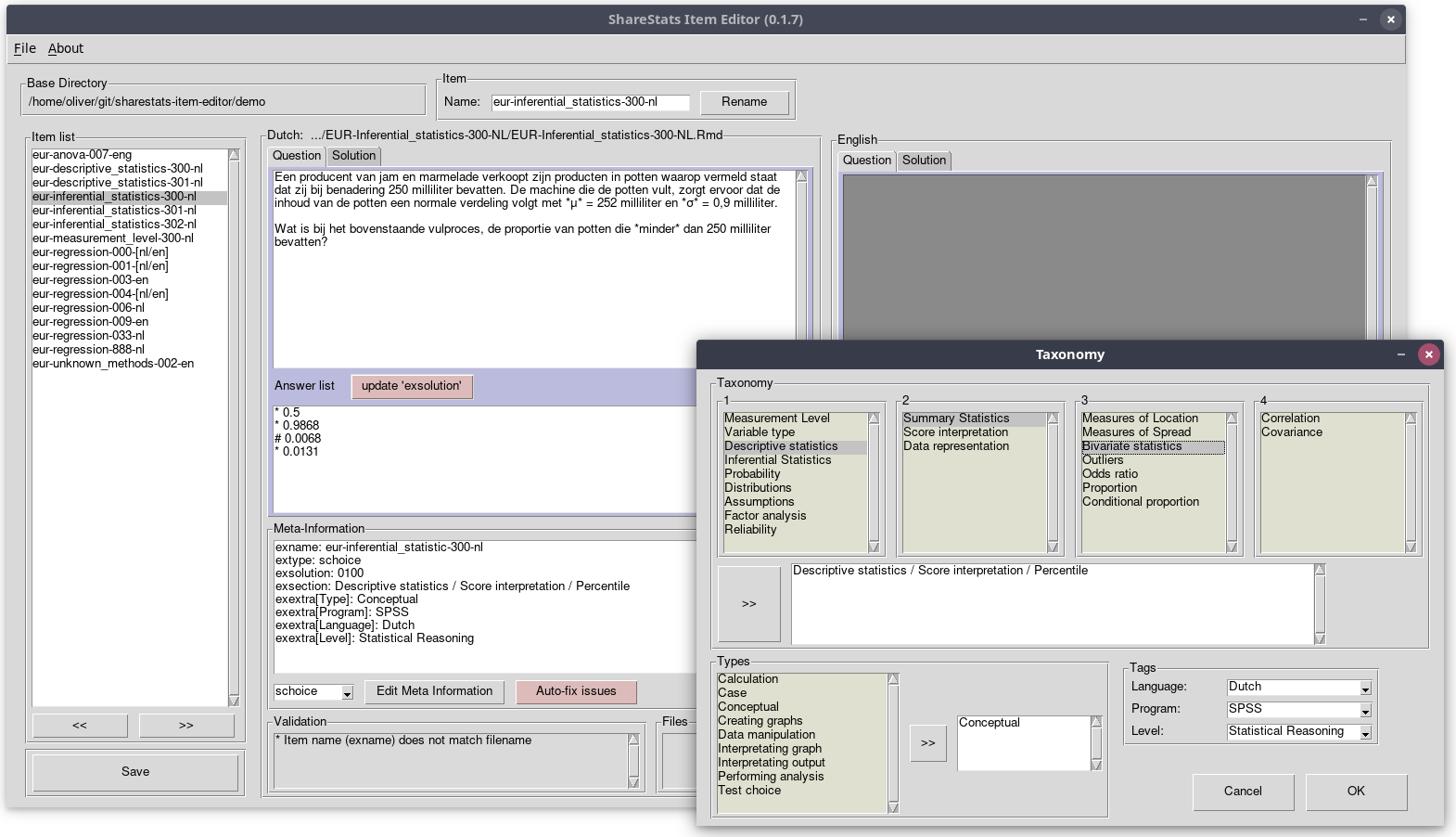
Editor and validator for Rexam items in the ShareStats project
Feature overview
- Takes into account the conventions of the ShareStats Project
- violation checks of file and folder naming and required meta-information
- required subfolder structure
- joining bilingual items in the database (Dutch, English)
- Convenience functions for item editing
- support for generating and naming new items
- auto-fix function for some violations of the conventions and R
markdown syntax - multiple choice items: correct answers can be indicated with an
#(instead of*).exsolutionwill be set automatically.
- R markdown rendering check (experimental, requires R)
This program is based on (and includes copy of) the Python package RExam Item Editor.
The software is released under the MIT License
Oliver Lindemann, Erasmus University Rotterdam, NL
Installation
Please, ensure that Python 3 is installed on your computer. If you install Python 3 on Windows, don't for get to add Python the path environment variable.
ShareStats-Item-Editor can be installed via the Pythons package manager
pip. Open a shell and call:
python -m pip install -U sharestats-item-editor
(This command is also used the update an existsing installing of ShareStats-Item-Editor.)
To run ShareStats-Item-Editor called this command via your shell:
sharestats-item-editor
Windows Executables
Windows user may run StatsShare-Item-Editor without installing Python.
Download the latest executable file, sharestats_item_editor.exe, via the
release website
and execute it.
Note, depending on your security settings, you may receive a security alert from Windows defender, because the executable is not a registered Windows application.
Using this installation method is convenient has however two disadvantages.
(a) Windows may classify the executable erroneously as a virus and prevents
you from installing.
(b) Using the executable instead of installing the application via pip results
in a slow launching application.
Dependencies
Python 3.7+ and the following libraries (see requirements.txt):
- PySimpleGUI
- appdirs
Optional requirement:
- rpy2 >=3.4
- markdown >=3.0
Rendering Rmd File (work in progress)
To render Rmd files directly via the StatsShare-Item-Editor, you need
a functioning
installation of R including the R-package exams.
If you don't use the Windows executable, install the Python-package rpy2 (pip install rpy2).
Windows user find two executable files for StatsShare-Item-Editor, one with and one without R rendering support. StatsShare-Item-Editor with rendering does not work on computers without a R installation.
Bugs: Please submit any bug you encounter to the Github issue tracker.
1 maintainer

Metadata
1 maintainer
Release files for sharestats-item-editor 0.2.11.post2
For a detailed explanation of source distributions (sdists) and built distributions (wheels), please see the package formats documentation.
Source distribution (sdist)
| File | Size | Uploaded | Provenance | |
|---|---|---|---|---|
| sharestats-item-editor-0.2.11.post2.tar.gz | 38.9 kB | Without provenance | Details |
Built distribution (wheel)
| File | Interpreter | ABI | Platform | Reset |
|---|---|---|---|---|
| sharestats_item_editor-0.2.11.post2-py3-none-any.whl | Python 3 | none | any | Details |
Total release size: 122.9 kB
Security for sharestats-item-editor 0.2.11.post2
Provenance
Provenance describes where a file came from. On PyPI, provenance is shared via attestations, which provide a verifiable record of the build or publishing details. View details, limitations and caveats.
No provenance found
None of the files in this release were uploaded with provenance metadata.
A note on package security
PyPI is a repository for distributing packages, not a service for auditing them. While third-party security researchers and our staff do their best to detect and remove malicious packages, PyPI cannot guarantee the quality, security or suitability of any given package.
To learn more about protecting yourself from malicious actors, visit our package security documentation.















