
sharktopus
Cloud-native GRIB cropper — crop GRIB2 weather data in the cloud
(by bounding box, variables, vertical levels) before it lands on your
disk. Local sources first (NOMADS, AWS Open Data, Google Cloud, Azure
Blob); a serverless wgrib2 worker is an optional second layer for
free-tier distributed cropping.
GFS today. HRRR, NAM, RAP, ECMWF open-data are on the roadmap — the core (batch orchestration, byte-range streaming, crop, inventory, quotas) is product-agnostic, so adding a new product is plugging in a URL resolver + catalog, not rewriting the core. See
docs/ARCHITECTURE.mdanddocs/ADDING_A_PRODUCT.md.
Status (2026-04-21): pre-alpha, Layer 3 covers AWS + GCloud. Nine sources registered for GFS 0.25°:
aws_crop(AWS Lambda cloud-side crop, credential- and quota-gated),gcloud_crop(GCloud Cloud Run cloud-side crop, ADC- and quota-gated),azure_crop(Azure Container Apps),nomads,nomads_filter,aws,gcloud,azure,rda. Full-file sources share one download + local-crop recipe;nomads_filter,aws_crop,gcloud_crop, andazure_cropdo server-side cropping.DEFAULT_PRIORITYtries cloud-side crop first (AWS → GCloud → Azure) when credentials are resolvable; otherwise falls back to the plain cloud mirrors. Seedocs/ROADMAP.mdfor the layered build plan.
Install
# Platform wheel (Linux x86_64 today; more platforms coming) — wgrib2
# is bundled inside the wheel, no system install needed:
pip install sharktopus

# Source install — you need to bring your own wgrib2:
pip install sharktopus --no-binary sharktopus
# then one of:
#   conda install -c conda-forge wgrib2
#   apt install wgrib2
#   export SHARKTOPUS_WGRIB2=/path/to/wgrib2
Runtime libs (minimal Linux hosts). The bundled
wgrib2binary dynamically linkslibgfortran5andlibgomp1(OpenMP). Most desktop distros ship these by default, but minimal server / container images may not — on those, install them alongside sharktopus:apt install libgfortran5 libgomp1(Debian/Ubuntu) ordnf install libgfortran libgomp(RHEL family). Conda/pip do not ship these because they're ABI-dependent on the host's glibc.
Resolution order at runtime: explicit wgrib2=... argument →
$SHARKTOPUS_WGRIB2 → bundled binary under
site-packages/sharktopus/_bin/ → $PATH. A clear WgribNotFoundError
with install hints is raised when nothing works.
Starting from zero on AWS / GCloud / Azure? Sharktopus can deploy its cropper to any of the three so the heavy work runs close to the data. Sign-up, billing, and minimum IAM roles per provider are documented in
docs/ACCOUNT_SETUP.md. You only need one cloud.
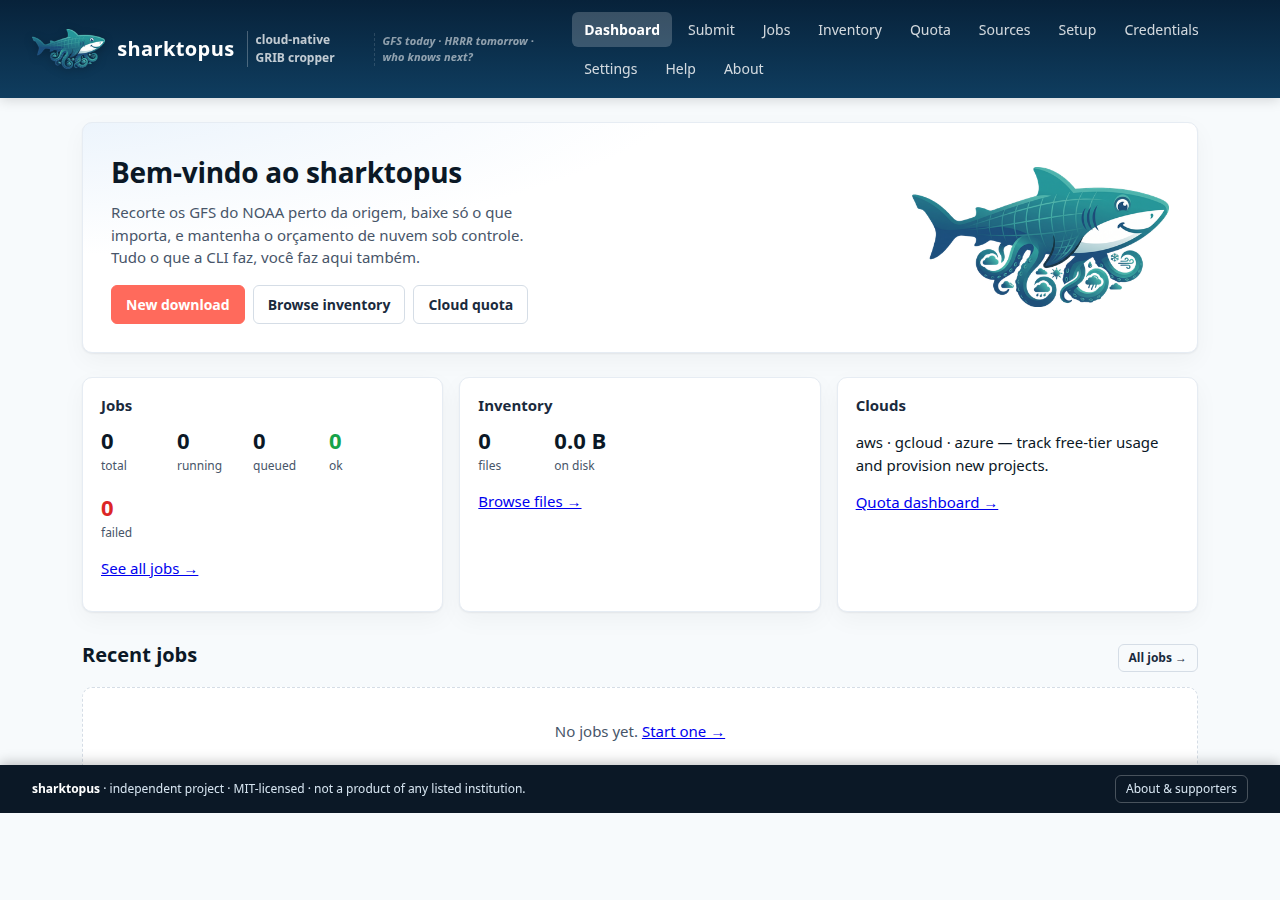
Web UI — the easy path
If you'd rather not write Python, sharktopus ships a local web UI that covers the full CLI surface — submit jobs, inspect inventory, monitor free-tier quota, manage credentials, and run the guided cloud setup.
pip install 'sharktopus[ui]'
sharktopus --ui          # opens http://127.0.0.1:8765/
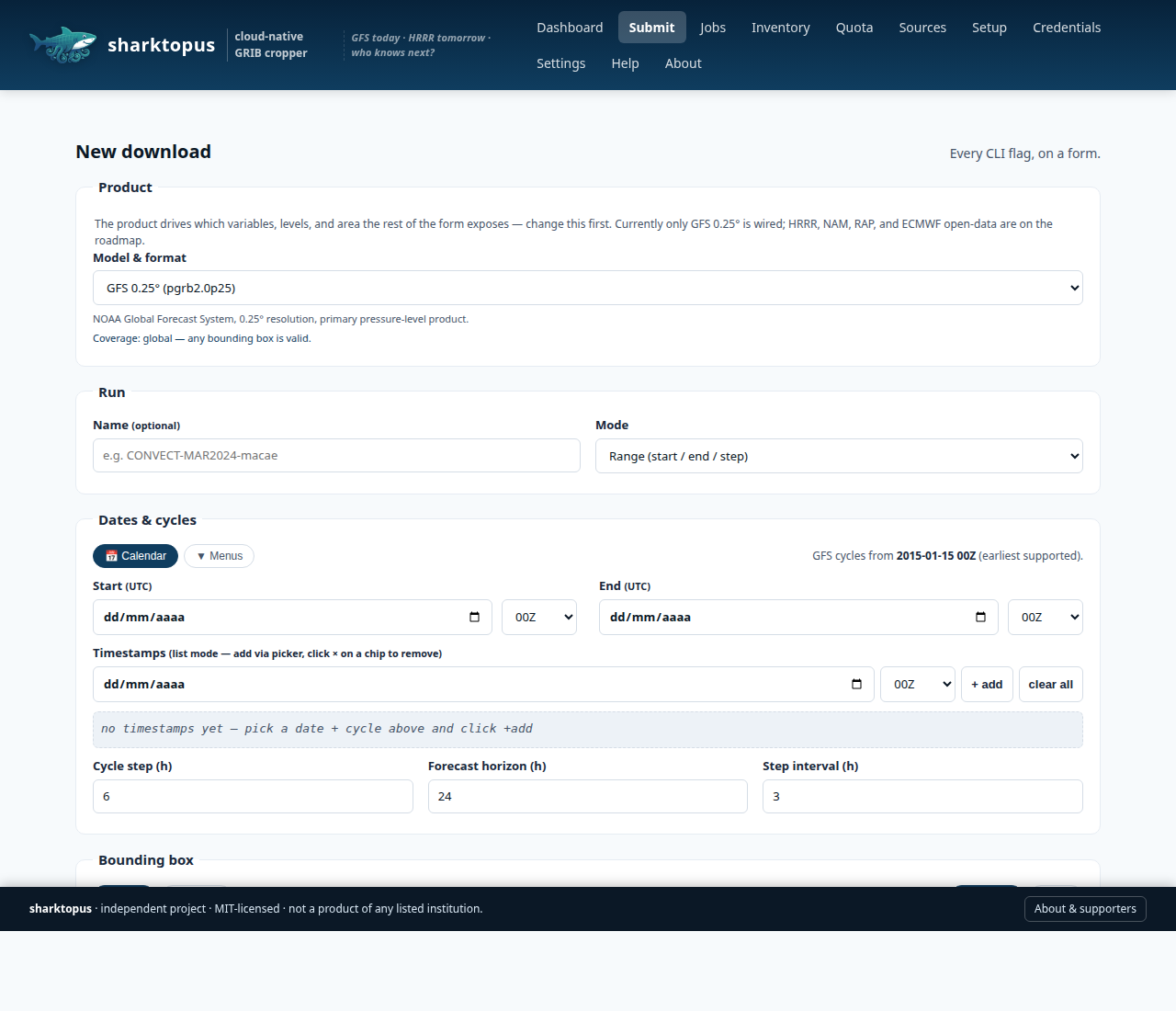
The Submit page is the full CLI, on a form — product picker, date
range, Leaflet map for the bounding box, variable / level cascade,
source priority, and a directory browser for dest / root.
Local-only by design. No authentication, binds to 127.0.0.1 only,
the directory picker reads your own disk. For remote use, prefer an
SSH port-forward (ssh -L 8765:localhost:8765 user@host) — recipes
are on the in-app /help page. Don't bind to 0.0.0.0 on an
untrusted network.
Quick start
Layer 0 — wgrib2 utilities
from sharktopus.grib import verify, crop, filter_vars_levels, parse_idx, byte_ranges

# Count GRIB2 records (wraps `wgrib2 -s`)
n = verify("gfs.t00z.pgrb2.0p25.f006")
print(n)  # e.g. 743

# Geographic subset (wraps `wgrib2 -small_grib`)
crop("in.grib2", "out.grib2", bbox=(-45, -40, -25, -20))

# Parse a .idx file into structured records
records = parse_idx(open("in.grib2.idx").read())

# Compute consolidated HTTP Range tuples for a subset of records
ranges = byte_ranges(records, wanted={"TMP:500 mb", "UGRD:850 mb"}, total_size=524_288_000)
Three ways to drive a batch
sharktopus.fetch_batch() is the orchestrator equivalent to CONVECT's
download_batch(). Three equivalent ways to invoke it:
(a) Python import
import sharktopus

# Default — auto-select the priority from availability of the first
# timestamp (cloud mirrors for recent dates, RDA for pre-2021, etc.).
sharktopus.fetch_batch(
    timestamps=["2024010200", "2024010206"],
    lat_s=-28, lat_n=-18, lon_w=-48, lon_e=-36,
    ext=24, interval=3,
)

# Pin the priority when you know better
sharktopus.fetch_batch(
    timestamps=["2024010200"],
    lat_s=-28, lat_n=-18, lon_w=-48, lon_e=-36,
    ext=24, interval=3,
    priority=["aws", "gcloud", "nomads"],
)

# Server-side subset via nomads_filter — omitting variables / levels
# falls back to the WRF-canonical set (sharktopus.wrf.DEFAULT_*).
sharktopus.fetch_batch(
    timestamps=["2024010200"],
    lat_s=-28, lat_n=-18, lon_w=-48, lon_e=-36,
    ext=24, interval=3,
    priority=["nomads_filter", "nomads"],
    variables=["TMP", "UGRD", "VGRD", "HGT"],   # override defaults
    levels=["500 mb", "850 mb", "surface"],
)

# Ask the library which mirrors have a given date before running
from sharktopus import batch
batch.available_sources("20180601")
# -> ['rda']
batch.available_sources("20240101")
# -> ['gcloud', 'aws', 'azure', 'rda']
(b) Command line (CLI flags mirror CONVECT's download_batch_cli.py)
sharktopus \
    --start 2024010200 --end 2024010318 --step 6 \
    --ext 24 --interval 3 \
    --lat-s -28 --lat-n -18 --lon-w -48 --lon-e -36 \
    --priority nomads_filter nomads \
    --vars TMP UGRD VGRD HGT \
    --levels "500 mb" "850 mb" surface
(c) INI config file
# my_run.ini
[gfs]
start = 2024010200
end   = 2024010318
step  = 6
ext   = 24
interval = 3
lat_s = -28
lat_n = -18
lon_w = -48
lon_e = -36
priority  = nomads_filter, nomads
variables = TMP, UGRD, VGRD, HGT
levels    = 500 mb, 850 mb, surface
sharktopus --config my_run.ini                # use file as-is
sharktopus --config my_run.ini --priority nomads  # override one key
Precedence is CLI flag > config file > built-in defaults, matching
Python stdlib conventions. Keys in the [gfs] section match the
CLI flag names (dashes → underscores) and raise a clear ConfigError
on typos.
Sources (Layer 1)
Eight sources, all registered at import time:
| Name | Endpoint | Earliest | Retention | Strategies |
|---|---|---|---|---|
aws_crop |
sharktopus AWS Lambda (user's own account) |
2021-02-27 | indefinite | Cloud-side crop (inline / S3 presigned) — credential-gated |
gcloud_crop |
sharktopus-crop Cloud Run service (user's own project) |
2021-01-01 | indefinite | Cloud-side crop (inline / GCS signed URL) — ADC-gated |
nomads |
nomads.ncep.noaa.gov (origin) |
rolling | ~10 days | Full download / idx byte-range |
nomads_filter |
nomads.ncep.noaa.gov/cgi-bin/filter_gfs_0p25.pl |
rolling | ~10 days | Server-side subset |
aws |
noaa-gfs-bdp-pds.s3.amazonaws.com |
2021-02-27 | indefinite | Full download / idx byte-range |
gcloud |
storage.googleapis.com/global-forecast-system |
2021-01-01 | indefinite | Full download / idx byte-range |
azure |
noaagfs.blob.core.windows.net/gfs |
2021-01-01 | indefinite | Full download / idx byte-range |
rda |
data.rda.ucar.edu/d084001 (NCAR) |
2015-01-15 | indefinite | Full download / borrowed idx byte-range (sibling AWS/GCloud/Azure; full-file fallback for pre-2021) |
Byte-range mode. When you pass both variables= and levels=,
the four NCEP-layout mirrors (nomads, aws, gcloud, azure)
switch from "download the whole 500 MB GRIB, crop locally" to
"fetch the tiny .idx, compute merged HTTP Range requests, download
only the requested records in parallel". It's the same pattern Herbie
uses and is a strict superset of nomads_filter because it works on
any date the mirror serves, not just the last 10 days.
rda participates via borrowed idx: NCAR's ds084.1 does not
publish .idx sidecars of its own, but its GRIB2 files are
byte-identical to the NCEP mirrors (AWS/GCloud/Azure), so the idx
records — and their offsets — transfer 1:1. When you pass
variables+levels, RDA probes each sibling's .idx in turn and
issues HTTP Range requests against the RDA URL itself. For the
pre-2021 window that only RDA covers (no sibling idx exists),
it transparently falls back to a full download followed by
wgrib2 -match, producing the same subset on disk.
Measured end-to-end for the WRF-canonical set (13 vars × 49 levels =
269 records, ~485 KB after local crop), f000 00Z on 2026-04-17:
| Source | Byte-range + crop | Full-file + crop | Speed-up |
|---|---|---|---|
| nomads | 21 s | 53 s | 2.5× |
| gcloud | 35 s | 47 s | 1.4× |
| aws | 50 s | 52 s | ≈ |
| azure | 51 s | 213 s | 4.2× |
For a narrow subset (e.g. TMP/UGRD/VGRD @ 500,850 mb) the transfer
drops into the low-MB range and wall time into the 1-5 s band.
sharktopus.fetch_batch(
    timestamps=["2024010200"],
    lat_s=-28, lat_n=-18, lon_w=-48, lon_e=-36,
    ext=24, interval=3,
    priority=["gcloud", "aws"],
    variables=["TMP", "UGRD", "VGRD"],         # triggers byte-range mode
    levels=["500 mb", "850 mb"],
)
All are anonymous — no accounts, no API keys, no SDK installs. RDA
accepts an optional SHARKTOPUS_RDA_COOKIE env var for the rare files
behind login.
The Earliest column is what EARLIEST is set to in each source
module — approximate and intentionally conservative. Every source also
exposes a supports(date, cycle=None) predicate, which
batch.available_sources(date) uses to filter DEFAULT_PRIORITY
before fetch_batch touches the network. Command-line shortcut:
sharktopus --list-sources                  # name/workers/earliest/retention table
sharktopus --availability 20240101          # which mirrors can serve this date
Default priority when the caller does not pass priority=:
aws_crop > gcloud_crop > gcloud > aws > azure > rda > nomads —
cloud-side crop first when credentials are configured (server-side
wgrib2 returns only the cropped bytes), plain cloud mirrors next for
their throughput and stable retention, NOMADS last as a rate-limited
origin fallback. aws_crop and gcloud_crop are skipped silently
from auto-priority when credentials/ADC are absent or the free-tier
quota is exhausted — they never raise a fatal error, the next source
just takes over. nomads_filter is opt-in because its value comes
from server-side variable/level subsetting: include it in priority=
explicitly when you want it.
Cloud-side crop (aws_crop). When AWS credentials are resolvable
(env vars, ~/.aws/credentials, or instance profile) and the local
free-tier quota still has room, fetch_batch invokes the sharktopus
AWS Lambda in the user's own account. The Lambda does the byte-range
fetch from noaa-gfs-bdp-pds and runs wgrib2 -small_grib server-side,
returning only the cropped bytes — typically 50-500 KB instead of
500 MB per step. Two delivery modes, auto-selected:
- Inline — base64-encoded GRIB2 in the Lambda response JSON (fast path, no S3 round-trip; capped at ~4.5 MB binary which covers most real bboxes).
- S3 presigned — Lambda uploads to a short-lived prefix, returns a presigned GET URL, client downloads, then deletes the object. Used automatically for larger crops.
Quota policy via env vars:
# Default: stay inside the AWS Always-Free tier (1M req + 400k GB-s / month).
# When the quota is spent, aws_crop becomes unavailable and the
# orchestrator falls back to the plain aws source (no Lambda cost).

# Force local crop even when credentials + quota would allow cloud:
export SHARKTOPUS_LOCAL_CROP=true

# Authorise paid usage up to a monthly ceiling once free tier runs out:
export SHARKTOPUS_ACCEPT_CHARGES=true
export SHARKTOPUS_MAX_SPEND_USD=5.00

# Keep intermediate S3 objects (default: deleted after successful download):
export SHARKTOPUS_RETAIN_S3=true
The counter is kept locally at ~/.cache/sharktopus/quota.json and
rolls over on the 1st of every UTC month. Deploying the Lambda in
your AWS account is a one-shot provisioning step handled by
sharktopus deploy aws (Layer 4 — shipping alongside phase-1b of
the cloud-crop rollout; until it lands, users can point at an
existing Lambda of theirs via the lambda_name= kwarg on
aws_crop.fetch_step).
Cloud-side crop (gcloud_crop). Parallel path for users on GCloud:
a Cloud Run service (sharktopus-crop) does the byte-range fetch from
the anonymous global-forecast-system GCS mirror and runs
wgrib2 -small_grib inside the container, returning only the cropped
bytes. Two delivery modes, auto-selected:
- Inline — base64-encoded GRIB2 in the JSON response (Cloud Run caps the response at 32 MB; sharktopus uses inline for crops ≤ 20 MB).
- GCS signed URL — service uploads to a short-lived
crops/prefix in a private bucket, returns a V4 signed GET URL, client downloads and then deletes the object (kept whenSHARKTOPUS_RETAIN_GCS=true). Used automatically for larger crops.
Quota policy mirrors AWS: Cloud Run's always-free tier is 2M requests,
180k vCPU-seconds, and 360k GiB-seconds per month; the same
SHARKTOPUS_LOCAL_CROP / SHARKTOPUS_ACCEPT_CHARGES /
SHARKTOPUS_MAX_SPEND_USD env vars gate the decision, with one extra
switch SHARKTOPUS_RETAIN_GCS to keep intermediate bucket objects.
The counter is the same JSON file as AWS, keyed by provider name
(gcloud vs aws). Inspect it from the CLI:
sharktopus --quota aws       # AWS Lambda invocations / GB-s / spend
sharktopus --quota gcloud    # Cloud Run invocations / vCPU-s / GiB-s / spend
One-shot provisioning in your GCloud project. The shortest path for a
fresh machine — installs the gcloud CLI (user-space, opt-in, with
a confirmation prompt), walks through browser auth, and runs the
provision script:
sharktopus --setup gcloud     # ~4 prompts end-to-end, nothing silent
sharktopus --setup aws        # same flow for the AWS Lambda deploy
The setup command never installs during pip install; it only runs
when you ask for it. Behind the scenes it calls the provision scripts
directly, so you can skip it and run them yourself if preferred:
# Equivalent manual path (both still supported)
python deploy/gcloud/provision.py --project my-project --authenticated-only
python deploy/aws/provision.py    --profile my-profile --region us-east-1

# Auto-discovery also works: when SHARKTOPUS_GCLOUD_URL is unset the
# client queries run.googleapis.com for the service named
# sharktopus-crop in the caller's default project/region.
URL resolution order at client side: explicit service_url= kwarg →
SHARKTOPUS_GCLOUD_URL env → ADC-based discovery on
run.googleapis.com. Auth: the Cloud Run service accepts
unauthenticated requests by default (still TLS-protected); pass
--authenticated-only at deploy time to require ID tokens. The
client mints audience-scoped OIDC tokens in four ways (tried in
order): explicit SHARKTOPUS_GCLOUD_ID_TOKEN env → service-account
ADC / metadata server → browser-OAuth cache + invoker-SA
impersonation (when deployed via --auth browser,
SHARKTOPUS_GCLOUD_INVOKER_SA drives the impersonation target) →
gcloud auth print-identity-token CLI fallback.
The container image is published by the project's CI workflow to
ghcr.io/sharktopus-project/sharktopus:cloudrun-latest; Cloud Run pulls it directly from GHCR with no Artifact Registry mirror needed. First-time setup: the package is uploaded as private on the first push — make it public once via GitHub → org packages → sharktopus → package settings → change visibility before runningdeploy/gcloud/provision.py.
WRF-canonical defaults. When nomads_filter is in the priority
list and the caller doesn't pass variables / levels,
fetch_batch falls back to sharktopus.wrf.DEFAULT_VARS (13 fields)
and sharktopus.wrf.DEFAULT_LEVELS (49 levels) — the minimum set WPS
needs to build WRF boundary conditions. Pass your own lists to
override when you care about a different subset
(e.g. just TMP @ 500 mb for a quick check, or radiation fluxes for
a cloud-study).
Anti-throttle defaults. Each source publishes a conservative
DEFAULT_MAX_WORKERS tuned below its observed throttle threshold.
fetch_batch caps step-level parallelism at the minimum across the
priority list, so the slowest-throttled mirror paces the pool:
| Source | Default max workers |
|---|---|
nomads |
2 |
nomads_filter |
2 |
aws |
4 |
gcloud |
4 |
azure |
4 |
rda |
1 (serial) |
Override per batch when you know better:
sharktopus.fetch_batch(..., max_workers=8) # explicit
Spread mode. When the priority list has more than one source,
fetch_batch runs in spread mode by default (when you let the
library pick the priority — an explicit priority=[...] preserves
the classic first-wins fallback chain for back-compat). Every
eligible source drives its own worker pool at its own
DEFAULT_MAX_WORKERS; they all pull from one globally ordered queue
(oldest (date, cycle, fxx) first) so the earliest timestamps —
which WRF will consume first — finish first even when a later date
is still in flight. A failure on source A re-enqueues the step with
A blacklisted (never bypasses A's rate limit by synchronously
falling through to B). Aggregate concurrency is
sum(workers per source) — ~10 for the default gcloud/aws/azure
fan-out — without any source exceeding its own ceiling.
# Auto-priority + multiple eligible mirrors → spread mode (default).
sharktopus.fetch_batch(
    timestamps=sharktopus.generate_timestamps("2024010100", "2024013118", 6),
    lat_s=-28, lat_n=-18, lon_w=-48, lon_e=-36,
    ext=24, interval=3,
)

# Abort any attempt that exceeds 60 s and re-enqueue the step on
# another mirror (good for flaky WAN).
sharktopus.fetch_batch(..., spread=True, attempt_timeout=60.0)

# Force classic fallback-chain even with an auto priority.
sharktopus.fetch_batch(..., spread=False)
Opt-in wgrib2 OpenMP. wgrib2 is built with -fopenmp, so
-small_grib and -match can parallelize across cores. Sharktopus
leaves this off by default (single-threaded is fine on a single file)
but lets you turn it on when you're processing many files in a row —
a year of 6-hourly cycles is ~5k crops, where even ~10% per-file is
hours. Two ways to enable:
# Process-wide: every wgrib2 call sharktopus makes uses 8 OMP threads.
export SHARKTOPUS_OMP_THREADS=8
# Per call: explicit override, beats the env var.
sharktopus.grib.crop(src, dst, bbox=(...), omp_threads=8)
On big hosts running spread mode, sharktopus emits a one-shot
UserWarning on the first fetch_batch if it detects significant
idle-core headroom and neither env var is set, suggesting a concrete
value. Use grib.suggest_omp_threads(concurrent_crops) to pick one
manually — it splits idle cores across expected concurrent wgrib2
processes and caps per-crop at 8 (wgrib2's OpenMP speedup flattens
past that on typical ~50 MB GFS files).
Layer 1 — NOMADS sources
from sharktopus.sources import nomads, nomads_filter

# Option A — full file (~500 MB), cropped locally afterwards.
# Omitting dest= routes the file into ~/.cache/sharktopus/fcst/YYYYMMDDHH/<bbox_tag>/
# (CONVECT-compatible layout). Set $SHARKTOPUS_DATA or pass root=... to move
# the root without touching callers.
path = nomads.fetch_step(
    "20240417", "00", 6,
    bbox=(-45, -40, -25, -20),   # lon_w, lon_e, lat_s, lat_n
)

# Option B — server-side subset (tiny download, no wgrib2 crop needed).
path = nomads_filter.fetch_step(
    "20240417", "00", 6,
    bbox=(-45, -40, -25, -20),
    variables=["TMP", "UGRD", "VGRD", "HGT"],
    levels=["500 mb", "850 mb", "surface"],
)

# Opt out of the convention any time:
nomads.fetch_step(..., dest="/scratch/my-run")
Default layout (drop-in compatible with CONVECT's /gfsdata/ tree):
<root>/                                   # $SHARKTOPUS_DATA or ~/.cache/sharktopus
└── fcst/
    └── 20240417-00 → 2024041700/
        ├── 90S_180W_90N_180E/            # no bbox = global tag
        │   └── gfs.t00z.pgrb2.0p25.f006
        └── 25S_45W_20S_40W/              # lat_s_lon_w_lat_n_lon_e
            └── gfs.t00z.pgrb2.0p25.f006
Both sources apply a default WRF-safe buffer of 2° on each side of bbox before downloading/cropping (8 grid cells at 0.25° — enough margin for WPS / metgrid to interpolate into the WRF outer domain without edge effects). Override per axis when you need to:
# Exact bbox, no buffer at all (e.g. you already padded upstream):
nomads.fetch_step(..., bbox=bbox, pad_lon=0, pad_lat=0)

# Wider zonal padding, narrow meridional padding (elongated domain):
nomads_filter.fetch_step(..., bbox=bbox, pad_lon=4.0, pad_lat=1.5, ...)

# Match CONVECT's legacy 5°-everywhere convention:
nomads.fetch_step(..., bbox=bbox, pad_lon=5.0, pad_lat=5.0)
Both raise sharktopus.sources.SourceUnavailable when the step cannot be
served (404, NOMADS retention exceeded, etc.) so Layer 2's orchestrator
can fall back to another mirror.
Roadmap
The package is built bottom-up in 6 layers. Each layer is validated before the next starts.
| Layer | Module | Status | Depends on network? | Depends on cloud deploy? |
|---|---|---|---|---|
| 0. grib utilities | sharktopus.grib |
✅ done | no | no |
| 1. sources (NOMADS/AWS/GCloud/Azure/RDA) | sharktopus.sources.* |
✅ done | yes | no |
2. orchestrator fetch_batch() |
sharktopus.batch |
✅ done | yes | no |
| 3. cloud invoke (AWS + GCloud done; Azure fase 2) | sharktopus.sources.aws_crop, sharktopus.sources.gcloud_crop, sharktopus.cloud.{aws,gcloud}_quota |
🟡 partial | yes | yes |
| 4. cloud deploy (AWS + GCloud done; Azure fase 2) | deploy/{aws,gcloud}/provision.py |
🟡 partial | yes | yes |
| 5. CLI + interactive menu | sharktopus.cli |
✅ done | — | — |
See docs/ROADMAP.md for details and validation criteria per layer.
License
MIT — see LICENSE.
1 maintainer

Download files
Download the file for your platform. If you're not sure which to choose, learn more about installing packages.
Source Distribution
Built Distribution
Filter files by name, interpreter, ABI, and platform.
If you're not sure about the file name format, learn more about wheel file names.
Copy a direct link to the current filters














