
Sharp Frame Extractor 
Sharp Frame Extractor is a command line utility for sampling videos into still images using sharpness scoring. It processes the input in short time windows and writes the highest scoring frame from each window to disk, which is useful for photogrammetry, volumetric capture, and similar pipelines.
Version 2 focuses on:
- A simpler command line interface
- Better sharpness scoring
- Two-pass architecture for memory-efficient analysis and faster processing
Example

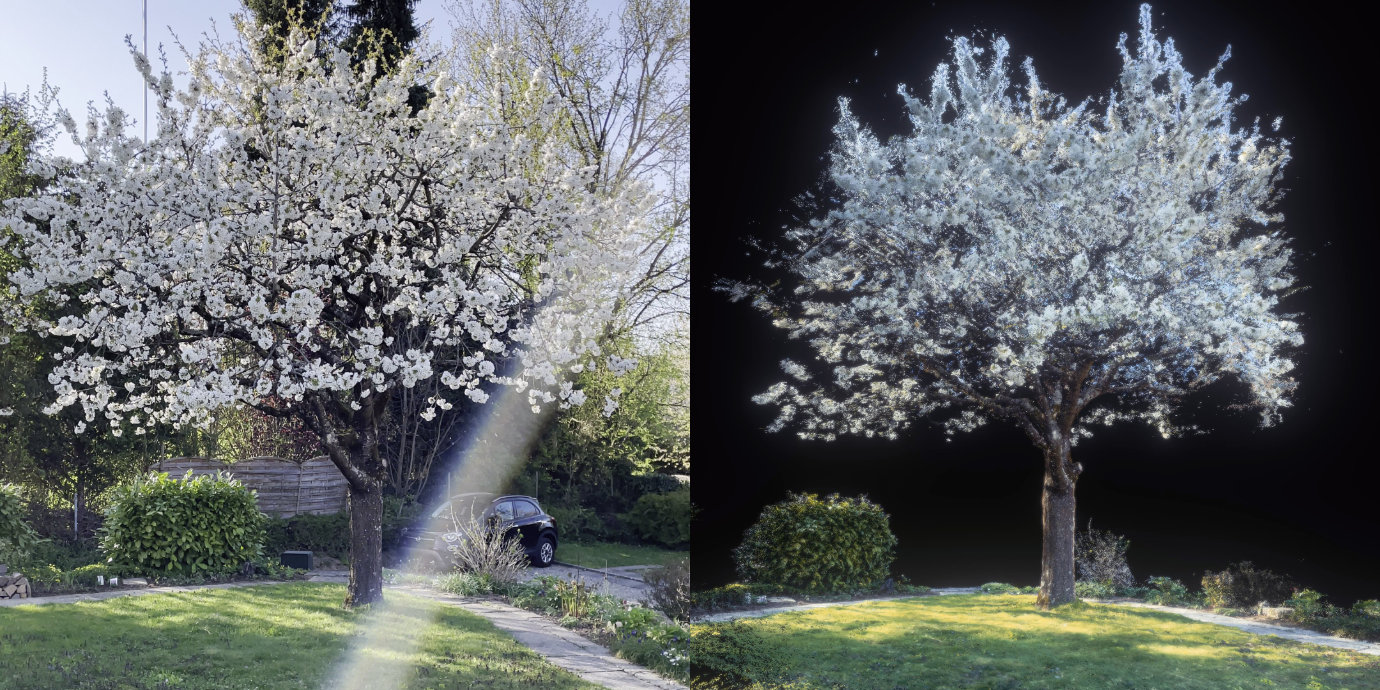
More context for this project is on Behance.
Quick start
Install:
pip install sharp-frame-extractor
Extract about 300 sharp frames from a video:
sharp-frame-extractor input.mp4 --count 300
Extract one sharp frame every 0.25 seconds:
sharp-frame-extractor input.mp4 --every 0.25
How it works
The extractor processes the video in consecutive blocks. You choose how blocks are defined:
--every SECONDSdefines blocks by time (one block per N seconds)--count Ndefines blocks by targeting a total of about N blocks across the video
For each block, it evaluates frames with a sharpness score and writes only the sharpest frame of that block to disk. Sharpness scoring is based on the Tenengrad focus measure (Sobel gradient energy), a common approach for focus and blur evaluation.
Notes:
- If an entire block is blurry (fast motion, heavy compression, defocus), the best frame in that block can still be blurry.
- With
--count, the final number is approximate because it depends on video duration and block sizing.
Usage
The command accepts one or more input videos. Choose exactly one sampling mode: --count or --every.
Extract a target number of frames
sharp-frame-extractor input.mp4 --count 300
Use this when you want a roughly fixed number of frames per clip, regardless of duration.
Extract one frame every N seconds
sharp-frame-extractor input.mp4 --every 0.25
Use this when you want a consistent sampling interval across clips.
Multiple videos
sharp-frame-extractor a.mp4 b.mp4 c.mp4 --count 100
Output directory
If you omit --output, results are written next to each input video:
./video.mp4becomes./video/frame-00000.png,./video/frame-00001.png, ...
To write everything into a single base directory (still grouped per input video):
sharp-frame-extractor a.mp4 b.mp4 -o frames --every 2
Outputs:
frames/a/frame-00000.pngframes/b/frame-00000.png
Performance tuning
By default, the extractor automatically chooses performance settings based on the workload and the available hardware. The options below let you override those defaults when you want more direct control.
There are three main tuning knobs, with two layers of parallelism:
-j/--jobs(max_video_jobs) = how many videos are processed at the same time. Each job mainly acts as an orchestrator: it drives frame decoding and hands blocks to the analysis stage.-w/--workers(max_workers) = how many analysis workers run in parallel. Workers are separate processes that perform the CPU intensive sharpness scoring and are shared across all jobs.-m/--memory-limit(memory_limit_mb) = the total memory budget for frame buffers. This limit is split across active jobs, so increasing--jobsreduces the buffer size available per video.
How the pipeline behaves:
- A job processes a video block by block.
- Each block needs an available worker to be analyzed.
- If no worker is available, the job waits and does not keep decoding more blocks.
- Frame buffering is bounded by the global memory limit, preventing unbounded memory growth when many jobs are active.
Practical guidance:
- Processing a single video: keep
--jobs 1and tune--workers. This usually controls total throughput. - Processing many videos: pick a sensible
--workersvalue first, often close to your CPU core count, then increase--jobsuntil the workers stay busy. If the CPU is already fully utilized, increasing--jobswill mostly add overhead without speeding things up. - If you run many jobs at once and see increased waiting or reduced throughput, consider raising the memory limit so each job has enough buffering.
Example:
sharp-frame-extractor a.mp4 b.mp4 --count 200 -j 2 --workers 6
Output
The extractor writes one image per processed block:
frame-00000.pngframe-00001.png- ...
The index is the block index, not the original frame number.
Help
sharp-frame-extractor --help
Usage: sharp-frame-extractor [-h] [-o DIR] (--count N | --every SECONDS) [-j N] [-w N]
                             [-m MEMORY_MB]
                             VIDEO [VIDEO ...]

Extract sharp frames from a video by scoring frames within blocks. Choose exactly one
sampling mode: --count or --every.

Positional Arguments:
  VIDEO                 One or more input video files.

Options:
  -h, --help            show this help message and exit
  -o, --output DIR      Base output directory. If omitted, outputs are written to
                        "<video_parent>/<video_stem>/". If set, outputs are written to
                        "<DIR>/<video_stem>/". (default: None)
  --count N             Target number of frames to extract per input video. (default: None)
  --every SECONDS       Extract one sharp frame every N seconds. Supports decimals, for example 0.25. (default: None)
  -j, --jobs N          Max number of videos processed in parallel (video jobs). (default: 4)
  -w, --workers N       Total analysis worker processes shared across all video jobs. (default: 8)
  -m, --memory-limit MEMORY_MB
                        Global memory limit for frame buffers in MB (shared across jobs). (default: 52428)

Examples:
  Extract frames by target count:
    sharp-frame-extractor input.mp4 --count 300

  Extract one sharp frame every 0.25 seconds:
    sharp-frame-extractor input.mp4 --every 0.25

  Process multiple videos, outputs next to each input:
    sharp-frame-extractor a.mp4 b.mp4 --count 100

  Write outputs into a single base folder (per input subfolder):
    sharp-frame-extractor a.mp4 b.mp4 -o out --every 2
Migrating from version 1 to version 2
Version 1 remains available on the version-1 branch.
Changes in version 2:
- New command name and argument layout
- Updated sharpness scoring
- Better performance via improved parallelism and worker pool design
# v1
sfextract --window 300 test.mov

# v2
sharp-frame-extractor test.mov --every 0.3
# v1
sfextract --frame-count 30 test.mov

# v2
sharp-frame-extractor test.mov --count 30
If you relied on v1 options such as method selection, cropping, preview, or debug output, keep using version 1 for now.
Development
This project uses uv for environment management and ruff for formatting and linting.
Setup:
uv sync --dev
Autoformat:
make autoformat
About
Copyright (c) 2026 Florian Bruggisser
Released under the MIT License. See LICENSE for details.
1 maintainer

Metadata
1 maintainer
Release files for sharp-frame-extractor 2.0.0
For a detailed explanation of source distributions (sdists) and built distributions (wheels), please see the package formats documentation.
Source distribution (sdist)
| File | Size | Uploaded | |
|---|---|---|---|
| sharp_frame_extractor-2.0.0.tar.gz | 27.0 kB | Details |
Built distribution (wheel)
| File | Interpreter | ABI | Platform | Reset |
|---|---|---|---|---|
| sharp_frame_extractor-2.0.0-py3-none-any.whl | Python 3 | none | any | Details |
Total release size: 58.9 kB














