








💿 Installation
💲 pip install shazamio
💻 Example
🔎🎵 Recognize track
Recognize a track from a file, a pathlib.Path, or the bytes of one. The
sample below ships with the repository, in examples/data/. The signature
covers 12 s of the audio, the window Shazam clients send;
segment_duration_seconds still takes another one and warns, and from 15 s up
Shazam finds nothing at all
import asyncio
from shazamio import Serialize, Shazam


async def main():
    async with Shazam() as shazam:
        out = await shazam.recognize("Gloria.ogg")

        print(out)  # dict
        print(Serialize.full_track(out).track.title)  # I Will Survive


asyncio.run(main())
🎵📄 About track
Get track information
https://www.shazam.com/track/552406075/ale-jazz
import asyncio
from shazamio import Serialize, Shazam


async def main():
    async with Shazam() as shazam:
        about_track = await shazam.track_about(track_id=552406075)

        print(about_track)  # dict
        print(Serialize.track(data=about_track))  # pydantic model


asyncio.run(main())
🎵📺 YouTube video of a track
The video Shazam shows for a track, looked up by its artist and title
import asyncio
from shazamio import Serialize, Shazam


async def main():
    async with Shazam() as shazam:
        out = await shazam.recognize("Gloria.ogg")
        track = Serialize.full_track(out).track

        youtube_data = await shazam.get_youtube_data(link=track.youtube_link)
        print(Serialize.youtube(youtube_data).uri)  # https://youtu.be/6dYWe1c3OyU?autoplay=1


asyncio.run(main())
🍎🔑 Apple Music ids to Shazam track keys
Resolve Apple Music track ids to the Shazam track keys track_about takes, in
one request. A call with several ids keys every entry by the id Shazam stores,
which can be one you never sent, so read the values instead of indexing by what
you asked for. A call with a single id keys it by that id. Either way an id
Shazam has no track for is absent, so the map can be shorter than the list you
passed.
import asyncio
from shazamio import Shazam


async def main():
    async with Shazam() as shazam:
        keys = await shazam.track_keys_from_apple_ids([1125281672, 1440650711])

        print(keys)  # {'1125281672': '325127876', '6781023657': '56670613'}


asyncio.run(main())
🔎🎶 Search tracks by text, through Apple's index
Shazam no longer answers text search, so this searches Apple's iTunes index and
fetches the Shazam track of every song found. Relevance and order are Apple's.
Songs Shazam has no track for are left out and versions sharing one Shazam track
come back once, so you can get fewer tracks than limit. Each song costs two
requests, which is why limit defaults to 5.
import asyncio
from shazamio import Shazam


async def main():
    async with Shazam() as shazam:
        tracks = await shazam.search_tracks_via_itunes("daft punk one more time")

        print([track["title"] for track in tracks])
        # ['One More Time', 'One More Time (12 Mix)', "One More Time (Romanthony's Unplugged)"]


asyncio.run(main())
🔝🎶🌏 Top tracks in world
The 200 most shazamed tracks worldwide
https://www.shazam.com/charts/top-200/world
import asyncio
from shazamio import Shazam


async def main():
    async with Shazam() as shazam:
        tracks = await shazam.top_world_tracks(limit=10)

        for track in tracks:
            print(f"{track.rank}. {track.artist} - {track.title}")


asyncio.run(main())
🔝🎶🏳️ Top tracks in country
The 200 most shazamed tracks in a country
https://www.shazam.com/charts/top-200/netherlands
import asyncio
from shazamio import Shazam


async def main():
    async with Shazam() as shazam:
        tracks = await shazam.top_country_tracks(
            country_code="NL",
            limit=5,
        )

        for track in tracks:
            print(f"{track.rank}. {track.artist} - {track.title}")


asyncio.run(main())
🔝🎶🏙️ Top tracks in city
The 50 most shazamed tracks in a city. The city name is the one
services/charts/locations publishes
https://www.shazam.com/charts/top-50/russia/moscow
import asyncio
from shazamio import Shazam


async def main():
    async with Shazam() as shazam:
        tracks = await shazam.top_city_tracks(
            country_code="RU",
            city_name="Moscow",
            limit=10,
        )

        for track in tracks:
            print(f"{track.rank}. {track.artist} - {track.title}")


asyncio.run(main())
🔝🎶🌏🎸 Top tracks in world by genre
The most shazamed tracks worldwide in one genre
https://www.shazam.com/charts/genre/world/rock
import asyncio
from shazamio import GenreMusic, Shazam


async def main():
    async with Shazam() as shazam:
        tracks = await shazam.top_world_genre_tracks(
            genre=GenreMusic.ROCK,
            limit=10,
        )

        for track in tracks:
            print(f"{track.rank}. {track.artist} - {track.title}")


asyncio.run(main())
🔝🎶🏳️🎸 Top tracks in country by genre
The most shazamed tracks in a country in one genre. Shazam offers only a
handful of genres per country, and asking for one it does not offer answers
404, which surfaces as aiohttp.ClientResponseError
https://www.shazam.com/charts/genre/spain/hip-hop-rap
import asyncio
from shazamio import GenreMusic, Shazam


async def main():
    async with Shazam() as shazam:
        tracks = await shazam.top_country_genre_tracks(
            country_code="ES",
            genre=GenreMusic.HIP_HOP_RAP,
            limit=4,
        )

        for track in tracks:
            print(f"{track.rank}. {track.artist} - {track.title}")


asyncio.run(main())
🔌 Closing what you open
A Shazam opens one connection pool on its first request and reuses it for
every later one, so ten calls no longer cost ten connections. The pool lives
until you close it, which async with does for you:
async with Shazam() as shazam:
    ...
Without a close the pool stays open and aiohttp reports it when the object is
collected: Unclosed client session. await shazam.close() does the same job
where a block does not fit, and a request after either one raises
RuntimeError: Session is closed.
A pool belongs to the event loop it was opened on. A Shazam kept across
several asyncio.run calls opens a new pool on each new loop and abandons the
old one, which aiohttp reports the same way. A closed Shazam stays closed
in every loop. Prefer one asyncio.run around all the calls.
An HTTPClient you build yourself is yours to close: Shazam closes only the
client it builds for itself. examples/recognize.py shows both blocks.
🎯 When a match may be wrong
Shazam sometimes answers with a confident match for the wrong track, and some
recordings get one at every offset. recognize(..., max_skew=1e-3) turns an
answer whose first match is skewed beyond the limit into a no-match, which
removes most of those. It is off by default because it also rejects audio
played faster, slower or pitch-shifted; the recognize docstring has the
measurements.
📊 What the chart methods return
Shazam publishes its charts as CSV with three columns, so a chart entry is a
ChartTrack carrying a rank, an artist and a title, and nothing else. A chart
has no ids, no artwork and no provider links, so a chart entry cannot be passed
to Serialize. Nothing in the library resolves a chart row to a track id
either: Shazam retired the search endpoints that used to do it.
limit defaults to the whole chart, and offset skips entries from the top:
both are applied to the chart the service returns, which is always the full
one.
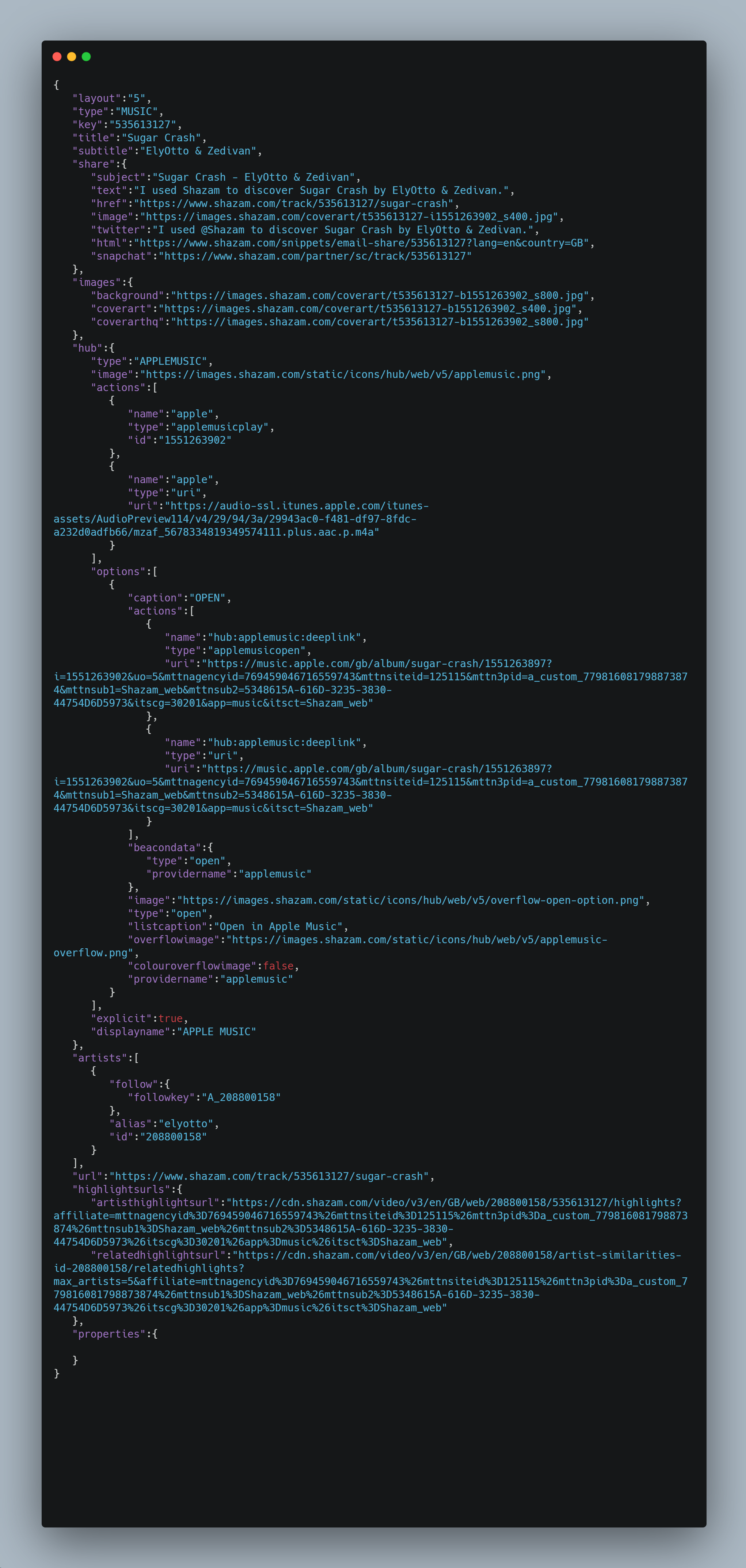
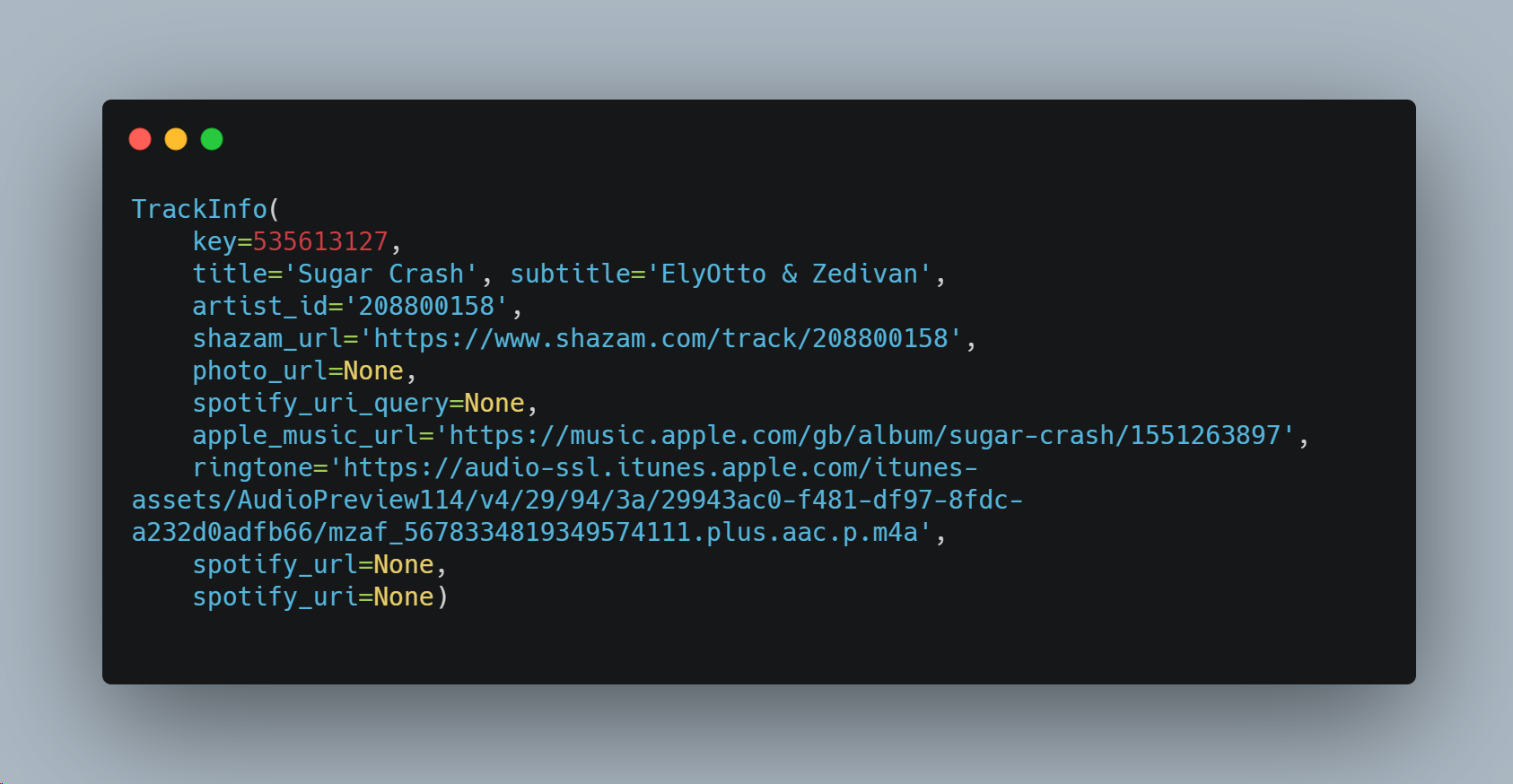
🔧 What data serialization gives you
Serialize.full_track turns the output of recognize into a ResponseTrack,
and Serialize.track turns the output of track_about into a TrackInfo.
Both carry the title, the artist, the artwork and the provider links, so you
no longer have to pick the fields out of the raw dictionary by hand.
Open photo: What song information looks like (Dict)
Open photo: what song information looks like (Custom serializer)
1 maintainer

Metadata
1 maintainer
Release files for shazamio 0.9.0
For a detailed explanation of source distributions (sdists) and built distributions (wheels), please see the package formats documentation.
Source distribution (sdist)
| File | Size | Uploaded | Provenance | Actions |
|---|---|---|---|---|
| shazamio-0.9.0.tar.gz | 24.2 kB | Without provenance | Details for shazamio-0.9.0.tar.gz |
Built distribution (wheel)
| File | Interpreter | ABI | Platform | Actions Reset |
|---|---|---|---|---|
| shazamio-0.9.0-py3-none-any.whl | Python 3 | none | any | Details for shazamio-0.9.0-py3-none-any.whl |
Total release size: 50.6 kB
Release files / shazamio-0.9.0.tar.gz
| Download URL | shazamio-0.9.0.tar.gz |
|---|---|
| Size | 24.2 kB |
| Tags | Source |
|
SHA-256 checksum How to use checksums |
a6c22f2b954860374baed0faeadf1c98270482ae572321ba247587d20d30d976
|
|
BLAKE2b-256 checksum How to use checksums |
07d331e907550cee66722cac4eccfe8edb38d17a3a85d524e8c048ea455ff8cd
|
| Upload date | |
|
Uploaded using Trusted Publishing? What is trusted publishing? |
No |
| Uploaded via |
uv/0.13.5 {"installer":{"name":"uv","version":"0.13.5","subcommand":["publish"]},"python":null,"implementation":{"name":null,"version":null},"distro":{"name":"Ubuntu","version":"24.04","id":"noble","libc":null},"system":{"name":null,"release":null},"cpu":null,"openssl_version":null,"setuptools_version":null,"rustc_version":null,"ci":true}
|
Release files / shazamio-0.9.0-py3-none-any.whl
| Download URL | shazamio-0.9.0-py3-none-any.whl |
|---|---|
| Size | 26.5 kB |
| Tags | Python 3 |
|
SHA-256 checksum How to use checksums |
41ef42a74cd100ffdf498f48a74e702fe362ec1df3071e14b20f237dd6e82654
|
|
BLAKE2b-256 checksum How to use checksums |
0ffb27267417f849f87f0013f9f154fb43a75d55a19eac025b74efef0a08e96a
|
| Upload date | |
|
Uploaded using Trusted Publishing? What is trusted publishing? |
No |
| Uploaded via |
uv/0.13.5 {"installer":{"name":"uv","version":"0.13.5","subcommand":["publish"]},"python":null,"implementation":{"name":null,"version":null},"distro":{"name":"Ubuntu","version":"24.04","id":"noble","libc":null},"system":{"name":null,"release":null},"cpu":null,"openssl_version":null,"setuptools_version":null,"rustc_version":null,"ci":true}
|
Security for shazamio 0.9.0
Provenance
Provenance describes where a file came from. On PyPI, provenance is shared via attestations, which provide a verifiable record of the build or publishing details. View details, limitations and caveats.
No provenance found
None of the files in this release were uploaded with provenance metadata.
A note on package security
PyPI is a repository for distributing packages, not a service for auditing them. While third-party security researchers and our staff do their best to detect and remove malicious packages, PyPI cannot guarantee the quality, security or suitability of any given package.
To learn more about protecting yourself from malicious actors, visit our package security documentation.














