
This release is a pre-release and may not be stable for production use.
⚡ SheepRL 🐑


 |
 |
 |
 |
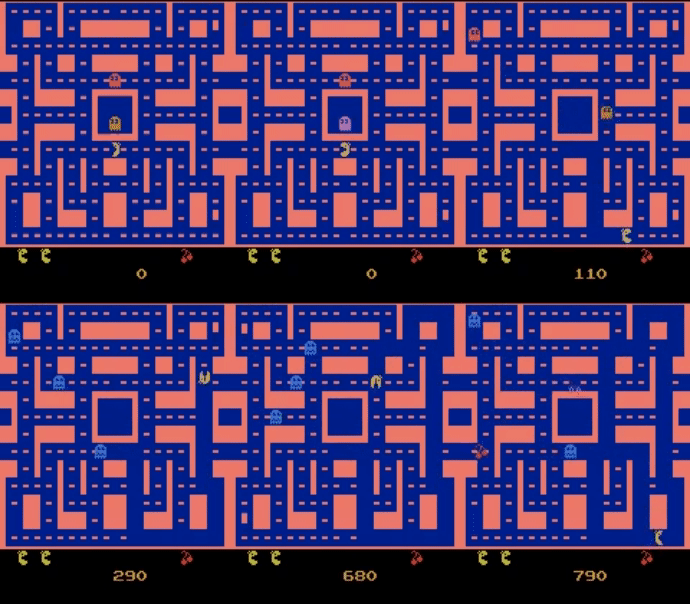
| Environment | Total frames | Training time | Test reward | Paper reward | GPUs |
|---|---|---|---|---|---|
| Crafter | 1M | 1d 3h | 12.1 | 11.7 | 1-V100 |
| Atari-MsPacman | 100K | 14h | 1542 | 1327 | 1-3080 |
| Atari-Boxing | 100K | 14h | 84 | 78 | 1-3080 |
| DOA++ | 7M | 18d 22h | 2726/33281 | N.A. | 1-3080 |
| Minecraft-Nav | 8M | 16d 4h | 27% >= 70 14% >= 100 |
N.A. | 1-V100 |
- Best leaderboard score in DIAMBRA (11/7/2023)
Benchmarks
The training times of SheepRL compared to the ones of Stable Baselines3 on the CPU, in seconds:
| Algorithm | Devices | SheepRL 1.0 | Stable Baselines3 2.2.1 |
|---|---|---|---|
| PPO | 1 | 23.9 ± 0.31 | 21.7 ± 0.11 |
| PPO | 2 | 31.8 ± 0.24 | N.D. |
| A2C | 1 | 31.6 ± 0.51 | 27.6 ± 0.09 |
| A2C | 2 | 36.0 ± 0.54 | N.D. |
| SAC | 1 | 136.3 ± 0.21 | 157.2 ± 1.53 |
| SAC | 2 | 137.6 ± 1.45 | N.D. |
The training times of the Dreamers on the GPU, without and with the compiled losses (algo.compile.enabled=True), in seconds:
| Algorithm | Eager | Compiled |
|---|---|---|
| DreamerV1 | 98.9 | 52.9 |
| DreamerV2 | 86.2 | 47.2 |
| DreamerV3 | 116.2 | 43.2 |
The setup of the benchmarks
- Hardware: an Intel Core i7-14700KF (the CPU experiments are pinned to 4 of its efficiency cores, up to 4.3 GHz, with
taskset -c 20-23), 32 GB of RAM and an NVIDIA GeForce RTX 5070 (12 GB, driver 580). - Software: Python 3.11, PyTorch 2.14.1 (CUDA 13.0), Lightning 2.6.6, Gymnasium 1.3.0 and NumPy 2.4.6. Stable Baselines3 2.2.1 runs in its own environment, with Gymnasium 0.29 and NumPy 1.26.
- SheepRL versions: the CPU results on 1 device were measured with SheepRL 1.0.0rc2; the CPU results on 2 devices and the Dreamer results with SheepRL 1.0.0rc1, and haven't been measured again since.
- Runs: the CPU experiments run 5 times each, and the tables report the mean and the standard deviation of the runs, the first one (cold start) excluded. The Dreamers run once each; the compiled ones after a first run that fills the cache of
torch.compile. - Timing: the wall time of the whole run for SheepRL, including the start of Hydra and Fabric (about 0.6 s); from the creation of the environments to the end of the training for Stable Baselines3.
The experiments are the exp=<algorithm>_benchmarks configs (sheeprl/configs/exp), without the test, the logging, the checkpoints and the registration of the models, except the logging and the checkpoints of the Dreamers:
| Config | Environment | Envs per process | Policy steps | Main settings |
|---|---|---|---|---|
ppo_benchmarks |
CartPole-v1 |
1 | 65536 | rollouts of 128 steps, minibatches of 64, 10 epochs |
a2c_benchmarks |
CartPole-v1 |
1 | 65536 | rollouts of 5 steps |
sac_benchmarks |
LunarLanderContinuous-v3 (-v2 in Stable Baselines3) |
4 | 65536 | batches of 256, one gradient step per iteration (run_benchmarks: True), learning starts after 100 steps |
dreamer_v1_benchmarks, dreamer_v2_benchmarks, dreamer_v3_benchmarks |
MsPacmanNoFrameskip-v4 |
1 | 16384 | tiny models (8 dense units, a recurrent state of 8, a stochastic state of 4, 4×4 discrete in V2 and V3, CNN channel multiplier 2), a buffer of 16384 steps, replay ratio 1/16 after 1024 steps, 32-true precision |
# On the CPU (2 devices: fabric.devices=2 fabric.strategy=ddp)
taskset -c 20-23 sheeprl exp=ppo_benchmarks
# On the GPU (eager: algo.compile.enabled=False)
sheeprl exp=dreamer_v3_benchmarks fabric.accelerator=cuda algo.compile.enabled=True
With these small models, 2 devices on 4 cores are not faster than 1: synchronizing the gradients costs more than splitting the work saves. benchmarks/benchmark.py and benchmarks/benchmark_sb3.py time a run of SheepRL and of Stable Baselines3.
What
An easy-to-use framework for reinforcement learning in PyTorch, accelerated with Lightning Fabric.
The algorithms sheeped by sheeprl out-of-the-box are:
| Algorithm | Recurrent | Vector obs | Pixel obs | Custom inputs | Status |
|---|---|---|---|---|---|
| A2C | ❌ | ✅ | ✅ | ✅ | ✅ |
| PPO | ❌ | ✅ | ✅ | ✅ | ✅ |
| PPO Recurrent | ✅ | ✅ | ✅ | ✅ | ✅ |
| SAC | ❌ | ✅ | ❌ | ❌ | ✅ |
| SAC-AE | ❌ | ✅ | ✅ | ✅ | ✅ |
| DroQ | ❌ | ✅ | ❌ | ❌ | ✅ |
| Dreamer-V1 | ✅ | ✅ | ✅ | ✅ | ✅ |
| Dreamer-V2 | ✅ | ✅ | ✅ | ✅ | ✅ |
| Dreamer-V3 | ✅ | ✅ | ✅ | ✅ | ✅ |
| Dreamer-V3 (Nature) | ✅ | ✅ | ✅ | ✅ | ✅ |
| Plan2Explore (Dreamer V1) | ✅ | ✅ | ✅ | ✅ | ✅ |
| Plan2Explore (Dreamer V2) | ✅ | ✅ | ✅ | ✅ | ✅ |
| Plan2Explore (Dreamer V3) | ✅ | ✅ | ✅ | ✅ | ✅ |
and more are coming soon! Open a PR if you have any particular request 🐑
An agent reads the observation keys it is given, through declared inputs: groups of keys, each with its transforms (resize, frame stack, scaling, running standardization, ...) and its network. Custom inputs are inputs other than the image and vector ones, with their own transforms and networks (e.g. a grid read by small convolutions); SAC and DroQ read the vector observations only, as they are, and any other observation flattened. Check how to select the observations.
The actions supported by sheeprl agents are:
| Algorithm | Continuous | Discrete | Multi-Discrete | Mixed |
|---|---|---|---|---|
| A2C | ✅ | ✅ | ✅ | ✅ |
| PPO | ✅ | ✅ | ✅ | ✅ |
| PPO Recurrent | ✅ | ✅ | ✅ | ✅ |
| SAC | ✅ | ❌ | ❌ | ❌ |
| SAC-AE | ✅ | ❌ | ❌ | ❌ |
| DroQ | ✅ | ❌ | ❌ | ❌ |
| Dreamer-V1 | ✅ | ✅ | ✅ | ✅ |
| Dreamer-V2 | ✅ | ✅ | ✅ | ✅ |
| Dreamer-V3 | ✅ | ✅ | ✅ | ✅ |
| Dreamer-V3 (Nature) | ✅ | ✅ | ✅ | ✅ |
| Plan2Explore (Dreamer V1) | ✅ | ✅ | ✅ | ✅ |
| Plan2Explore (Dreamer V2) | ✅ | ✅ | ✅ | ✅ |
| Plan2Explore (Dreamer V3) | ✅ | ✅ | ✅ | ✅ |
Note
The Dreamers and Plan2Explore play the bounded continuous actions in [-1, 1]: with
algo.normalize_actions=True(their default), thesheeprl.envs.wrappers.NormalizeActionwrapper rescales them to the bounds of the action space of the environment.
The environments supported by sheeprl are:
| Environment | Installation command | More info | Status |
|---|---|---|---|
| Classic Control | uv pip install sheeprl |
✅ | |
| Box2D | uv pip install "sheeprl[box2d]" |
Please install first swig with uv pip install swig |
✅ |
| Mujoco (Gymnasium) | uv pip install "sheeprl[mujoco]" |
how_to/mujoco | ✅ |
| Atari | uv pip install "sheeprl[atari]" |
how_to/atari | ✅ |
| DeepMind Control | uv pip install "sheeprl[dmc]" |
how_to/dmc | ✅ |
| MineRL | uv pip install "sheeprl[minerl]" |
how_to/minerl | ✅ |
| MineDojo | uv pip install "sheeprl[minedojo]" |
how_to/minedojo | ✅ |
| DIAMBRA | uv pip install "sheeprl[diambra]" |
how_to/diambra | ✅ |
| Crafter | uv pip install "sheeprl[crafter]" |
https://github.com/danijar/crafter | ✅ |
| Super Mario Bros | uv pip install "sheeprl[supermario]" |
https://github.com/Kautenja/gym-super-mario-bros/tree/master | ✅ |
Why
We want to provide a framework for RL algorithms that is at the same time simple and scalable thanks to Lightning Fabric.
Moreover, in many RL repositories, the RL algorithm is tightly coupled with the environment, making it harder to extend them beyond the gym interface. We want to provide a framework that allows to easily decouple the RL algorithm from the environment, so that it can be used with any environment.
How to use it
Upgrading from sheeprl 0.x? See howto/migrate_to_v1.md.
Installation
SheepRL is installed with uv, a fast Python package manager. If you don't have it yet, install it with:
curl -LsSf https://astral.sh/uv/install.sh | sh
Then create a virtual environment and activate it: SheepRL and its dependencies are installed there. SheepRL supports Python 3.10 to 3.13.
uv venv --python 3.11
source .venv/bin/activate
Three options exist for installing SheepRL in it:
- Install the latest version directly from the PyPi index
- Clone the repo and install the local version
- Install the framework from its GitHub URL
Instructions for the three methods are shown below.
Note
SheepRL is installed with
uv pip install, not withuv sync: some of its extras cannot be installed together (minerlandminedojorequire different versions ofgym), so the project has no lockfile. Install only the extras you need.
Install SheepRL from PyPi
You can install the latest version of SheepRL with
uv pip install sheeprl
Note
To install optional dependencies one can run for example
uv pip install "sheeprl[atari,box2d,dev,mujoco,test]": the quotes keep shells like zsh from expanding the brackets
For a detailed information about all the optional dependencies you can install please have a look at the What section
Cloning and installing a local version
First, clone the repo with:
git clone https://github.com/Eclectic-Sheep/sheeprl.git
cd sheeprl
From inside the newly created folder, with the virtual environment activated, run
uv pip install .
Note
To install optional dependencies one can run for example
uv pip install ".[atari,box2d,dev,mujoco,test]"
Installing the framework from the GitHub repo
With the virtual environment activated:
# if you do not wish to install extras such as mujoco, atari do
uv pip install "sheeprl @ git+https://github.com/Eclectic-Sheep/sheeprl.git"

# or, to install with atari and mujoco environment support, do
uv pip install "sheeprl[atari,mujoco,dev] @ git+https://github.com/Eclectic-Sheep/sheeprl.git"

# or, to install with box2d environment support, do
uv pip install swig
uv pip install "sheeprl[box2d] @ git+https://github.com/Eclectic-Sheep/sheeprl.git"

# or, to install with minedojo environment support, do
uv pip install "sheeprl[minedojo,dev] @ git+https://github.com/Eclectic-Sheep/sheeprl.git"

# or, to install with minerl environment support, do
uv pip install "sheeprl[minerl,dev] @ git+https://github.com/Eclectic-Sheep/sheeprl.git"

# or, to install with diambra environment support, do
uv pip install "sheeprl[diambra,dev] @ git+https://github.com/Eclectic-Sheep/sheeprl.git"

# or, to install with super mario bros environment support, do
uv pip install "sheeprl[supermario,dev] @ git+https://github.com/Eclectic-Sheep/sheeprl.git"

# or, to install all extras, do
uv pip install swig
uv pip install "sheeprl[box2d,atari,mujoco,minerl,supermario,dev,test] @ git+https://github.com/Eclectic-Sheep/sheeprl.git"
Additional: installing on an M-series Mac
Caution
If you are on an M-series Mac and encounter an error attributed box2dpy during installation, you need to install SWIG using the instructions shown below.
It is recommended to use homebrew to install SWIG to support Gym.
# if needed install homebrew
/bin/bash -c "$(curl -fsSL https://raw.githubusercontent.com/Homebrew/install/HEAD/install.sh)"

# then, do
brew install swig

# then attempt to install with the preferred method, such as
uv pip install "sheeprl[atari,box2d,mujoco,dev,test] @ git+https://github.com/Eclectic-Sheep/sheeprl.git"
Additional: MineRL and MineDojo
Note
If you want to install the minedojo or minerl environment support, Java JDK 8 is required: you can install it by following the instructions at this link.
Caution
MineRL and MineDojo environments have conflicting requirements, so DO NOT install them together with the
uv pip install "sheeprl[minerl,minedojo]"command, but instead install them individually with either the commanduv pip install "sheeprl[minerl]"oruv pip install "sheeprl[minedojo]"before running an experiment with the MineRL or MineDojo environment, respectively.
Run an experiment with SheepRL
Now you can use one of the already available algorithms, or create your own. For example, to train a PPO agent on the CartPole environment with only vector-like observations, just run
python sheeprl.py exp=ppo env=gym env.id=CartPole-v1
if you have installed from a cloned repo, or
sheeprl exp=ppo env=gym env.id=CartPole-v1
if you have installed SheepRL from PyPi.
Similarly, you check all the available algorithms with
python sheeprl/available_agents.py
if you have installed from a cloned repo, or
sheeprl-agents
if you have installed SheepRL from PyPi.
That's all it takes to train an agent with SheepRL! 🎉
Before you start using the SheepRL framework, it is highly recommended that you read the following instructional documents:
- How to run experiments
- How to modify the default configs
- How to work with steps
- How to select the observations and transform them
Moreover, there are other useful documents in the
howtofolder, these documents contain some guidance on how to properly use the framework.
📈 Check your results
Once you trained an agent, a new folder called logs will be created, containing the logs of the training. You can visualize them with TensorBoard:
tensorboard --logdir logs
A video of the logs in TensorBoard
🤓 More about running an algorithm
What you run is the PPO algorithm with the default configuration. But you can also change the configuration by passing arguments to the script.
For example, in the default configuration, the number of parallel environments is 4. Let's try to change it to 8 by passing the env.num_envs argument:
sheeprl exp=ppo env=gym env.id=CartPole-v1 env.num_envs=8
All the available arguments, with their descriptions, are listed in the sheeprl/configs directory. You can find more information about the hierarchy of configs here.
Running with Lightning Fabric
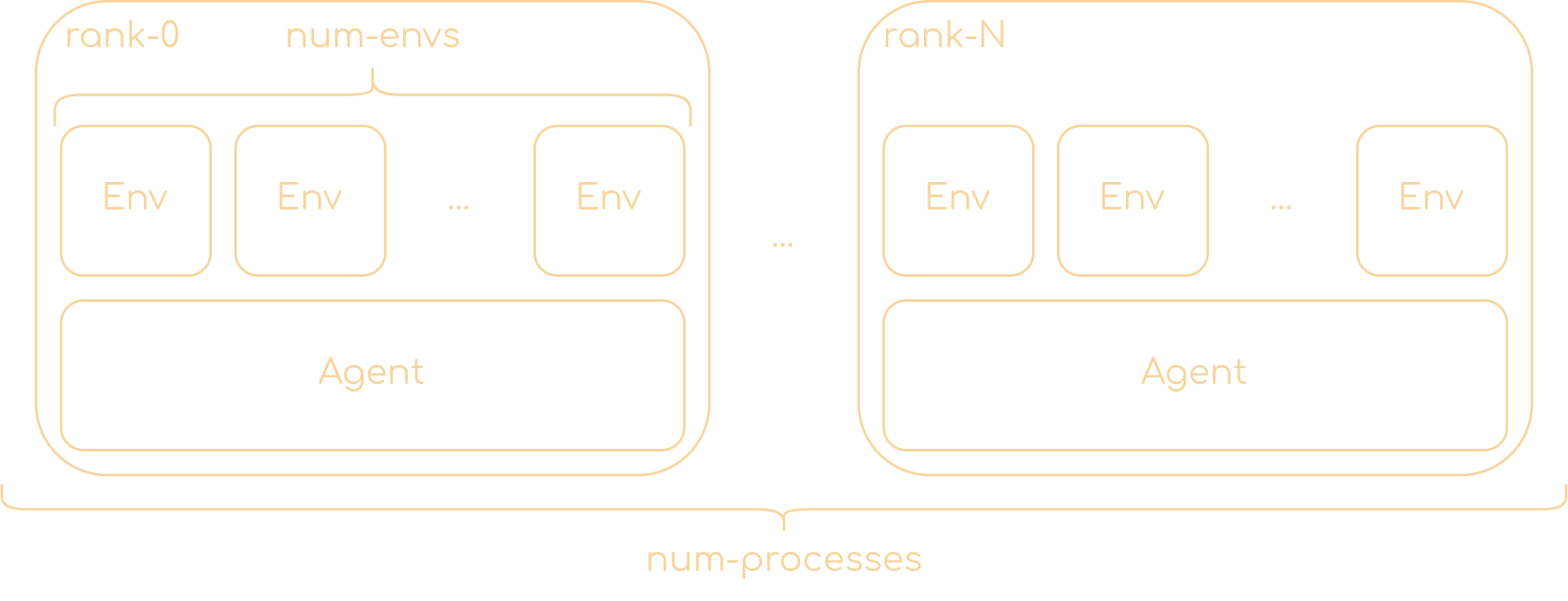
To run the algorithm with Lightning Fabric, you need to specify the Fabric parameters through the CLI. For example, to run the PPO algorithm on 2 processes on the CPU, each with 4 parallel environments, you can run:
sheeprl fabric.accelerator=cpu fabric.strategy=ddp fabric.devices=2 exp=ppo env=gym env.id=CartPole-v1
Every process plays in its own environments and trains its own copy of the agent: the processes start from the same weights, and the gradients are averaged over the processes at every optimizer step.
You can check the available parameters for Lightning Fabric here.
Evaluate your Agents
You can easily evaluate your trained agents from checkpoints: training configurations are retrieved automatically.
sheeprl-eval checkpoint_path=/path/to/checkpoint.ckpt fabric.accelerator=gpu env.capture_video=True
For more information, check the corresponding howto.
📖 Repository structure
The repository is structured as follows:
-
algos: contains the implementations of the algorithms. Each algorithm is in a separate folder, and (possibly) contains the following files:<algorithm>.py: contains the implementation of the algorithm.agent: optional, contains the implementation of the agent.loss.py: contains the implementation of the loss functions of the algorithm.utils.py: contains utility functions for the algorithm.evaluate.py: contains the evaluation function of the algorithm, used bysheeprl-eval.
-
configs: contains the default configs of the algorithms. -
core: contains the training loop shared by all the algorithms, and the interface that every algorithm implements. -
data: contains the implementation of the data buffers. -
envs: contains the implementation of the environment wrappers. -
models: contains the implementation of some standard models (building blocks), like the multi-layer perceptron (MLP) or a simple convolutional network (NatureCNN) -
utils: contains utility functions for the framework.
⚙️ How SheepRL works
From the command line to the algorithm
sheeprl exp=ppo env=gym env.id=CartPole-v1 algo.total_steps=100000
- Hydra composes the configuration from
sheeprl/configs: theexpfile chooses the groups (algo,env,buffer,fabric,metric,checkpoint, ...) and overrides some of their keys, and every key can be overridden from the command line. sheeprl.cli.runchecks the configuration, creates the Lightning Fabric of the run (fabric.accelerator,fabric.devices,fabric.strategy,fabric.precision), starts one process per device and seeds them.- Every process calls the
main()of the algorithm named byalgo.name, registered with the@register_algorithm()decorator.main()creates the algorithm and hands it to the training loop shared by every algorithm,sheeprl.core.run; when the training ends, it tests the agent (algo.run_test=True) and registers its models (model_manager.disabled=False).
The training loop
Every process has its own environments and its own copy of the agent, which interacts with the environments and executes the training loop.
Every iteration of sheeprl.core.run(fabric, cfg, algo):
- plays: the
Collector(sheeprl.core.Collector) steps the environmentsalgo.steps_per_iterationtimes with the actions the policy of the algorithm chooses for the current observations (random actions beforealgo.learning_startsfor the off-policy algorithms), and the writer of the algorithm writes every step in the store of the collected data (the rollout of the on-policy algorithms, the replay buffer of the off-policy ones). The collector resets the memory of the policy (e.g. a recurrent state,Policy.reset_state) for the environments that start a new episode, counts the policy steps (TrainSchedule) and logs the episodes that have ended; - trains:
algo.batches()yields one batch per gradient step andalgo.train_step()does the step, returning its metrics. The on-policy algorithms train on their rollout (epochs × minibatches); the off-policy ones start afteralgo.learning_startspolicy steps (optionally withalgo.per_rank_pretrain_stepsgradient steps first) and then doalgo.replay_ratiogradient steps per policy step (TrainSchedule); - logs and saves: the metrics are aggregated on the device and read on the host once every
metric.log_everypolicy steps, and a checkpoint is saved everycheckpoint.everypolicy steps (Cadence).
The environments
The collector steps the environments through an Environment (sheeprl.core.Environment): the num_envs environments of the process, with their current observations (obs), step(actions), random_actions(), reset() and close(). Every step returns an EnvStep: the observations the actions were chosen from and the next ones, the rewards, terminated and truncated, the last observations of the episodes that have just ended (final_obs: an environment whose episode ends starts the next one in the same step), the environments created again after a crash (restarted), the episodes that have just ended (episodes) and the info of the environments, which neither the training loop nor the writers read.
GymEnvironment implements it with the gymnasium environments created by make_env from the env configs, seeded differently on every process. Another backend only has to return the same EnvSteps: the algorithms, the logging and the checkpoints don't change.
The interface of an algorithm
An algorithm is implemented in its <algorithm>.py file, as a subclass of sheeprl.core.Algorithm with the following methods:
build(): creates the training state (modules, optimizers, ...) and the store of the collected data, aReplayStore: aReplayBufferand its sampler (sheeprl.core.rollout_storefor the rollout of the on-policy algorithms, read by theEpochSamplerof the minibatches of an update;sheeprl.core.transition_storefor the replay buffer of the off-policy algorithms trained on single steps,sheeprl.core.sequence_storefor the one of the algorithms trained on sequences).policy(): returns thePolicythat plays in the environments, sharing its weights with the trained modules:act(obs, greedy)returns anAct, the actions to play in the environments (env_actions) with the columns to store (e.g. the actions one-hot, their log-probabilities, the values) and anything else the writer needs (extras);random(env)returns random actions,init_states(num_envs)creates the memory of the policy (e.g. a recurrent state) before the first step andreset_state(env_idxes)forgets it for the environments that start a new episode, which reset themselves. The policy modules of the algorithms implement it (e.g.class PPOPolicy(nn.Module, Policy)), so it can also be compiled or exported.writer(): returns theWriter, whosewrite(store, step, act)writes a step of the environments (theEnvStep) played with the actionsactin the store.batches(): prepares the training data of an iteration and yields one batch per gradient step.train_step(): executes one gradient step on a batch and returns the metrics to log, as tensors.end_iteration(): optional, updates what changes once per iteration (e.g. annealed coefficients).test(): plays a test episode with the trained policy (sheeprl.core.run_test, the same for every algorithm), at the end of the training and to evaluate a checkpoint.
Its class attributes tell the loop how to drive it: steps_per_iteration (e.g. the rollout length of the on-policy algorithms, 1 for the off-policy ones), off_policy (training on a replay buffer, with the learning starts and the replay ratio above), random_warmup (random actions until algo.learning_starts, e.g. not when finetuning a policy) and restart_crashed_envs (a crashed environment is created again instead of stopping the run).
Every algorithm of SheepRL (A2C, PPO, PPO Recurrent, SAC, DroQ, SAC-AE, DreamerV1, DreamerV2, DreamerV3, DreamerV3.5 and the exploration and finetuning of Plan2Explore) is implemented this way: the environments, the logging, the checkpoints and the resuming of a run are the same for all of them.
Distributed training
The modules are not wrapped by DistributedDataParallel: every process computes the gradients on its own data, and update (sheeprl.core.update) averages them over the processes before every optimizer step. The processes start from the same weights, so they stay identical. Every process samples its own replay buffer, and the processes of an on-policy algorithm do the same number of gradient steps, even with rollouts split into different numbers of minibatches.
Compiling the losses
With algo.compile.enabled=True, the losses of the algorithm (forward and backward passes) are compiled with torch.compile, also with several processes. With algo.compile.mode=reduce-overhead (the default), the compiled losses run as CUDA graphs in the 32-true and bf16-mixed precisions (the other precisions use the default mode), which removes most of the cost of launching their many small kernels. With algo.compile.policy=True (the default), the step of the policy that plays in the environments is compiled too; the optimizer steps are not compiled.
The losses are written so that they compile into graphs that don't wait for the GPU: they don't read tensors on the host (.item(), an if on a tensor), their shapes don't depend on the data (e.g. masked sums instead of boolean indexing, and the minibatches of PPO Recurrent padded to a few sizes), and the recurrent layers are unrolled from their weights while compiling, since torch.compile doesn't trace nn.LSTM and nn.GRU.
Compiling takes from a few seconds (PPO, SAC) to a few minutes (the Dreamers) at the start of the run. Then, on an RTX 5070 in 32-true, a gradient step of the default experiments is from about 1.2× (PPO on Atari and SAC-AE, on pixels) and 1.4-1.9× (the Dreamers) to 2.8× (PPO on CartPole) faster. CUDA graphs reserve more memory: when a large model doesn't fit, algo.compile.mode=null compiles without them.
Checkpoints, resuming and evaluation
The training state is a TrainState dataclass: each of its fields (modules, optimizers, annealed coefficients, ...) is saved in the checkpoints and restored when a run is resumed. The evaluation (sheeprl-eval) and the registration of the models from a checkpoint (sheeprl-registration) restore it in the same way, with sheeprl.core.load_trained_state.
A resumed run starts from the iteration after the one of its checkpoint. The replay buffer of an off-policy run is saved in the checkpoints when buffer.checkpoint=True: a run resumed with it trains right away, without playing random actions again; without it, it first fills a new one, playing its policy for algo.learning_starts policy steps.
Algorithms implementation
You can check inside the folder of each algorithm the README.md file for the details about the implementation.
All algorithms are kept as simple as possible, in a CleanRL fashion. But to allow for more flexibility and also more clarity, we tried to abstract away anything that is not strictly related to the algorithm: the environments, the logging, the checkpoints and the resuming of a run are handled by the shared training loop, and the core folder also provides the helpers for the device, the precision and the optimizer steps (setup_module, autocast and update).
For example, we decided to create a models folder with already-made models that can be composed to create the model of the agent.
For each algorithm, losses are kept in a separate module, so that their implementation is clear and can be easily utilized for the recurrent version of the algorithm.
🗂️ Buffer
For the buffer implementation, we choose to use a wrapper around a dictionary of Numpy arrays.
To enable a simple way to work with numpy memory-mapped arrays, we implemented the sheeprl.utils.memmap.MemmapArray, a container that handles the memory-mapped arrays.
Every algorithm stores its steps in a single kind of storage, the ReplayBuffer: the steps of every environment, with a write pointer per environment (add with env_idxes writes some environments only, e.g. the first steps of the ones that ended an episode). What the training reads from it is decided by the samplers of sheeprl.data.samplers, which draw the steps of the samples with their own random number generator and let the buffer gather them:
TransitionSampler: single steps (SAC, DroQ, SAC-AE);SequenceSampler: sequences of consecutive steps of a single environment (the Dreamers, Plan2Explore);EpisodeSampler: sequences inside the episodes that ended, with their ends prioritized withbuffer.prioritize_ends(DreamerV2 withbuffer.type=episode);CuriousSequenceSampler: sequences drawn by the priorities of Curious Replay, from the number of trainings on their steps and the losses of the world model on them (DreamerV3 and DreamerV3.5 withbuffer.curious.enabled=True);EpochSampler: the minibatches of the epochs of an on-policy update (PPO, A2C, PPO-recurrent).
The off-policy algorithms train on a sheeprl.data.store.ReplayStore: a storage and a sampler, whose batches go to the device of the training. The store is saved in the checkpoints with its sampler, whose generator a resumed run continues. With buffer.prefetch the next batches are sampled in a thread while the training uses the current ones, and with buffer.on_device the storage is kept in the memory of the device, where its batches are gathered (see the configs howto).
🔍 Technical details
The shape of the Numpy arrays in the dictionary is (T, B, *), where T is the number of timesteps, B is the number of parallel environments, and * is the shape of the data.
The on-policy algorithms (A2C, PPO and PPO Recurrent) store their rollout in a ReplayBuffer with T equal to algo.rollout_steps and B equal to env.num_envs, in a ReplayStore (sheeprl.core.rollout_store). For A2C and PPO, buffer.size must be equal to algo.rollout_steps.
🙇 Contributing
The best way to contribute is by opening an issue to discuss a new feature or a bug, or by opening a PR to fix a bug or to add a new feature.
📭 Contacts
You can contact us for any further questions or discussions:
- Federico Belotti: belo.fede@outlook.com
- Davide Angioni: davide.angioni@orobix.com
- Refik Can Malli: refikcan.malli@orobix.com
- Michele Milesi: michele.milesi@orobix.com
3 maintainers


Metadata
3 maintainers
Release files for sheeprl 1.0.0rc7
For a detailed explanation of source distributions (sdists) and built distributions (wheels), please see the package formats documentation.
Source distribution (sdist)
| File | Size | Uploaded | Provenance | Actions |
|---|---|---|---|---|
| sheeprl-1.0.0rc7.tar.gz | 362.5 kB | With provenance | Details for sheeprl-1.0.0rc7.tar.gz |
Built distribution (wheel)
| File | Interpreter | ABI | Platform | Actions Reset |
|---|---|---|---|---|
| sheeprl-1.0.0rc7-py3-none-any.whl | Python 3 | none | any | Details for sheeprl-1.0.0rc7-py3-none-any.whl |
Total release size: 800.2 kB
Release files / sheeprl-1.0.0rc7.tar.gz
| Download URL | sheeprl-1.0.0rc7.tar.gz |
|---|---|
| Size | 362.5 kB |
| Tags | Source |
|
SHA-256 checksum How to use checksums |
34153ac0877dd572a66070f7763c9c9bb282f2a3ea42bab308ffb4090f38eab5
|
|
BLAKE2b-256 checksum How to use checksums |
0c5fb16ba570be61a038007aa96e7205c5742ec1f37599b0f08cdafdf2341d77
|
| Upload date | |
|
Uploaded using Trusted Publishing? What is trusted publishing? |
Yes |
| Uploaded via |
twine/7.0.0 CPython/3.13.16
|
Provenance
Provenance describes where a file came from. On PyPI, provenance is shared via attestations, which provide a verifiable record of the build or publishing details. View details, limitations and caveats.


PyPI Publish Attestation
PyPI verified that this artifact, at this checksum, originated from the publisher listed below.
Signed by GitHub Actions, verified by PyPI on Oct 27, 2026.
Transparency logRelease files / sheeprl-1.0.0rc7-py3-none-any.whl
| Download URL | sheeprl-1.0.0rc7-py3-none-any.whl |
|---|---|
| Size | 437.7 kB |
| Tags | Python 3 |
|
SHA-256 checksum How to use checksums |
b4bb45de397a988164f5d8810301eee030ccd6317f2f116d1d59a2f832a41b40
|
|
BLAKE2b-256 checksum How to use checksums |
5a1d05fd400e3757b4025cb66a109a6ed910f8b14562e6d2e449be4bf2a18e9a
|
| Upload date | |
|
Uploaded using Trusted Publishing? What is trusted publishing? |
Yes |
| Uploaded via |
twine/7.0.0 CPython/3.13.16
|
Provenance
Provenance describes where a file came from. On PyPI, provenance is shared via attestations, which provide a verifiable record of the build or publishing details. View details, limitations and caveats.
PyPI Publish Attestation
PyPI verified that this artifact, at this checksum, originated from the publisher listed below.
Signed by GitHub Actions, verified by PyPI on Oct 27, 2026.
Transparency logSecurity for sheeprl 1.0.0rc7
Provenance
Provenance describes where a file came from. On PyPI, provenance is shared via attestations, which provide a verifiable record of the build or publishing details. View details, limitations and caveats.
Full provenance
Both files in this release have been uploaded with provenance metadata.
Attestation for sheeprl-1.0.0rc7.tar.gz
PyPI Publish Attestation
PyPI verified that this artifact, at this checksum, originated from the publisher listed below.
Signed by GitHub Actions, verified by PyPI on Oct 27, 2026.
Transparency logA note on package security
PyPI is a repository for distributing packages, not a service for auditing them. While third-party security researchers and our staff do their best to detect and remove malicious packages, PyPI cannot guarantee the quality, security or suitability of any given package.
To learn more about protecting yourself from malicious actors, visit our package security documentation.














