
📊 Sheet Audit Trail



Git diffs for spreadsheets. A GitHub Action (and CLI) that parses Excel workbooks
whenever they change in a pull request and posts an audit-ready Markdown diff of
formulas, hardcoded inputs and cell dependencies, instead of
Binary files differ.
Built for finance teams whose valuation models, forecasts and board packs live in Excel or Google Sheets, where finding which cell changed after a model breaks is a forensic exercise.
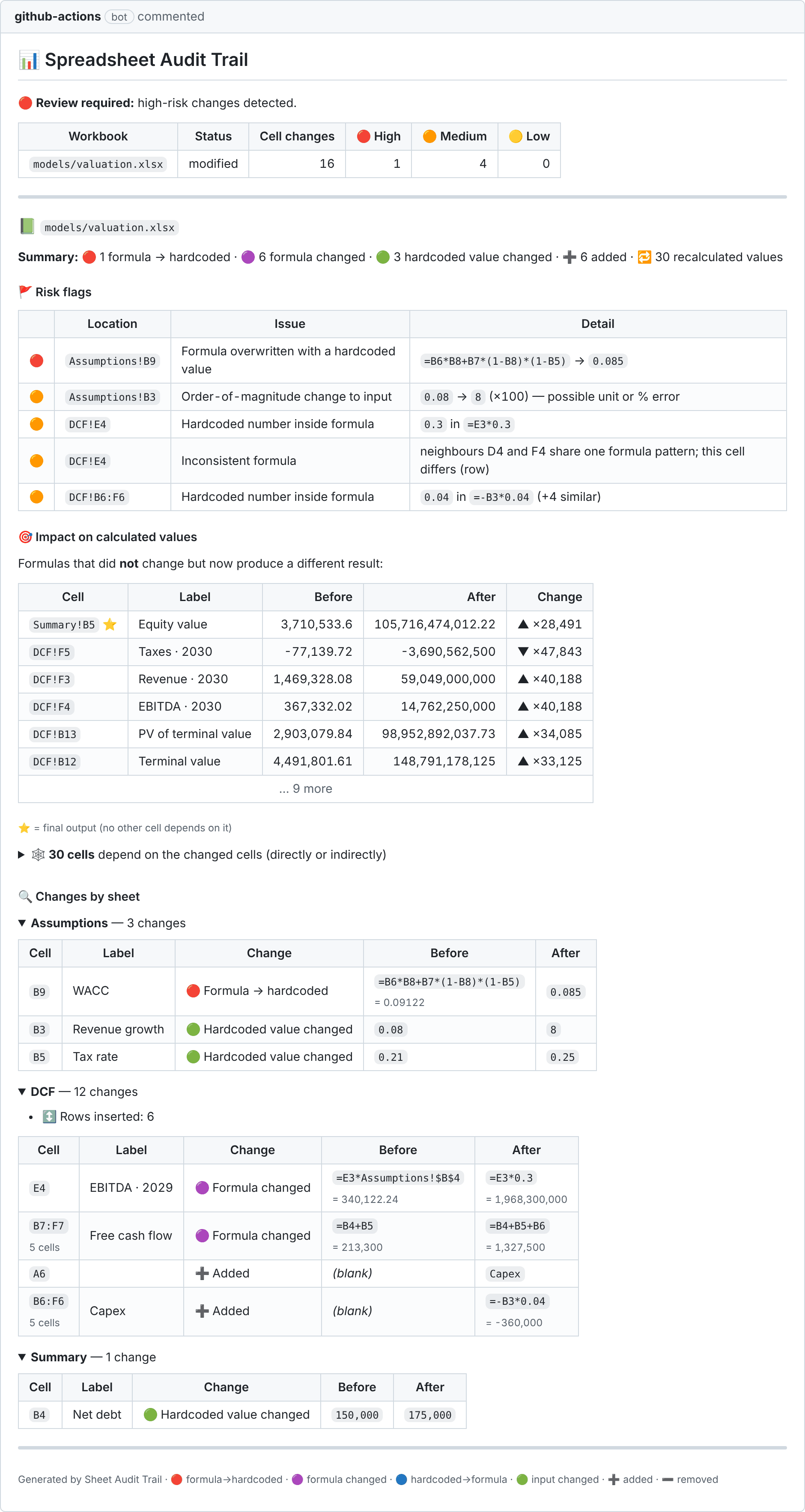
A real comment from the demo pull request.
What the PR comment shows
| Section | What it tells the reviewer |
|---|---|
| Risk flags 🚩 | The edits that break models (see below), ranked by severity |
| Impact on calculated values 🎯 | Cells whose formula did not change but whose result did, e.g. Equity value 3.71M → 4.02M (+8.4%). Final outputs are starred |
| Dependency impact 🕸️ | Every cell downstream of the edits, traced through cross-sheet references and named ranges |
| Changes by sheet 🔍 | Each changed cell with its business label ("Free cash flow · 2028"), before/after formula and value. An edit copied across a row is collapsed into one line (B7:F7 · 5 cells) |
| Structure ↕️ | Inserted/deleted rows and columns, added/deleted/renamed/hidden sheets, named-range edits |
See examples/demo/sample-report.md for a full report on the
included DCF model.
Risk flags
| Severity | Flag |
|---|---|
| 🔴 high | Formula overwritten with a hardcoded value, the classic "plug" |
| 🔴 high | Formula now evaluates to an error (#REF!, #DIV/0!, …) or contains #REF! |
| 🟠 medium | Hardcoded number inside a formula (=E3*0.3 instead of referencing an assumption) |
| 🟠 medium | Inconsistent formula: the cell breaks the pattern its row/column neighbours share |
| 🟠 medium | Order-of-magnitude change to an input (0.08 → 8: a likely % / unit error) |
| 🟠 medium | New link to an external workbook · named range redefined/deleted · sheet deleted or made very hidden |
| 🟡 low | Sheet added · sheet hidden |
Smart enough not to cry wolf
- Row/column insertion detection. Inserting one row in a model shifts every formula
below it. A naive diff reports hundreds of "changes". Sheet Audit Trail aligns rows the way
git diffaligns lines: it compares position-independent (R1C1) formula signatures and row labels. It then translates old formulas into new coordinates, so only real edits are reported. - Sheet renames are detected, and references to the renamed sheet aren't flagged.
- Merged flags. The same issue copied across
B6:F6is one flag, not five. - Fits in a PR comment. The comment shrinks to GitHub's 65k-character limit; the full report goes to the job summary, and a JSON report is written for downstream tooling.
Quick start (GitHub Action)
# .github/workflows/spreadsheet-audit.yml
name: Spreadsheet audit
on:
  pull_request:
    paths: ["**/*.xlsx", "**/*.xlsm"]
permissions:
  contents: read
  pull-requests: write
jobs:
  audit:
    runs-on: ubuntu-latest
    steps:
      - uses: actions/checkout@v7
        with:
          fetch-depth: 0   # compare against the PR base
          lfs: true        # if workbooks are in Git LFS
      - uses: RyMB-007/sheet-audit-trail@v1
        with:
          fail-on: high    # optional: block merges with high-risk edits
Inputs
| Input | Default | |
|---|---|---|
include |
*.xlsx *.xlsm |
Newline-separated globs of workbooks to audit |
fail-on |
none |
Fail the check on flags at/above low / medium / high |
comment |
true |
Post/update one sticky PR comment |
base, head |
PR base/head (or push before/after) | Revisions to compare |
github-token |
github.token |
Token for commenting |
Outputs: changed-files, cell-changes, high, medium, low, report-path, json-path.
Google Sheets (experimental)
Experimental: this path hasn't been tested end-to-end against the live Google Drive API yet. Please open an issue if it doesn't work for you.
Google Sheets don't live in git, so the tool snapshots them as .xlsx:
- List the sheets in a manifest,
gsheets.json:{"sheets": [{"id": "<id from the sheet URL>", "path": "models/forecast.xlsx"}]} - Share each sheet (Viewer) with a Google Cloud service account and store its key as the
secret
GOOGLE_SERVICE_ACCOUNT_JSON. - Use
examples/workflows/google-sheets-sync.yml: on a schedule it exports each sheet. If the content changed (re-exports with identical content are ignored), it opens a PR and posts the audit diff on it.
CLI
Diff workbooks locally, no GitHub needed:
pip install sheet-audit-trail # or: pip install "sheet-audit-trail[gsheets]"
sheetaudit diff old.xlsx new.xlsx              # Markdown to stdout
sheetaudit diff old.xlsx new.xlsx --json r.json --fail-on high
sheetaudit git --base main --head HEAD         # every workbook changed on this branch
sheetaudit textconv model.xlsx                 # plain-text dump for `git diff`
sheetaudit gsheet-sync --manifest gsheets.json
Readable local git diff: add *.xlsx diff=sheetaudit to .gitattributes, then run
git config diff.sheetaudit.textconv "sheetaudit textconv".
How it works
 .xlsx (base) ─┐                ┌─ formulas + cached values + names ─┐
               ├─ openpyxl ─────┤                                    ├─ align rows/cols ─ cell diff ─┐
 .xlsx (head) ─┘                └─ formulas + cached values + names ─┘                               │
                                                                                                     ▼
              PR comment / job summary / JSON  ◀── Markdown report ◀── risk rules + dependency graph
sheetaudit/refs.py: formula tokenizer: references (quoted sheets, ranges, whole columns, external[1]Booklinks), numeric literals, R1C1 conversion, reference remappingsheetaudit/model.py: loads formulas and last-calculated values (Excel stores both)sheetaudit/align.py: row/column insertion and deletion detectionsheetaudit/diff.py: cell classification and risk rulessheetaudit/deps.py: reverse dependency graph (cells, ranges, named ranges, cross-sheet)sheetaudit/report.py: Markdown/JSON rendering
Limitations
- Value-impact analysis uses the cached results saved in the file. Files saved by Excel, Google Sheets or LibreOffice have them. Files generated by scripts (e.g. openpyxl) usually don't; the dependency graph still works for those.
- The tool doesn't evaluate formulas itself, and doesn't diff VBA macros, charts, formatting or comments.
INDIRECT/OFFSETtargets are dynamic, so they aren't traced in the dependency graph.- Row and column insertions in the same sheet in one PR fall back to a positional diff for that sheet.
Versioning
Releases follow semantic versioning and are listed in the changelog.
@v1always points at the latestv1.x.yrelease. Use it to get fixes automatically.@v1.0.0(an exact tag) never changes. Use it if you want to upgrade on your own schedule.
Development
pip install -e ".[test]"
python examples/make_demo.py examples/demo   # builds the demo models (uses LibreOffice if present)
pytest -q
Releasing (maintainers)
- Update
versioninpyproject.tomland__version__insheetaudit/__init__.py, and move the[Unreleased]notes inCHANGELOG.mdunder the new version. - Merge to
main, then publish a GitHub Release with the tagvX.Y.Ztargetingmain. - The Release workflow runs the tests, moves the
vXtag to the release, and publishes the package to PyPI.
License
1 maintainer

Metadata
1 maintainer
Release files for sheet-audit-trail 1.0.0
For a detailed explanation of source distributions (sdists) and built distributions (wheels), please see the package formats documentation.
Source distribution (sdist)
| File | Size | Uploaded | Provenance | Actions |
|---|---|---|---|---|
| sheet_audit_trail-1.0.0.tar.gz | 31.7 kB | With provenance | Details for sheet_audit_trail-1.0.0.tar.gz |
Built distribution (wheel)
| File | Interpreter | ABI | Platform | Actions Reset |
|---|---|---|---|---|
| sheet_audit_trail-1.0.0-py3-none-any.whl | Python 3 | none | any | Details for sheet_audit_trail-1.0.0-py3-none-any.whl |
Total release size: 64.3 kB
Release files / sheet_audit_trail-1.0.0.tar.gz
| Download URL | sheet_audit_trail-1.0.0.tar.gz |
|---|---|
| Size | 31.7 kB |
| Tags | Source |
|
SHA-256 checksum How to use checksums |
e4e59c8a2e70100a60a82acffb55eed3611baf329d93cfd67d5fba8d1f5f714e
|
|
BLAKE2b-256 checksum How to use checksums |
5c9d1b21507ad5b77ae4cec057ec73356c7a5f745e24f02eff22565dd1c0ed20
|
| Upload date | |
|
Uploaded using Trusted Publishing? What is trusted publishing? |
Yes |
| Uploaded via |
twine/7.0.0 CPython/3.13.16
|
Provenance
Provenance describes where a file came from. On PyPI, provenance is shared via attestations, which provide a verifiable record of the build or publishing details. View details, limitations and caveats.


PyPI Publish Attestation
PyPI verified that this artifact, at this checksum, originated from the publisher listed below.
Signed by GitHub Actions, verified by PyPI on Nov 11, 2026.
Transparency logRelease files / sheet_audit_trail-1.0.0-py3-none-any.whl
| Download URL | sheet_audit_trail-1.0.0-py3-none-any.whl |
|---|---|
| Size | 32.5 kB |
| Tags | Python 3 |
|
SHA-256 checksum How to use checksums |
2a56e9636b51b034837c4709a6165b9b04c5f44c9e79c96121c29d78aadbb87a
|
|
BLAKE2b-256 checksum How to use checksums |
7c249ca29e3c35e054612089f6740c1f5bd7af906d7ecf9dd0df7784f523b023
|
| Upload date | |
|
Uploaded using Trusted Publishing? What is trusted publishing? |
Yes |
| Uploaded via |
twine/7.0.0 CPython/3.13.16
|
Provenance
Provenance describes where a file came from. On PyPI, provenance is shared via attestations, which provide a verifiable record of the build or publishing details. View details, limitations and caveats.
PyPI Publish Attestation
PyPI verified that this artifact, at this checksum, originated from the publisher listed below.
Signed by GitHub Actions, verified by PyPI on Nov 11, 2026.
Transparency logSecurity for sheet-audit-trail 1.0.0
Provenance
Provenance describes where a file came from. On PyPI, provenance is shared via attestations, which provide a verifiable record of the build or publishing details. View details, limitations and caveats.
Full provenance
Both files in this release have been uploaded with provenance metadata.
Attestation for sheet_audit_trail-1.0.0.tar.gz
PyPI Publish Attestation
PyPI verified that this artifact, at this checksum, originated from the publisher listed below.
Signed by GitHub Actions, verified by PyPI on Nov 11, 2026.
Transparency logA note on package security
PyPI is a repository for distributing packages, not a service for auditing them. While third-party security researchers and our staff do their best to detect and remove malicious packages, PyPI cannot guarantee the quality, security or suitability of any given package.
To learn more about protecting yourself from malicious actors, visit our package security documentation.













