
shift-this-version
Stop guessing your next version. Let AI read your diff and pick major, minor or patch.





npx shift-this-version
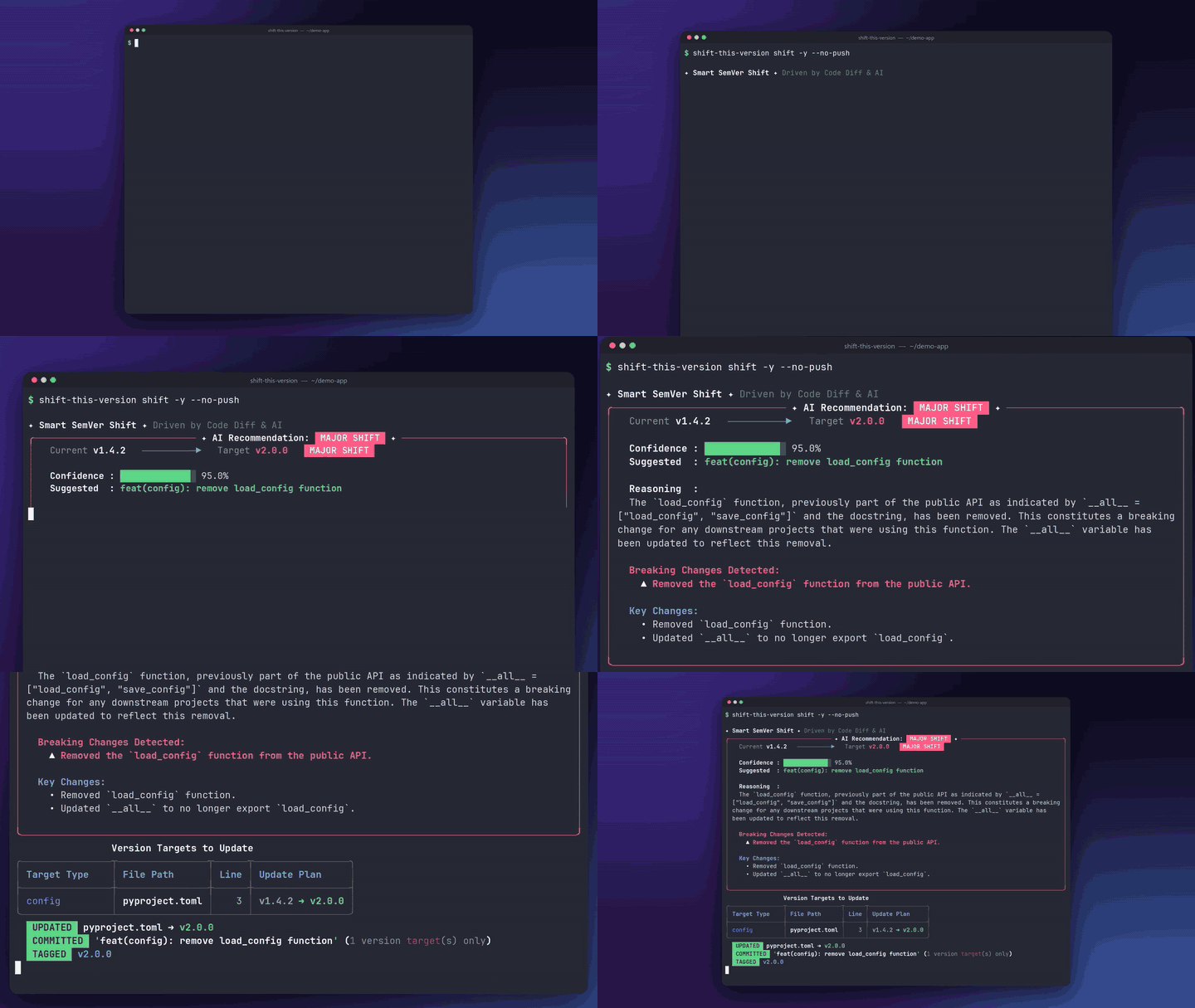
A real run, not a mock-up: the commit says fix:, but the diff removes a public function. The tool recommends a major bump, updates pyproject.toml, commits and tags. (Output is revealed line by line so it is easy to follow.)
shift-this-version reads the actual code diff since your last release tag, asks an LLM (Gemini, Claude, OpenAI, DeepSeek, Groq, OpenRouter, or a local Ollama model) whether it is a breaking change, a feature, or a fix, then updates every version file, commits, tags and pushes, in one command.
Why
Most version bumpers either ask you to decide by hand, or trust your commit messages. Both fail in the same way: a commit that says fix: but quietly removes a public function ships as a patch.
| Manual bump | Commit-message based tools | shift-this-version | |
|---|---|---|---|
| Looks at the real code change | no | no | yes |
| Needs Conventional Commits | no | yes | no |
| Updates every version file for you | no | partly | yes (incl. VERSION = "..." in source) |
| Explains why it picked a level | no | no | yes (reasoning + confidence) |
| Works offline / without AI | yes | yes | yes (--manual) |
| Your code can stay on your machine | yes | yes | yes (Ollama) |
AI can be wrong, so it only recommends: you see the reasoning, the files that will change, and confirm each step. Use --dry-run to preview without touching anything.
Quick Start
# 1. Install (pick one)
npx shift-this-version          # no install
uv tool install shift-this-version
pip install shift-this-version

# 2. First run: pick a provider and paste an API key (or use local Ollama)
shift-this-version

# 3. In any git repo with a release tag:
shift-this-version shift --dry-run   # preview, changes nothing
shift-this-version shift             # bump, commit, tag, push
No API key? Run shift-this-version shift --manual to choose the level yourself and still get the multi-file update, commit, tag and push.
Features
- Diff-aware: analyzes real code changes, ignoring lockfiles, minified bundles, docs and images; large diffs are summarized with
git diff --stat. - Multi-file:
pyproject.toml,package.json,Cargo.toml,setup.cfg,setup.py,composer.json,pubspec.yaml, plus version variables in source code (__version__,export const VERSION, ...). Syncsuv.lock/poetry.lock. - Any LLM: Gemini, Anthropic, OpenAI, DeepSeek, Groq, OpenRouter, Ollama, or any OpenAI-compatible endpoint.
- Safe by default: dry-run, step-by-step confirmation, and automatic fallback to manual mode if the AI is unreachable.
- CI-friendly:
--yesfor non-interactive pipelines, API keys via environment variables. - Built-in tooling:
doctor(environment diagnostics),status(repo inspection),update(self-upgrade). - Zero-Python option: the
npxwrapper falls back to a standalone binary (SHA256-verified) if Python is not installed.
Table of Contents
- Why
- Quick Start
- Features
- Install
- Uninstall
- Usage
- API
- Security
- Contributing
- License
Install
Requirements
- Git CLI accessible in PATH
- Python >= 3.10 (for uv/pip) or Node.js >= 16 (for npm/npx)
- (Note: Standalone installer via
irmdoes not require Python or Node.js)
Quick Install (Windows PowerShell)
irm https://raw.githubusercontent.com/snui1s/shift-this-version/main/install.ps1 | iex
Via uv, pip, npm, or npx
# Install as a global CLI tool
uv tool install shift-this-version

# Or install via pip
pip install shift-this-version

# Or install via npm
npm i shift-this-version
# (or globally: npm i -g shift-this-version)

# Or run instantly with zero installation via npx
npx shift-this-version
Local Development Setup
git clone https://github.com/snui1s/shift-this-version.git
cd shift-this-version
uv sync
Uninstall
Quick Uninstall (Windows PowerShell)
irm https://raw.githubusercontent.com/snui1s/shift-this-version/main/uninstall.ps1 | iex
Via uv, pip, or npm
# If installed via uv
uv tool uninstall shift-this-version

# If installed via pip
pip uninstall shift-this-version

# If installed via npm
npm uninstall -g shift-this-version
# (or locally: npm uninstall shift-this-version)
Usage
1. First-Time Setup Wizard
Run shift-this-version with no arguments on first use. The interactive setup wizard guides you through selecting your preferred AI provider, securely storing your configuration in ~/.shift-this-version/config.json:
shift-this-version
What the wizard does:
- Presents Provider Categories: Choose from 4 groups:
- Group 1 (Direct Cloud Giants): Google Gemini, Anthropic Claude, OpenAI
- Group 2 (High-Speed & Value Powerhouses): DeepSeek, Groq
- Group 3 (Universal Hub): OpenRouter (Access 200+ models with 1 key)
- Group 4 (Local & Self-Hosted): Ollama, Custom OpenAI-Compatible
- Prompts for Provider Credentials:
- For Cloud providers: Prompts for API key (securely masked)
- For OpenRouter: Prompts for API key and lets you specify any model
- For Ollama: Prompts only for the Host URL (defaults to
http://localhost:11434, no API key needed) - For Custom endpoints: Prompts for Base URL, model name, and optional key
- Saves Configuration: Saves settings securely to
~/.shift-this-version/config.json. - Displays Quick-Start Guide: Shows next recommended commands.
To reconfigure your provider or update your API key at any time, run:
shift-this-version config
(Optional: You can also supply keys via environment variables such as GEMINI_API_KEY, OPENROUTER_API_KEY, or OPENAI_API_KEY for CI/CD environments.)
2. Inspect Repository (status / check)
Verify the current Git state, recent commits, diff summary, and all detected version targets:
shift-this-version inspect

# Or use intuitive developer aliases:
shift-this-version status
shift-this-version check
Sample Output:
── 1. Git State ──────────────────────────────────────────
┌───────────────────────────────── Git State ─────────────────────────────────┐
│ Latest Tag: v0.1.0                                                          │
│ Commits Ahead: 2 commits ahead                                              │
└─────────────────────────────────────────────────────────────────────────────┘

── 2. Detected Version Files & Variables ─────────────────
Targets Found in Project:
┌──────────┬─────────────────────────┬──────┬─────────────────┬───────────────┐
│ Type     │ File Path               │ Line │ Current Version │ Snippet       │
├──────────┼─────────────────────────┼──────┼─────────────────┼───────────────┤
│ config   │ pyproject.toml          │    3 │ 0.1.0           │ version = …   │
│ code_var │ frontend/src/config.ts  │    8 │ 0.1.0           │ const VERSION…│
└──────────┴─────────────────────────┴──────┴─────────────────┴───────────────┘

Recent Commits:
  • feat: add OAuth2 login handler
  • fix: correct button padding

── 3. Changed Files Summary ──────────────────────────────
pyproject.toml         |  2 +-
frontend/src/config.ts |  2 +-
2 files changed, 2 insertions(+), 2 deletions(-)

── 4. Latest Uncommitted Changes ─────────────────────────
diff --git a/frontend/src/config.ts b/frontend/src/config.ts
...
3. Shift Version
3.1 Standard Run (Zero Flags Needed)
Run shift-this-version shift to analyze code changes with AI, bump version files, commit, tag, and push to remote automatically using your saved AI configuration:
shift-this-version shift
3.2 Dry-Run Mode
Simulate the AI evaluation without modifying any files or Git state:
shift-this-version shift --dry-run
3.3 Interactive Confirmation Stages
When running shift-this-version shift, the CLI guides you through 5 discrete confirmation stages:
-
AI Recommendation Display:
╭───────────────────── AI Recommendation: MINOR ──────────────────────╮
│ Current Version: 0.1.0                                              │
│ Suggested Version: 0.2.0  (MINOR shift)                             │
│ Confidence: 95.0%                                                   │
│                                                                     │
│ Reasoning:                                                          │
│ Added OAuth login support without breaking existing endpoints.      │
│                                                                     │
│ Key Changes:                                                        │
│   • Added Google OAuth login handler                                │
╰─────────────────────────────────────────────────────────────────────╯

Files to update:
  • pyproject.toml:3 (0.1.0 -> 0.2.0)
  • frontend/src/config.ts:8 (0.1.0 -> 0.2.0)
-
Stage-by-Stage Confirmation:
- Stage 1 (Version): Confirm
0.2.0across all target files[Y/n](enternto provide a custom version). - Stage 2 (Git Commit): Confirm creating a Git commit
[Y/n]. - Stage 3 (Commit Message): Accept default message (
chore(release): shift version to 0.2.0) or provide a custom message. - Stage 4 (Git Tag): Confirm creating Git tag
v0.2.0[Y/n](automatically warns if tag already exists). - Stage 5 (Git Push): Confirm pushing branch and tag to remote repository
[Y/n].
- Stage 1 (Version): Confirm
  Updated pyproject.toml -> 0.2.0
  Updated frontend/src/config.ts -> 0.2.0
  Git committed: 'chore(release): shift version to 0.2.0'
  Created Git Tag: v0.2.0
  Pushed to remote: main & v0.2.0

Successfully shifted version to 0.2.0!
(Note: Automatic pushing is enabled by default. Use --no-push if you prefer to push manually.)
3.4 Manual SemVer Mode (No AI Required)
If you are working offline, have not configured an AI provider, or prefer to choose the SemVer bump yourself, use the --manual flag:
shift-this-version shift --manual
The tool also falls back to manual mode automatically if your AI provider is unreachable or unconfigured.
╭──────────────── Manual Version Shift (No AI) ────────────────╮
│ Current Version: 0.1.0                                       │
│                                                              │
│   [1] Patch  ➔ 0.1.1  (Bug fixes, backwards-compatible)      │
│   [2] Minor  ➔ 0.2.0  (New features, backwards-compatible)   │
│   [3] Major  ➔ 1.0.0  (Breaking changes, major redesign)     │
│   [4] Custom ➔ Enter a custom version string                 │
│   [0] Cancel                                                 │
╰──────────────────────────────────────────────────────────────╯
Select bump level [1/2/3/4/0] (1):
After selection, it proceeds through the same 5 confirmation stages (Version -> Commit -> Commit Message -> Tag -> Push).
3.5 Provider Options (Optional Overrides)
You can optionally override your saved default provider or model for a single run:
-
Group 1: Direct Cloud Giants
# Google Gemini (Default: gemini-2.5-flash)
shift-this-version shift -p gemini -m gemini-2.5-flash

# Anthropic Claude (Default: claude-3-5-haiku-20241022)
shift-this-version shift -p anthropic -m claude-3-5-sonnet-20241022

# OpenAI (Default: gpt-4o-mini)
shift-this-version shift -p openai -m gpt-4o
-
Group 2: High-Speed & Value Powerhouses
# DeepSeek (Default: deepseek-chat)
shift-this-version shift -p deepseek -m deepseek-chat

# Groq (Default: llama-3.3-70b-versatile)
shift-this-version shift -p groq -m llama-3.3-70b-versatile
-
Group 3: Universal Hub
# OpenRouter (Choose any model available on openrouter.ai)
shift-this-version shift -p openrouter -m anthropic/claude-3.5-haiku
shift-this-version shift -p openrouter -m deepseek/deepseek-chat
-
Group 4: Local & Self-Hosted
# Ollama: Specify host URL (no API key needed)
shift-this-version shift -p ollama --host http://localhost:11434

# Custom OpenAI-Compatible Endpoint (LM Studio, vLLM, LocalAI)
shift-this-version shift -p custom --host http://localhost:1234/v1 -m local-model
3.6 Custom Code Variables
Target specific variable names defined in frontend or backend code:
shift-this-version shift --var APP_VERSION --var RELEASE_VERSION
3.7 Disable Commit, Tag, or Push
Disable Git commit, tag generation, or remote push when needed:
# Update version files only without creating git commits, tags, or pushing
shift-this-version shift --no-tag --no-commit --no-push
3.8 CI/CD Integration
For non-interactive pipelines (GitHub Actions, GitLab CI), use --yes or -y:
shift-this-version shift -p gemini --yes
GitHub Actions Workflow Example (.github/workflows/release.yml):
name: AI Version Shift

on:
  push:
    branches:
      - main

jobs:
  shift-version:
    runs-on: ubuntu-latest
    steps:
      - name: Checkout Code
        uses: actions/checkout@v4
        with:
          fetch-depth: 0

      - name: Setup Python
        uses: actions/setup-python@v5
        with:
          python-version: "3.12"

      - name: Install shift-this-version
        run: pip install shift-this-version

      - name: Run AI Shift
        env:
          GEMINI_API_KEY: ${{ secrets.GEMINI_API_KEY }}
        run: |
          shift-this-version shift --yes -p gemini
          git push --tags
4. Environment Diagnostics (doctor)
Run an automated health check on your Git environment, project version targets, AI provider, and update status:
shift-this-version doctor
What it verifies:
- Git Executable & Repository: Verifies
gitis accessible in PATH, checks whether the current directory is a repository, and displays remote status. - Version Targets: Detects all version files (
pyproject.toml,package.json,VERSION, etc.) and verifies that version numbers are in sync. - AI Provider & Connectivity: Checks provider credentials, displays masked API key, and tests endpoint reachability (e.g. pinging local Ollama or custom endpoints).
- Update Check: Verifies if your installed version matches the latest PyPI release.
5. Self-Update (update / upgrade)
Check PyPI for newer versions and upgrade shift-this-version directly:
# Check PyPI and prompt for automatic upgrade:
shift-this-version update

# Check for updates only without installing:
shift-this-version update --check

# Non-interactive automatic upgrade (for CI/CD or automation):
shift-this-version update -y
(Note: shift-this-version upgrade is available as an alias.)
6. Command Reference
| Command / Flag | Description |
|---|---|
shift-this-version |
Run setup wizard on first run, or show provider status and commands overview |
shift-this-version shift |
Analyze diff with AI and shift SemVer across targets |
shift-this-version shift --manual |
Run interactive SemVer bump without AI |
shift-this-version shift --dry-run |
Preview AI recommendation without modifying files |
shift-this-version shift -y |
Non-interactive auto-confirm mode for CI/CD |
shift-this-version inspect |
Inspect Git diff, commit history, and detected version targets (aliases: status, check) |
shift-this-version doctor |
Run environment diagnostics (Git, version files, AI key/host connectivity, update check) |
shift-this-version update |
Check PyPI and self-upgrade to the latest release (alias: upgrade, flags: --check, -y) |
shift-this-version config |
Reconfigure default provider, API key, model, or host |
shift-this-version --version |
Display version number (convenience aliases: -v, --v) |
shift-this-version -h |
Display usage guide and options (alias: --help) |
shift-this-version help [cmd] |
Display detailed command guide and usage examples |
API
shift-this-version can also be integrated into custom automation scripts as a Python library:
import shift_this_version as stv

# 1. Locate version files and variables
targets = stv.find_version_targets()

# 2. Retrieve Git context
tag = stv.get_latest_tag()
diff = stv.get_filtered_diff(tag=tag)
commits = stv.get_commits_since(tag=tag)

# 3. Analyze changes via AI
analysis = stv.analyze(
    diff=diff,
    commits=commits,
    provider="gemini"
)

print(f"Recommendation: {analysis.bump_type}")
print(f"Reasoning: {analysis.reasoning}")
print(f"Breaking Changes: {analysis.breaking_changes}")

# 4. Compute next version and update files
current_version = targets[0].current_version
next_version = stv.calculate_next_version(current_version, analysis.bump_type)

for target in targets:
    stv.apply_version_bump(target, next_version)
Security
- API keys are stored locally in
~/.shift-this-version/config.jsonwith restricted user permissions, or read from environment variables. Keys are never logged or transmitted except to your chosen provider endpoint. - Git diff extraction excludes ignored directories (
.git,.venv,node_modules), secrets, and common binary/image assets. - For private or sensitive source code, use the local
ollamaprovider to ensure data remains strictly on your local machine.
Contributing
Pull requests are welcome. For major changes, please open an issue first to discuss what you would like to change.
Run the test suite before submitting changes:
python tests/test_core.py
License
1 maintainer

Metadata
1 maintainer
Release files for shift-this-version 1.9.2
For a detailed explanation of source distributions (sdists) and built distributions (wheels), please see the package formats documentation.
Source distribution (sdist)
| File | Size | Uploaded | Provenance | Actions |
|---|---|---|---|---|
| shift_this_version-1.9.2.tar.gz | 6.3 MB | Without provenance | Details for shift_this_version-1.9.2.tar.gz |
Built distribution (wheel)
| File | Interpreter | ABI | Platform | Actions Reset |
|---|---|---|---|---|
| shift_this_version-1.9.2-py3-none-any.whl | Python 3 | none | any | Details for shift_this_version-1.9.2-py3-none-any.whl |
Total release size: 6.3 MB
Release files / shift_this_version-1.9.2.tar.gz
| Download URL | shift_this_version-1.9.2.tar.gz |
|---|---|
| Size | 6.3 MB |
| Tags | Source |
|
SHA-256 checksum How to use checksums |
9c4b521f438ada277a0c7e3299130888d8b2d8e69415212e1168c7ad9acd7197
|
|
BLAKE2b-256 checksum How to use checksums |
321fc9002a9443890e1f57e78e35175c3f91f808ddf21f77ddcf491b00036125
|
| Upload date | |
|
Uploaded using Trusted Publishing? What is trusted publishing? |
No |
| Uploaded via |
uv/0.12.24 {"installer":{"name":"uv","version":"0.12.24","subcommand":["publish"]},"python":null,"implementation":{"name":null,"version":null},"distro":{"name":"Ubuntu","version":"24.04","id":"noble","libc":null},"system":{"name":null,"release":null},"cpu":null,"openssl_version":null,"setuptools_version":null,"rustc_version":null,"ci":true}
|
Release files / shift_this_version-1.9.2-py3-none-any.whl
| Download URL | shift_this_version-1.9.2-py3-none-any.whl |
|---|---|
| Size | 41.5 kB |
| Tags | Python 3 |
|
SHA-256 checksum How to use checksums |
30b7471fc263f8f05235573c83d1c5e8c90b02f42add40a4247698daf08b7446
|
|
BLAKE2b-256 checksum How to use checksums |
56bcb52a4c60455443502d5c041926c91eceb8f9744634b1fcd45d861d7550d5
|
| Upload date | |
|
Uploaded using Trusted Publishing? What is trusted publishing? |
No |
| Uploaded via |
uv/0.12.24 {"installer":{"name":"uv","version":"0.12.24","subcommand":["publish"]},"python":null,"implementation":{"name":null,"version":null},"distro":{"name":"Ubuntu","version":"24.04","id":"noble","libc":null},"system":{"name":null,"release":null},"cpu":null,"openssl_version":null,"setuptools_version":null,"rustc_version":null,"ci":true}
|
Security for shift-this-version 1.9.2
Provenance
Provenance describes where a file came from. On PyPI, provenance is shared via attestations, which provide a verifiable record of the build or publishing details. View details, limitations and caveats.
No provenance found
None of the files in this release were uploaded with provenance metadata.
A note on package security
PyPI is a repository for distributing packages, not a service for auditing them. While third-party security researchers and our staff do their best to detect and remove malicious packages, PyPI cannot guarantee the quality, security or suitability of any given package.
To learn more about protecting yourself from malicious actors, visit our package security documentation.














