

shinyshell
The Most Feature-Rich Zero-Dependency Python Terminal Library
130+ features. 0 dependencies. Pure Python stdlib.
Tables, charts, progress bars, games, QR codes, code highlighting, HTTP client,
JSON/YAML/XML formatters, and much more — all in one import.









✨ Why shinyshell?
from shinyshell import Shell
sh = Shell()

sh.success("Deployed!")            # ✨ Green success
sh.table(users, title="Team")      # 📊 Professional table
sh.pie({"Python": 45, "JS": 30})   # 📈 ASCII chart
sh.qr("https://github.com")        # 📱 Terminal QR code
sh.progress("Uploading")           # 🔄 Animated progress
sh.confetti(5)                     # 🎉 Confetti!
One import. Zero dependencies. All the pretty your terminal deserves.
✦ Key Selling Points
| Value | |
|---|---|
| 🧩 130+ features | The most feature-rich zero-dep terminal library for Python |
| 📦 Zero dependencies | Pure Python stdlib — os, sys, shutil, json, csv, hashlib |
| 🌍 Cross-platform | Linux, macOS, Windows Terminal, PowerShell, CMD, VS Code, Jupyter |
| 🚀 Production-ready | Scripts, CLIs, CI/CD pipelines, Docker containers |
| 🪶 Lightweight | ~2,900 lines — small, readable, easy to contribute to |
📊 Feature Distribution
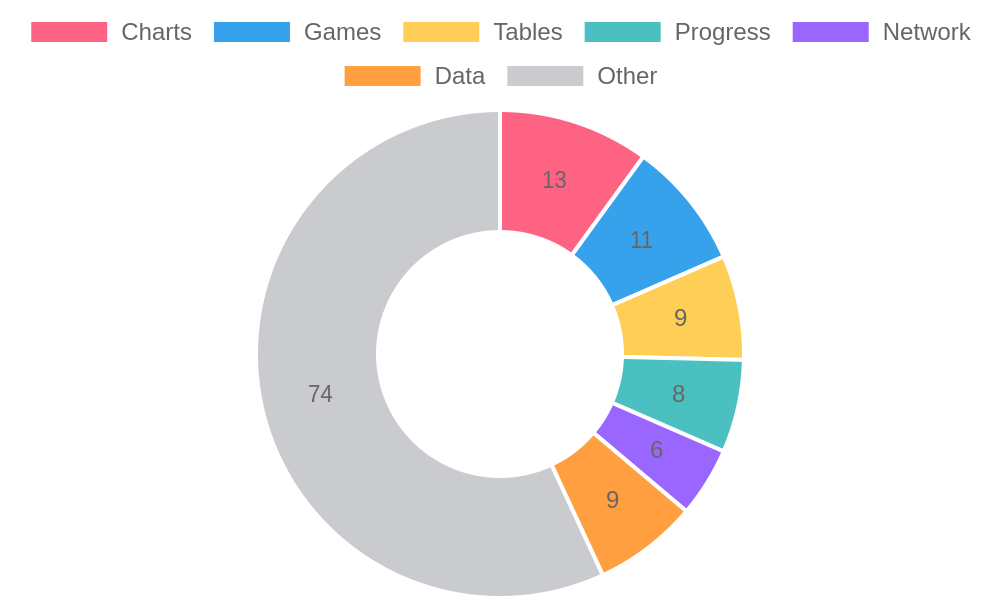
| Category | Count | Highlights |
|---|---|---|
| 📈 Charts | 13 | pie, bar, line, histogram, scatter, waterfall, donut, bullet, heatmap, sparkline, gauge, radar, funnel |
| 🎮 Games & Fun | 11 | slot, dice, magic8, matrix, confetti, marquee, particles, tic-tac-toe, wordle |
| 📊 Tables & Layout | 12 | table, metrics, timeline, grid, columns, header, banner, box |
| 🔄 Progress | 8 | spinner, progress, countdown, benchmark, live, steps, timer, pomodoro |
| 🌐 Network | 6 | http, ping, status, dns_lookup, ip_info |
| 📄 Data Formats | 9 | json, markdown, xml, yaml, csv, hexdump, jwt_decode, url_parse |
| 🔐 Security & Utils | 12 | secret, password, debug, dict_diff, hash_text, password_generate, slugify, bytes_format, duration, percent |
| 🎨 Visual FX | 8 | rainbow, gradient, neon, typewrite, color_picker, color_grid |
| 💻 Code & Dev | 8 | code, diff, git_log, git_status, stack_trace, process_info |
| ⌨️ Interactive | 8 | confirm, choice, input, form, toggle, autocomplete, menu |
| 📁 Files & System | 8 | tree, disk_usage, checksum, csv, config, env |
| 🧩 Decorators & Misc | 12 | trace, retry, throttle, background, batch, link, badge, emoji, venn, calendar |
| TOTAL | 130+ |
🆚 vs Alternatives
| shinyshell | rich | colorama | termcolor | |
|---|---|---|---|---|
| Dependencies | 0 ✅ | 10+ | 0 | 0 |
| Features | 130+ ✅ | 50+ | 3 | 5 |
| Tables | ✅ | ✅ | ❌ | ❌ |
| Charts (pie/bar/radar) | ✅ | ✅ | ❌ | ❌ |
| QR codes | ✅ | ❌ | ❌ | ❌ |
| Games | ✅ | ❌ | ❌ | ❌ |
| Animations | ✅ | ✅ | ❌ | ❌ |
| HTTP client | ✅ | ❌ | ❌ | ❌ |
| Decorators (@trace/@retry) | ✅ | ❌ | ❌ | ❌ |
| Interactive forms/menus | ✅ | ✅ | ❌ | ❌ |
| Password/hash/slug utils | ✅ | ❌ | ❌ | ❌ |
shinyshell = Rich's features + Colorama's portability + 80 extra features — all with zero deps.
🚀 Quick Start
Install
pip install shinyshell
Hello World
from shinyshell import Shell

sh = Shell()
sh.success("Hello, shiny terminal! ✨")
5-Second Tour
sh = Shell()

# Messages
sh.success("Done!") · sh.error("Failed!") · sh.warning("Careful!") · sh.info("Running...")

# Tables & Charts
sh.table([{"Name": "Ada", "Lang": "Python"}], title="Team")
sh.bar({"A": 85, "B": 62, "C": 45})
sh.radar_chart({"Speed": 80, "Power": 60, "Range": 90}, "Robot")

# Progress
sh.progress("Uploading")

# Games & Fun
sh.magic8() · sh.dice(6, 2) · sh.matrix(5) · sh.confetti(3)

# Data
sh.json({"hello": "world"}) · sh.qr("https://github.com")
📚 Complete Feature Reference
💬 Messages & Status
sh.success("Done!")       # ✨ Green success
sh.error("Failed!")       # 💥 Red error
sh.warning("Careful!")    # ⚠️ Yellow warning
sh.info("Running...")     # ℹ️ Cyan info
📐 Layout & Headers
sh.header("MY APP")        # ╔═ Boxed header
sh.banner("SHINY")         # ASCII art banner
sh.hr()                    # ─── Horizontal rule
sh.box("content", "Title") # ╭─ Boxed content
sh.rule()                  # Gradient rule
📊 Tables & Data
sh.table(users, title="Team")          # Professional tables
sh.metrics({"CPU":"45%","RAM":"8GB"})  # Key-value dashboard
sh.timeline(events)                     # Vertical timeline
sh.columns(items, cols=3)              # Side-by-side columns
sh.grid(items, cols=2)                 # Grid layout
📈 Charts & Visualizations
sh.pie({"Python":45,"JS":30,"Go":25})        # ASCII pie chart
sh.bar({"A":85,"B":62,"C":45})                 # Bar chart
sh.line_chart([1,5,2,8,3,9])                   # Line chart
sh.histogram([1,2,2,3,3,3,4,5])               # Histogram
sh.scatter([(1,2),(3,5),(4,3)])                # Scatter plot
sh.waterfall([("Start",100),("+Sales",50)])    # Waterfall chart
sh.donut({"A":30,"B":70})                       # Donut chart
sh.bullet_graph("Revenue", 75, 90)              # Bullet graph
sh.heatmap([[1,2,3],[4,5,6],[7,8,9]])          # Heatmap
sh.sparkline([1,5,2,8,3,9])                    # ▁▃▁▆▂█
sh.gauge(75, 100, "CPU")                       # Gauge meter
sh.radar_chart({"Spd":80,"Pwr":60}, "Robot")   # 🕸️ Radar chart
sh.funnel_chart([("Visit",1000),("Paid",100)]) # Funnel chart
🔄 Progress & Loading
sh.spinner("Loading...", 3.0)         # Animated spinner
sh.progress("Uploading")              # Progress bar
sh.countdown(5, "Launching")          # 5...4...3...
sh.benchmark("Processing")            # ⏱️ Timed context
sh.live()                             # Live-updating display
sh.steps("Deploy", total=5)           # Step tracker
sh.timer(30, "Break")                 # Countdown timer
sh.pomodoro(25, 5, 4)                 # 🍅 Pomodoro timer
💻 Code & Development
sh.code(python_source)                # Syntax highlighting
sh.diff(old, new)                     # Colored git diff
sh.git_log(10)                        # Pretty git log
sh.git_status()                       # Pretty git status
sh.stack_trace()                      # Pretty stack trace
sh.process_info()                     # Process metrics
sh.pip_list("django")                 # Pretty pip list
sh.filewatch("app.py")                # File change watcher
🌐 Network & Web
sh.http("GET", "https://api.example.com")  # HTTP viewer
sh.network_ping("google.com")              # Ping with visuals
sh.network_status("https://example.com")   # HTTP status check
sh.dns_lookup("google.com")                # DNS lookup
sh.ip_info("8.8.8.8")                      # IP geolocation
📁 Files & System
sh.tree("./src")                      # Directory tree
sh.disk_usage("/")                    # Disk usage gauge
sh.file_permissions("app.py")         # Permission viewer
sh.checksum("file.bin", "sha256")     # File hash
sh.config(".env")                     # Config file viewer
sh.csv("data.csv")                    # CSV viewer
sh.sql_table(rows)                    # SQL result viewer
sh.env("PYTHON")                      # Environment viewer
📄 Data Formats
sh.json(data)                         # Colored JSON
sh.markdown(text)                     # Terminal markdown
sh.xml("<root><item/></root>")        # Colored XML
sh.yaml_view(yaml_text)               # YAML viewer
sh.hexdump(b"hello world")            # Hex dump
sh.jwt_decode(token)                  # JWT decoder
sh.url_parse(url)                     # URL parser
sh.base64_encode("hello")             # Base64 encode
sh.uuid_gen(5)                        # UUID generator
🔐 Security & Debug
sh.secret("sk-abc123")                # sk-****123
sh.password("Enter key:")             # Masked input + strength
sh.debug(user, status)                # Type + value + location
sh.trace                              # @sh.trace decorator
sh.dict_diff(old, new)                # Deep dict comparison
🎮 Games & Fun
sh.slot(5)                            # 🍒 Slot machine
sh.coin_flip()                        # 🪙 Coin flip
sh.magic8()                           # 🎱 Magic 8 ball
sh.dice(6, 2)                         # 🎲 Dice roller
sh.spin_wheel(["A","B","C"])          # 🎡 Spin wheel
sh.matrix(10)                         # Matrix rain
sh.confetti(5)                        # 🎉 Confetti
sh.marquee("Breaking News!")          # Scrolling text
sh.particles(5)                       # Particle animation
sh.tic_tac_toe()                      # 🎮 Tic-Tac-Toe (2-player)
sh.wordle()                           # 🟩 Terminal Wordle
🎨 Visual Effects
sh.rainbow("Hello World")             # 🌈 Rainbow text
sh.gradient_text("Gradient")          # Color gradient
sh.neon("NEON")                       # Neon glow
sh.typewrite("Hello...")              # Typewriter effect
sh.color_picker()                     # ANSI color browser
sh.color_grid()                       # RGB color grid
📝 Text Utilities
sh.wrap_text(long_text, width=60)     # Word wrap
sh.truncate(text, 50)                 # Smart truncation
sh.align_text("Hi", 40, "center")     # Text alignment
sh.highlight(text, "keyword")         # Keyword highlight
sh.ordinal(42)                        # → "42nd"
sh.pluralize("file", 3)               # → "files"
sh.camel_case("hello world")          # → "helloWorld"
sh.snake_case("HelloWorld")           # → "hello_world"
sh.strip_ansi(escaped)                # Remove ANSI
sh.slugify("Hello World!")            # → "hello-world"
sh.bytes_format(1536)                 # → "1.5 KB"
sh.duration(3661)                     # → "1h 1m 1s"
sh.percent(45, 200)                   # → "22.5%"
🖼️ Images & QR
sh.qr("https://github.com")           # Terminal QR code
sh.image("photo.jpg", width=80)       # Image → ASCII (needs Pillow)
sh.screenshot("output.txt")           # Capture terminal
⌨️ Interactive
sh.confirm("Deploy?")                 # Yes/No prompt
sh.choice("Select:", ["A","B","C"])   # Pick from list
sh.input("Name:", default="World")    # Styled input
sh.form([("Name:",str),("Age:",int)]) # Multi-field form
sh.toggle("Dark Mode", True)          # Toggle switch
sh.autocomplete("Search:", options)   # Filter-as-you-type
sh.menu(["Deploy","Rollback"])        # Arrow-key menu
🎧 Audio & Clipboard
sh.audio_beep(3)                      # Terminal beep
sh.audio_ding()                       # System ding
sh.clipboard_copy("Hello")            # Copy to clipboard
sh.notify("Build complete")           # Desktop notification
🔧 Decorators & Utils
@sh.trace                             # Auto-log function calls
@sh.retry(3)                          # Auto-retry on failure
@sh.throttle(1.0)                     # Rate limiting
@sh.background                        # Run in background thread

sh.batch(items, 10, callback=fn)      # Batch processor
sh.sleep(5, "Cooling down")           # Pretty sleep
sh.password_generate(16)              # Secure random password
sh.hash_text("hello")                 # → sha256 hex
🔗 Utility Methods
sh.link("GitHub", url)                # Clickable link
sh.badge("v7.0", "green")             # Colored badge
sh.emoji("rocket")                    # → 🚀
sh.venn({1,2,3}, {2,3,4})             # Set comparison
sh.calendar(2026, 7)                  # Monthly calendar
sh.pipe(data).table().metrics()       # Chained output
📼 Session
sh.session_start("debug")             # Record session
# ... your code ...
sh.session_stop()                     # Stop recording
📈 Growth & Stats




🤝 Contributing
Pull requests are welcome! See CONTRIBUTING.md for guidelines.
git clone https://github.com/adnanahamed66772ndpc/shinyshell.git
cd shinyshell
python -m pytest tests/
⭐ Support
If this library saved you time, star the repo and share it!
pip install shinyshell --upgrade



MIT © 2026 Adnan Ahamed Himal · Crafted with ✨ in Bangladesh
1 maintainer

Metadata
1 maintainer
Release files for shinyshell 0.7.0
For a detailed explanation of source distributions (sdists) and built distributions (wheels), please see the package formats documentation.
Source distribution (sdist)
| File | Size | Uploaded | Provenance | |
|---|---|---|---|---|
| shinyshell-0.7.0.tar.gz | 44.0 kB | Without provenance | Details |
Built distribution (wheel)
| File | Interpreter | ABI | Platform | Reset |
|---|---|---|---|---|
| shinyshell-0.7.0-py3-none-any.whl | Python 3 | none | any | Details |
Total release size: 84.9 kB
Release files / shinyshell-0.7.0.tar.gz
| Download URL | shinyshell-0.7.0.tar.gz |
|---|---|
| Size | 44.0 kB |
| Tags | Source |
|
SHA-256 checksum How to use checksums |
a16e74da62f88246800281a8a8782cdbcacb52c823b14b679f62e13d72eb7863
|
|
BLAKE2b-256 checksum How to use checksums |
d0e23baacafcd999c7046bc6f9383c2d940db604f25520e8b23eb2275b214b6f
|
| Upload date | |
|
Uploaded using Trusted Publishing? What is trusted publishing? |
No |
| Uploaded via |
twine/7.0.0 CPython/3.11.2
|
Release files / shinyshell-0.7.0-py3-none-any.whl
| Download URL | shinyshell-0.7.0-py3-none-any.whl |
|---|---|
| Size | 41.0 kB |
| Tags | Python 3 |
|
SHA-256 checksum How to use checksums |
0f63bf28db8b67dcd50552c6f125818384b9a2a9f978cede665d7a805cb6cb8f
|
|
BLAKE2b-256 checksum How to use checksums |
40e97a929d37d62b43dbeff1af910d64cab659ebf50fccf8f380060308e158dc
|
| Upload date | |
|
Uploaded using Trusted Publishing? What is trusted publishing? |
No |
| Uploaded via |
twine/7.0.0 CPython/3.11.2
|
Security for shinyshell 0.7.0
Provenance
Provenance describes where a file came from. On PyPI, provenance is shared via attestations, which provide a verifiable record of the build or publishing details. View details, limitations and caveats.
No provenance found
None of the files in this release were uploaded with provenance metadata.
A note on package security
PyPI is a repository for distributing packages, not a service for auditing them. While third-party security researchers and our staff do their best to detect and remove malicious packages, PyPI cannot guarantee the quality, security or suitability of any given package.
To learn more about protecting yourself from malicious actors, visit our package security documentation.














