


SHIPIT Agent
A clean, powerful, open-source Python runtime for building tool-using AI agents.
One consistent API over every major LLM provider — with tools, skills, memory, MCP, a rule-based permission layer, prompt caching, deep multi-agent orchestration, RAG, and structured streaming events.
📖 Documentation · 📦 PyPI · Quick start · Changelog · Security














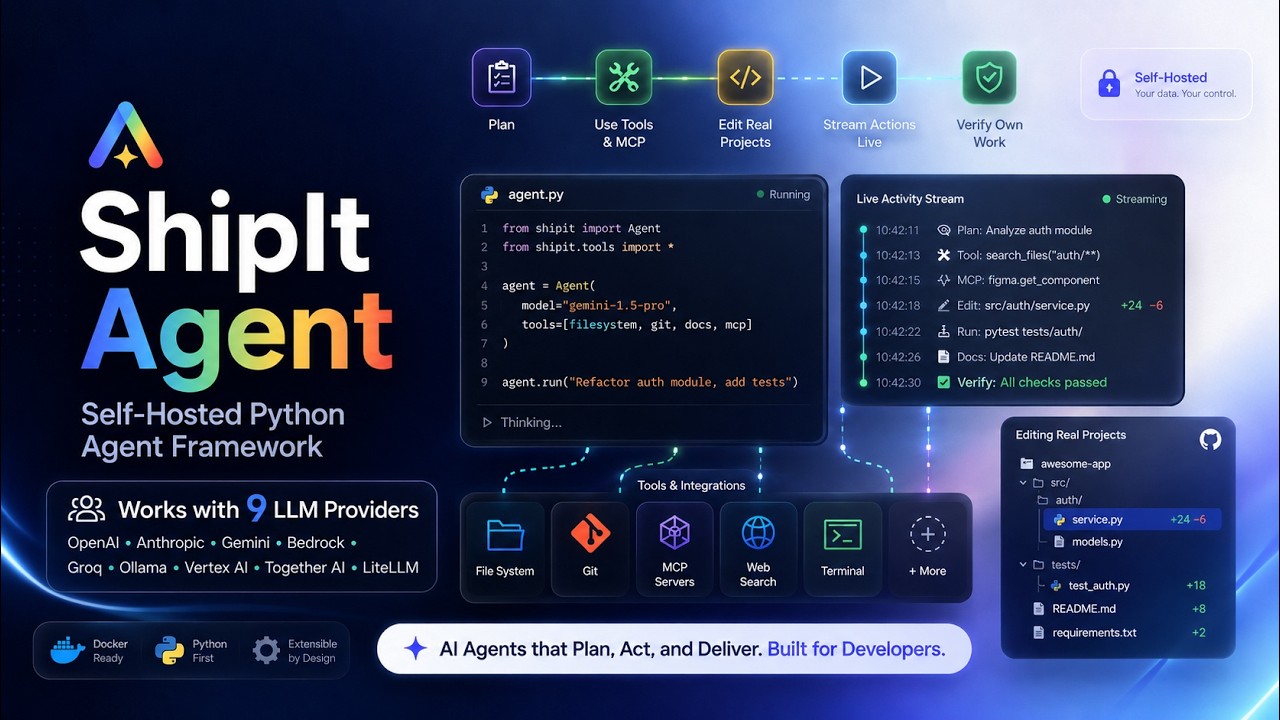
▶ **Shipt Agent UI**| Watch the intro
What is SHIPIT Agent?
SHIPIT Agent is a small, explicit runtime for building production agents in Python. You bring an LLM; the runtime gives you the loop around it — tool calling, retries, streaming, memory, sessions, permissions, and cost tracking — plus a deep library of batteries (40+ built-in tools, 17 SaaS connectors, RAG, multi-agent orchestration, browser automation).
It is provider-agnostic by design: the same agent code runs on OpenAI, Anthropic, AWS Bedrock, Google Vertex/Gemini, Groq, Together, Ollama, or any of 100+ models through LiteLLM. Swap the model in one line — nothing else changes.
from shipit_agent import Agent
from shipit_agent.llms import build_llm_from_env

agent = Agent.with_builtins(llm=build_llm_from_env())   # any provider
print(agent.run("Find every TODO in this repo and summarize them.").output)
The only hard dependency is
pydantic. Everything else (a provider SDK, Playwright, a vector store) is an optional extra you install when you need it. Python 3.11+ · MIT · 3,500+ tests.
Highlights
- 🤖 The Agent — one runtime: tool calling, retries, parallel tools, context compaction, and a
final-answer guarantee.
Agent.with_builtins()ships the full tool catalogue. - 🔌 Any LLM — OpenAI · Anthropic · Bedrock · Vertex · Gemini · Groq · Together · Ollama · OpenRouter · 100+ via LiteLLM. Native adapters where it matters, one interface everywhere.
- 🛡️ Control plane — a fast, rule-based permission engine (allow/deny/ask), plan mode (read-only research before acting), and hooks that can block or rewrite any tool call.
- ⚡ Prompt caching — cross-provider cache-read accounting (Anthropic/Bedrock/Vertex
cache_control+ OpenAI automatic caching) so repeated calls bill at a fraction of the cost. - 🧰 Tools & connectors — 40+ built-in tools (bash, SQL, files, web search, code execution, vision, PDF…) and 17 SaaS connectors (GitHub, Slack, Gmail, Jira, Salesforce, Stripe…).
- 🔗 MCP — connect Model Context Protocol servers over stdio, HTTP, or a persistent subprocess.
- 🧠 Deep agents —
GoalAgent,ReflectiveAgent,Supervisor/Worker,ShipCrew, and thecreate_deep_agent()factory for autonomous, multi-step, multi-agent work. - 📚 Super RAG — hybrid vector + BM25 search with auto-cited sources and pluggable backends (Chroma, Qdrant, pgvector).
- 🚀 Autopilot — long-running autonomous loops with a critic, artifacts, fan-out, and a scheduler.
- 🖥️ Computer use — drive a real browser via screenshots + a vision model (works in Jupyter).
- 📊 Production-ready — sessions, memory consolidation, structured output with validation-retry, streaming events (+ SSE/WebSocket packets), tracing (file/OTel/LangSmith), and budgets.
What's new in v1.9.6 — fewer tokens, steadier connectors
- Calibrated context accounting (v1.9.5) — compaction now fires at the right
time. The trigger learns each model's real tokens-per-char from the provider's
reported usage (
TokenCalibrator) and counts the fixed prompt prefix (system + tool schemas), instead of a flatchars/4that under-counted dense tool output by multiples. Result: long, tool-heavy runs stay lean and stop overflowing the model. Clamped so it can only ever compact earlier, never later. - MCP resilience (v1.9.6) — a per-server circuit breaker + bounded retry
(
ResilientMCPTransport). A connector that is down or rate-limiting (HTTP 429 / JSON-RPC-32029) fails fast instead of waiting out the full timeout on every step, so one flaky server can't tax the whole agent. A success resets it.
Both are backwards compatible and covered by the test suite. See the changelog.
Automatic tool discovery
Ordinary Agent(llm=llm, tools=tools, mcps=servers) now defaults to
deferred_tools="auto". Catalogs that fit ten tools and approximately 4,096
schema tokens stay visible. Otherwise, the initial request exposes up to nine
working tools plus search_tools, within that schema budget.
An existing ToolSearchTool is reused under its configured name.
Core selection prefers a tool's numeric discovery_priority, then Shipit's
core capabilities, then registration order. Assign higher priorities to your
application's frequently used tools. Up to three recently discovered schemas
can be reused within the same session, competing for the same initial slots.
Changed schemas and statically denied tools are excluded from reuse; argument
permissions are still checked at execution. Session caches are bounded to 32
sessions per Agent instance and are not persisted across process restarts.
The model can search descriptions, names, and MCP server metadata; matching
tools become callable with their full schemas on the next step. Search does
not execute them or grant additional permissions. Loaded tools remain visible
for the rest of the run, so ten is an initial budget, not an execution limit.
Auto mode includes a compact capability-family index instead of listing every
deferred tool name. Ranking runs locally without additional LLM calls.
Exact-name searches load only the named tool; names can use underscores,
camelCase or Unicode. Newly loaded schemas append after those already shown.
This works through run(), stream(), and the async runtime using ordinary
function schemas, including providers without native tool-search support.
Use deferred_tools=False to keep every schema visible, True for the existing
core-only policy, or a list of names to defer specific tools. Code mode retains
its own discovery policy. Measure total request tokens and task completion in
your workload: discovery adds an LLM step, so schema savings are not a promise
of equal total-token savings.
See the discovery review and offline benchmark for measured payload reductions and remaining tradeoffs.
Ordinary Agent also supports opt-in progressive_skills=True for metadata-first
skill loading and max_task_tokens=50_000 for a soft per-run token threshold.
See progressive skills, budget limits and validation
for setup, isolation guarantees and provider-usage caveats.
from shipit_agent.deferral import DiscoveryPolicy

agent = Agent(
    llm=llm, tools=tools, mcps=servers,
    deferred_tools=DiscoveryPolicy(initial_tools=10, schema_tokens=4096, reuse_tools=3),
)
Discovery itself remains visible even if its schema exceeds a very small
configured budget. Definitions loaded during a run are not evicted mid-run.
For large structured results, tools may return
ToolOutput.from_records(rows, fields=["id", "evidence"], limit=20).
The model receives an explicit page and total count; callers retain the full
JSON. This is context reduction, not security redaction.
Run summaries distinguish finished from incomplete provider output, expose
finish reasons, failed-tool counts, and recovery counts. finished means the
runtime ended normally, not that an independent grader verified the answer.
Provider-reported usage counters remain unchanged; cache ratios and cost
estimates account for whether cached tokens are included in prompt tokens.
An opt-in, billed multi-turn evaluation is available in
scripts/evaluate_agent_session.py. It uses safe fixture tools and an
in-process MCP server, not production data or production MCP transport.
What's new in v1.7.0 — the working set
The biggest capability release yet: do the powerful thing without burning tokens or trust. All of it works with any LLM provider.
from shipit_agent import Agent

# 1. Deferred tool loading — a small core stays resident; the rest (and MCP
#    tools) are listed by name and loaded on demand via tool_search.
agent = Agent.with_builtins(llm=llm, deferred_tools=True)

# 2. Attachments — images, PDFs, and code/markdown files on the turn.
agent.run("What changed here?", images=["diagram.png"], files=["spec.pdf", "app.py"])

# 3. Batch, atomic edits to one file, and a full shell when you want it.
#    multi_edit applies many edits at once; bash gets a 600s ceiling,
#    an unrestricted mode, and a bash_job companion to poll/kill jobs.

# 4. Structured output straight from the provider (no parse-retry needed).
agent.run("Extract the invoice", output_schema=InvoiceSchema)

# 5. Plan mode as a workflow — the agent researches read-only, then submits a
#    structured plan for approval before it acts.
Plus: read parallelization (read-only tools fan out, writes stay ordered),
prompt caching across the conversation prefix, compaction re-grounding
(re-reads files after summarizing), MCP hardening (name sanitization,
collision-safe, timeouts, respawn re-handshake), the orchestrator role,
connection cards, and an end-of-run usage/cost summary. Retries back off
with jitter, every LLM call and MCP call has a timeout, and eviction no longer
corrupts saved sessions. Verified live on AWS Bedrock Mantle (Gemma 4) and
Hetzner inference. See the changelog.
The shipit CLI
shipit code "fix the failing test"     # 🛠 coding agent in your repo
shipit browse --show "cheapest SFO→JFK flight?"   # 🌐 computer use, watchable
shipit run "prompt"                    # one-shot with live tool cards
shipit chat                            # REPL with bottom-pinned input (TUI)
shipit serve                           # your agent as an OpenAI-compatible API
shipit code --mcp playwright "..."     # attach MCP servers (browser & more)
shipit roles | models | mcp | tools    # catalogs
shipit code roots the agent in your repository — project memory, slash
commands, permission policy, 50 builtin tools (structured git_ops,
notebook_edit, hardened edits with diffs, deep_research, …) — with
human-in-the-loop [y]/[n]/[a]lways prompts, --plan (read-only) and
--yes (auto-accept) modes, self-healing tool calls for open-weight
models, and --mcp to attach catalog servers incl. the official
Playwright MCP. Full CLI guide →
Installation
Requirements: Python 3.11+ (3.11 – 3.14 supported). The only hard dependency is
pydantic; provider SDKs and heavier features are opt-in extras.
From PyPI (recommended)
pip install shipit-agent
Optional extras
Install only what you need — each extra pulls in the relevant third-party packages:
| Extra | Installs | For |
|---|---|---|
openai |
openai |
OpenAI / OpenAI-compatible |
anthropic |
anthropic |
native Anthropic (Claude) |
bedrock |
boto3 |
AWS Bedrock |
google |
google-generativeai |
Gemini |
groq / together / ollama |
provider SDK | Groq / Together / Ollama |
litellm |
litellm |
100+ models via one interface |
playwright |
playwright |
browser automation / computer use |
pdf |
pypdf |
the PDF tool |
sql |
sqlalchemy |
the SQL tool (add your own driver) |
rag-chroma / rag-qdrant / rag-pgvector |
vector store | RAG backends |
rag-openai / rag-cohere / rag-sentence-transformers |
embedder | RAG embeddings |
otel / langsmith |
exporters | tracing |
all |
everything | kitchen sink |
pip install "shipit-agent[anthropic]"        # one provider
pip install "shipit-agent[anthropic,playwright,rag-chroma]"   # combine
pip install "shipit-agent[all]"              # everything
Browser automation / computer use also needs the Chromium binary:
pip install "shipit-agent[playwright]" && playwright install chromium
From source (development)
git clone https://github.com/shipiit/shipit_agent.git
cd shipit_agent
pip install -e ".[dev]"     # editable install with test/docs tooling
pytest -q                   # 3,500+ tests
ruff check .
Alternatives: pip install . (non-editable), pip install -r requirements.txt, or
poetry install.
Verify
import shipit_agent
print(shipit_agent.__version__)
Notebook tip: if imports look out of date, your kernel may be using an older globally installed copy. Run
pip install -U shipit-agent(orpip install -e .from the repo) in the kernel's environment.
Environment setup
The fastest way to choose a model is environment variables — copy
.env.example to .env and fill in what you use:
# Pick the provider; build_llm_from_env() reads these:
SHIPIT_LLM_PROVIDER=bedrock            # openai | anthropic | bedrock | vertex | gemini | groq | together | ollama | litellm

# …then the provider's own credentials, e.g.:
OPENAI_API_KEY=sk-...
ANTHROPIC_API_KEY=sk-ant-...
AWS_REGION_NAME=us-east-1             # Bedrock uses your AWS region / profile (no key)
SHIPIT_BEDROCK_MODEL=bedrock/us.anthropic.claude-3-5-sonnet-20240620-v1:0
GEMINI_API_KEY=...
GROQ_API_KEY=...
SHIPIT_LITELLM_MODEL=openrouter/openai/gpt-4o-mini    # for the litellm provider
from shipit_agent import Agent
from shipit_agent.llms import build_llm_from_env

agent = Agent.with_builtins(llm=build_llm_from_env())   # reads SHIPIT_LLM_PROVIDER + creds
print(agent.run("Hello, who are you?").output)
Run diagnostics any time with agent.doctor() to check provider config, credentials, and tools.
Use any LLM provider
The agent never cares which model it talks to. Configure once via env, or instantiate an adapter directly:
from shipit_agent.llms import (
    build_llm_from_env, OpenAIChatLLM, AnthropicChatLLM,
    BedrockChatLLM, GeminiChatLLM, GroqChatLLM, LiteLLMChatLLM,
)

llm = build_llm_from_env("bedrock")                       # env-driven (prod)
llm = OpenAIChatLLM(model="gpt-4o")                       # native OpenAI
llm = AnthropicChatLLM(model="claude-opus-4-1")           # native Anthropic
llm = BedrockChatLLM(model="bedrock/us.meta.llama4-maverick-17b-instruct-v1:0")
llm = GeminiChatLLM(model="gemini/gemini-2.0-flash")
llm = GroqChatLLM(model="groq/llama-3.3-70b-versatile")
llm = LiteLLMChatLLM(model="together_ai/meta-llama/Llama-3.1-70B-Instruct-Turbo")
| Provider | Adapter | Env (SHIPIT_LLM_PROVIDER=) |
Auth |
|---|---|---|---|
| OpenAI | OpenAIChatLLM |
openai |
OPENAI_API_KEY |
| Anthropic | AnthropicChatLLM |
anthropic |
ANTHROPIC_API_KEY |
| AWS Bedrock | BedrockChatLLM |
bedrock |
AWS region / profile |
| Google Vertex | VertexAIChatLLM |
vertex |
service-account JSON |
| Gemini | GeminiChatLLM |
gemini |
GEMINI_API_KEY |
| Groq | GroqChatLLM |
groq |
GROQ_API_KEY |
| Together | TogetherChatLLM |
together |
TOGETHERAI_API_KEY |
| Ollama (local) | OllamaChatLLM |
ollama |
— |
| LiteLLM / OpenRouter | LiteLLMChatLLM / LiteLLMProxyChatLLM |
litellm |
per provider |
Claude, end to end
Everything below is optional — AnthropicChatLLM(model=…) on its own is a
working agent. This is what is available when you want more from Claude
specifically.
Install and authenticate
pip install "shipit-agent[anthropic]"
export ANTHROPIC_API_KEY=sk-ant-...
| Model | Use it for |
|---|---|
claude-opus-5 |
the most capable, for complex multi-step agents |
claude-sonnet-5 |
the default — the balance of speed and intelligence |
claude-haiku-4-5-20251001 |
the fastest and cheapest, for high-volume jobs |
shipit models prints this list, and --model or $SHIPIT_ANTHROPIC_MODEL
overrides it anywhere.
From the CLI
export SHIPIT_LLM_PROVIDER=anthropic          # or pass --provider anthropic

shipit run "Summarise this repo" --provider anthropic
shipit chat --provider anthropic              # REPL, bottom-pinned input
shipit code "fix the failing test" --provider anthropic --model claude-opus-5
shipit serve --provider anthropic             # OpenAI-compatible API, Claude behind it

shipit doctor --provider anthropic            # names the variable it wants
doctor is the one to reach for when something is wrong: it reports the
adapter, the resolved model and the exact missing environment variable,
and exits non-zero — so shipit doctor --provider anthropic && shipit serve
stops rather than starting a server that cannot answer.
Extended thinking
Give Claude a budget to reason before it replies. interleaved_thinking
lets it think between tool calls rather than only before the first —
useful when each result should change the plan, and ignored unless a
thinking budget is set, because there is nothing to interleave without one.
from shipit_agent import Agent
from shipit_agent.llms import AnthropicChatLLM

llm = AnthropicChatLLM(
    model="claude-opus-5",
    thinking_budget_tokens=4096,
    interleaved_thinking=True,
)
agent = Agent.with_builtins(llm=llm)
Prompt caching is already on
prompt_caching=True is the default. The adapter marks the system prompt
and the tool schemas as cacheable, which is the part of the request that
repeats verbatim on every turn — on a long agent run it is most of the
input. Pass prompt_caching=False to switch it off.
Server-side tools
Tools Anthropic runs on its own infrastructure, so nothing executes on your machine and no result has to travel through your process:
These are declarations passed to the adapter alongside your own tools, so they live at the LLM layer rather than in the agent's toolbox:
from shipit_agent.llms import AnthropicChatLLM, code_execution, web_search

llm = AnthropicChatLLM(model="claude-sonnet-5")
response = llm.complete(
    messages=messages,
    tools=[web_search(max_uses=3), code_execution()],
)
print(response.metadata["server_tool_use"])       # what Claude ran
print(response.metadata["server_tool_results"])   # what came back
bash(), text_editor() and computer_use(width, height) are available the
same way. Beta headers are attached only when a tool needs one — web_search
is generally available, so a request using it stays on the GA endpoint and is
identical to one without this feature.
Citations from your own documents
Attach sources and get back claims with the span each came from, rather than a summary you have to spot-check:
import base64

from shipit_agent.llms import AnthropicChatLLM, pdf_document, text_document

pdf = base64.b64encode(open("10-K.pdf", "rb").read()).decode()

llm = AnthropicChatLLM(
    model="claude-sonnet-5",
    documents=[pdf_document(pdf, title="FY25 10-K"),
               text_document("Revenue grew 14% YoY.", title="Board note")],
)
response = llm.complete(messages=messages)
for citation in response.metadata.get("citations", []):
    print(citation)     # {"type": "page_location", "cited_text": …, "document_title": …}
pdf_document() takes base64 — url_pdf_document() has the API fetch it
instead, and content_document() takes in-memory content blocks. Every one
sets citations=True by default.
Context management
Let the API drop stale tool results server-side on a long run, instead of resending a transcript that grows every turn:
llm = AnthropicChatLLM(
    model="claude-sonnet-5",
    context_management={"edits": [{"type": "clear_tool_uses_20250919"}]},
)
The required beta header is added for you when this is set.
Claude through Bedrock
Same models, your AWS account, no Anthropic key:
shipit run "…" --provider bedrock --model bedrock/anthropic.claude-sonnet-5-v1:0
from shipit_agent.llms import BedrockChatLLM

llm = BedrockChatLLM(model="bedrock/anthropic.claude-sonnet-5-v1:0")
Bedrock authenticates with your AWS region and profile — see
bedrock/anthropic.claude-haiku-4-5-v1:0 in shipit models for the cheaper
route.
Core building blocks
Custom tools
Wrap any Python callable — the agent reads its signature and calls it when useful:
from shipit_agent import Agent, FunctionTool

def get_weather(city: str) -> str:
    """Current weather for a city."""
    return f"{city}: 22°C, clear"

agent = Agent.with_builtins(llm=llm, tools=[FunctionTool.from_callable(get_weather)])
agent.run("What's the weather in Tokyo — umbrella?")
Skills
Reusable behaviour templates that shape how the agent thinks and which tools it reaches for:
agent = Agent.with_builtins(
    llm=llm,
    skills=["code-workflow-assistant", "database-architect"],
    auto_use_skills=True,      # activate authored trigger phrases
)
Sessions & memory
session = agent.chat_session(session_id="user-42")
session.send("My name is Ada. I build compilers.")
session.send("What was my name again?")          # → remembers across turns
Persist across processes with FileSessionStore, and distill conversations into durable facts
with MemoryConsolidator.
Structured output
from pydantic import BaseModel

class Ticket(BaseModel):
    title: str; priority: str; tags: list[str]

result = agent.run("Triage: 'login broken on Safari'", output_schema=Ticket)
print(result.parsed)            # validated; auto-retries inside the same conversation
Streaming
for event in agent.stream("Write a haiku about shipping code"):
    if event.type == "text_delta":
        print(event.payload["chunk"], end="", flush=True)
    elif event.type == "tool_output_delta":
        print(event.payload["chunk"], end="", flush=True)
    elif event.type == "tool_called":
        print("→", event.payload["tool"])
Events also serialize to ready-made SSE / WebSocket packets for web UIs.
The control plane
A rule-based safety layer — no extra LLM call.
from shipit_agent import Agent, PermissionEngine

agent = Agent.with_builtins(
    llm=llm,
    permissions=PermissionEngine(
        deny=["bash", "*_delete"],   # never run these
        ask=["sql"],                 # require approval
        allow=["read*", "grep*"],    # always fine
    ),
)

# Read-only "plan mode" — research and propose, take no action:
plan = agent.plan("Migrate the billing schema to multi-tenant.").output
- Modes:
default,acceptEdits,plan,bypass. permission_callback(name, args)for programmatic human-in-the-loop approval.- Blocking hooks —
before_toolhooks can deny a call or rewrite its arguments;on_user_promptcan redact prompts:
@hooks.on_before_tool
def guard(name, args):
    if name == "bash" and "rm -rf" in args.get("command", ""):
        return {"decision": "deny", "reason": "destructive command"}
Performance: prompt caching
The runtime rebuilds the same system prompt + tool schemas each turn — the ideal cacheable prefix.
from shipit_agent.llms import AnthropicChatLLM
llm = AnthropicChatLLM("claude-opus-4-1", prompt_caching=True)   # default on for Claude
cache_control breakpoints are placed on tools + system prompt; responses surface
cache_read_input_tokens / cache_creation_input_tokens, which flow into CostTracker. Caching
spans Anthropic, Bedrock, Vertex (cache_control) and OpenAI (automatic) — cache reads bill
at ~10% of input.
For a large, long-running coding agent, enable the optimized preset. It keeps the full tool catalogue available behind progressive discovery and turns on model-aware checkpoint compaction:
agent = Agent.for_project(
    llm=llm,
    project_root="/path/to/repo",
    optimized=True,
)

# Reuse this id after a process restart to continue the same durable chat.
chat = agent.chat_session(session_id="main")
chat.send("Review the authentication flow")
chat.send("Now implement the fixes and run the tests")
Run agent.doctor() to verify tool schemas, skill dependencies, MCP and
connector readiness, prompt caching, code mode, and compaction settings.
Optimized project agents keep canonical chat history in .shipit/sessions/
and long-term facts in .shipit/memory.json; only the compact replay sent to
the model is shortened, so historical messages remain available to the user.
Large MCP/tool outputs are similarly bounded only in model context; complete
results remain available through AgentResult.tool_results and event traces.
Every tool also emits tool_output_started and tool_output_delta events.
Existing tools and MCP calls produce a delta when their final response arrives;
custom generator tools can yield ToolOutputChunk values for true incremental
output. Guardrail-enabled runs buffer first and publish only sanitized output.
Deep agents & orchestration
from shipit_agent import create_deep_agent, Goal

# Autonomous goal decomposition with a planner / explorer / coder / verifier loop:
agent = create_deep_agent(llm=llm, tools=[...])
result = agent.run(Goal(objective="Build and test a REST API for todos"))
GoalAgent (decompose → execute), ReflectiveAgent (self-improve to a quality bar),
Supervisor + Worker (hierarchical), ShipCrew (role-based crews), AdaptiveAgent, and
PersistentAgent (checkpoint + resume) are all first-class.
Super RAG
from shipit_agent import RAG, Agent
from shipit_agent.rag.embedder import HashingEmbedder

rag = RAG.default(embedder=HashingEmbedder())
rag.index_text("Payments run on Stripe; refunds settle in 5–7 days.", source="ops.md")

agent = Agent.with_builtins(llm=llm, rag=rag)     # retrieves, then answers with cited sources
print(agent.run("How long do refunds take?").rag_sources)
Hybrid vector + BM25 ranking, a document chunker, multiple embedders/rerankers, and pluggable backends (Chroma, Qdrant, pgvector).
Autopilot, computer use & connectors
# Drive a real browser (works in Jupyter):
from shipit_agent.computer_use import ComputerUseAgent, PlaywrightBrowserSession

with PlaywrightBrowserSession.launch(headless=True) as browser:
    ComputerUseAgent(llm=claude_llm, browser=browser,
                     goal="Find the iPhone 15 Pro price on apple.com").run()
Autopilot runs long, unattended jobs with a critic, artifacts, fan-out, and a scheduler. 17 SaaS connectors — GitHub, GitLab, Slack, Gmail, Google Drive/Sheets/Calendar, Jira, Linear, Notion, Confluence, HubSpot, Salesforce, Stripe, Zendesk, Figma, LinkedIn — share a credential store with built-in OAuth helpers.
MCP
from shipit_agent import Agent, connect_mcp

github = connect_mcp("github")                      # needs GITHUB_TOKEN
files  = connect_mcp("filesystem", args=["/my/project"])
agent  = Agent.with_builtins(llm=llm, mcps=[github, files])
A prebuilt catalog of 12 well-known servers (GitHub, Slack, Postgres, filesystem, Puppeteer,
Brave search, …) connects by name with fail-fast env/launcher validation — or bring your own
server over stdio, HTTP, a persistent subprocess, or the 2025 streamable-HTTP spec
(MCPStreamableHTTPTransport, with bearer_token= for hosted servers). Beyond tools, servers'
resources and prompt templates are first-class (list_resources() / read_resource() /
get_prompt() / resource_tool()).
Observability & cost
- Tracing —
FileTraceStore, OpenTelemetry, and LangSmith exporters. - Cost & budgets —
CostTrackerprices every call from a model table;Budgetenforces a ceiling (and flags unknown-model pricing instead of silently billing $0). - Verifier network — an optional cheap LLM that vetoes hallucinated tool calls and detects stalling, complementing the rule-based permission engine.
Examples & notebooks
examples/— runnable scripts (basic agent, custom tools, parallel tools, cost budgets, multi-turn memory, async runtime, secure tools, the verifier guard, and more).notebooks/— 60+ Jupyter notebooks covering agents, streaming, MCP, connectors, deep agents, RAG, skills, autopilot, the control plane, prompt caching, and the memory tool.
python examples/run_multi_tool_agent.py
Documentation
- 🌐 Full documentation site — searchable, with guides for every subsystem.
- 📓 CHANGELOG.md · release-notes/ — per-release detail.
- 🧰 TOOLS.md — the built-in tool catalogue.
- 🔐 SECURITY.md · ⚖️ LICENSE.md (MIT).
Contributing
Issues and PRs are welcome. Install the dev extras, keep the suite green, and run the linter:
pip install -e ".[dev]"
pytest -q
ruff check .
See CONTRIBUTING.md for the full guide.
Review
Every pull request is read by ShipIT Forge before a human gets to it. Two workflows, both gated:
.github/workflows/forge.yml— reviews the diff and runs three deterministic scans over the whole tree: committed credentials, infrastructure (workflow permissions, Dockerfiles, unpinned actions), and source code. The scans make no model call and cost nothing. They publish a check run, so a finding can be made a required status check rather than a comment somebody scrolls past..github/workflows/forge-issues.yml— reads the code behind a new issue and replies with root cause, the fix, and the test that would have caught it. It writes no code unless somebody comments/fix.
Both decline forks and non-collaborators in a separate gate job, so a declined
run says why in the log instead of looking like a broken if:. Write access is
checked against the API rather than read off author_association, which reports
MEMBER only when organization membership is public.
Five repository secrets configure them — named for the project rather than for one vendor, so changing provider is a settings change and not a workflow edit:
| Secret | Required | Value |
|---|---|---|
SHIPIT_PROVIDER |
always | vertex, anthropic, openai, gemini, … |
SHIPIT_MODEL |
always | the model id, e.g. gemini-2.5-flash |
SHIPIT_CREDENTIALS |
always | the API key, or the whole service-account JSON for Vertex |
SHIPIT_PROJECT |
Vertex only | GCP project id |
SHIPIT_LOCATION |
Vertex only | region, e.g. us-central1 |
Nothing is defaulted in the workflow files. A model hardcoded there is one somebody changes in the settings page and then wonders why the run ignored them.
Built with Love. Powered by your choice of AI models.
Ship it fast. Ship it right.
1 maintainer

Metadata
1 maintainer
Release files for shipit-agent 2.2.1
For a detailed explanation of source distributions (sdists) and built distributions (wheels), please see the package formats documentation.
Source distribution (sdist)
| File | Size | Uploaded | Provenance | |
|---|---|---|---|---|
| shipit_agent-2.2.1.tar.gz | 2.8 MB | With provenance | Details |
Built distribution (wheel)
| File | Interpreter | ABI | Platform | Reset |
|---|---|---|---|---|
| shipit_agent-2.2.1-py3-none-any.whl | Python 3 | none | any | Details |
Total release size: 4.0 MB
Release files / shipit_agent-2.2.1.tar.gz
| Download URL | shipit_agent-2.2.1.tar.gz |
|---|---|
| Size | 2.8 MB |
| Tags | Source |
|
SHA-256 checksum How to use checksums |
b9801d82126b3a6577bfb266644897222c516de5451d4af39a240705a31a6deb
|
|
BLAKE2b-256 checksum How to use checksums |
14b8280f3802766cd8c3b39be5356eabb0ba4b83420b1878d509728509383c29
|
| Upload date | |
|
Uploaded using Trusted Publishing? What is trusted publishing? |
Yes |
| Uploaded via |
twine/7.0.0 CPython/3.13.14
|
Provenance
Provenance describes where a file came from. On PyPI, provenance is shared via attestations, which provide a verifiable record of the build or publishing details. View details, limitations and caveats.


PyPI Publish Attestation
PyPI verified that this artifact, at this checksum, originated from the publisher listed below.
Signed by GitHub Actions, verified by PyPI on Oct 7, 2026.
Transparency logRelease files / shipit_agent-2.2.1-py3-none-any.whl
| Download URL | shipit_agent-2.2.1-py3-none-any.whl |
|---|---|
| Size | 1.2 MB |
| Tags | Python 3 |
|
SHA-256 checksum How to use checksums |
8cc5ece8b5d13d9ba86a0936a538ed5fc4d92e9d5c03323a6e6d793ce9c85be2
|
|
BLAKE2b-256 checksum How to use checksums |
85f28dabbba7c5e57a343948ce443acc058e8f6f87c75e82e4386ed39b586fc2
|
| Upload date | |
|
Uploaded using Trusted Publishing? What is trusted publishing? |
Yes |
| Uploaded via |
twine/7.0.0 CPython/3.13.14
|
Provenance
Provenance describes where a file came from. On PyPI, provenance is shared via attestations, which provide a verifiable record of the build or publishing details. View details, limitations and caveats.
PyPI Publish Attestation
PyPI verified that this artifact, at this checksum, originated from the publisher listed below.
Signed by GitHub Actions, verified by PyPI on Oct 7, 2026.
Transparency logSecurity for shipit-agent 2.2.1
Provenance
Provenance describes where a file came from. On PyPI, provenance is shared via attestations, which provide a verifiable record of the build or publishing details. View details, limitations and caveats.
Full provenance
All 2 files in this release have been uploaded with provenance metadata.
Attestation for shipit_agent-2.2.1.tar.gz
PyPI Publish Attestation
PyPI verified that this artifact, at this checksum, originated from the publisher listed below.
Signed by GitHub Actions, verified by PyPI on Oct 7, 2026.
Transparency logA note on package security
PyPI is a repository for distributing packages, not a service for auditing them. While third-party security researchers and our staff do their best to detect and remove malicious packages, PyPI cannot guarantee the quality, security or suitability of any given package.














