

shirabe-profiling
A fast, Polars-native data profiling tool that generates interactive HTML reports equipped with automated data quality alerts to streamline your exploratory data analysis.


Quickstart | Report tour | Use it in code | License
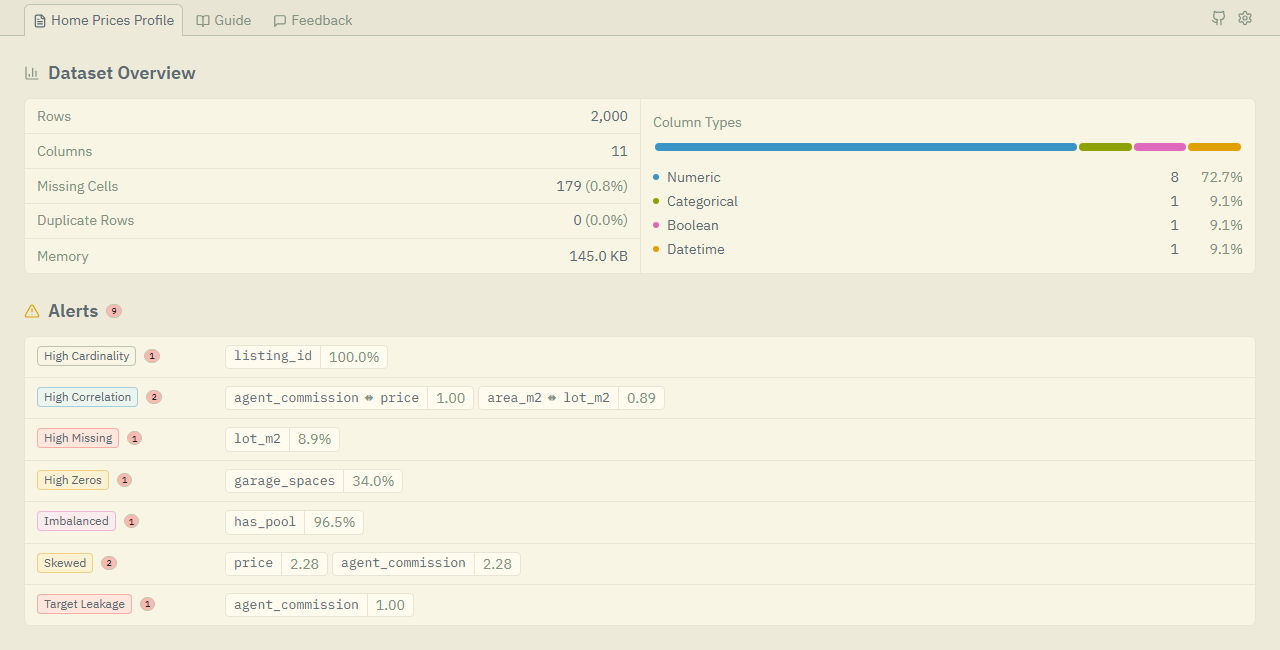
shirabe-profiling reads a Polars DataFrame and writes one HTML report that you open in a browser. The report shows the facts of each column, flags quality problems as alerts, and explains how to fix each alert.
- Fast, the engine is Polars, and overview mode skips the slow parts for a quick first look. See the benchmarks.
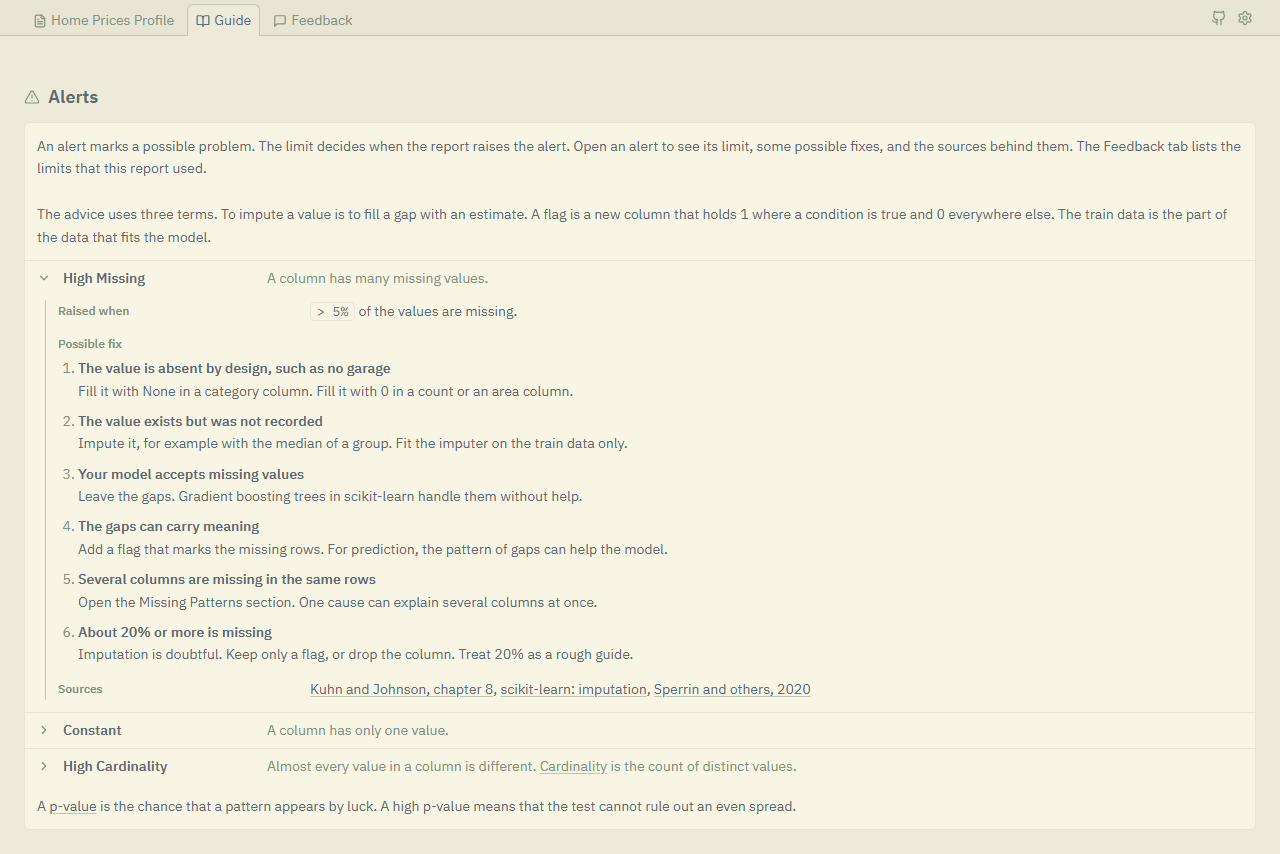
- A guide for every alert, the Guide tab covers all 12 alerts, with each limit, and with some possible fixes and the sources for most of them.
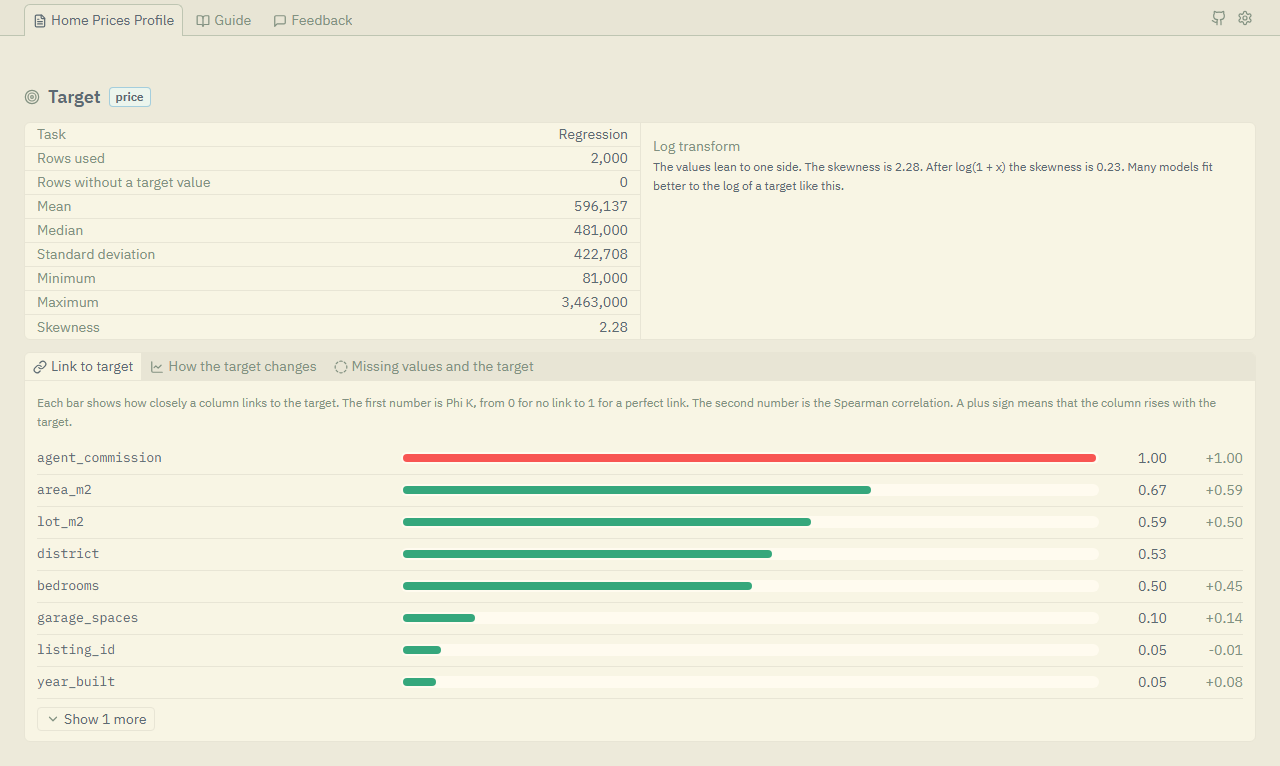
- Made for modeling, the target section shows how columns link to the target and warns about leakage, and skewed columns get
log1pand Yeo-Johnson tabs. - Easy to use in code, read the numbers with
.to_dict(),.to_json(),.stats, and.alerts, and the package is fully typed. - Easy on the eyes, the report follows the theme of your system, and you can switch between dark and light in the settings menu.
- Open to many inputs, Polars frames, pandas frames, CSV paths, and Parquet paths all work.
Quickstart
Install the package from PyPI:
pip install shirabe-profiling
With uv, run uv add shirabe-profiling in a project, or uv pip install shirabe-profiling in a virtual environment.
For pandas tables with text columns, install the extra: pip install "shirabe-profiling[pandas]".
Then write a report:
import polars as pl
from shirabe_profiling import ProfileReport

df = pl.read_csv("data.csv")
report = ProfileReport(df)
report.to_html("report.html")
You can name the column that you want to predict to add a target section:
report = ProfileReport(df, target="price")
The report loads ECharts and Tailwind CSS from a CDN, so it needs an internet connection to display correctly.
Report tour
Click any picture to open it full size.
| Target |
|---|
 |
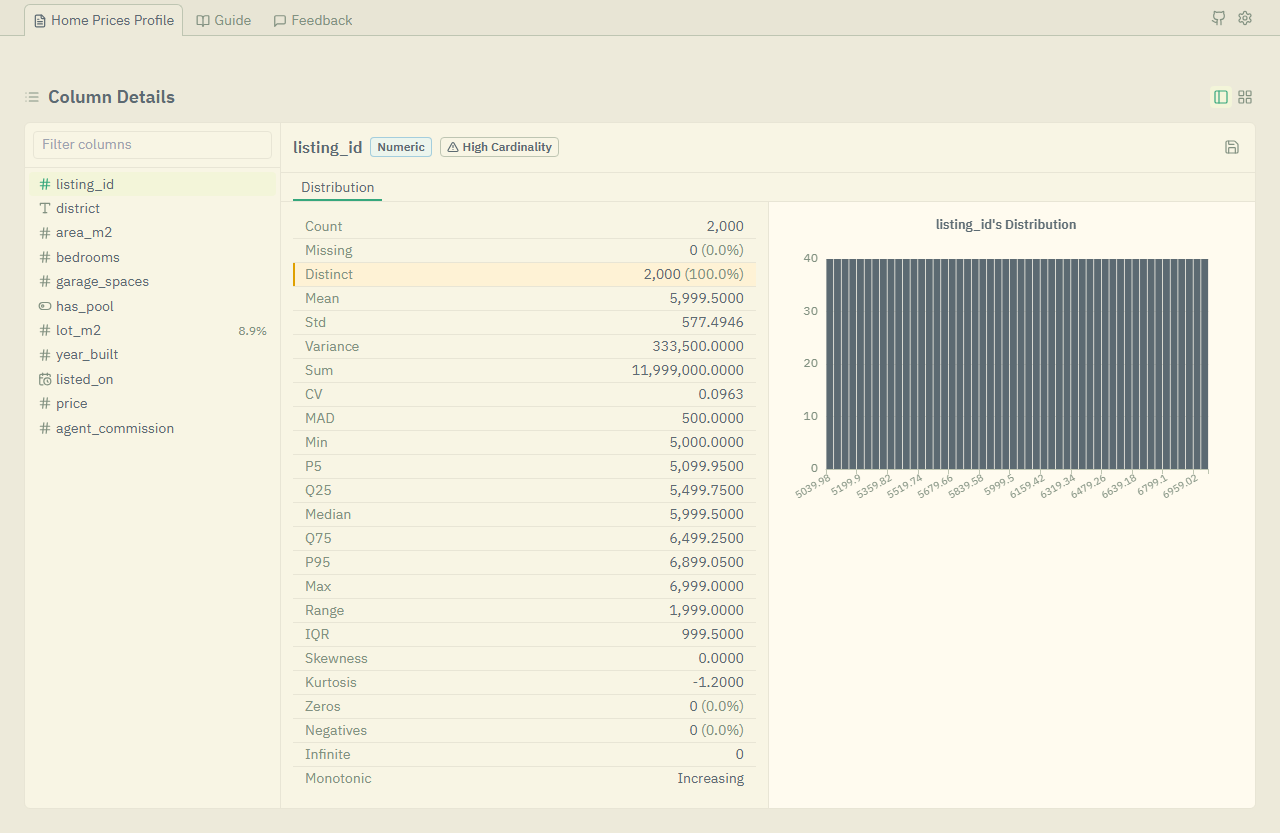
| Column details |
|---|
 |
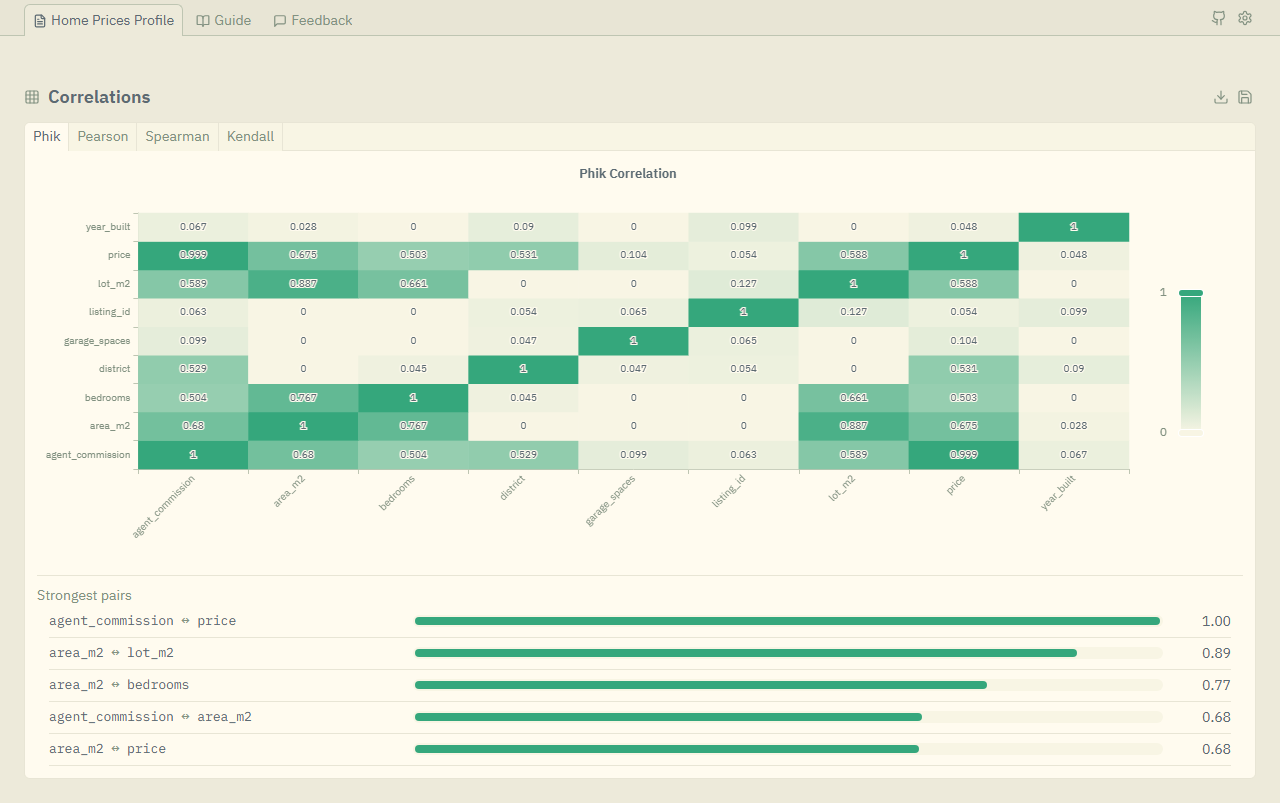
| Correlations |
|---|
 |
| Guide |
|---|
 |
The report also has:
- A correlation heatmap for each method (Phik, Pearson, Spearman, Cramér's V, and Kendall), with a list of the strongest pairs.
- An Interactions section with scatter plots, box plots, and a column picker.
- A Missing Patterns table and an Outliers table.
- A Sample section with the first rows, the last rows, random rows, and the rows with the most gaps.
Use it in code
Read the results
report = ProfileReport(df, title="Home Prices Profile")

stats = report.to_dict()
alerts = report.alerts
column_stats = report.stats["area_m2"]
correlations = report.correlations
Change the settings
from shirabe_profiling import ProfileReport, ProfileConfig

config = ProfileConfig(
    title="Home Prices Profile",
    mode="overview",
    missing_threshold=0.1,
    histogram_bins=30,
)
report = ProfileReport(df, config=config)
Pick a mode
Use "overview" when you want a fast first look, because it skips the slow parts of the report.
| Feature | "complete" |
"overview" |
|---|---|---|
| Basic stats | ✓ | ✓ |
| Histograms and value counts | ✓ | ✓ |
| Correlations | ✓ | ✗ |
| Interactions | ✓ | ✗ |
| Skew transform tabs | ✓ | ✗ |
| Missing patterns and outliers tables | ✓ | ✗ |
| Random and most missing samples | ✓ | ✗ |
| Character analysis | ✓ | ✗ |
| Duplicate rows table | ✓ | ✗ |
Choose an output format
| Format | Method | Use |
|---|---|---|
| HTML | report.to_html("report.html") |
The interactive report |
| JSON | report.to_json("report.json") |
Other programs |
| Dict | report.to_dict() |
Python code |
License
This project is a derivative work based on dataxid-profiling by DataXID, originally licensed under the Apache License 2.0.
- LICENSE, the Apache-2.0 grant for the whole repository
- LICENSES/, the full text of each license that the files use
- REUSE.toml, the license and the copyright holder of each file
1 maintainer

Metadata
1 maintainer
Release files for shirabe-profiling 0.2.0
For a detailed explanation of source distributions (sdists) and built distributions (wheels), please see the package formats documentation.
Source distribution (sdist)
| File | Size | Uploaded | Provenance | Actions |
|---|---|---|---|---|
| shirabe_profiling-0.2.0.tar.gz | 547.7 kB | With provenance | Details for shirabe_profiling-0.2.0.tar.gz |
Built distribution (wheel)
| File | Interpreter | ABI | Platform | Actions Reset |
|---|---|---|---|---|
| shirabe_profiling-0.2.0-py3-none-any.whl | Python 3 | none | any | Details for shirabe_profiling-0.2.0-py3-none-any.whl |
Total release size: 723.4 kB
Release files / shirabe_profiling-0.2.0.tar.gz
| Download URL | shirabe_profiling-0.2.0.tar.gz |
|---|---|
| Size | 547.7 kB |
| Tags | Source |
|
SHA-256 checksum How to use checksums |
8cfca3888307d88536e80d95d9248deb4b239e466d13c883c5bd03a717bba4ba
|
|
BLAKE2b-256 checksum How to use checksums |
1020ab3cc7858321ad7f6923eb36ccdb382a948aaf438611d6e265349ddab5f4
|
| Upload date | |
|
Uploaded using Trusted Publishing? What is trusted publishing? |
Yes |
| Uploaded via |
twine/7.0.0 CPython/3.13.14
|
Provenance
Provenance describes where a file came from. On PyPI, provenance is shared via attestations, which provide a verifiable record of the build or publishing details. View details, limitations and caveats.


PyPI Publish Attestation
PyPI verified that this artifact, at this checksum, originated from the publisher listed below.
Signed by GitHub Actions, verified by PyPI on Oct 19, 2026.
Transparency logRelease files / shirabe_profiling-0.2.0-py3-none-any.whl
| Download URL | shirabe_profiling-0.2.0-py3-none-any.whl |
|---|---|
| Size | 175.7 kB |
| Tags | Python 3 |
|
SHA-256 checksum How to use checksums |
9dd0971323cab96c86c1fbf23ac2562e28b756157fc2b4d2254ca3f7f2ac4c7f
|
|
BLAKE2b-256 checksum How to use checksums |
44f92b8648abc673f5922b07647509c43f37fd0c920a5bc95603a936f8ee751c
|
| Upload date | |
|
Uploaded using Trusted Publishing? What is trusted publishing? |
Yes |
| Uploaded via |
twine/7.0.0 CPython/3.13.14
|
Provenance
Provenance describes where a file came from. On PyPI, provenance is shared via attestations, which provide a verifiable record of the build or publishing details. View details, limitations and caveats.
PyPI Publish Attestation
PyPI verified that this artifact, at this checksum, originated from the publisher listed below.
Signed by GitHub Actions, verified by PyPI on Oct 19, 2026.
Transparency logSecurity for shirabe-profiling 0.2.0
Provenance
Provenance describes where a file came from. On PyPI, provenance is shared via attestations, which provide a verifiable record of the build or publishing details. View details, limitations and caveats.
Full provenance
Both files in this release have been uploaded with provenance metadata.
Attestation for shirabe_profiling-0.2.0.tar.gz
PyPI Publish Attestation
PyPI verified that this artifact, at this checksum, originated from the publisher listed below.
Signed by GitHub Actions, verified by PyPI on Oct 19, 2026.
Transparency logA note on package security
PyPI is a repository for distributing packages, not a service for auditing them. While third-party security researchers and our staff do their best to detect and remove malicious packages, PyPI cannot guarantee the quality, security or suitability of any given package.
To learn more about protecting yourself from malicious actors, visit our package security documentation.














