
Understand your database as a map — built for the AI-coding era.
Verified details
These details have been verified by PyPIProject links
GitHub Statistics
Maintainers

Project description

shirube
You hand-write less SQL than ever.
You still own the schema.
標べ (shirube) — Japanese for a signpost. It reads your database as a map.




🚧 Status: Beta. Both the explorer and the AI navigator work today. shirube is pre-1.0, so things may still change.
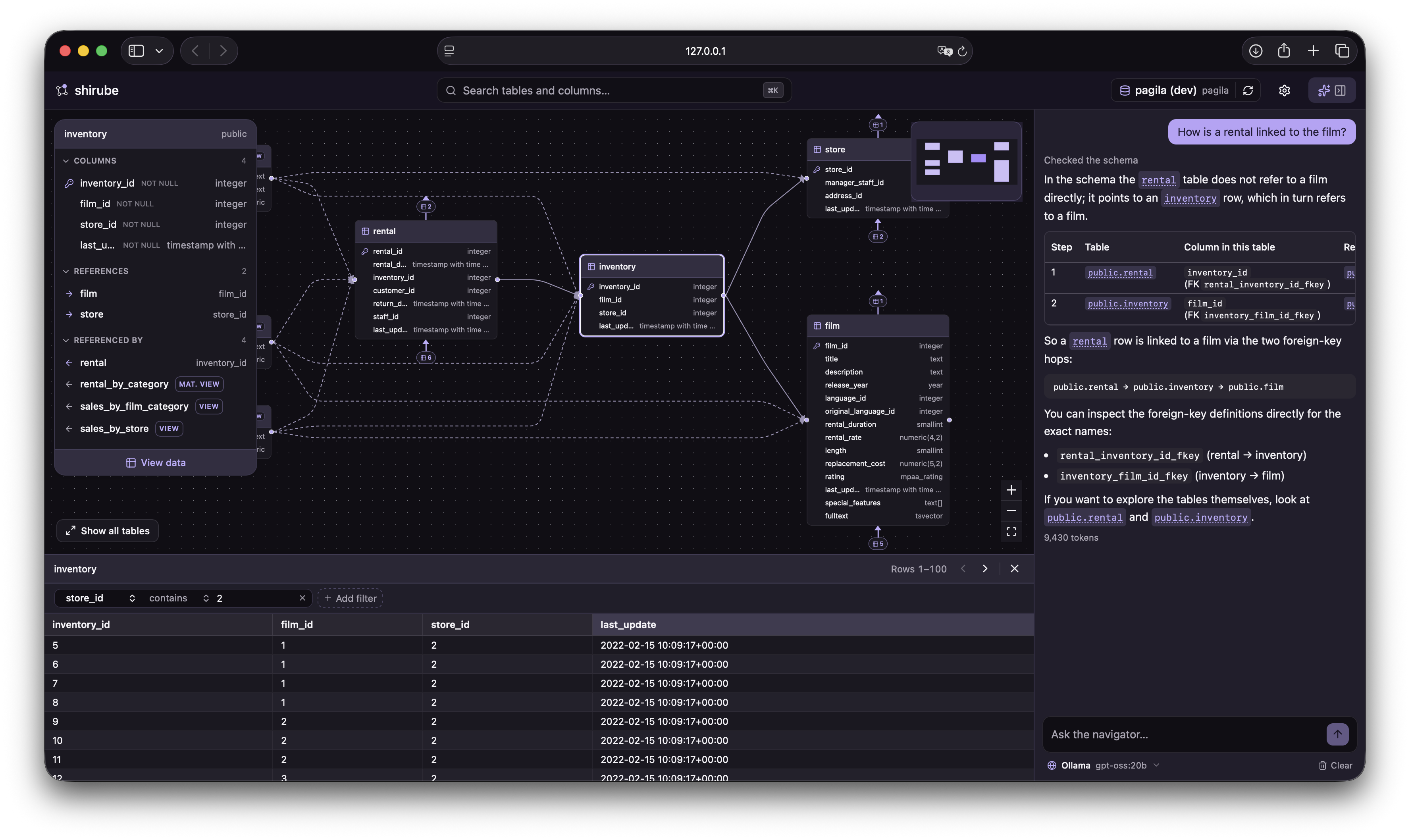
Ask a question — see the answer on the map.
🤖 Why shirube
You hand-write less SQL than you used to — tables become models and methods in your code, and in the AI-coding era much of even that code is written for you. But the schema is still there underneath, and it is still yours to understand: to judge whether the code an AI wrote is right — which tables it reads, which columns it touches, which relationships it follows — and to ask the tools for the right thing in the first place.
A plain list of tables is a poor place to see that. Open them one at a time and you get columns, not connections — not what a table references, what references it, or which hops lead to the data you are after. Relationships are the very thing you need to follow, and a list is where they hide, so shirube lets you read a database as a map instead — just as useful when you drop into a project with hundreds of undocumented tables and need your footing fast.
AI changed who writes the SQL. shirube changes how we understand databases.
🧭 What shirube does
shirube turns a database into a map you can read. It opens on an interactive ER diagram and gives you two ways to find your footing: steer it yourself — search for a table, focus on it, follow its relationships outward — or just ask, and the AI navigator answers on the map. Either way you see how everything connects without reading DDL or writing a single query.
It is not another SQL IDE or database administration console — there is no query editor, and nothing that ever writes. shirube is a tool for understanding a database.
✨ Features
Everything below works today, in the beta:
- 🔮 AI navigator — ask in plain language and get an answer on the map, lighting up the tables involved. Bring your own Claude or OpenAI key, or point it at a local model.
- 🗺️ ER diagram home — auto-generated and centred on the most-connected table; see a table and its immediate neighbours, and travel outward one hop at a time.
- 📋 Table detail — columns with their types, primary keys and nullability, plus relationships split into references and referenced by.
- 🔗 Relationship navigation — click a related table to glide the map over to it.
- 👁️ Data preview — read a table or view's actual rows in a drawer, with click-to-sort columns, simple filters and paging.
- ⚡ Instant search — jump straight to any table or column.
- 🔐 Saved connections — passwords kept in your operating system's keychain, never in a config file.
- 🌗 Light and dark themes.
🔮 The AI navigator
Ask in plain language and get your answer on the map: the navigator reads your schema metadata to guide you and lights up the tables involved, with every object name a link that flies the map to it. It is a navigator, not a SQL generator — it never writes or runs a query.
Use your own Claude or OpenAI key, or a local model such as Ollama, configured in Settings → AI navigator. Whichever you pick, the request goes straight from your machine to that model — never through a shirube server (see Safe by design below). The navigator is entirely optional; the explorer works fully without it.
🛡️ Safe by design
- 🔒 Read-only — every connection is opened read-only with a statement timeout. shirube cannot modify your database — no writes, no schema changes, ever.
- 💻 Local-first — it runs on your machine and binds to
127.0.0.1only. Your database credentials and data never leave your computer. - 📝 Metadata-only logging — the local log records errors and request timings, but never the values in your data.
- 🤖 Your data, your provider — the AI navigator talks straight from your machine to the model you chose; only question-relevant schema metadata is sent, and a local model sends nothing off your machine at all.
🚀 Getting started
You'll need a PostgreSQL database to point shirube at, and a way to run a Python application without installing it permanently.
pipx run shirube   # with pipx
# or
uvx shirube        # with uv
Either command starts a small local server and opens shirube in your browser. Add a connection with your PostgreSQL details, and shirube inspects the schema and opens the ER diagram.
💡 shirube connects with whatever credentials you give it. A read-only role with
CONNECTandSELECTis all it needs — and all it should have.
🔮 To use the AI navigator, add a provider in Settings → AI navigator — your own Claude or OpenAI key, or a local model. It's optional; the explorer works fully without it.
📚 Learn more
- Full README and roadmap — https://github.com/shou-taro/shirube
- Contributing — https://github.com/shou-taro/shirube/blob/main/CONTRIBUTING.md
- Licence — GNU AGPL-3.0
Project details
Verified details
These details have been verified by PyPIProject links
GitHub Statistics
Maintainers
Release history Release notifications | RSS feed


Download files
Download the file for your platform. If you're not sure which to choose, learn more about installing packages.
Source Distribution
Built Distribution
Filter files by name, interpreter, ABI, and platform.
If you're not sure about the file name format, learn more about wheel file names.
Copy a direct link to the current filters
File details
Details for the file shirube-0.2.0b2.tar.gz.
File metadata
- Download URL: shirube-0.2.0b2.tar.gz
- Upload date:
- Size: 311.8 kB
- Tags: Source
- Uploaded using Trusted Publishing? Yes
- Uploaded via: uv/0.11.30 {"installer":{"name":"uv","version":"0.11.30","subcommand":["publish"]},"python":null,"implementation":{"name":null,"version":null},"distro":{"name":"Ubuntu","version":"24.04","id":"noble","libc":null},"system":{"name":null,"release":null},"cpu":null,"openssl_version":null,"setuptools_version":null,"rustc_version":null,"ci":true}
File hashes
| Algorithm | Hash digest | |
|---|---|---|
| SHA256 |
c82be9a8bc10273fa647e78ff6d0c088dd1a6c014e98f4a5d4e0a6590eaf7076
|
|
| MD5 |
5f1d65407cef9c3e4274aae2a607ebb2
|
|
| BLAKE2b-256 |
15c1adb8aa3459fcf94daa56d3c5f33ff124430fb01e8ee0d354b23c1d1cd7c7
|
File details
Details for the file shirube-0.2.0b2-py3-none-any.whl.
File metadata
- Download URL: shirube-0.2.0b2-py3-none-any.whl
- Upload date:
- Size: 337.6 kB
- Tags: Python 3
- Uploaded using Trusted Publishing? Yes
- Uploaded via: uv/0.11.30 {"installer":{"name":"uv","version":"0.11.30","subcommand":["publish"]},"python":null,"implementation":{"name":null,"version":null},"distro":{"name":"Ubuntu","version":"24.04","id":"noble","libc":null},"system":{"name":null,"release":null},"cpu":null,"openssl_version":null,"setuptools_version":null,"rustc_version":null,"ci":true}
File hashes
| Algorithm | Hash digest | |
|---|---|---|
| SHA256 |
cb02de4c4f6c71fe4d8af6aab72e7b60d27c6faec902630efc945ac3db3ce68c
|
|
| MD5 |
ebd27d0a1ab2f2b2218ebc7ebb918713
|
|
| BLAKE2b-256 |
45195a5647b3f4d515f357611c2e125fd09bf7ed895eee45531add17c2d9f89f
|






