
Shmessy








If your data is messy - Use Shmessy!
Shmessy designed to deal with messy pandas dataframes. We all knows the frustrating times when we as analysts or data-engineers should handle messy dataframe and analyze them by ourselves.
The goal of this tiny tool is to identify the physical / logical data type for each Dataframe column. It based on fast validators that will validate the data (Based on a sample) against regex / pydantic types or any additional validation function that you want to implement.
As you understand, this tool was designed to deal with dirty data, ideally developed for Dataframes generated from CSV / Flat files or any source that doesn't contain strict schema.
Installation
pip install shmessy
Usage
You have two ways to use this tool
Identify the Dataframe schema
import pandas as pd
from shmessy import Shmessy

df = pd.read_csv('/tmp/file.csv')
inferred_schema = Shmessy().infer_schema(df)
Output (inferred_schema dump):
{
    "infer_duration_ms": 12,
    "columns": [
        {
            "field_name": "id",
            "source_type": "Integer",
            "inferred_type": "Integer"
        },
        {
            "field_name": "email_value",
            "source_type": "String",
            "inferred_type": "Email"
        },
        {
            "field_name": "date_value",
            "source_type": "String",
            "inferred_type": "Date",
            "inferred_pattern": "%d-%m-%Y"
        },
        {
            "field_name": "datetime_value",
            "source_type": "String",
            "inferred_type": "Datetime",
            "inferred_pattern": "%Y/%m/%d %H:%M:%S"
        },
        {
            "field_name": "yes_no_data",
            "source_type": "String",
            "inferred_type": "Boolean",
            "inferred_pattern": [
                "YES",
                "NO"
            ]
        },
        {
            "field_name": "unix_value",
            "source_type": "Integer",
            "inferred_type": "UnixTimestamp",
            "inferred_pattern": "ms"
        },
        {
            "field_name": "ip_value",
            "source_type": "String",
            "inferred_type": "IPv4"
        }
    ]
}
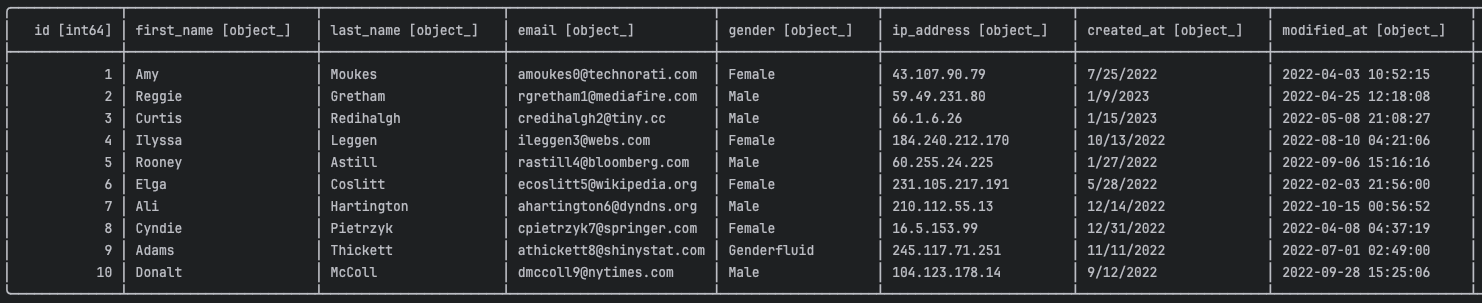
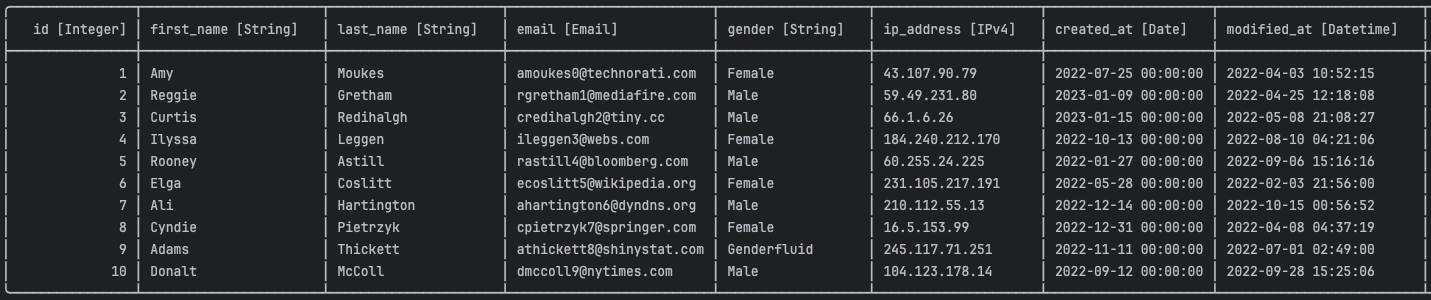
Identify and fix Pandas Dataframe
This piece of code will change the column types of the input Dataframe according to Messy infer.
import pandas as pd
from shmessy import Shmessy

df = pd.read_csv('/tmp/file.csv')
fixed_df = Shmessy().fix_schema(df)
Original Dataframe
Fixed Dataframe
Read Messy CSV file
from shmessy import Shmessy
df = Shmessy().read_csv('/tmp/file.csv')
Original file

Fixed Dataframe

API
Constructor
shmessy = Shmessy(
    sample_size: Optional[int] = 1000,
    reader_encoding: Optional[str] = "UTF-8",
    locale_formatter: Optional[str] = "en_US",
    use_random_sample: Optional[bool] = True,
    types_to_ignore: Optional[List[str]] = None,
    max_columns_num: Optional[int] = 500,
    fallback_to_string: Optional[bool] = False,  # Fallback to string in case of casting exception
    fallback_to_null: Optional[bool] = False,  # Fallback to null in case of casting exception
    use_csv_sniffer: Optional[bool] = True,  # Use python sniffer to identify the dialect (seperator / quote-char / etc...)
    fix_column_names: Optional[bool] = False,  # Replace non-alphabetic/numeric chars with underscore
    numeric_types_max_length: Optional[int] = 20,  # Fallback to string for numeric values with many digits
)
read_csv
shmessy.read_csv(filepath_or_buffer: Union[str, TextIO, BinaryIO]) -> DataFrame
infer_schema
shmessy.infer_schema(df: Dataframe) -> ShmessySchema
fix_schema
shmessy.fix_schema(df: Dataframe) -> DataFrame
get_inferred_schema
shmessy.get_inferred_schema() -> ShmessySchema
1 maintainer

Metadata
1 maintainer
Release files for shmessy 2.0.4
For a detailed explanation of source distributions (sdists) and built distributions (wheels), please see the package formats documentation.
Source distribution (sdist)
| File | Size | Uploaded | |
|---|---|---|---|
| shmessy-2.0.4.tar.gz | 12.1 kB | Details |
Built distribution (wheel)
| File | Interpreter | ABI | Platform | Reset |
|---|---|---|---|---|
| shmessy-2.0.4-py3-none-any.whl | Python 3 | none | any | Details |
Total release size: 30.5 kB
Release files / shmessy-2.0.4.tar.gz
| Download URL | shmessy-2.0.4.tar.gz |
|---|---|
| Size | 12.1 kB |
| Tags | Source |
|
SHA-256 checksum How to use checksums |
46c86f483ca8ff566002fc62bda906870c2068caa1a05016ae80d3aee734783f
|
|
BLAKE2b-256 checksum How to use checksums |
22b99310e3df1b15bc419ad020b709d96cc57479cc157e1da68fe34b652bf785
|
| Upload date | |
|
Uploaded using Trusted Publishing? What is trusted publishing? |
No |
| Uploaded via |
poetry/2.2.1 CPython/3.9.16 Linux/6.17.0-1020-azure
|
Release files / shmessy-2.0.4-py3-none-any.whl
| Download URL | shmessy-2.0.4-py3-none-any.whl |
|---|---|
| Size | 18.4 kB |
| Tags | Python 3 |
|
SHA-256 checksum How to use checksums |
8b8b9948386a503c9e5a6506beb01b599b18b567168c9b71d8110c2ffc413038
|
|
BLAKE2b-256 checksum How to use checksums |
8f0a4da03e89b67650ef0d56896d993770697bbfbf2baacd89690f2b33d185cb
|
| Upload date | |
|
Uploaded using Trusted Publishing? What is trusted publishing? |
No |
| Uploaded via |
poetry/2.2.1 CPython/3.9.16 Linux/6.17.0-1020-azure
|














