
This module provides an inter-process lock implementation, eliminating the need to pass around objects for synchronization. Under the hood, the module leverages the shared_memory module.

Project description
Readme
Table of Contents
- About
- Pros and Cons: When to Use This Module and When Not To
- Installation
- Quick Dive
- Examples
- Troubleshooting and Known Issues
- Version History
- ToDos
About
Feel free to provide constructive feedback, suggestions, or feature requests. Thank you. This module is currently under development and may undergo frequent changes on the master branch. It is recommended to use a static version for testing.
This module provides an inter-process lock implementation, eliminating the need to pass around objects for synchronization. Designed for seamless integration across multiple terminals or consoles, it enables reliable process locking simply by referencing a shared name identifier. Under the hood, the module leverages Python’s multiprocessing.shared_memory.
In real-world scenarios, a lock is used to synchronize access to shared resources across multiple Python instances, such as different terminals.
Notable examples include a file or a shared memory block, which may be modified by multiple actors; see the real-world example in Section Quick Dive and comments therein for more details.
Pros and Cons: When to Use This Module and When Not To
| When to Use | When Not to Use |
|---|---|
| You want a lock without passing lock objects around | You do not want a lock that uses a polling interval (i.e. a sleep interval) |
| You need a simple locking mechanism | You require very high performance and a large number of acquisitions |
| You want to avoid file-based or server-client-based locks (like filelock, Redis, pyzmq, etc.) | You are not comfortable using shared memory as a lock mechanism |
| You do not want the lock to add dependencies to your project |
So if you chose to use this module it is best to keep the number of synchronized accesses not too high.
Installation
This module has no additional dependencies. There are several ways to install it:
-
Via the Python Package Index (available from version 3.0.0 onward; older versions can be accessed through git tags):
pip install shmlock -
Install directly from the repository:
pip install git+https://github.com/fwkrumm/shmlock@masterfor the latest version or
pip install git+https://github.com/fwkrumm/shmlock@X.Y.Z
for a specific version; cf. Section Version History.
-
Clone this repository and install it from the local files via pip:
git clone https://github.com/fwkrumm/shmlock
cd shmlock
pip install . -r requirements.txt
Note that
-r requirements.txtis only necessary if you want to run the tests and examples. The module itself does not have additional requirements apart from standard modules.
Quick Dive
For further examples please check out the Examples section.
For the sake of completeness: Do not share a lock among threads. Each thread should use its own lock. However, typically, you would not use this lock implementation to synchronize threads within the same process. Instead, you would use the more efficient threading.Lock().
import shmlock

# lock name should only be used by locks and not any other shared memory
# if you want to use the lock in any other process, just use the same name
lock = shmlock.ShmLock("shm_lock")

#
# to apply the lock, use one of the following a), b), c)
#

# a)
with lock:
    # your code here
    pass

# b)
with lock.lock():
    # your code here
    pass

# c)
lock.acquire()
# your code here
lock.release()

#
# if you want a larger poll interval
#
lock = shmlock.ShmLock("shm_lock", poll_interval=1.0)

#
# if you want a timeout (NOTE that you also could also use lock.lock(...) or lock.acquire(...))
#
with lock(timeout=1) as success:
    if success:
        # your code
        pass
    else:
        # sadness i.e. lock could not be acquired after specified timeout
        pass


# add description for debug purposes
lock.description = "main process lock"

# get exit event and set it in the main process to stop all locks from acquiring
lock.get_exit_event()

# get uuid of lock which has currently acquired shared memory
lock.acquire()
print(lock.debug_get_uuid_of_locking_lock())
lock.release()

# get uuid of this lock
print(lock.uuid)

# check if lock is currently acquired
print(lock.acquired)

# the lock is reentrant:
with lock:
    with lock:
        pass
    # still locked, lock.release() would raise Exception unless force parameter is used
Real-world Example
A simple example demonstrating the actual use of a lock is the following code, which should run across different terminals. The reference counter is incremented synchronously, and each terminal writes a 16-byte UUID to the shared memory block in a synchronized manner.
Additionally, the unlink() function (only relevant for POSIX) is only called when the last terminal executing the code has closed.
from multiprocessing import shared_memory
import shmlock
import time
import uuid

lock = shmlock.ShmLock("lock_name ")

with lock:
    # create (attach to) shared memory for synchronized access
    try:
        shm = shared_memory.SharedMemory(name="shm_name", create=True, size=17) # buffer layout: 1 byte for the reference counter (to track usage), followed by 16 bytes for the UUID (a 128-bit unique identifier).
    except FileExistsError:
        shm = shared_memory.SharedMemory(name="shm_name")

    # increment ref counter (synchronized with lock)
    shm.buf[0] += 1
    print("ref count incremented to", shm.buf[0])

try:

    while True:

        with lock:
            print("lock acquired; current ref count is", shm.buf[0])
            # write uuid (or any other payload) to shared memory block
            uuid_bytes = uuid.uuid4().bytes
            shm.buf[1:1+len(uuid_bytes)] = uuid_bytes
        time.sleep(1) # prevent spam

except KeyboardInterrupt:
    print("KeyboardInterrupt received, exiting...")

finally:
    with lock:
        shm.buf[0] -= 1
        ref_count = shm.buf[0]
        print("ref count decremented to", ref_count)
        shm.close()
        if ref_count == 0:
            shm.unlink()
            print("shared memory unlinked since last reference released")

# the lock does not require any additional release as long as the process did not terminate abruptly.
Examples
There are examples that demonstrate the usage in more detail. Note that the requirements from the requirements.txt file are required for some of the examples.
./examples/multiple_terminals/run_multiple.py
Simply execute this file from different consoles and experiment with the global variable:
USE_LOCK = True
Each instance will attempt to increment the value stored in a shared memory, the name of which is defined by RESULT_SHM_NAME in the file.
If USE_LOCK is set to True (default), the lock is enabled, and the output should resemble the following (depending on the OS, and the chosen number of RUNS and DELAY_FOR_LOCKS in the example):
If the latter is True (default) the lock is enabled and the output should be something like (depending on OS, and chosen number of RUNS and DELAY_FOR_LOCKS in the example)
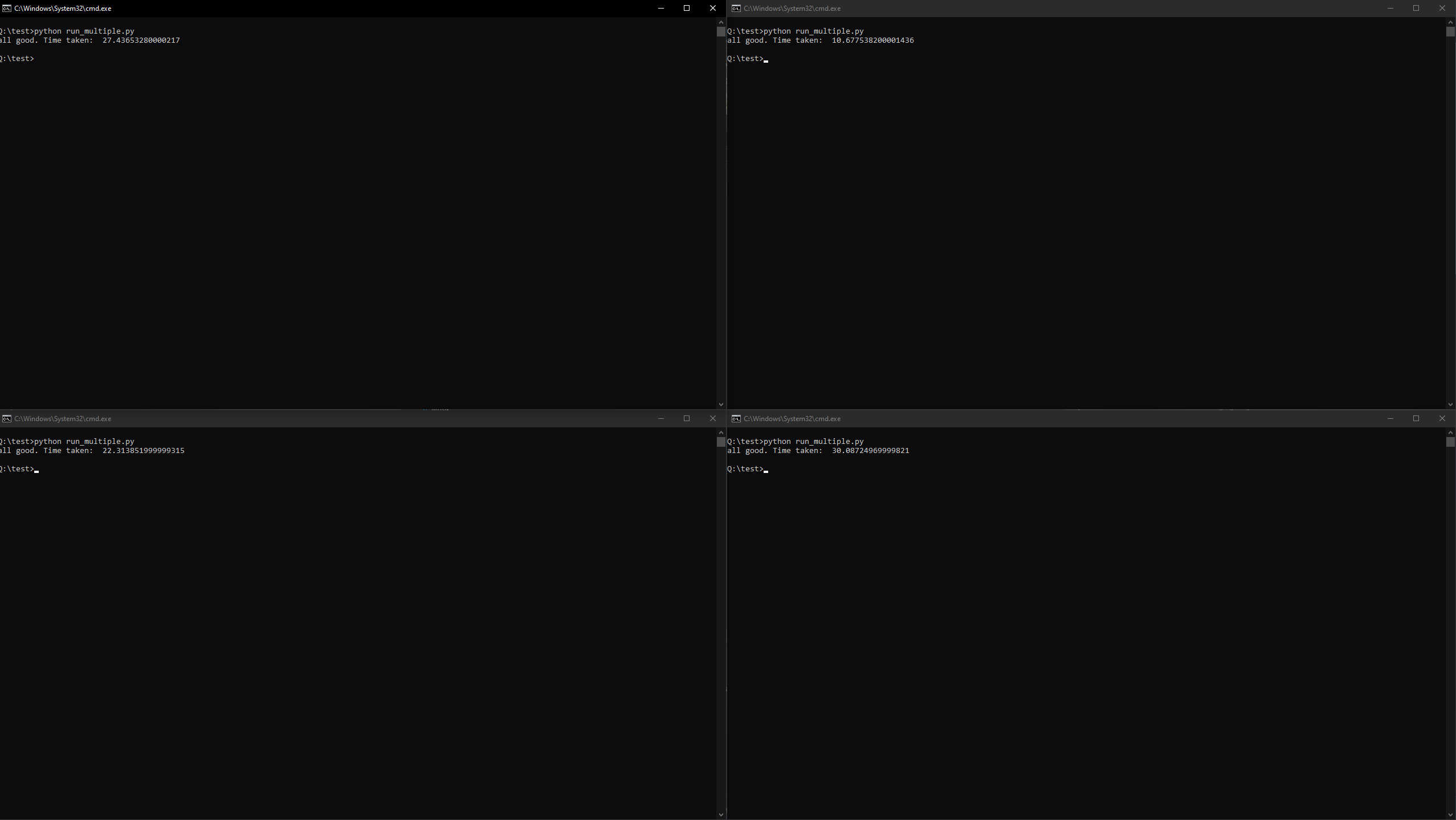
If you now try the same with:
USE_LOCK = False
you will (non-deterministically) get
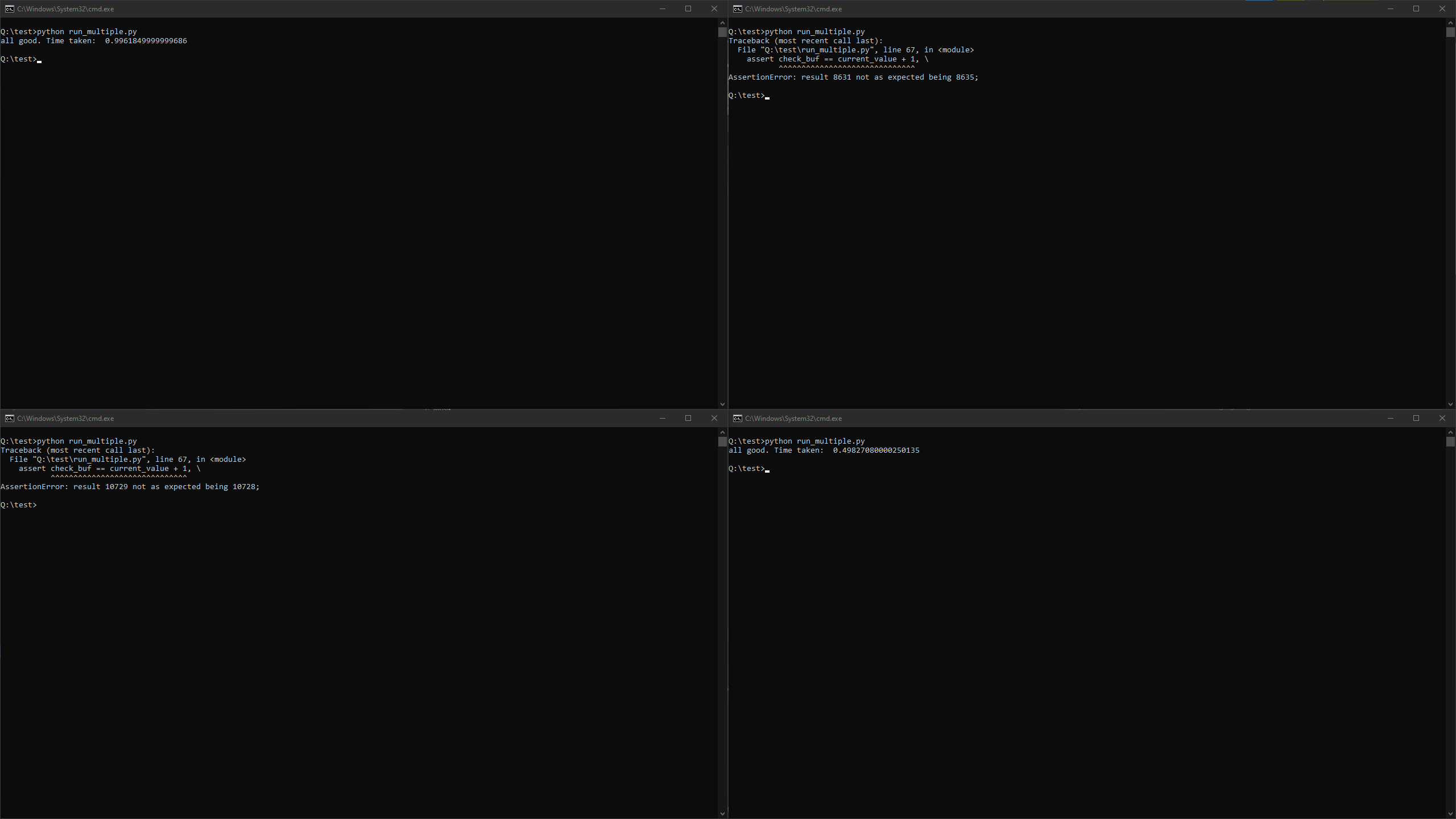
This happens if a race condition occurs, i.e., one instance overwrote the value already extracted by another instance before it could increment and store the value. This does not happen if the locking mechanism is used.
./examples/performance_analysis/run_perf.py
This file can be used to test the performance of different locking mechanisms. Currently, this includes "no lock", zmq, shmlock, and filelock.
After executing python run_perf.py, you should get an output that looks approximately like this:
INFO:PerformanceLogger:Running test type no_lock
INFO:PerformanceLogger:Test type no_lock:
INFO:PerformanceLogger:average time: 0.000001s
INFO:PerformanceLogger:max time: 0.000600s
INFO:PerformanceLogger:min time: 0.000001s
INFO:PerformanceLogger:standard deviation: 0.000009s
INFO:PerformanceLogger:Result buffer: 2902 (probably smaller than 15000)


INFO:PerformanceLogger:Running test type zmq
INFO:PerformanceLogger:Test type zmq:
INFO:PerformanceLogger:average time: 0.003169s
INFO:PerformanceLogger:max time: 0.590404s
INFO:PerformanceLogger:min time: 0.000361s
INFO:PerformanceLogger:standard deviation: 0.022007s
INFO:PerformanceLogger:Result buffer: 15000 (should be 15000)


INFO:PerformanceLogger:Running test type shmlock
INFO:PerformanceLogger:Test type shmlock:
INFO:PerformanceLogger:average time: 0.000412s
INFO:PerformanceLogger:max time: 0.392681s
INFO:PerformanceLogger:min time: 0.000045s
INFO:PerformanceLogger:standard deviation: 0.008226s
INFO:PerformanceLogger:Result buffer: 15000 (should be 15000)


INFO:PerformanceLogger:Running test type filelock
INFO:PerformanceLogger:Test type filelock:
INFO:PerformanceLogger:average time: 0.006232s
INFO:PerformanceLogger:max time: 0.645011s
INFO:PerformanceLogger:min time: 0.000296s
INFO:PerformanceLogger:standard deviation: 0.030970s
INFO:PerformanceLogger:Result buffer: 15000 (should be 15000)
The first test does not synchronize anything. This is, of course, the fastest; however, the counter is often not incremented properly.
The second test uses pyzmq (https://pypi.org/project/pyzmq/), the third test uses the shared memory lock implemented in this project, and the fourth test uses filelock (https://pypi.org/project/filelock/).
Note that the results depend on the OS and hardware. The "average time" refers to the time required for a single lock acquisition, result value increment, and lock release:
start = time.perf_counter()
try:
    lock.acquire()
    current_value = struct.unpack_from("Q", result.buf, 0)[0]
    struct.pack_into("Q", result.buf, 0, current_value + 1)
finally:
    lock.release()
end = time.perf_counter()
The other values are the maximum time delay, the minimum time delay, the standard deviation of the average time calculation, and the final value of the result buffer (which should be equal for all locking mechanisms and equal to NUM_PROCESSES * NUM_RUNS).
./examples/performance_analysis/run_poll_perf.py
This file is very similar to run_perf.py; however, it focuses solely on shmlock and compares its performance for different poll intervals. The measurement and analysis are the same as in the previous section.
Troubleshooting and Known Issues
Resource Tracking
For Python 3.13 and later versions, there is an additional parameter for SharedMemory(..., track: bool = True) which disables the shared memory tracking that causes the following tracking issues.
On POSIX systems, the resource_tracker will likely complain that either shared_memory instances were not found or spam KeyErrors. This issue is known:
https://bugs.python.org/issue38119 (forwarded from https://bugs.python.org/issue39959) originally found at https://stackoverflow.com/questions/62748654/python-3-8-shared-memory-resource-tracker-producing-unexpected-warnings-at-appli
This can be deactivated (not fixed, as it essentially just turns off shm tracking) via the remove_shm_from_resource_tracker function:
# NOTE that you can also use an empty pattern to remove track of all shared memory names
lock_pattern = "shm_lock"

# has to be done by each process
shmlock.remove_shm_from_resource_tracker(lock_pattern)

# create locks with pattern
lock1 = shmlock.ShmLock(lock_pattern + "whatsoever")
lock2 = shmlock.ShmLock("whatsoever" + lock_pattern)
This also seems to slightly increase the performance on POSIX systems.
Usually, each lock should be released properly. One problem however is if the process is interrupted abruptly (SIGINT/SIGTERM) which might cause issues. For details see the following Subsection.
Please note that with Python version 3.13, there will be a "track" parameter for shared memory block creation, which can be used to disable tracking. I am aware of this and will use it at some point in the future.
Process Interrupt (SIGINT/SIGTERM)
One potential issue arises if a process is terminated (such as through a KeyboardInterrupt) during the creation of shared memory (i.e., inside shared_memory.SharedMemory(...)). On Linux, this can lead to unintended outcomes, such as the shared memory mmap file being created with a size of zero or a shared memory block being allocated without an object reference being returned. In such cases, neither close() nor unlink() can be properly called.
Since detecting this scenario is not trivial, the function query_for_error_after_interrupt(...) helps to handle such cases:
lock = shmlock.ShmLock("lock_name")
lock.query_for_error_after_interrupt()
If the shared memory is in an inconsistent state (such as being created but lock does not hold reference) the function raises an exception. Otherwise, if everything is functioning correctly, it simply returns None. For further details, see to the function's doc-string.
In case you expect the process being terminated abruptly, you should assure the release via signal module:
s = shmlock.ShmLock("lock_name")

def cleanup(signum, frame):
    s.release(force=True)
    os._exit(0)

signal.signal(signal.SIGTERM, cleanup) # and/or signal.SIGINT for KeyboardInterrupt
However, please note that in some situations, you might not be able to recover from an interruption. One example on POSIX is when the shared memory mmap has been created at /dev/shm/ but has not yet been filled—i.e., it has a size of zero—and the process is interrupted. In this case, you can neither create shared memory with that name (FileExistsError) nor attach to it (ValueError). The previously mentioned query_for_error_after_interrupt(...) will report this error; however, you will have to manually delete the mmap file at /dev/shm/{lock_name}.
Version History
| Version / Git Tag on Master | Description |
|---|---|
| 1.0.0 | First release version providing basic functionality |
| 1.1.0 | Add pypi workflow; minor corrections |
| 2.0.0 | Added query_for_error_after_interrupt(...) function, removed custom (experimental) resource tracker, added many tests for code coverage |
| 3.0.0 | Add reentrancy support and remove throw parameter |
| 3.0.1 | Minor adjustments in README.md and some workflow files |
| 3.0.2 | Added example code to README.md |
| 3.1.0 | ShmLockConfig moved to separate file and added support down to Python 3.8 (Union from typing) |
| 3.1.1 | Minor fix to real-world example in README.md |
| 3.1.2 | Use warnings.warn for potential dangling shared memory block |
| 3.1.3 | Fix anchors in readme and remove unnecessary space |
ToDos
- TBD
Release history Release notifications | RSS feed


Download files
Download the file for your platform. If you're not sure which to choose, learn more about installing packages.
Source Distribution
Built Distribution
Filter files by name, interpreter, ABI, and platform.
If you're not sure about the file name format, learn more about wheel file names.
Copy a direct link to the current filters
File details
Details for the file shmlock-3.1.3.tar.gz.
File metadata
- Download URL: shmlock-3.1.3.tar.gz
- Upload date:
- Size: 29.6 kB
- Tags: Source
- Uploaded using Trusted Publishing? No
- Uploaded via: twine/6.1.0 CPython/3.13.3
File hashes
| Algorithm | Hash digest | |
|---|---|---|
| SHA256 |
198594fbd2e5ab60990b1eff55dfe6aaca88cffc911e76df0d3f18d312e6ab8e
|
|
| MD5 |
7f80a6dfa5a5862d4b98b3c15cd53ee5
|
|
| BLAKE2b-256 |
296307585b39d6610b7ee9ad1ffc9bf3d95c6b4b9d13d51ec365473c5cf9659b
|
File details
Details for the file shmlock-3.1.3-py3-none-any.whl.
File metadata
- Download URL: shmlock-3.1.3-py3-none-any.whl
- Upload date:
- Size: 20.4 kB
- Tags: Python 3
- Uploaded using Trusted Publishing? No
- Uploaded via: twine/6.1.0 CPython/3.13.3
File hashes
| Algorithm | Hash digest | |
|---|---|---|
| SHA256 |
f910271735055da9a54fbe527c3868e3ca704fe78d8ce90471410d57272ecc62
|
|
| MD5 |
ea9bfe341f1899c832e2b5f2c8379467
|
|
| BLAKE2b-256 |
bf8f4aa4d38e359b2e6e5e5ccef2497491bcb9e4319cee15a0e81f2534b3728f
|






