





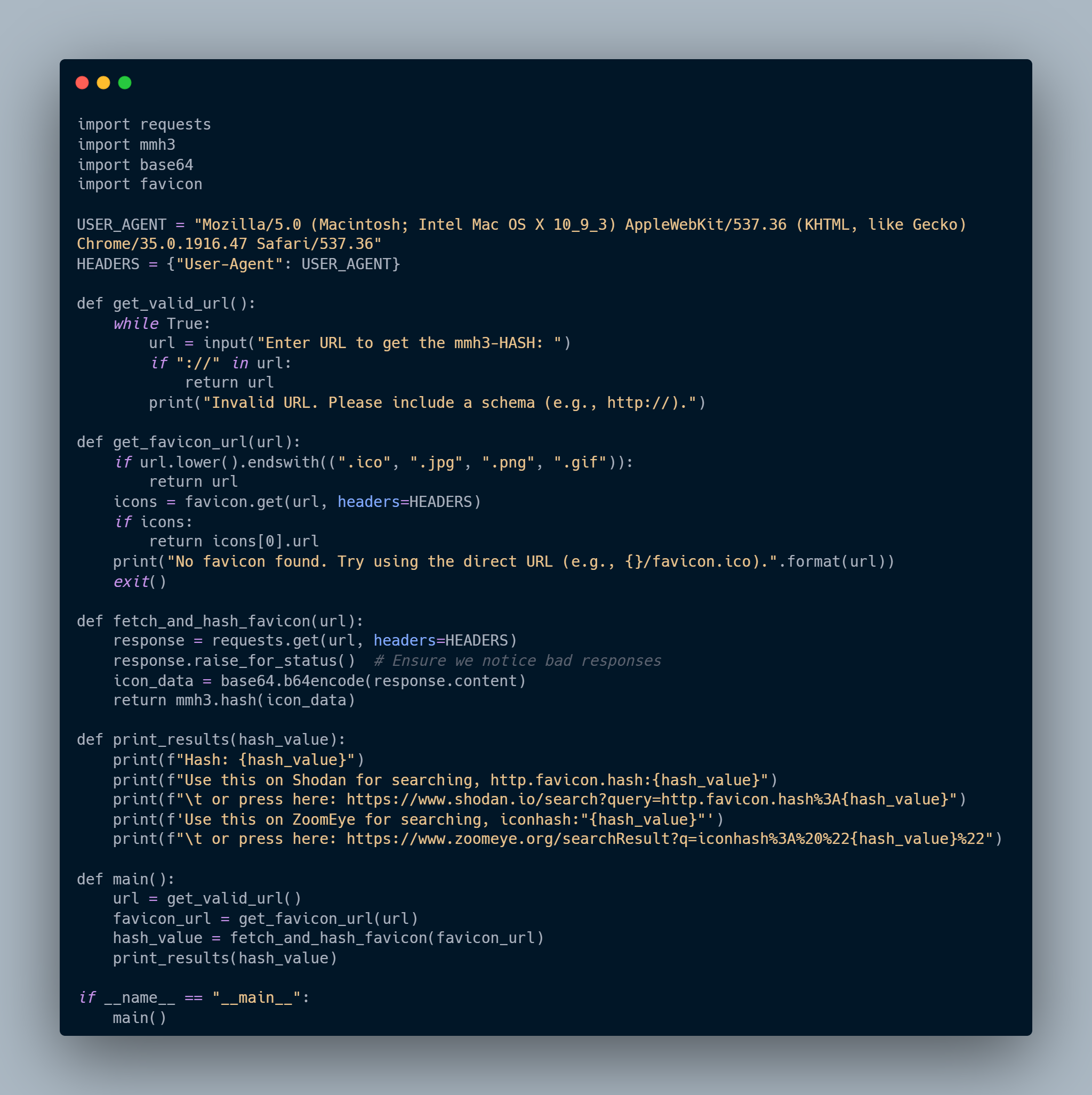
Shodafinder is a simple Python script to compute the Shodan hash for a website's favicon.
Features
- Validates and processes a URL to fetch the favicon.
- Computes a hash of the favicon using
mmh3. - Provides search links for Shodan and ZoomEye based on the favicon hash.
Requirements
- Python 3.x
requestslibrarymmh3librarybase64libraryfaviconlibrary
Installation
Install from PyPI
You can install Shodafinder directly from PyPI using pip:
pip install shodafinder
Manual Installation
-
Clone this repository:
git clone https://github.com/logm1lo/Shodafinder.git
-
Navigate to the project directory:
cd Shodafinder
-
Install the required libraries:
pip install -r requirements.txt
Usage
After installing, you can run Shodafinder from the command line:
shodafinder
Or manually run the Python script:
python get_favicon_hash.py
-
Enter a URL when prompted. Ensure the URL includes a schema (e.g.,
http://orhttps://). -
The script will fetch the favicon, compute its hash, and display results with links to search in Shodan and ZoomEye.
Example
# Prompt for user input
Enter URL to get the mmh3-HASH: https://example.com

# Output the computed hash of the favicon
Hash: 1234567890

# Provide Shodan search query link
Use this on Shodan for searching, http.favicon.hash:1234567890
    # Direct link to search in Shodan with the computed hash
    or press here: https://www.shodan.io/search?query=http.favicon.hash%3A1234567890

# Provide ZoomEye search query link
Use this on ZoomEye for searching, iconhash:"1234567890"
    # Direct link to search in ZoomEye with the computed hash
    or press here: https://www.zoomeye.org/searchResult?q=iconhash%3A%20%221234567890%22
How to Contribute
-
Clone the repo and create a new branch:
git checkout https://github.com/logm1lo/Shodafinder -b name_for_new_branch
-
Make changes and test.
-
Submit a Pull Request with a comprehensive description of changes.
Pull requests are welcome. For major changes, please open an issue first to discuss what you would like to change.
Please make sure to update tests as appropriate.
License
This project is licensed under the GPL License - see the LICENSE file for details.
Acknowledgments
1 maintainer

Metadata
1 maintainer
Release files for shodafinder 1.0.3
For a detailed explanation of source distributions (sdists) and built distributions (wheels), please see the package formats documentation.
Source distribution (sdist)
| File | Size | Uploaded | |
|---|---|---|---|
| shodafinder-1.0.3.tar.gz | 16.4 kB | Details |
Built distribution (wheel)
| File | Interpreter | ABI | Platform | Reset |
|---|---|---|---|---|
| shodafinder-1.0.3-py3-none-any.whl | Python 3 | none | any | Details |
Total release size: 33.2 kB
Release files / shodafinder-1.0.3.tar.gz
| Download URL | shodafinder-1.0.3.tar.gz |
|---|---|
| Size | 16.4 kB |
| Tags | Source |
|
SHA-256 checksum How to use checksums |
d2b9ae62906eace5f6fed175b1d763fe7f4522b24208e05b77eaeac7df23b1ff
|
|
BLAKE2b-256 checksum How to use checksums |
e51f3021daec59e382e3d6fae056a0095160050e871aa02a341e7057a65ae5ca
|
| Upload date | |
|
Uploaded using Trusted Publishing? What is trusted publishing? |
No |
| Uploaded via |
twine/5.1.1 CPython/3.12.4
|
Release files / shodafinder-1.0.3-py3-none-any.whl
| Download URL | shodafinder-1.0.3-py3-none-any.whl |
|---|---|
| Size | 16.8 kB |
| Tags | Python 3 |
|
SHA-256 checksum How to use checksums |
37739f5c9c00e4c6c0de48111d509543f09a9ec316a66ee1dc8856a2cd3c9b55
|
|
BLAKE2b-256 checksum How to use checksums |
28bae4bc8a93674b2ecbf8e30ba6518b88845271a2466bb5a59ebd9ada266af3
|
| Upload date | |
|
Uploaded using Trusted Publishing? What is trusted publishing? |
No |
| Uploaded via |
twine/5.1.1 CPython/3.12.4
|














