
Show off your coding contributions without leaking corporate IP

Project description
shōmei (証明)
your work deserves to be seen


shōmei (証明, pronounced "shoh-may") means "proof" in Japanese. because sometimes you just need proof that you weren't on vacation for the past year.
this CLI tool mirrors your corporate commits to your personal GitHub. no code, no secrets, just timestamps. your contribution graph gets the credit it deserves, and your company's IP stays safe.

the problem
you've probably seen posts like this:
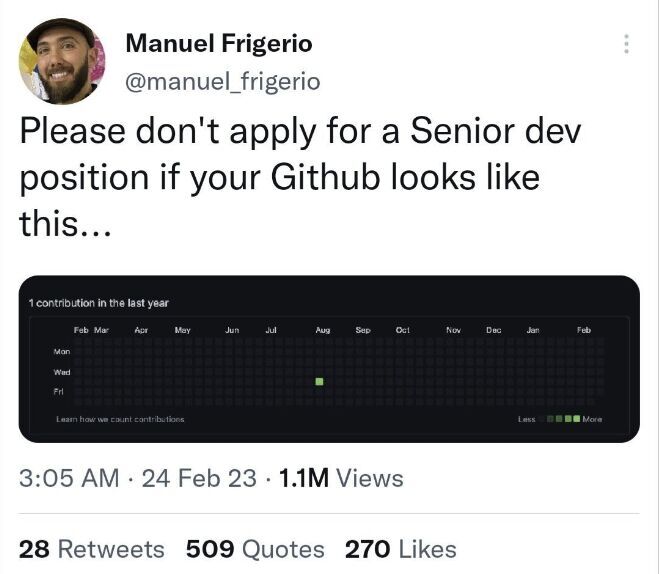
look, we all know GitHub's green squares don't define you as a developer. but when you're job hunting and your profile looks dead because you've been shipping code from a work account? that's annoying.
lots of developers use separate emails for work, and when they leave a company, their personal profile makes it look like they took a year off. recruiters don't always get it. this tool is for those times when you just want your graph to reflect reality.
shōmei fixes this. safely.
features
- zero IP leakage - creates empty commits with just dates, no code
- dead simple - one command, that's it
- contribution proof - updates your GitHub graph to show you were actually working
- your commits only - filters by your email, won't touch anyone else's work
- dry-run mode - preview before you commit (pun intended)
- private repos - option to mirror to a private repo if you want
quick start
installation
pip install shomei
usage
# go to any repo where you've been committing with your work email
cd ~/work/cool-project

# run shomei
shomei

# follow the prompts, it'll ask for:
# - your personal GitHub username
# - what to call the mirror repo
# - your GitHub personal access token

# that's it! check your contribution graph in a few minutes
example session
$ shomei

███████╗██╗  ██╗ ██████╗ ███╗   ███╗███████╗██╗
██╔════╝██║  ██║██╔═══██╗████╗ ████║██╔════╝██║
███████╗███████║██║   ██║██╔████╔██║█████╗  ██║
╚════██║██╔══██║██║   ██║██║╚██╔╝██║██╔══╝  ██║
███████║██║  ██║╚██████╔╝██║ ╚═╝ ██║███████╗██║
╚══════╝╚═╝  ╚═╝ ╚═════╝ ╚═╝     ╚═╝╚══════╝╚═╝

current git user: alice@bigcorp.com
current repo: awesome-app

your personal GitHub username: alicecodes
what should we call the mirror repo? (awesome-app-mirror):
GitHub personal access token (needs 'repo' permissions): [hidden]

scanning commit history...
found 247 commits by you

creating GitHub repository...
repo created: github.com/alicecodes/awesome-app-mirror

creating 247 empty commits...
mirroring commits... ━━━━━━━━━━━━━━━━━━━━━━━━ 100%

SUCCESS!

mirrored 247 commits to your personal GitHub.
check it out: github.com/alicecodes/awesome-app-mirror

your contribution graph should update in a few minutes
options
# preview what would happen (no changes made)
shomei --dry-run

# create a private mirror repo
shomei --private
how it works
- scans your git log for commits with your email
- extracts just the commit dates (nothing else!)
- creates a new repo on your personal GitHub
- uses GitHub's API to create empty commits with those dates
- boom, your contribution graph now shows your real activity
important: no code ever leaves your machine. we only send timestamps to GitHub's API. your company's IP stays exactly where it is.
github token setup
you'll need a GitHub personal access token with repo permissions:
- go to GitHub Settings → Developer settings → Personal access tokens
- click "Generate new token (classic)"
- give it a name like "shomei"
- check the
repocheckbox (this lets shomei create repos and commits) - generate and copy the token
- use it when shomei asks for it
pro tip: save the token somewhere safe (like a password manager). GitHub only shows it once.
contributing
got ideas? found a bug? want to add a feature? hell yeah, we'd love your help!
check out CONTRIBUTING.md for how to get started.
quick version:
- fork it
- make your changes
- test it
- send a PR
we're super chill about contributions. if you're not sure about something, just open an issue and ask!
development
# clone
git clone https://github.com/petarran/shomei.git
cd shomei

# install in dev mode
pip install -e .

# run it
shomei --help
faq
Q: Is this safe? A: yes. shomei only sends commit dates to GitHub's API. no code, no commit messages (beyond "work happened here"), no file names. your company's IP never touches the internet.
Q: Will this get me in trouble? A: we're not lawyers, but: you're not exposing any proprietary code or information. just timestamps. that said, check your company's policies if you're worried.
Q: Does this work with private repos?
A: yep! use the --private flag to create a private mirror repo.
Q: What if I want to delete everything later? A: just delete the mirror repo from GitHub. your original work repo is never touched.
Q: Can I customize the commit messages? A: not yet, but that's a great idea! open an issue or PR if you want to add this.
Q: Why not just change the git config on my work repos? A: because then you'd be committing to company repos with your personal email, which might break things or violate policies. shomei keeps everything separate.
license
MIT - do whatever you want with it.
disclaimer
shōmei is a tool to help developers showcase their work. use it responsibly:
- no company code or secrets are exposed (we only send dates)
- always check your employment agreement if you're paranoid
- the authors aren't responsible if you use this in weird ways
credits
built with:
made with love for developers who actually ship code
if this helped you, give it a star on GitHub!
Release history Release notifications | RSS feed


Download files
Download the file for your platform. If you're not sure which to choose, learn more about installing packages.
Source Distribution
Built Distribution
Filter files by name, interpreter, ABI, and platform.
If you're not sure about the file name format, learn more about wheel file names.
Copy a direct link to the current filters
File details
Details for the file shomei-0.3.1.tar.gz.
File metadata
- Download URL: shomei-0.3.1.tar.gz
- Upload date:
- Size: 13.1 kB
- Tags: Source
- Uploaded using Trusted Publishing? No
- Uploaded via: twine/6.2.0 CPython/3.12.11
File hashes
| Algorithm | Hash digest | |
|---|---|---|
| SHA256 |
32f1e63ffbcf00293db1ac69fff02a6992fb63c07e8b34caf0afbfe27f876da0
|
|
| MD5 |
592e93d0a83398ff86cbf9ee02f5d5f7
|
|
| BLAKE2b-256 |
1f31a0bf5e23cb1124770de8e89f42eab60c5772e55b65f9dbc8cdf78aa25ecb
|
File details
Details for the file shomei-0.3.1-py3-none-any.whl.
File metadata
- Download URL: shomei-0.3.1-py3-none-any.whl
- Upload date:
- Size: 11.0 kB
- Tags: Python 3
- Uploaded using Trusted Publishing? No
- Uploaded via: twine/6.2.0 CPython/3.12.11
File hashes
| Algorithm | Hash digest | |
|---|---|---|
| SHA256 |
3e0a8107aff1740849ae0f6803f2fea90f56bba669fab5d5df0870623ca0c7b1
|
|
| MD5 |
6d9ea5776eb5aec05754d264e9daeb5c
|
|
| BLAKE2b-256 |
cfbcdb18475de9ccc81711105174ea5f82f07527d82271ef388921718a321bf1
|






