

Shop Notify






Shop Notify watches an Etsy shop and tells you – and anyone else you like – as soon as new items appear. Perfect for one-of-a-kind pieces that sell out quickly.
- New items and items back in the shop: every listing is reported once; if it is gone for more than a day and comes back, you hear about it – with its previous price and when it was last seen.
- Any notification channel: HTML e-mail with item images to as many recipients as you want, push to your phone via ntfy, Telegram, Signal and 100+ more – also several at once.
- Runs unattended: made for a Raspberry Pi, as a Docker container or systemd service, with health check, watchdog and Etsy rate-limit handling.
How it works
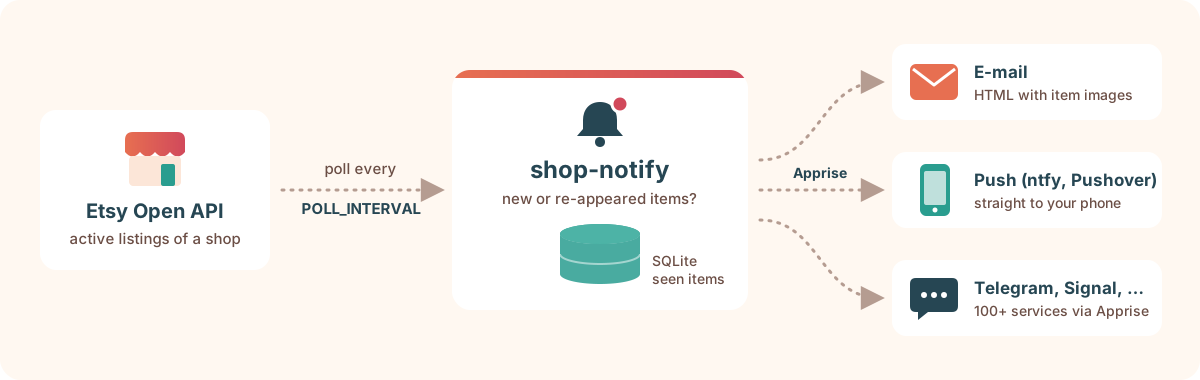
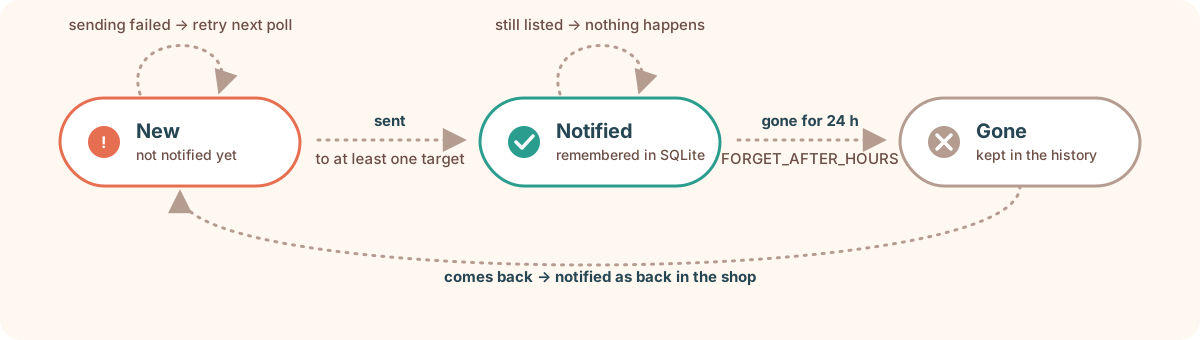
Every few minutes Shop Notify fetches the active listings of the shop from the Etsy Open API v3 and compares them with the items it has already seen. Each new item is notified exactly once:
First run
When the database is empty, all items currently in the shop would be "new". Instead of flooding your phone, Shop Notify only records them on the first run and prints them to the console; notifications start with the next new item:
First run: 87 items currently in YourShop (recorded, not notified)
…
Set NOTIFY_EXISTING_ON_FIRST_RUN=true to send them to all targets anyway. To start over, delete the database (DB_PATH).
Example notification
A notification on your phone (plain text) looks like this – e-mails additionally show the item picture:
2 new items in YourShop

Hand-thrown mug "Morning dew"
€24.50 · Oct 14, 2026, 19:46
https://www.etsy.com/listing/1234567890

Small vase in sage green
€18.00 · Oct 14, 2026, 20:46
https://www.etsy.com/listing/1234567891
Quick start
-
Get an Etsy API key – see Creating an Etsy app. You need the keystring and the shared secret.
-
Configure: download
compose.yamland.env.example, save the latter as.envand fill in your key, secret and the shop name (as inetsy.com/shop/<name>). -
Start:
mkdir -p data
docker compose up -d
docker compose logs -f
Without notification targets, new items are only written to the log – a good first test. Then set up notifications.
Configuration
All settings are read from .env in the working directory or from environment variables (which take precedence).
| Variable | Default | Description |
|---|---|---|
ETSY_API_KEY |
required | Keystring of your Etsy app |
ETSY_SHARED_SECRET |
required | Shared secret of your Etsy app |
ETSY_SHOP_NAME |
– | Shop to watch, as in etsy.com/shop/<name>; the ID is looked up at startup |
ETSY_SHOP_ID |
– | Numeric shop ID, alternative to ETSY_SHOP_NAME |
POLL_INTERVAL |
300 |
Seconds between two polls (minimum 10), see below |
FORGET_AFTER_HOURS |
24 |
An item counts as gone once it has been missing from the shop this long; if it comes back later, it is notified as back in the shop. Shorter gaps – Etsy's listing index is occasionally incomplete – don't cause a notification |
NOTIFY_BACK |
true |
Notify items that are back in the shop; with false they are only recorded in the history |
POLL_HISTORY_DAYS |
14 |
Days the poll log is kept (shop-notify history --polls); the listing history is kept forever |
NOTIFY_CONFIG |
– | Path to an Apprise YAML file with notification targets |
NOTIFY_URLS |
– | One or more Apprise URLs, short form for simple setups |
NOTIFY_CONSOLE |
auto |
Print notifications to stdout: auto only if no other targets are configured (plus the first run), true always (in addition to them), false never |
NOTIFY_EXISTING_ON_FIRST_RUN |
false |
Send the items already in the shop on the first run to all targets |
NOTIFY_LANGUAGE |
en |
Language of the built-in messages: en or de |
NOTIFY_IMAGES |
true |
Push/chat services get one message per new item with its picture |
NOTIFY_IMAGES_MAX |
5 |
Up to this many new items per poll are sent individually; above, one summary message |
NOTIFY_IMAGES_IN_SUMMARY |
false |
Attach up to 10 pictures to the summary message (a Telegram album with ?album=yes) |
NOTIFY_TEMPLATE_DIR |
– | Directory with custom message templates |
DB_PATH |
shop-notify.db |
SQLite database of seen items |
HEARTBEAT_FILE |
next to DB_PATH |
Touched after every successful poll, used by the health check |
LOG_FILE |
shop-notify.log |
Log file; empty to log to stdout only |
LOG_LEVEL |
INFO |
DEBUG, INFO, WARNING, … |
ETSY_API_ENDPOINT |
Etsy Open API v3 | Only needed for testing |
TZ |
UTC | Docker only: time zone for dates in notifications and logs, e.g. Europe/Berlin (locally and with systemd the system time zone is used) |
Only listing ID, title, URL, price and modification time are stored locally; vanished listings are deleted once they were notified.
Choosing the poll interval
A new Etsy app may make 5,000 requests per day. Every poll needs one request per 100 active listings, so stay above 35 s × pages to use at most half of the quota:
| Active listings | Requests per poll | Recommended POLL_INTERVAL |
|---|---|---|
| up to 100 | 1 | ≥ 35 s |
| up to 200 | 2 | ≥ 70 s |
| up to 500 | 5 | ≥ 3 min |
The default of 5 minutes needs fewer than 300 requests per day for a typical shop. Shop Notify logs a warning when less than 20 % of the daily quota is left, and waits as long as Etsy asks when it answers 429 Too Many Requests.
Notifications
Notifications are sent with Apprise – e-mail, ntfy, Telegram, Signal and 100+ more. Copy notify.example.yml to notify.yml, adjust it and set NOTIFY_CONFIG=notify.yml:
version: 1
urls:
  # One e-mail to several people who don't see each other's address
  - mailtos://you:app-password@gmail.com:
      - bcc: alice@example.com, bob@example.com
  # Push notification to your phone
  - ntfys://ntfy.sh/your-long-random-topic
E-mail gets one HTML message with all new items; push and chat services get one message per item with its picture. Try your setup with shop-notify test-notify – no Etsy key needed.
→ Notifications in detail: setting up Gmail, ntfy and Telegram, pictures and summaries, testing, custom templates and languages.
Creating an Etsy app
Shop Notify only reads public listings, so it needs an API key (keystring and shared secret) but no OAuth login. New apps start as Pending Personal Approval; until they are Active, every request fails with 403. → Step-by-step registration
Running
Docker
Images for linux/amd64 and linux/arm64 (Raspberry Pi with a 64-bit OS) are published as ghcr.io/spielkind/shop-notify (latest = newest release). With compose.yaml and your .env:
mkdir -p data
docker compose pull
docker compose up -d
docker compose logs -f
To use notify.yml, uncomment its volume in compose.yaml and set NOTIFY_CONFIG=/config/notify.yml; set TZ=Europe/Berlin (or your time zone) as the container runs in UTC otherwise. → Docker in detail: image tags, updates, moving an existing database, verifying the image, troubleshooting.
systemd
Alternatively install it as a sandboxed systemd service, e.g. on Raspberry Pi OS; systemctl status then shows the result of the last poll. → systemd setup
Locally
Install it from PyPI with uv (it downloads Python 3.14+ if needed) or pipx:
uv tool install shop-notify    # or: pipx install shop-notify
# create .env in the current directory (see .env.example) and fill it in
shop-notify
Update with uv tool upgrade shop-notify. To run it from a clone of the repository instead: uv sync, then uv run shop-notify.
Stop it with Ctrl+C.
History
Shop Notify keeps a history of every listing – when it appeared, was notified, went missing, was gone or came back, and price and title changes – and a log of the polls of the last 14 days:
shop-notify history                      # events of the last 7 days
shop-notify history 1550875589           # everything about one listing
shop-notify history --since 2w           # a longer period (m, h, d, w)
shop-notify history --polls --since 1d   # the polls, e.g. incomplete answers from Etsy
docker compose exec shop-notify shop-notify history   # in Docker
2026-10-21 09:07   1550875589  new            Mermaid Dreams- 5 x 7 Mini Art Print  (price: 24.99 USD, created: 2023-08-23 19:26, …)
2026-10-23 14:00   1550875589  price_changed  Mermaid Dreams- 5 x 7 Mini Art Print  (old: 24.99 USD, new: 19.99 USD)
Nothing before the first run is known (Etsy has no history), and changes are only noticed at the next poll. The database layout is described in docs/architecture.md.
Health check
After every successful poll Shop Notify touches a heartbeat file. shop-notify healthcheck exits with 0 if the last successful poll is younger than 2 × POLL_INTERVAL + 60 s, otherwise with 1 – e.g. when Etsy rejects the API key or the network is down. Docker uses it for its health status; manually:
shop-notify healthcheck                              # local
docker compose exec shop-notify shop-notify healthcheck   # Docker
FAQ
Why not simply use an RSS feed?
Etsy doesn't provide an official, reliable feed of new shop listings. The Open API is the supported way to read them.
Every request fails with 403 API key not found or not active
Your Etsy app is still Pending Personal Approval, or keystring and shared secret are mixed up. Check the status under https://www.etsy.com/developers/your-apps.
I received the same item twice
That's intended if the item was gone from the shop in between (sold, deactivated, renewed) – re-appeared items are reported again. It also happens if all notification targets failed: then the items are retried with the next poll.
Can I watch several shops?
Not yet with a single instance (planned) – run one instance per shop with its own .env and DB_PATH. Keep the shared API quota in mind.
Why didn't I get notified about the items already in the shop?
On the first run existing items are only recorded, so you are not flooded with notifications. Set NOTIFY_EXISTING_ON_FIRST_RUN=true and delete the database to receive them once.
Development
uv sync
uv run pre-commit install
uv run pytest
See CONTRIBUTING.md for the development workflow, pull requests and releases. Planned features are on the roadmap; security issues please report as described in SECURITY.md.
License and disclaimer
MIT.
The term "Etsy" is a trademark of Etsy, Inc. This application uses the Etsy API but is not endorsed or certified by Etsy, Inc.
1 maintainer

Metadata
1 maintainer
Release files for shop-notify 1.1.0
For a detailed explanation of source distributions (sdists) and built distributions (wheels), please see the package formats documentation.
Source distribution (sdist)
| File | Size | Uploaded | Provenance | |
|---|---|---|---|---|
| shop_notify-1.1.0.tar.gz | 28.5 kB | With provenance | Details |
Built distribution (wheel)
| File | Interpreter | ABI | Platform | Reset |
|---|---|---|---|---|
| shop_notify-1.1.0-py3-none-any.whl | Python 3 | none | any | Details |
Total release size: 63.1 kB
Release files / shop_notify-1.1.0.tar.gz
| Download URL | shop_notify-1.1.0.tar.gz |
|---|---|
| Size | 28.5 kB |
| Tags | Source |
|
SHA-256 checksum How to use checksums |
5e4847cdeaf8580343fa2d730088a2f9e7386ab4b9a8d144efd53a6073b01a1e
|
|
BLAKE2b-256 checksum How to use checksums |
29c66a1c7180e6d1f46c8221f8aabd8b4764ce0b3a8bcea0d4f22d9c437ad834
|
| Upload date | |
|
Uploaded using Trusted Publishing? What is trusted publishing? |
Yes |
| Uploaded via |
twine/7.0.0 CPython/3.13.16
|
Provenance
Provenance describes where a file came from. On PyPI, provenance is shared via attestations, which provide a verifiable record of the build or publishing details. View details, limitations and caveats.


PyPI Publish Attestation
PyPI verified that this artifact, at this checksum, originated from the publisher listed below.
Signed by GitHub Actions, verified by PyPI on Oct 22, 2026.
Transparency logRelease files / shop_notify-1.1.0-py3-none-any.whl
| Download URL | shop_notify-1.1.0-py3-none-any.whl |
|---|---|
| Size | 34.7 kB |
| Tags | Python 3 |
|
SHA-256 checksum How to use checksums |
fa83dc692a9c5f7f235084c3218d0420ed94e8e0cbd92357ca88817d3d440051
|
|
BLAKE2b-256 checksum How to use checksums |
dddd1c5183e0fb56e9be7c88cc1612303ae0492754ff552527ead07cc5c0cc9a
|
| Upload date | |
|
Uploaded using Trusted Publishing? What is trusted publishing? |
Yes |
| Uploaded via |
twine/7.0.0 CPython/3.13.16
|
Provenance
Provenance describes where a file came from. On PyPI, provenance is shared via attestations, which provide a verifiable record of the build or publishing details. View details, limitations and caveats.
PyPI Publish Attestation
PyPI verified that this artifact, at this checksum, originated from the publisher listed below.
Signed by GitHub Actions, verified by PyPI on Oct 22, 2026.
Transparency logSecurity for shop-notify 1.1.0
Provenance
Provenance describes where a file came from. On PyPI, provenance is shared via attestations, which provide a verifiable record of the build or publishing details. View details, limitations and caveats.
Full provenance
All 2 files in this release have been uploaded with provenance metadata.
Attestation for shop_notify-1.1.0.tar.gz
PyPI Publish Attestation
PyPI verified that this artifact, at this checksum, originated from the publisher listed below.
Signed by GitHub Actions, verified by PyPI on Oct 22, 2026.
Transparency logA note on package security
PyPI is a repository for distributing packages, not a service for auditing them. While third-party security researchers and our staff do their best to detect and remove malicious packages, PyPI cannot guarantee the quality, security or suitability of any given package.














